"My girl friend has a good voice, and I record one song she sings with my iPhone 5. The music is as long as 4 minutes. I wanna make the song as the ringtone on my iPhone 5. How can I create it?"
"I find many songs interesting, but I cannot find any related ring tone in iTunes store. Where can I download those ringtones for my iPhone 6? Or can I use free ring tone maker to create them by myself?"
As iPhone users, ringtone is the frequently-heard audio every day. The ringtone will remind you of you receiving text messages or mail tone; the alert tone will wake you up, even the calendar and reminder will give you the reminder for your schedule. For those various affairs, you may feel bored to hear the built-in ringtones on your iPhone. How about changing ringtones on iPhone? Good idea. But downloading ringtones for iPhone from iTunes is not costing, because it costs $2 for a piece of song through Apple iTunes store. Then making free iPhone ringtones in M4R format no longer than 40 seconds by yourself? It sounds wonderful. How to? Follow the following guide to make your own ringtones on iPhone.
iTunes is not only used to back up/restore iPhone, it can also be a free iPhone ringtone maker for you. What you need is to get music file in the format of MP3/AAC/AIFF/ALAC/WAV on your PC/Mac, and the latest iTunes.
Step 1 Download iTunes with the version of 12.0 or later
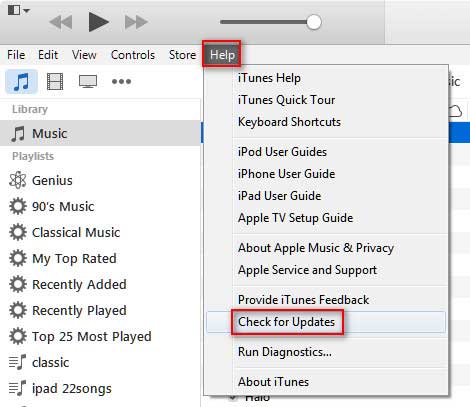
If you do not have iTunes on your PC, then download the latest iTunes version. If you do have iTunes on your PC, make its version is 12.0 or later or update it to the latest version by clicking "Help" -> "Check for Updates. After that, you need to launch iTunes on your PC.
Step 2 Get AAC encoder settings
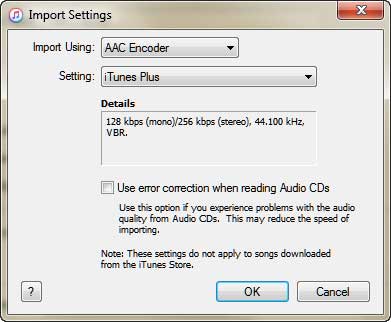
Click "Edit" in menu; choose "Preference" from the drop-down list, navigate "General" > "Import Settings" > choose "AAC Encoder" from the drop-down list of "Import Using" and click "OK" to save the changes.
Step 3 Choose song you want to turn into ringtone for iPhone
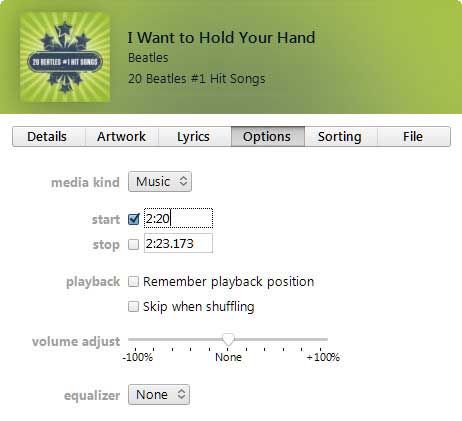
Back to iTunes's main interface, click "Playlist" to view all your songs on iTunes. Drag the song that you want to make as ringtone for your iPhone into this playlist. Navigate the song, right click "Get Info" > "Options" to set the starting and stopping time for the ringtone. Commonly the ringtone is 30 – 40 seconds long. Then click "OK" to apply the options.
Step 4 Convert song to AAC
In the main interface, right click the chose song again, click "Create AAC Version". Seconds later, and you will find new created AAC song next to the chose song. You can play this AAC music file to check if the ringtone is the exact one that you want.
You may be interested in: How to fix iTunes disabled to play music.
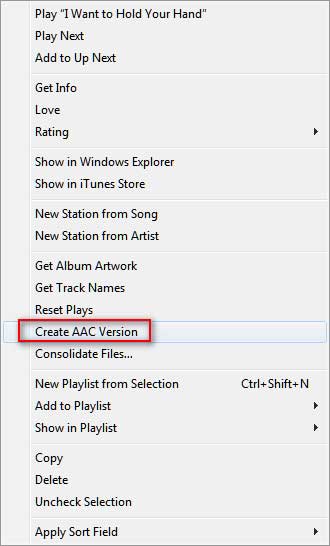
Step 5 Make free M4R ringtone
This step is the most important to consist of two points orderly.
1. You need to make it carefully. Drag the new created AAC encoder ringtone to your desktop or other disk for saving, and it becomes an audio file with the extension of .m4a. Back to iTunes, delete the new created AAC file by right clicking "Delete" > "Move to Recycle Bin".
2. Go to the saved M4A file on your PC; right click it to rename it from M4R to M4R.
By now, you have completed the whole process of making custom ringtones for your iPhone. If you find iTunes is not ideal to help you make song as iPhone ringtone, then find iTunes alternatives to help you do it in the following description.
Without iTunes, you can turn to free online iPhone ringtone makers for help. Input the keywords, online iPhone ringtone maker, it will list various sites for you to create iPhone ringtones online. http://makeownringtone.com/ is one of the online ringtone makers for iPhone users.
Step 1 Go to http://makeownringtone.com/, in your browser of Firefox or Chrome, click "Upload" to add your music files on your PC or Mac to this site.
You could add several audio files at one time, but it only converts to M4R one by one. Moreover, the supporting imported song formats are AAC, FLAC, M4A, MP3, OGG, WAV and WMA.
Step 2 Drag the marker to set the iPhone ringtone duration (Max out 40 seconds).
Step 3 Click the "Play" button to listen to your ringtone and confirm if it is the exact one.
Step 4 Select "M4R" as the output format for your iPhone ringtone. You could also choose MP3 to create ringtone for Android BlackBerry phone.
Step 5 Click "MAKE RINGTONE" to convert the song into iPhone ringtone.
Step 6 After the conversion, you could click "DOWNLOAD" to save the ringtone to your PC/Mac, or open the created iPhone ringtone in iTunes by default.
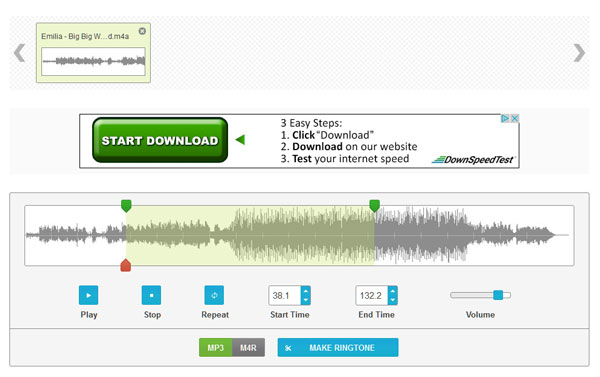
Similar free online iPhone ringtone makers like Online Audio Converter (http://online-audio-converter.com/), Ringtone Converter (http://ringtone-converter.com/), Zamzar (http://www.zamzar.com/convert/mp3-to-m4r/), also work well to custom ringtone for your iPhone SE/6s Plus/6s/6 Plus/6/5s/5c/5/4S/4/3GS. But they are not perfect to create ringtones. Like MakeM4R (http://www.makem4r.com/), it only allows you to use MP3 to convert to M4R as iPhone ringtone. http://mp3m4r.com, this site lets you add MP3, M4A, etc. audio file, but you can only make M4R ringtones fro iPhone, not for Android phone. And another draw is this site will list the user's iPhone ringtone creating history in its site, which sounds not good to protect your privacy.
iTunes is too complicated to use to make song ringtone on iPhone, and online ringtone makes is not safe enough to protect your private information to crate iPhone ringtones. Then get freeware to create a ringtone as you wish. Free Ringtone Maker, is the exact one tool to make music or video as ringtone on your Windows 10/8/7 computer. Firstly, free download this ringtone maker app for iPhone to your computer. Then install and launch this program instantly.
Step 1 Add music file or video
After running this ringtone maker on your PC, you could click "Add File" to import music video or music files. If you want to set background music as the iPhone ringtone, you can import the movie file to this app.
Step 2 Make iPhone ringtone
After setting the ringtone time, you should choose output format, M4R from drop-down list of "Output Format", and checkmark the songs, click "Convert" to make iPhone ringtones.
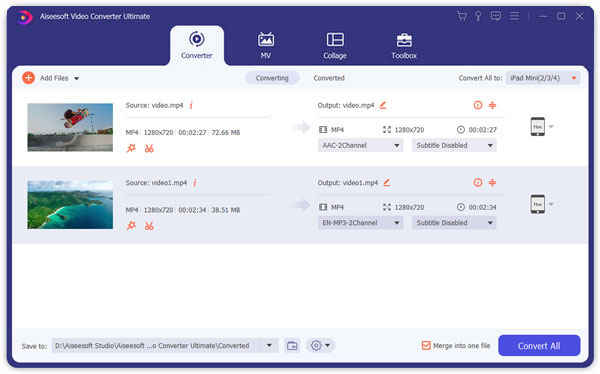
You just need to wait seconds to get favorite Christmas ringtones from songs for your iPhone.
After succeeding in making your own ringtones, you could transfer ringtones to iPhone, and set the new made ringtones as your incoming call or text messages ringtones on iPhone. On your iPhone, go to "Settings" > "Sounds" > "Ringtone" and your new tone will be above the built-in ones.
For making it clear to choose which solution is the best one for you to make iPhone ringtones, we make a chart as below to make comparison for your reference:
| Tools | Pros | Cons |
|---|---|---|
| iTunes | 1. It is safe to convert audio file to M4R ringtone. | 1. It only supports adding MP3, WAV, AAC, AIFF and ALAC. 2. It is a little complicated to create free ringtones for iPhone. |
| Online ringtone maker | It is easy to set a song as ringtone. | 1. The internet will affect the speed of creating ringtone. 2. It is limited to import some audio files. 3. It is risky of releasing the private information. |
| Free app on PC | 1. It supports adding any video and audio to make ringtones for iPhone and Android. 2. It saves your time by making batch ringtones for free. |
1. It only has Windows version to convert to M4R ringtone. |
By now, you must have found that which is the best iPhone ringtone maker. Create your own ringtone for iPhone or Android by yourself.

May 25, 2018 16:10 / Updated by Louisa White to Transfer iOS Data
 Two Ways to Sync Ringtones to iPhone
After making your own ringtones for iPhone, you may want to know how to put those ringtones on iPhone.
 How to Add Music to iPod without iTunes
In this article, you could add all your made ringtones and music file to iPod without iTunes.
 Top 6 M4A Audio Editor (Free & Paid) to Edit M4A Files as a Pro
When you want to edit M4A audio files, an M4A editor is needed. This article shows 6 best M4A editing software to edit your M4A files on Windows and Mac easily.
 Tips and Tricks to Get Final Cut Pro for Free
Final Cut Pro costs $299.99. It is possible to get free Final Cut Pro? This post shows you some ways to get Final Cut Pro for free.
 How to Recover Deleted Files on iPhone
How to recover deleted files from iPhone? The post introduces you with one best way to help you get back the deleted files from iPhone.
 2018 Best iPhone Apps & Troubleshooting
Check best iPhone apps of 2018 by popular categories (music, photo, video, social networking, etc.) as well as iPhone app troubleshooting tips.
 Leave your comment and join our discussion
