Music is the best voice from the world. As music lover, it is cool to listen to music from iPod when you are running. Also it is relaxing to enjoy to silent music when you are annoyed. However, many music goers may meet some problems that it is difficult to copy one iPod files to another iPod when you get a new iPod touch, or it is hard to transfer the computer music files to iPod, as well as from iPod to computer for the protected copyrights on iPod videos, music. In this article, we will share you various ways to transfer songs from one iPod to another.
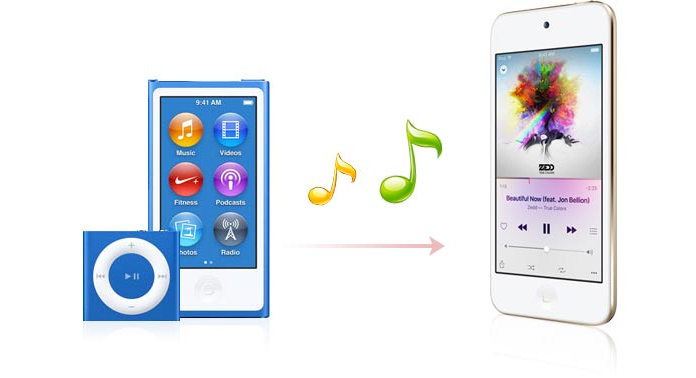
iTunes is the first free way that many of you may think of to move music between iPods. But the complicated process of putting music on iPods is easy to be mistaken. This way will requires you to transfer music from iPod to computer/Mac firstly with iTunes, and then copy music from Mac/PC to iPod. Follow the steps as below to transfer iPod music to another iPod.
Step 1 Download the latest iTunes on your computer or Mac. If you do have iTunes, then check it to update the newest iTunes version. And then launch iTunes instantly.
Step 2Plug iPod to PC/Mac with USB cable, wait seconds for iTunes to detect your iPod. Until you find your iPod icon display in iTunes (On the top right next to the eclipse).
Step 3 Click your iPod icon, and you will find the summary information of your iPod show in the interface. Find "Backups" > tick "This computer" > "Back Up Now" to transfer music from iPod to Mac/PC free. The whole process of transferring music from iPod to Mac/PC will take minutes. If you need, you could click "Encrypt local backup" to make your private music files encrypted.
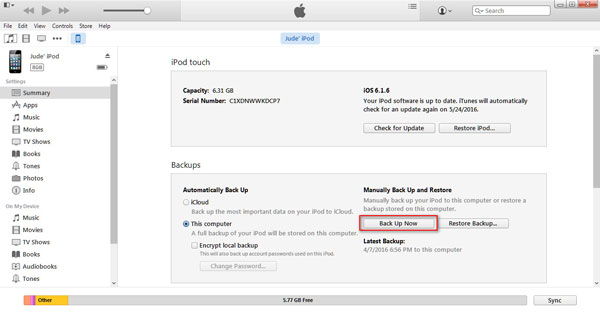
Many people are familiar with iTunes, and it is useful when you want to transfer Music from iPod to another iPod.
Step 1 Pull out of the first iPod from your PC/Mac, and connect another iPod to this PC/Mac with USB cable.
Step 2 Still wait seconds like mentioned above to see the icon of another iPod.
Step 3 Click the icon of another iPod to see the summary information of another iPod. Go to "Backups" > choose "This computer" > click "Restore Backup…" > select your original iPod backup and click "Restore" to transfer music from your computer to my iPod.
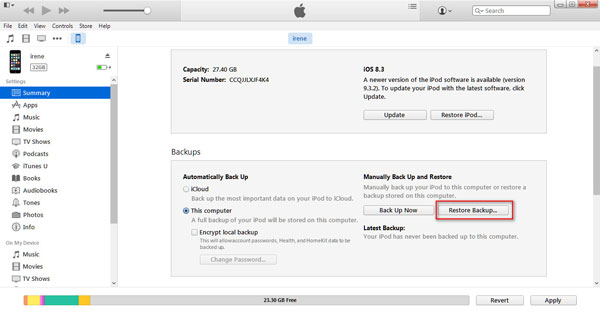
If you set password for the iPod music backup in the above description, you need to input password to restore.
From above six steps, you may know iTunes is not the best ways to transfer music between two iPods. So without iTunes, how do you sync music to iPod easily? A program to copy music from iPod to another iPod will be necessary. iPod Transfer is the exact one tool to help you get iPod to iPod transfer at one time. In this article, you will get the detailed information to do that. You need to prepare well your two iPods, two USB cables, and of course a link to free download the iPod music transfer to your Windows computer or Mac.
Step 1Connect iPods to PC/Mac
After downloading this program to your PC/Mac, install and launch it right now. Use two USB cables to connect your two iPods to PC. And seconds later, you will see your two iPods appear in the interface of this iPod to iPod music transfer software.

Step 2Choose music files
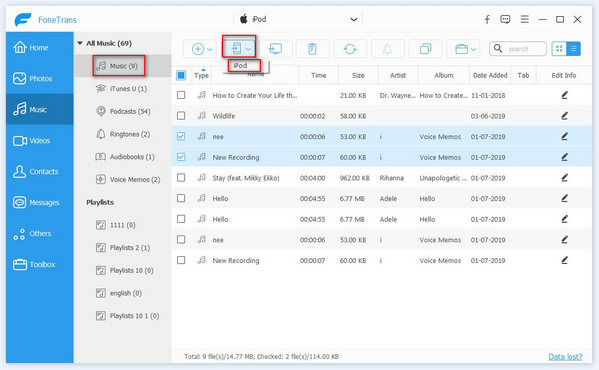
Click the name of your source iPod from the device list, click "Music", and select the music files you need from the right part of the interface. You can choose all songs or get multiple selections.
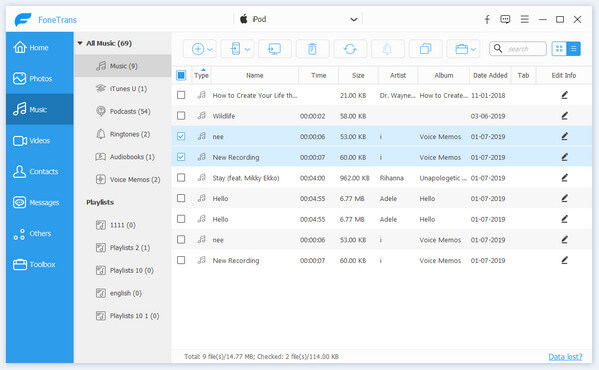
Step 3Sync music to another iPod
After you choosing all wanted songs, click "Export to Device" to select the target device to start the transfer.
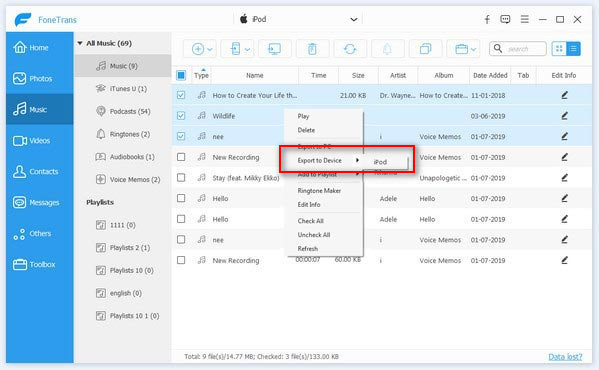
You also can select the music files you want to transfer. Then right click them and click "Export to Device" to choose the target device..
In this step, you could copy music from iPod to computer or backup for future use, and then add music from PC to another iPod by following guide.
After choosing all music files, click "Export to PC" to export iPod music to computer in a folder. Then click "Music" of the target iPod, and click "Add item(s)" > "Add File" or "Add folder". Then choose music files exported before to import to another iPod.
After making the process, the music files will be transferred to another iPod in seconds. And now you can enjoy the music on both iPods.
When you take the second way to get songs from iPod to iPod, you should keep the following points in mind:
Still other ways you can use to sync songs from iPod to another iPod, like iTools and AirDrop. But when you use AirDrop to sync iPod music, you must make sure your iPod touch with iOS 7 or later version, and MacBook, iMac, MacBook Air, Mac nini or Mac Pro with OS X El Capitan.
Find the easiest way to transfer your iPosd music to another iPod by yourself.

June 15, 2018 08:26 / Updated by Louisa White to Transfer iOS Data
 How to Share Music between iPhones
This article will do you a favor to show you three ways to share iPhone music freely.
 How to Transfer Music from iPad to iPad/iPhone/iPod
Follow this guide about how to transfer songs from iPad to iPad, iPhone and iPod.
 How to Erase Music from iPod
How to erase music from iPod to free up your iPod space? Read this article to erase songs from your iPod.
 Leave your comment and join our discussion
