
MTS or M2TS format is the equivalent of h.264 or MPEG-4 AVC. It is a fairly new High Definition codec that provides greater compression than the regular MP4 and others. Those two High Definition format always be used on HD Camcorder, such as Sony, Canon or Panasonic.
As they are HD video, most of our video editor such as windows movie maker can not edit it directly. And also you can not upload it to youtube.com and share with your friends.
So you need to convert them into normal video format, such as wmv, mp4, avi and so on.
Here I know a really powerful MTS/M2TS Converter
And the process of operation is really easy and fast.
Step 1 Import MTS files
Click "Add File(s)" to load the video that you want to convert.
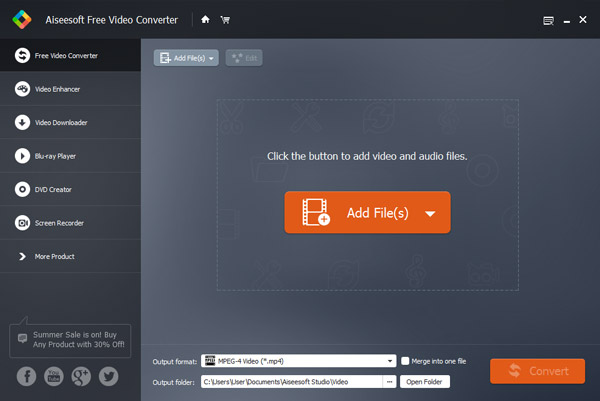
Step 2 Choose output profile and settings
From "Profile" drop-down list you can choose your preferred output video/audio format according to your need.
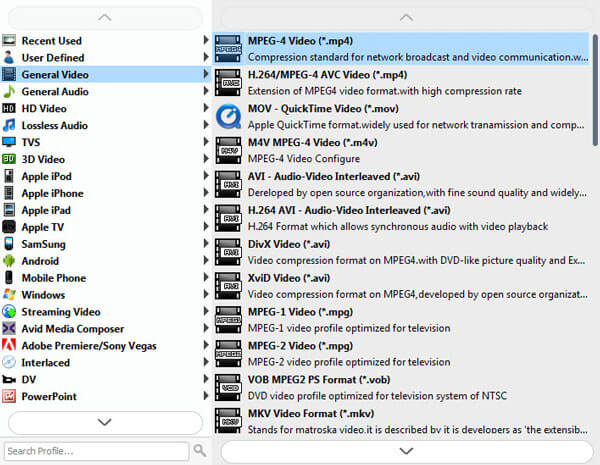
For example, if you have a iPod and you want to convert video for it. You need to choose "iPod" from the profile list and then it also provides the second chance to specify your iPod generation.
Step 3 Make the MTS conversion
After you have done all the steps above, you can click "Convert" button to start the MTS video conversion.
Step 1 Add M2TS file(s)
Load your M2TS video to this powerful video converting software.
Step 2 Choose output profile and settings
Select your output profile according your need and adjust the settings of your output video if you like.
Step 3 Start M2TS conversion
Click "Convert" to begin your conversion.

June 13, 2018 10:14 / Updated by Jenny Ryan to Convert Video
 How to Convert MTS/M2TS to MP4/WMV/AVI for Free
This article introduces to you what is MTS file and how to free convert AVCHD MTS video to MP4/WMV/AVI for Mac QuickTime/iMovie or Windows
 How to Convert MTS to MOV for QuickTime Player
Do you know how to convert them to MOV and play them on your Mac? This post will tell you clearly.
 Make Your M2TS Video Compatible with Any Player
Want to play MTS/M2TS file easily on your portable devices? Free convert MTS/M2TS video files to MP4, MOV, AVI, MKV firstly.
 Leave your comment and join our discussion
