If you are looking for a good FLV to QuickTime MOV video converter, then you just come to the right place. This article shows complete solutions of how to convert FLV to MOV Online and Offline.
Thus, you can get both free and professional ways to convert FLV to MOV Mac and Windows PC easily.
So just read the following paragraphs to get the information you want. No matter you want to convert FLV file to MOV in batch or singly, you can always get the satisfied result here.
If you only need to convert a FLV video to MOV and you do not mind its output video quality, then you can choose an online video converter to solve the problem. Here are 5 representative FLV to MOV video converters you can take.
This video converter online allows you to convert any popular video formats, such as MP4, MOV, FLV, 3GP, MKV, AVI, and WMV. It should be your best choice to turn FLV videos to MOV for playing on your Apple devices. You can also use it to extract audio from video files with high quality.
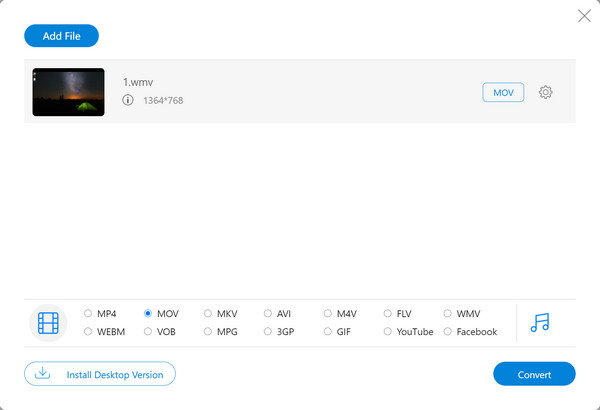
button in the center of banner. Click it and follow the on-screen instructions to download and install the launcher on your computer.Step 1 Go to the official site of Aiseesoft Free Online Video Converter, you will see the button in the center of banner. Click it and follow the on-screen instructions to download and install the launcher on your computer.
Step 2 After the installment, the Select window should pop up automatically. If not, please click on the Add Files to Convert button again. Then select the FLV video you want to convert.
Step 3 Now you can simply choose MOV as the output format. Click on the Convert button to start the conversion. Within a few minutes, the MOV file you want will be saved on your computer.
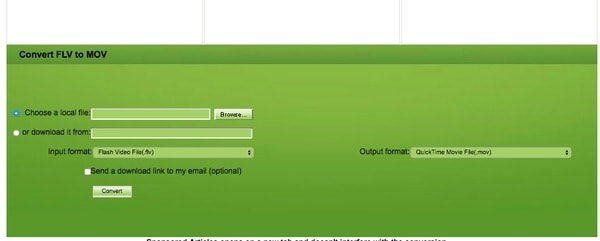
Step 1 Search and open Convert.Files on your web browser
Step 2 Choose "Browse…" to import a FLV video
Step 3 Select "QuickTime Movie File (.mov)" as the output format
Step 4 Click "Convert" to convert a FLV to a QuickTime MOV video online
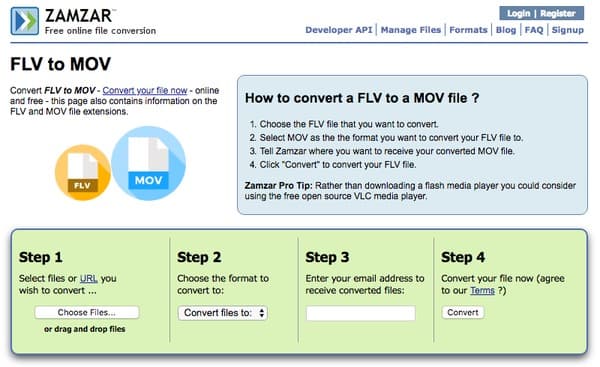
Step 1 Locate Zamzar website on your web browser
Step 2 Click "Choose Files…" to upload a FLV video
Step 3 Select "MOV" from the drop-down "Convert files to" menu
Step 4 Enter your email address
Step 5 Choose "Convert" to convert FLV to MOV online
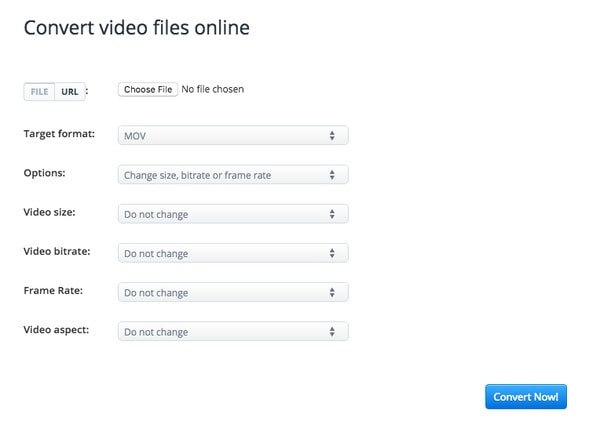
Step 1 Navigate Aconvert site to click "Choose File" option to add your FLV video
Step 2 Select "MOV" from the "Target format" list
Step 3 Choose "Change size, bitrate or frame rate" from "Options" below
Step 4 Manage those filters to adjust the output video effect
Step 5 Click "Convert Now!" to get the converted FLV to MOV video
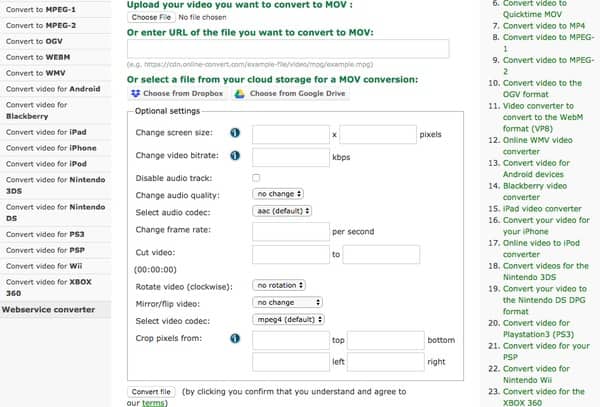
Step 1 Open Online-convert website on your browser
Step 2 Upload a FLV video from computer, URL, Dropbox or Google Drive
Step 3 Customize the FLV file with filters from "Optional settings"
Step 4 Click "Convert File" to free convert FLV to QuickTime MOV online
By using Aiseesoft Video Converter Ultimate, you can convert FLV to MOV and other formats without losing quality. To be more specific, you can get much more editing features than other common video converters. And its user-friendly interface guarantees everyone can convert and edit videos quickly, even for beginners. Therefore, Video Converter Ultimate is the exactly best FLV to MOV converter software you are looking for.
What Can You Get from Video Converter Ultimate
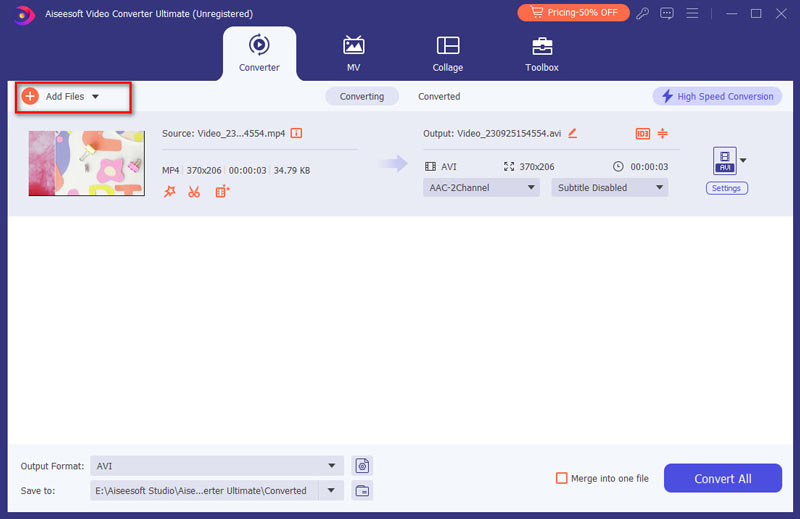
Step 1 Add FLV video
Free download and install Video Converter Ultimate on your computer. Launch this FLV to MOV converter. Then choose Add Files to add FLV video from the local folder or external hard drive plugged into your computer.
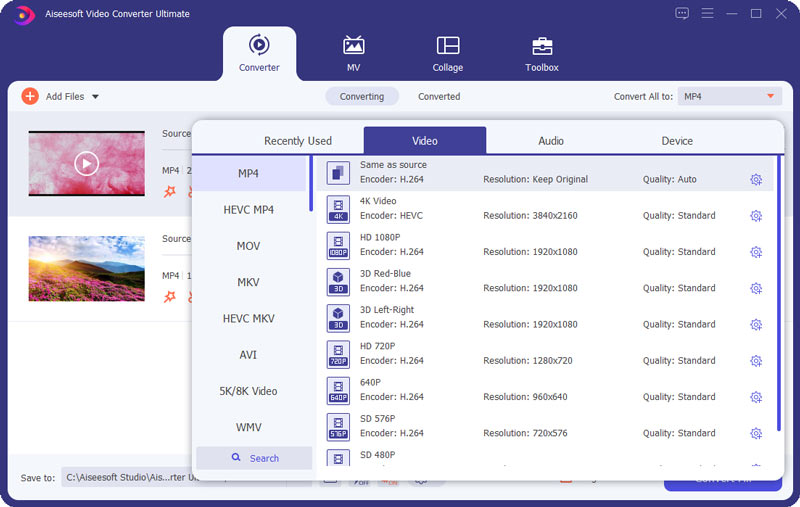
Step 2 Set MOV as the output format
Click Custom Profile from Video Converter Ultimate. You can see various preset profiles from its drop-down menu. Open the Video tab and then select MOV. In addition, you can click Settings icon besides to adjust profile settings if necessary.
Step 3 Convert FLV to MOV
If you do not want to save the converted QuickTime MOV video to the default destination folder, then you can click the File icon below. At last, click Convert All to start to convert FLV files to MOV in high quality.
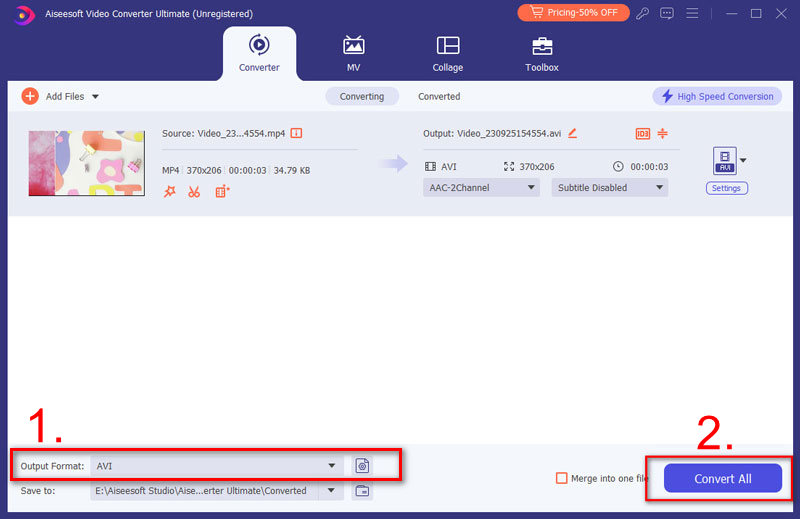
Moreover, you can customize the output video effect with a real-time preview window here. So if you are looking for an easy-to-use but powerful video converter, then Video Converter Ultimate can be your best choice. You can always convert FLV to MOV in high quality with this program quickly and easily.
Is FLV a good video format?
FLV is a great format for online streaming videos. But not all platforms support this format. For example, you can not play it on some of mobile devices directly.
Can VLC convert FLV to MP4?
Yes, you can use VLC Media Player to convert FLV to MOV video for free on Windows and Mac. Though you cannot get much video editing tools, you can still batch convert FLV files to MOV with no Internet connection.
Is MOV good for YouTube?
MOV does work on YouTube. But it obviously is not the best video format. MP4 is a better choice, for it can be played on almost all devices and platforms.
Definitely, MOV converter will not be your ideal choice, if you are looking for a MOV player for your mobile phone. Check here to MOV Player for Android.

January 27, 2021 14:00 / Updated by Jenny Ryan to Convert Video
 How to Merge/Join/Combine MOV Clips on Computer [Starters Guide]
There are several ways to combine your MOV files into one quickly and effortlessly. In this article, you'll learn how to join multiple MOV clips with free and online tools.
 5 Best Free MP4 Splitter for Windows and Mac
You can find 5 best free MP4 splitter for Windows and Mac to split MP4 video.
 How to Convert Common Videos to HD Quality (4K, 1080p and 720p)
You can easily get your video with high quality after converting it to 4K or 1080p HD video. Read this article and get the way.
 Leave your comment and join our discussion
