
Note
Convert.Files does not support users to batch convert MKV to MP4 on Mac.
- "I was wondering if there was any way to convert an h.264 MKV file (with subtitles) into a MP4 file…"
- "I am looking for a safe program to convert .mkv to .mp4 on my MacBook."
- "How to convert MKV video files to MP4 without losing quality on Mac Yosemite?"
Convert MKV to MP4 on Mac
These questions can be concluded into one sentence, how to convert MKV to MP4 on Mac in batch or singly. The main difference is that some people want to free convert video format to MP4, while others are looking for a private and professional program. To solve above problems, this article shows 5 different ways to convert MKV files to MP4 online and offline. So just read and follow.
Here are two popular video converters you can take to convert MKV to MP4 Mac online free. Make sure you are in a good Internet condition, and your uploaded MKV file size is no more than its maximum limitation.
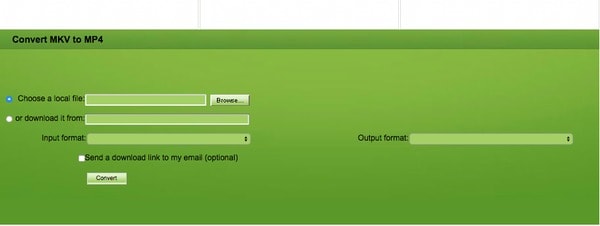
Step 1 Search and open Convert.Files MKV to MP4 online converter
Step 2 Click "Browse" to add a MKV video
Step 3 Choose "MPEG-4 Video File (.mp4)" from the "Output format" menu
Step 4 Mark "Send a download link to my email" and enter your email address if necessary
Step 5 Click "Convert" to start to convert a MKV to a MP4 online for free
Note
Convert.Files does not support users to batch convert MKV to MP4 on Mac.
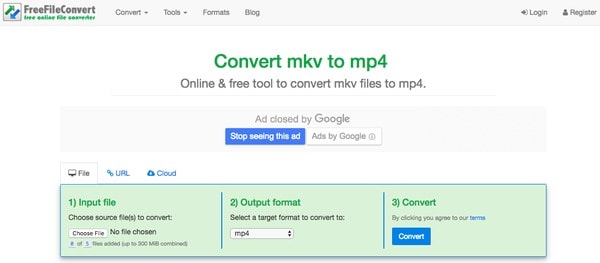
Step 1 Navigate FreeFileConvert online MKV converter Mac
Step 2 Click "Choose File" to upload no more than 5 files
Step 3 Select "MP4" under "Output format" option
Step 4 Click "Convert" to convert MKV to MP4 online for free
Note
You should upload 0 to 5 files per time to FreeFileConvert. And the maximum file size is combined up to 300 MB.
Moreover, you can also use MKV to MP4 converter freeware to change video format on Mac. As for free MKV converter software, QuickTime, VLC, FFmpeg, Handbrake and other programs are also popular and easy to access.
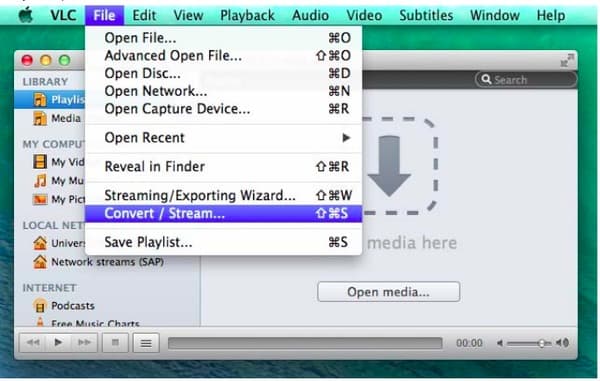
Step 1 Run VLC on Mac PC
Download and install VLC on your Mac computer. Then double click its icon to run this program. Choose "File" on the top toolbar. Later, click "Convert/Stream" from the drop-down "File" menu.
Step 2 Convert MKV to MP4 on Mac VLC
Upload MKV video from your local folder. Check if you have set MP4 as the output video format. In addition, you can customize its settings manually. When the process finished, click "Start" to convert MKV to MP4 on Mac for free.
Step 1 Add MKV movie
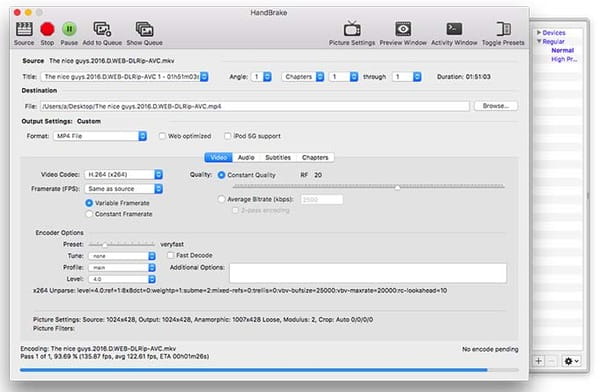
Complete the installment of Handbrake on your Mac computer. Launch Handbrake and choose "Source" on the top left corner. Then you can import MKV videos to this program.
Step 2 Convert MKV to MP4 on Mac Handbrake
You can see several filters under "Output Settings" section. Select "MP4 File" from the "Format" option. Locate the certain part to customize the frame rate, video codec, bitrate and other options. After that, you can order Handbrake to convert MKV file to MP4 for free on Mac.
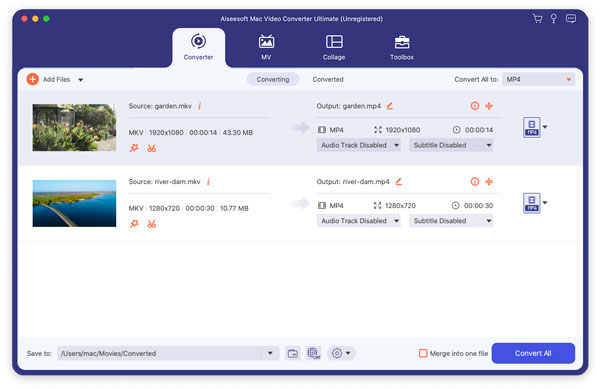
If you have a bunch of videos need to be converted to MP4, then it is quite important to get your best program to convert MKV to MP4 on Mac. To be honest, online video converters are not proper for batch converting videos, while MKV to MP4 free converters are not professional enough. During this time, you can turn to Aiseesoft Mac Video Converter Ultimate for help.
Step 1 Add MKV video files
Free download and install Mac Video Converter Ultimate on your Mac OS X. Launch this powerful MKV to MP4 video converter. Then click "Add File" option on the top toolbar of its main interface. Well, it is also supported to drag and drop MKV videos directly.
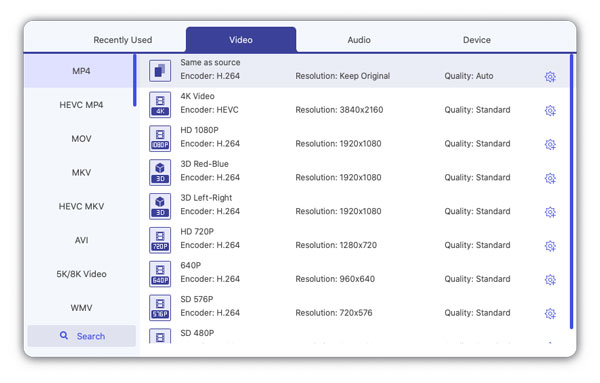
Step 2 Set MP4 as the output video format
Choose "Profile" at the bottom. You can access all preset profiles from its drop-down menu. As a result, if you do not know which format to convert, you can locate the certain output device with ease. Later, click "General Video" and select "MPEG-4 Video (*.mp4)".
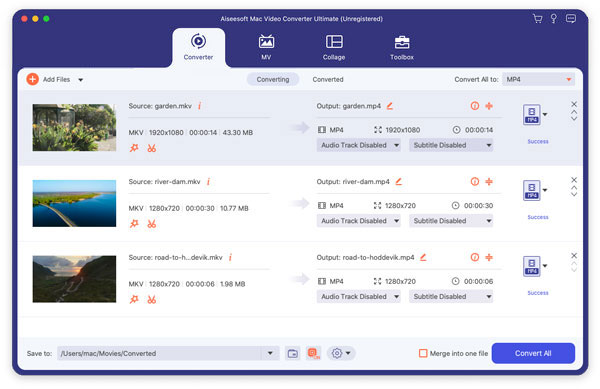
Step 3 Convert MKV to MP4 quickly on Mac
Click "Settings" option besides to adjust the profile settings if necessary. Choose "Browse" near "Destination" to set an output folder. Finally, click "Convert" to convert MKV to MP4 with no quality loss on Mac.
Note
For people who want to batch edit MKV videos, just click "Edit" on the top to get a new popping-up window. And there is a real-time preview window you can use.
Actually, get one reliable and professional video converter is the fastest and easiest way to convert MKV to MP4 on Mac. You can convert MKV files to MP4 on Mac as much as possible here. And the whole process can be finished offline in a short time. Furthermore, Mac Video Converter Ultimate is friendly to beginners. So feel free to download and try this easy-to-use program right now.

May 03, 2018 18:25 / Updated by Jenny Ryan to Convert Video
 How to Convert 3GP to iPhone X/8/7/6/5/SE on Mac
Want to play 3GP videos on your iPhone X or iPhone 8/8 Plus? You need learn how to convert 3GP to iPhone on Mac with the professional iPhone video converter for Mac in this article.
 How to Convert Video to Creative Zen Vision/X-Fi on Mac
Can't play video on Creative Zen and want to convert video to Creative Zen on Mac? You can learn how to convert video to Creative Zen supported AVI/WMV/MPG in this post.
 Best AVI Converter for Mac in 2018 [Updated]
Get the complete overview to find your best AVI converter for Mac here. You can convert AVI to MP4 on Mac in 3 steps from this article.
 Leave your comment and join our discussion