If you want to watch QuickTime HD video on some portable players, the best way is to convert QuickTime HD video to other popular video formats. Aiseesoft HD Video Converter is designed for you to solve this problem.
Aiseesoft Free HD Video Converter aims at helping you to convert HD video to SD video, convert SD video to HD and convert between various HD videos for free. In addition, this QuickTime HD Video Converter can also extract popular audios like MP3, M4V, MP2, OGG, WAV, WMA... from HD and SD video like QuickTime HD video.
Firstly, please download and install Aiseesoft Free HD Video Converter. Launch the HD video converter, and now we will start the conversion.
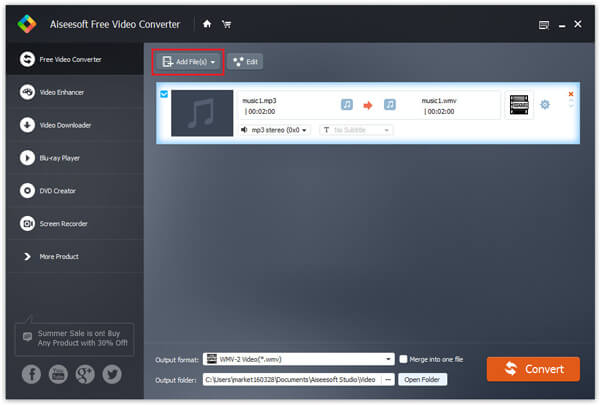
Step 1 Add the QuickTime HD video
Click "Add File" button on tool tar to add the QuickTime HD video you want to convert. And the QuickTime HD Video Converter allows you to add several files at the same time.
Step 2 Set output format
Click and open the "Profile" drop-down list, choose your needed output video formats.
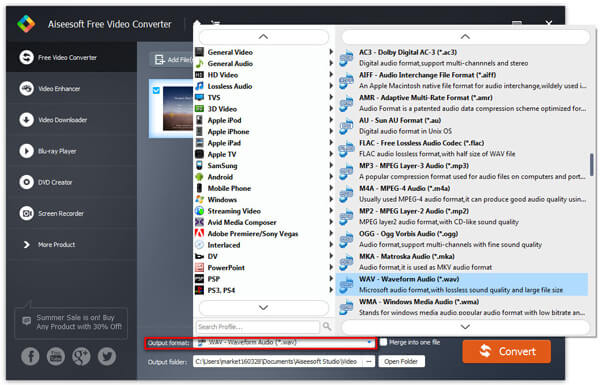
In addition, you can set the destination folder through "Browse..." button. And if you are skilled users, set video size, video quality, video length in Video Edit window to get customized output video.
Step 3 Start the conversion
Click the "Convert" button at the bottom to start the QuickTime HD video conversion.
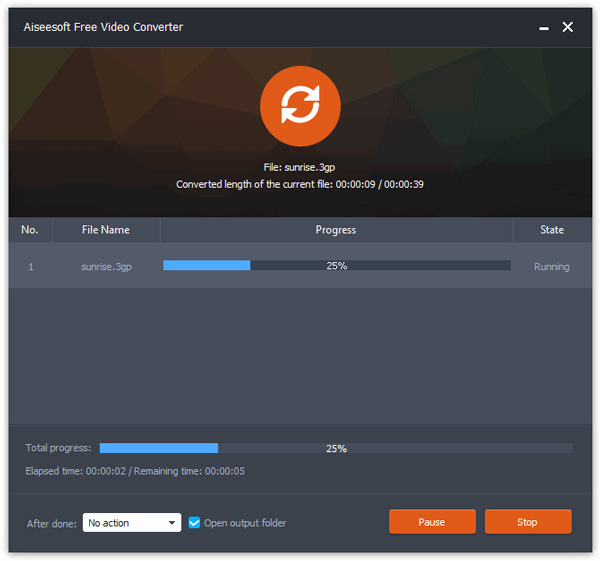
When the software informs you that the QuickTime HD video conversion is finished, you can click "Open Folder" button to directly open the target folder and check the converted QuickTime HD video.
Advanced conversion ability, fast conversion speed, excellent video effect, compatible with abundant players. Free download and have a try now!
Aiseesoft Video Converter Ultimate is a dedicated video converting software for you to convert various videos formats (including MOD, TOD, AVI, WMV, FLV, MOV, MKV, VOB, etc.) to video format on PC/Mac, so that you can watch more interesting videos on the go.
You can check the video tutorial as below:



December 11, 2020 14:33 / Updated by Jenny Ryan to Convert Video
 How to convert and edit HD video
Guide tells you how to convert and edit HD video with Aiseesoft HD Video Converter.
 How to Convert HD Video to SD
Guide shows you how to convert HD video to SD with HD Video Converter.
 How to Convert Common Videos to HD
You can easily get your video with high quality after converting it to HD video quality. Read this article and get the way.
 Leave your comment and join our discussion
