You may have known that iTunes can help you transfer music from Mac to iPod for listening on the way. But you may do not know there is other iPod music sync software, which does a better job than iTunes without erasing any music.

 100% Secure. No Ads.
100% Secure. No Ads.
How to transfer music Mac to iPod?
You blurted out iTunes.
There is no doubt that iTunes is the answer most of you knew. However, there are other excellent substitutes for iTunes to put music from Mac on iPod conveniently.
Here in this article, we are going to show you 3 ways to copy songs and playlists from Mac to iPod with and without iTunes.
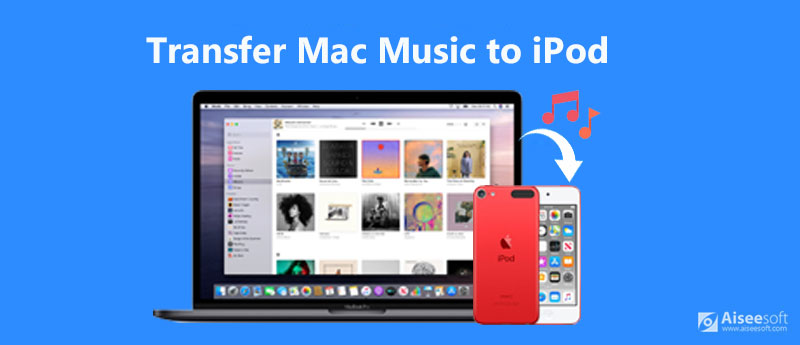
You have to admit iTunes is the tiring tool to sync data for iPod for its arcane settings.
To get rid of iTunes and seek for an iPod music transfer software can be easy. Aiseesoft FoneTrans is the exact one.
It is a professional but easy-to-use iPod data sync tool. Not only getting music from Mac to iPod, but it can also backup videos, photos, and other data from iPod to Mac computer. Without any device limitations, it can work for almost all iPod models, like iPod touch 7/6/5, iPod shuffle, iPod nano, iPod mini, and iPod classic.
Downloads
FoneTrans – Put Mac Music on iPod
100% Secure. No Ads.
100% Secure. No Ads.
We're here to walk you through how to transfer the songs and playlists from Mac to iPod with FoneTrans.
Free download FoneTrans on your Mac. It is compatible with MacBook Pro, MacBook Air, Mac Mini, iMac, iMac Pro, and Mac Pro running in macOS Sonoma and before. You can use it freely.
Launch this software after the installation. Get the USB cable to plug your iPod into Mac.
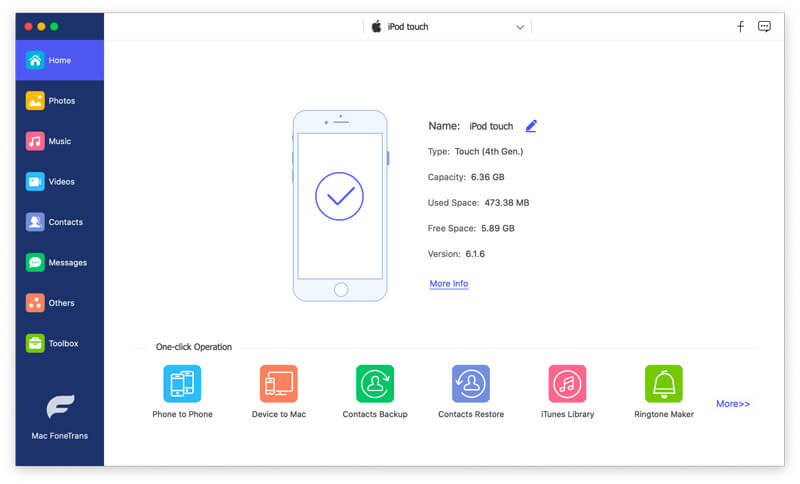
After connecting iPod to Mac successfully, all the data from iPod will be categorized on the left pane. Click Music and all the audio types on iPod will appear in the middle pane, Music, iTunes U, Podcasts, Ringtone, Audiobooks, Voice Memos, and Playlists.
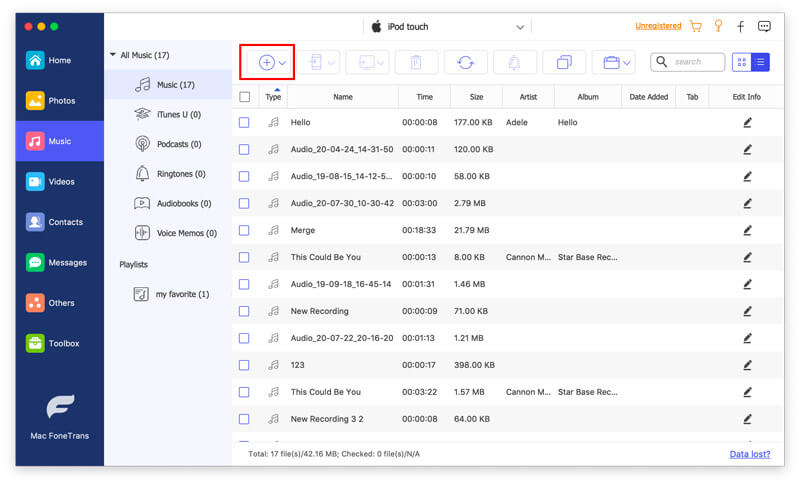
Click the Music or Playlist tab, then click the Add button at the top menu to browse and select the songs on your Mac.
Then this program will import the selected items into iPod from Mac automatically.
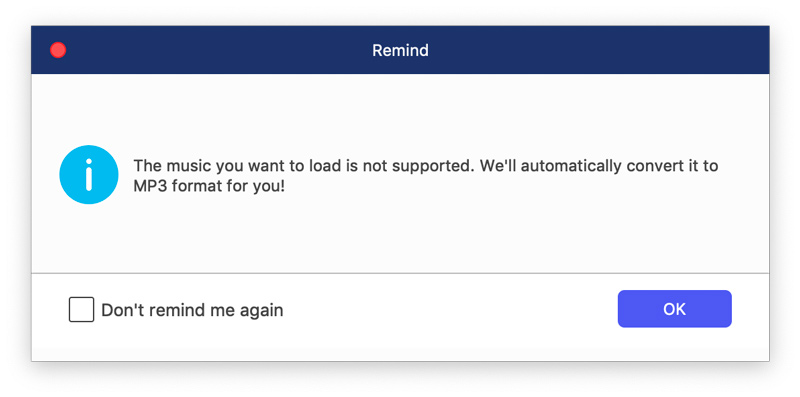
If the music format you added is not compatible with your iPod, this software will convert the format to work on iPod automatically.
The other tools you can try in the toolbar let you transfer music from iPod to Mac, share songs between iPod and iPhone, delete songs from iPod, create playlists on iPod, add album art to music, and more.
The added bonus of using this iTunes alternative is both the existing music and the synced songs coexist safely on your iPod without data loss.
Though it is an old story to transfer Mac songs to iPod, here you may not be willing to miss the detailed guide to migrating music from Mac to iPod with iTunes.
Download the latest iTunes on your Mac. Click the Music tab. Drag and drop the songs from your Mac drive into iTunes Media Library.
Plug iPod into Mac with the USB cable.
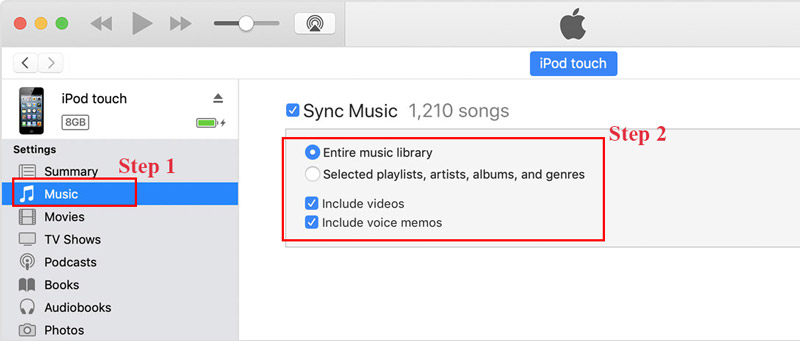
Click your iPod icon in the upper-left corner of the iTunes window. From the list under Settings on the left side, click Music, select the checkbox of Sync Music, and tick the box Entire music library or Selected playlists, artists, albums and genres.
And click Apply button, then the music will be added into iPod.
iTunes is not syncing iPod? Here are the solutions.
Mac using macOS Catalina and later, iTunes is not available and replaced with Finder. The steps of adding music from Mac to iPod are similar to those on iTunes.
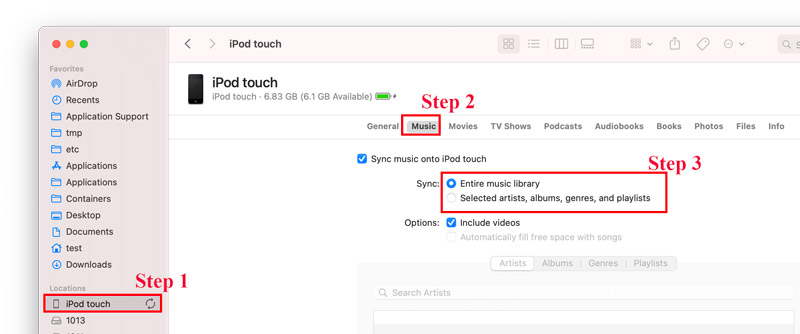
When you connect iPod to Mac, just click Finder and locate your iPod under Locations from the sidebar. Then you will see a similar interface to iTunes.
Click Music tab and select the checkbox of the entire music library and selected songs. After that, click Apply to start syncing songs from Mac to iPod immediately.
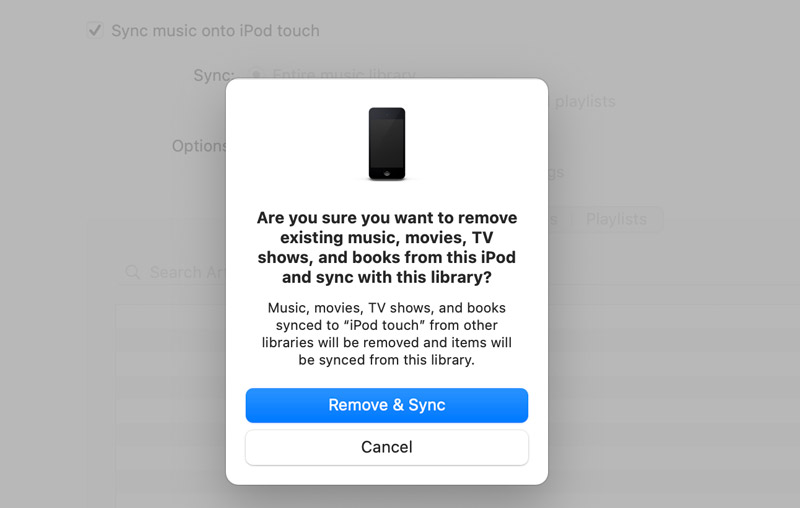
To be clear: Whether you are using iTunes or Finder to transfer music from Mac to iPod, all the existing music from this iPod will be removed and replaced with the synced music library.
Can you put Apple music songs on an iPod?
Yes, you can. To use Apple Music on iPod, you should subscribe to Apple Music service. Then Sign in with the same Apple ID you used to subscribe to Apple Music, then you open the Apple Music app on iPod touch to sync Apple Music songs for offline playback on iPod touch.
What audio formats does the iPod touch support?
iPod is compatible with MP3, AAC/M4A, Protected AAC, AIFF, WAV, Audible audiobook, and Apple Lossless. If the music on Mac is not compatible with your iPod, just had better convert music to MP3.
Can I still download Apple Music to my iPod nano?
Yes. Apple Music is limited to WiFi-enabled iOS devices. All the iPod models like iPod nano, iPod shuffle, etc., can be connected to Wi-Fi is capable of downloading Apple Music to the device.
Conclusion
There are many ways of copying music from Mac to iPod, and iTunes is a widely-used way. However, due to its drawback of overwriting the existing music on iPod, iTunes is not the best option. The other method of using FoneTrans to transfer the songs and playlists from Mac to iPod is more feasible without erasing any data. Moreover, it offers more management tools to handle iPod data conveniently.
Which way is your preferred one?
Do you have any iTunes alternatives?
Let me know by leaving your comments.
 How to Transfer iPod Music to Android Phone/Tablet
If you want to export music from old iPod to new Samsung Galaxy S20, you are coming to right place. This page shares 2 easy ways to transfer iPod music to Android.
 How to Turn off iCloud Music Library on Your iPhone/iPad, Mac or PC
Want to turn off iCloud Music Library because of music sync error, wrong metadata, or other reasons? Read on to see how to disable iCloud Music Library and delete music from iCloud on iOS, PC or Mac.
 Top 5 Best iPod Photo Transfer on Mac
This article collects 5 representative iPod photo transfer on Mac. Thus, you can transfer photos from iPod to Mac for backup or further management easily and quickly.
 Leave your comment and join our discussion
Transfer Music to iPod
Transfer Music from iPod to Another iPod Transfer Music from Dead iPod to iPod Trasnfer Music from iPad to iPod Transfer Music and Playlist from Mac to iPod Import Music to iPod iPod Transfer Transfer Music from iPod to Android Transfer Music from iPod to MP3 Player Transfer MP3 to iPod with or without iTunes
The best iOS Transfer software to manage and transfer iOS files from iPhone/iPad/iPod to your computer or reversely without running iTunes.
100% Secure. No Ads.
100% Secure. No Ads.

