WMV stands for Windows Media Video which was created by Microsoft. And WMV HD is encoding by Windows Media Video 9 codec from Microsoft. The WMV HD content can be found in resolution that reaches 720p and 1080p. WMV is a popular format. It can be supported by many devices. Normally, we would like to save videos in WMV for conveniently watching videos later. However, WMV cannot be supported by iPad 2.
If you want to play WMV videos on iPad 2, you may need to convert it to iPad 2 supported format first. WMV to iPad 2 Converter can help you convert WMV to iPad 2 and the converted iPad 2 file possesses high quality.
Aiseesoft WMV to iPad Converter is a professional video converter. With WMV to iPad 2 Converter, You can free convert WMV to iPad 2 supported formats quickly. Apart from converting function, you can also use editing function with WMV to iPad 2 Converter. You are able to rotate video, adjust video effect, crop video and add watermark to video according to your own demands.
Step 1 Install WMV to iPad 2 Converter
Download WMV to iPad 2 Converter, install and launch it on your computer.
Step 2 Add File
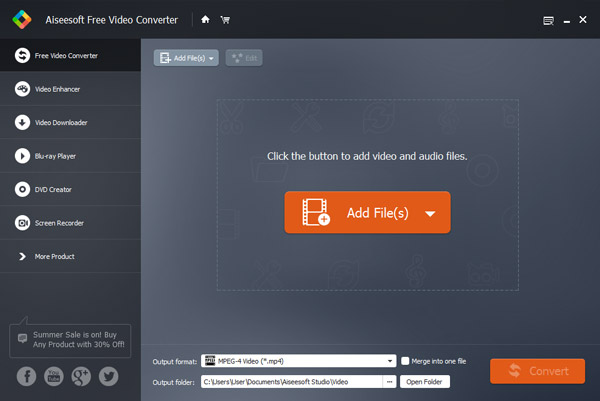
Click "Add File" button to add the WMV files that you want to convert to iPad 2.
Step 3 Choose the output format
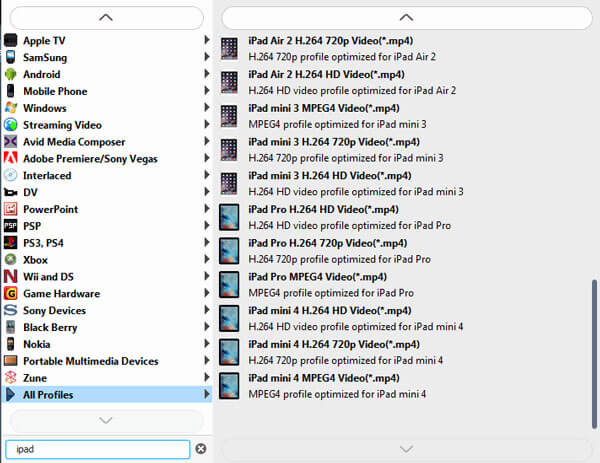
Click "Profile" to choose the output formats, and then click "Browse" button to choose destination folder for saving output files. Click "Settings" button to set output video parameters.
Step 4 Convert WMV to iPad
Click "Convert" button to start convert WMV to iPad 2 video. After finishing steps above, you only need to click "Convert" to complete the conversion.
Wait a few seconds, and you will finish the conversion from WMV to iPad. After that, you can handily enjoy the WMV video on your iPad device and WMV player.
Above part introduces a useful converter to convert WMV to iPad 2, here we will introduce another way to you. You can use online converter to finish the conversion. We will mainly introduce the steps of online conversion on zamzar for you. Althought it is a straightforward way, it is less practical than using WMV to iPad 2 Converter. Below are the detailed steps.
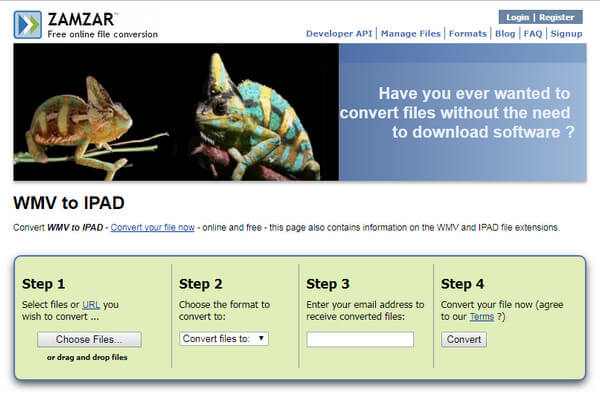
Step 1 Click "Choose File" or "URL" to upload the WMV file you need to convert.
Step 2 Select iPad 2 supported format like MPEG-4/H.264 as output format.
Step 3 Import your email address for receiving the converted iPad 2 file.
Step 4 Click "Convert" to get the conversion from WMV to iPad 2.
This article introduces two ways for you. You can choose to use WMV to iPad 2 Converter to finish your conversion. You are also able to choose online converter to complete the conversion. Which way is more suitable for you?

June 29, 2018 10:17 / Updated by Jenny Ryan to Convert Video
 How to Convert Flip Video?
It will help you to convert Flip video created by the Flip family: Flip Ultra, Flip Ultra HD, Flip Mino and Flip Mino HD as Flip Mino HD files conversion tool.
 5 Ways to Rotate a Video on Windows 10/8/7 and Mac
How to rotate a video on Windows 10/8/7 and Mac? This post shows 5 best ways to help you easily rotate/flip a video on computer.
 How to Use iMovie for iPad and 5 Best Alternatives on iOS
Want to use iMovie for iPad? Maybe you can learn how to use iMovie for iPad from this article and get its best 5 iMovie alternatives on iOS.
 Leave your comment and join our discussion
