As we all know that PDF files cannot be edited. When we want to edit PDF files, we may need to convert PDF to text files. How can I convert PDF files to text for editting without spending a lot of time? Read this article, you will find a useful PDF converter to help you convert PDF files to plain text.
Aissesoft PDF to Text Converter is a professional converter which can quickly convert PDF files to text files with high quality. With PDF to Text Converter, you are able to convert several PDF files to text at the same time. You can also rename the PDF files you need to convert. After converting PDF to text files, you can open and edit the text with the notepad.
1Install PDF to Text Converter on your computer
Please click the link above to download PDF to Text Converter, and then install it on your computer. After installing, please launch it for ready use.
2Upload PDF files
After launching the product, please click "Add File" to upload the PDF files you want to convert on it for latter conversion. If you have several PDF files, you can upload them on PDF to Text Converter to convert them to text files at the same time.
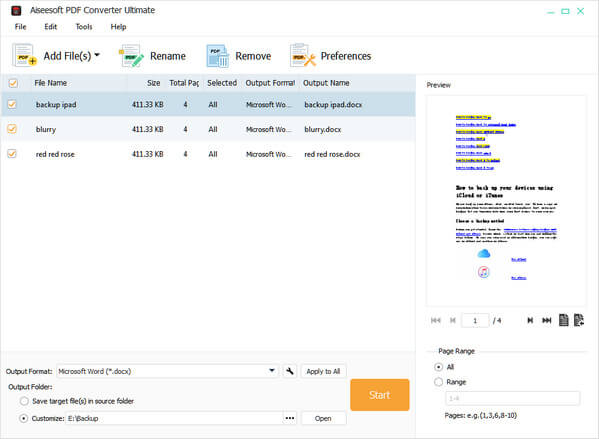
Tip: You can click the "Add Folder" button to add all PDF files in a folder.
3Set output format
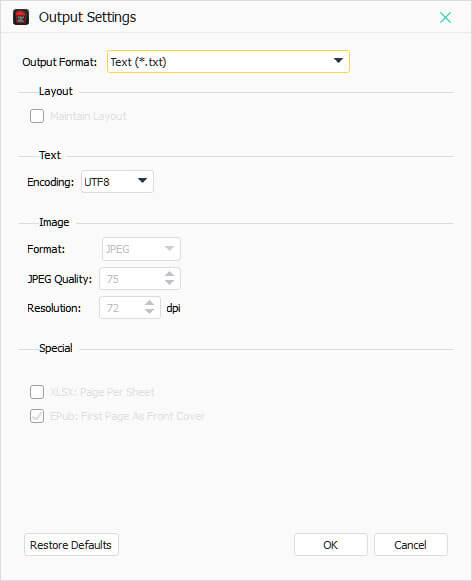
After adding PDF files on it, you can click "Output Settings" to set output format, quality and resolution. And you can also set the page range in "Preview" according to your own needs.
4Convert PDF to text
After setting, click "Start" to start convert PDF files to text.
Just wait a few seconds, and you will finish the conversion from PDF to text.
You are able to convert PDF to other editable text file like convert PDF to Word, Excel, RTF, etc.
Above introduces a professional converter to help you convert PDF to text files, next we will introduce a direct way to convert PDF to text files online. There are many online PDF converters like pdftotext, Zamzar, SmallPDF, etc. We will mainly introduce the steps on pdftotext for you. Below are the detailed steps.
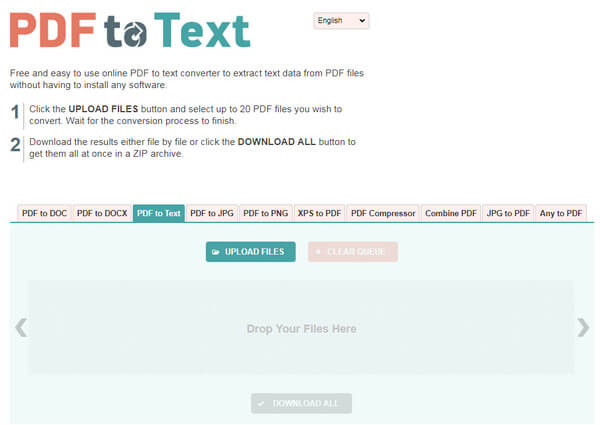
1Click "Upload Files" or drag PDF files to upload the PDF files on it.
2Click "DOWNLOAD ALL" to convert and save your PDF files on your computer.
Just two steps, and wait several minutes, and then you will finish the conversion form PDF to text.
For more PDF converter and editor, you can refer to this post: Online PDF editor.
We introduce two ways for you to convert PDF to text files. You are able to use PDF to Text Converter to finish the conversion from PDF to text. You can also use online PDF converter to complete the conversion.
Online PDF converter may take a long time to convert PDF to text, so PDF to Text Converter may be a better chooses for you. Hope it is helpful for you.

June 14, 2018 15:14 / Posted by Amanda Brown to PDF
 How to Convert PDF to SWF
This article introduces a PDF Converter and tells you how to convert PDF to SWF.
 How to Quickly Convert PDF to Excel Spreadsheets
This is a step-by-step article that tells how to convert PDF to editable Excel file with ease.
 How to Convert PDF to Word on Mac
This article introduces a PDF to Word Converter to users and shows how to convert PDF to Word document on Mac.
 Leave your comment and join our discussion
