FLAC (Free Lossless Audio Codec) may be somewhat unfamiliar for you. But for music lovers, it is a very popular audio format. FLAC is a compressed audio encoding format that preserves lossless musical quality of the original recording. However, FLAC also has its disadvantages. It takes up a large amount of hard drive space, and it is incompatible with lots of music players.
Most Hi-Fi players can highly support FLAC audio format. If you are a Hi-Fi junkie and have a large collection of FLAC songs, your Hi-Fi devices can easily play them for you. While in daily life, on the way to or from work, you prefer to listen to some music with your iPhone or Android phone. Here comes the question, how to convert FLAC to MP3 for iPhone, Android device or other MP3 players? Don't worry. In this post, we will show you simple ways to free convert FLAC to MP3.
Before we show you the effective ways to convert FLAC to MP3, you should first know about the difference between FLAC and MP3.
FLAC ( Free Lossless Audio Codec) is a compressed audio format which maintains the same quality as the original audio, meaning that audio is compressed in FLAC without any loss in quality. FLAC offers true CD quality but only requires less than 50 percent of the original file size. FLAC first emerged in 2001 as an open-source alternative to other lossless formats like ALAC, WAV, WMA and more. It not only supports tags (artist, album name, lyrics, etc.) but also is compatible with many different types of equipment.
MP3 (MPEG-1 Audio Layer-3) is a standard kind of audio coding format that uses psychoacoustic modeling to reduce the size of audio files by up to 90%, which makes it a very convenient, versatile and popular way to store music. It is one of the most common music formats. What's more, MP3 is a lossy format, which means the audio data and quality will lose to reduce the file size to a more compact level. MP3 is highly compatible with almost all audio devices and multimedia players.
To free convert FLAC to MP3, you can rely on the professional Free FLAC to MP3 Converter to make the audio conversion. The converted MP3 audios will keep the high sound quality of the original FLAC files. You can free download it and have a try.
Step 1Launch Free FLAC to MP3 Converter
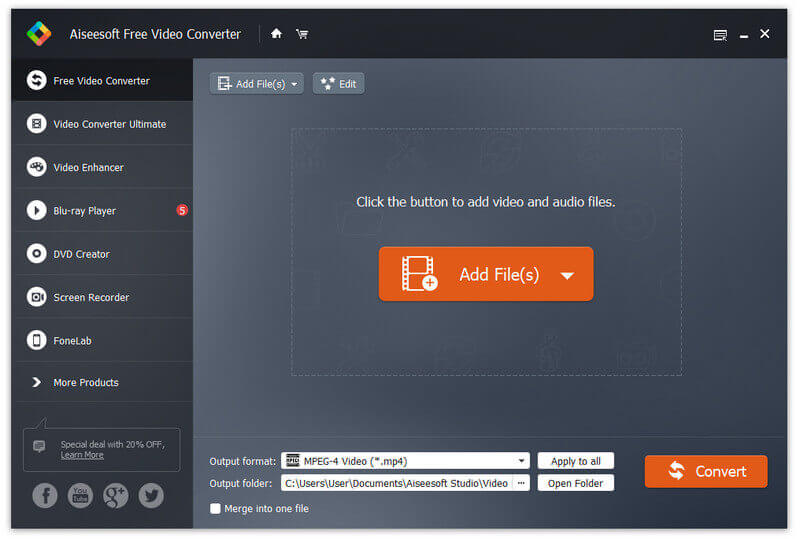
Download, install and open this powerful FLAC to MP3 converting software on your PC/Mac.
Step 2Add FLAC songs
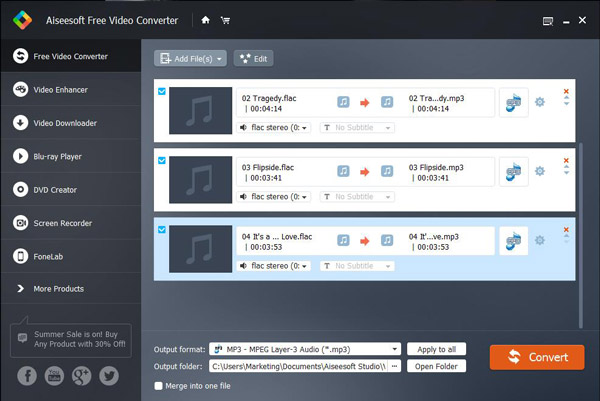
Click "Add File(s)" in the interface to load the FLAC files you want to convert to MP3. Moreover, it enables you to directly import FLAC folder to this Free FLAC to MP3 Converter.
Step 3Convert FLAC to MP3
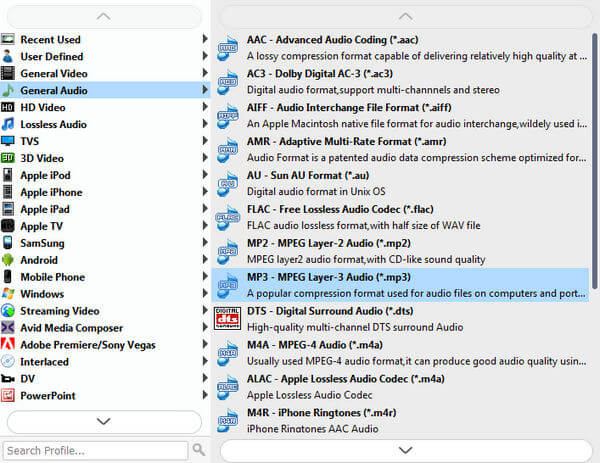
It is compatible with any frequently-used video/audio format like MOV, MP4, AVI, FLV, MKV, MP3, AAC, WMA, FLAC and more. You can select "MP3" format from the drop-down list of "Output format". Also, you can freely choose the destination file folder for the converted MP3 audio files. After that, click "Convert" button to start to convert lossless FLAC to supported MP3.
Just a few seconds later, the whole FALC to MP3 converting will be finished. Besides converting FLAC to MP3, you can also use this free video/audio converting software to make the conversion from video to video and from video to audio.
If you only have several FLAC songs that need to be converted to MP3, online FALC to MP3 converting tool can also be a good choice for you. Here we sincerely recommend an easy-to-use online FALC to MP3 converter for you. You can follow the steps below to make the audio conversion from FALC to MP3.
1. Open the media.io site on your browser.
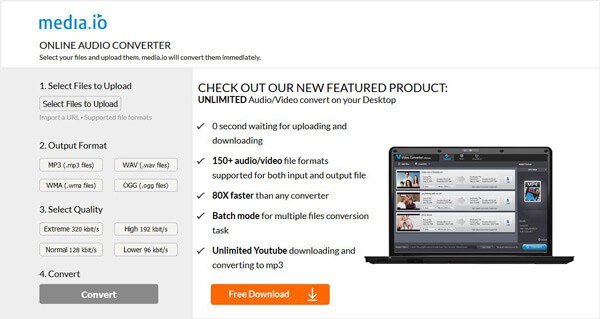
2. Click "Select Files to Upload" to import the FLAC music you want to convert to MP3.
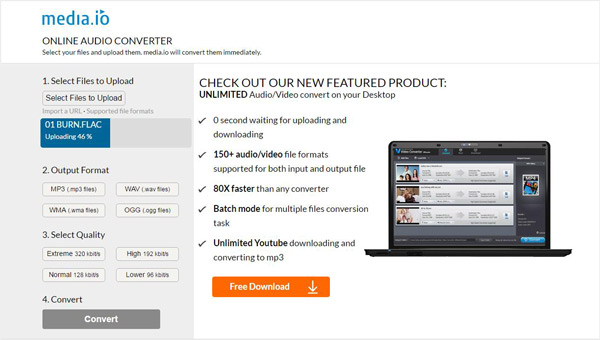
3. Select "MP3" as the target format and then choose the suitable audio quality.
4. Click "Convert" button to upload the FLAC audio to this online FLAC to MP3 converter. It will take you some time to compete the loading. Then you need to click "Download" button to save the converted MP3 file to your computer.
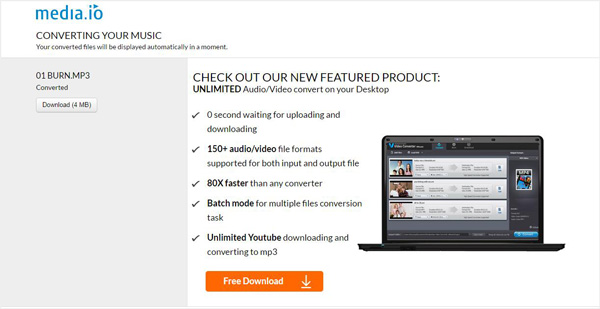
Compared with the first way, this online FLAC to MP3 converter will cost your much more time to convert FLAC to MP3. What's more, you are only allowed to convert one FLAC audio at a time.
In this article, we show you two free ways to convert FLAC to MP3. If you want to make the audio conversion from FLAC to MP3 for your iPhone/iPad/iPod or other portable devices, you can choose either one as you like.
How We Test & Review
All our reviews and selections are done by humans who consider users' perspectives and experiences essential.
Our writers spend hours testing each product, providing unique insights into their features and performance. We ensure all apps and products are carefully reviewed, including tests on various systems, task handling, file support, and task completion time. For paid products, we explore all features in free trials to help you decide on purchases.
Finally, we cross-check results to provide the best reviews and top product lists.

June 21, 2018 09:51 / Updated by Jenny Ryan to Audio
 How to Convert FLAC File to ALAC
Can't play your FLAC music with iTunes? Read this article to learn about FLAC and ALAC and methods to convert FLAC to ALAC.
 Best FLAC Player for Windows/Mac/iOS/Android
What is FLAC? How to play FLAC on Windows/Mac/iOS/Android? This article lists best FLAC players for Windows, Mac, iOS and Android.
 How to Split Audios with MP3 Splitter
Want to split MP3 audio files? You can learn how to split up MP3 audios with free MP3 splitter online and best MP3 splitter in this post.
 Leave your comment and join our discussion
