iPhone Data Recovery
 100% Secure. No Ads.
100% Secure. No Ads.
Accidentally deleted important photos, messages, contacts, or WhatsApp chats from your iPhone?
Lost data after iOS update, system crash, or factory reset?
iPhone data loss can happen anytime - and it often feels permanent.
But in reality, most deleted iOS data is still recoverable if you use the right iOS Data Recovery tool.
100% Secure. No Ads.
100% Secure. No Ads.
When data is lost, users usually try quick fixes like:
❌ iTunes restore (overwrites existing data completely)
❌ iCloud restore (limited backup and missing latest files)
❌ Random free recovery apps (unsafe or low success rate)
❌ DIY methods without understanding iOS structure
These methods often lead to:
1) Permanent data overwrite.
2) Partial or failed recovery.
3) Loss of newly created files.
4) Increased frustration and confusion.
That’s why a professional iPhone Data Recovery solution is essential.
100% Secure. No Ads.
100% Secure. No Ads.
If you want to safely and effectively recover deleted iPhone data, use a trusted professional tool:
👉 Aiseesoft iPhone Data Recovery
It s a professional-grade recovery software designed for one purpose: getting your lost iOS data back safely and quickly. TWhether you accidentally deleted photos from last summer, lost WhatsApp chats after an update, or your iPhone won’t even turn on – this tool can help.
100% Secure. No Ads.
100% Secure. No Ads.
100% Secure. No Ads.
100% Secure. No Ads.
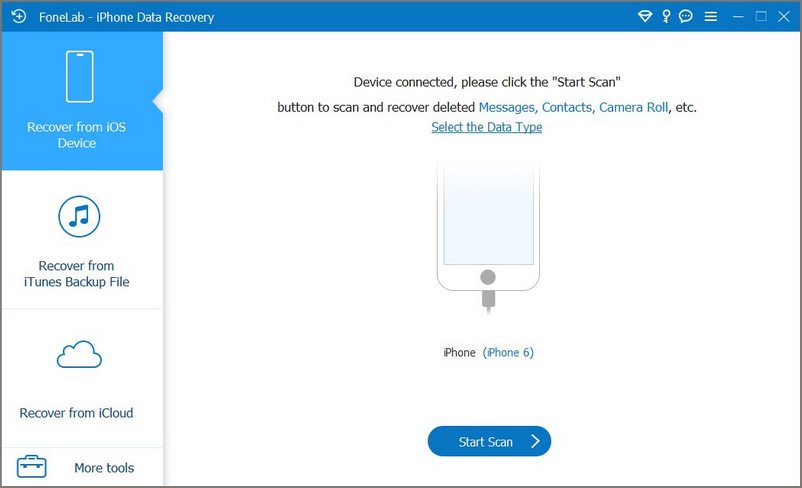
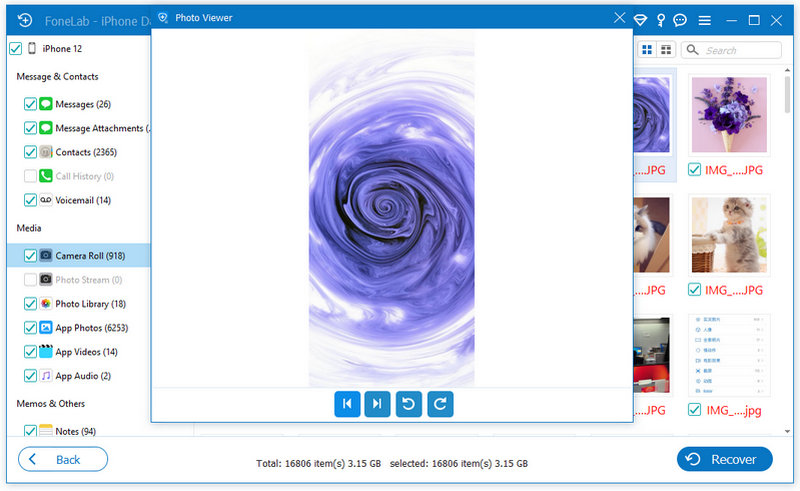
Unlike complicated recovery methods, Aiseesoft simplifies the entire process into easy clear steps, now start recovering lost data in under 3 minute - no technical skills required:
100% Secure. No Ads.
100% Secure. No Ads.
| Feature | iTunes | iCloud | Aiseesoft iPhone Data Recovery |
| Selective recovery | ❌ No | ❌ No | ✅ Yes |
| Preview before restore | ❌ No | ❌ No | ✅ Yes |
| Works without backup | ❌ No | ❌ No | ✅ Yes |
| Recovers from a broken device | ❌ No | ❌ No | ✅ Yes |
| Overwrites current data | ✅ Yes | ✅ Yes | ❌ No |
| Free to try | ✅ Yes (limited) | ✅ Yes (limited) | ✅ Yes (preview feature) |
iTunes and iCloud are backup tools, not recovery tools. Aiseesoft is built specifically for recovery.
100% Secure. No Ads.
100% Secure. No Ads.
Is it possible to recover deleted data from iPhone?
Yes, in many cases deleted iPhone data can still be recovered. When files are removed, they are not immediately erased from the device storage. Instead, they remain until being overwritten by new data. This is why using an iPhone Data Recovery tool as soon as possible increases the chance of successful recovery.
Can I recover iPhone data without backup?
Yes, it is possible to recover data without backup in some situations. Modern iOS Data Recovery methods can scan the internal storage of the device and detect recoverable deleted files even if no iCloud or iTunes backup exists. However, success depends on whether the deleted data has been overwritten.
What should I do immediately after losing data on iPhone?
To improve recovery chances, you need to: 1) Stop using the device immediately; 2) Avoid taking new photos or installing apps; 3) Do not perform factory reset; 4) Try recovery as soon as possible. This helps prevent overwritten data.
Are there free ways to recover iPhone data?
Some basic recovery options exist through iCloud or iTunes backups. However, they are limited and often require overwriting the device or restoring full backups. For more flexible recovery (especially selective recovery), users often rely on dedicated iOS Data Recovery tools.
Conclusion
Stop worrying about permanently lost files or risky restore methods. With Aiseesoft iPhone Data Recovery, you can quickly and safely recover deleted iPhone data without technical skills. Whether it’s photos, messages, contacts, or app data - your files are often still recoverable. Download Aiseesoft iPhone Data Recovery today and start your iOS data recovery in just a few minutes.
100% Secure. No Ads.
100% Secure. No Ads.
 Leave your comment and join our discussion
The best iPhone data recovery software ever, allowing users to safely recover lost iPhone/iPad/iPod data from iOS device, iTunes/iCloud backup.
100% Secure. No Ads.
100% Secure. No Ads.

*Required field
*Please enter a valid email

