
If you have already taken some videos in 3GP with your smart phone, you should convert 3GP to AVI in order to playback video in TV or other devices.
You can find lots of 3GP to AVI converters. The problem should be how to transcode 3GP to AVI with the best quality. Aiseesoft 3GP to AVI Converter should be the choice for you. Or if you want to convert 3GP to AVI for free without installing any program, you can also check the online solution.
When you need to use 3GP files for other devices, you should able to change 3GP to MP4, 3GP to AVI or other video formats according to the device types. Aiseesoft 3GP to AVI converter should be the best tool to convert 3GP to AVI video.
Step 1Launch 3GP to AVI Converter
When you download and install the latest version of 3GP to AVI Converter, you can launch the program as the screenshot.
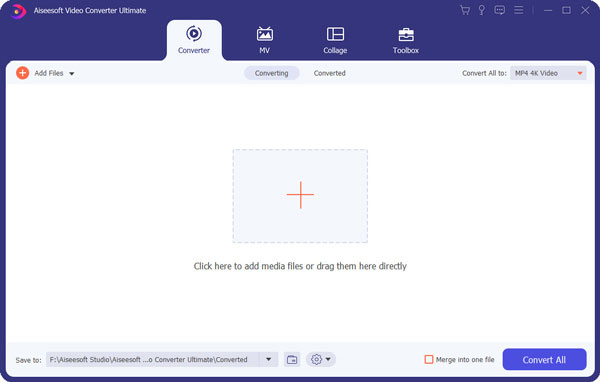
Step 2Load 3GP files to the program
Click the "Add Files" to load 3GP files or the whole 3GP folder to the program. The batch function enables you to convert multiple 3GP videos to AVI videos.
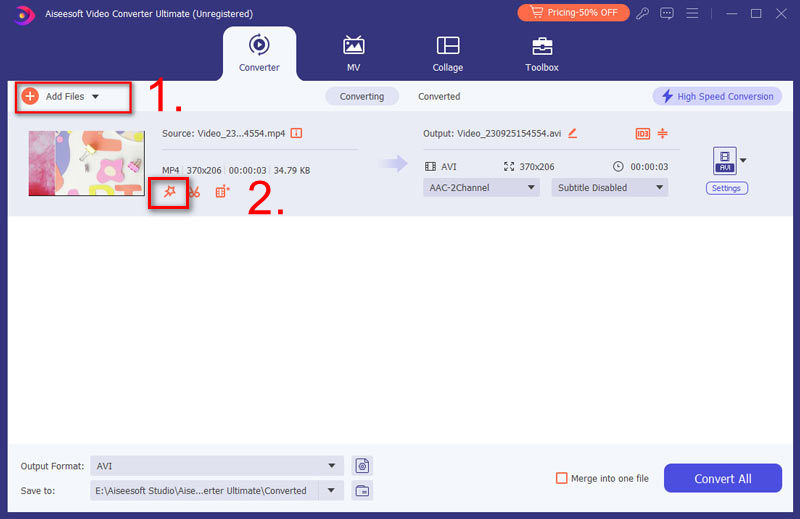
Step 3Choose output as AVI format
You can convert to general AVI format or convert 3GP to AVI with a certain device type. The program provides multiple presets for your requirement.
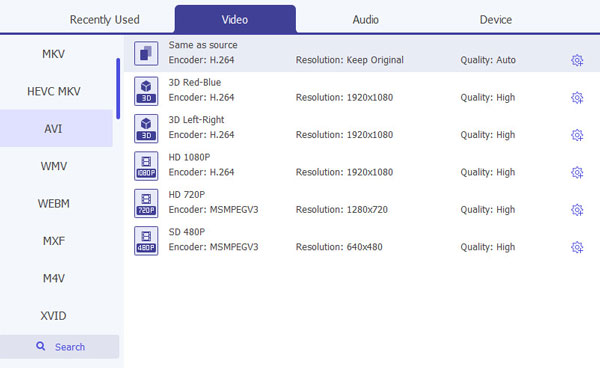
Step 4Adjust the output parameters
You can click the "Settings" button to adjust the parameters of output file before you convert 3GP to AVI.
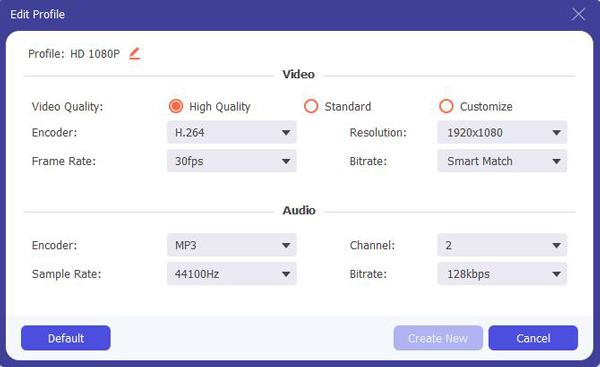
Step 5Convert 3GP to AVI format
When you make sure everything can meet your requirement, you can click the "Convert All" button to transcode 3GP to AVI format.
Converting 3GP to AVI is very easy for you to play videos on TV or other players. Still if you only get the 3G mobile phones, you could still convert VOB to 3GP.
Check the video tutorial for easy understanding:


Besides this professional 3GP to AVI converter we mentioned above, if you do not care much about conversion quality and has less file to convert. You can also use a free online converter to help you convert 3GP to AVI easily.
Let's take one of the famous free online file conversion site for example: zamzar.com.
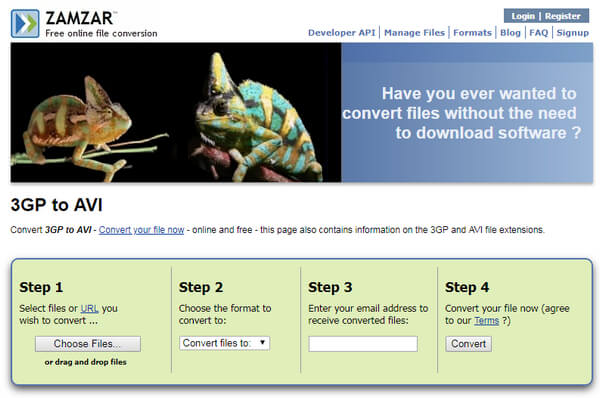
Step 1Select the 3GP files you want to convert from your computer. Or you can also enter an URL for online 3GP video conversion.
Note: Make sure your uploaded file will not exceed 50MB.
Step 2Choose AVI under Video Formats category as the output format from the dropdown list.
Step 3Enter your email address to receive the converted AVI files. Just make sure to remember which email address you have entered without any mistake. Or you may never find you converted video files again.
Step 4Then click Convert button to start converting your 3GP videos to AVI.
| Features | Aiseesoft Video Converter Ultimate | Zamzar Online File Converte |
|---|---|---|
| Support file formats | 4K, MP4, TS, MKV, AVI, FLV, WebM, MOV, MXF, AVI, etc. over 1000 video and audio formats | Less than 20 file format including 3GP, AVI, 3G2, AAC, AC3, etc. |
| HD/4K and 3D conversion | Support | No Support |
| Conversion speed | Very fast | Very slow |
| Conversion quality | High | Low |
| Built-in Editor | Yes | No |
| Easy to Use | Yes | Yes |
| Add subtitles and audio tracks | Yes | No |
| Limitation | None | 50MB file size limitation |
Before you transcode 3GP to AVI, you can learn more details about the two formats and learn the important things that you should keep in mind.
1. Usually 3GP is the video format taken by smart phones. The size of 3GP video is relatively small. When you need to change 3GP file to AVI, you should able to adjust parameters of video.
2. Since the 3GP files are small in size and limited in taken period, you might take several 3GP videos to combine them together for AVI. The 3GP to AVI converter should able to join several videos together.
That is why some 3GP to AVI online converters cannot be taken into consideration. When you convert 3GP to AVI online, it is quite different from convert VOB to 3GP, the 3GP files are compressed, and you are not able to play them on any device.
In this article, we introduce two ways to assist you convert 3GP to AVI, you can choose either professional video converter to do the conversion in high quality and fast speed, or do 3GP to AVI online for free. Just choose the way which will be more suitable for your situation.

December 14, 2020 09:00 / Updated by Jenny Ryan to Convert Video
 How to Convert 3GP to MP4
"When you record video with your phone or get the movie from the website as 3GP, you can simply convert 3GP to MP4.
 How to Convert MP4 to MP3
How do you change MP4 to MP3? With MP4 to MP3 online converter? Or download free MP4 to MP3 converter? Read this article to get all comprehensive ways.
 Convert MKV to AVI/MPEG
MKV video can't be playable on Blu-ray or DVD player? This article will show you.
 Leave your comment and join our discussion
