Have you ever considered converting AVCHD to iPod? You must enjoy recording your daily life or travelling dairy with your AVCHD camcorders. However, you may find it a big trouble that these AVCHD videos are not compatible with most players, which means that it is unavailable for your iPhone, iPod, or the video sharing website.
Don't worry! There are some feasible solutions for you to solve this problem, one of which is to convert these AVCHD videos to your iPod. And this tutorial will give you a comprehensive introduction about top 5 AVCHD converters and how to convert them to iPhone, iPad. Please read on and learn more details.
AVCHD, or Advanced Video Codec High Definition, is a latest HD format for inexpensive HD video production. These AVCHD file extension could be M2TS, M2T, MTS, TS, TR, TP, TD, TRP, TOD, MOD, WMV, 3GP, 3G2, MOV, VOB, MPG, ASF, FLV, AVI, RM, RMVB, DV, MPEG-1, MPEG-2, MP4, MKV and so on.
In general, if you are using Canon VIXIA HG20, Sony HDR-UX5, Panasonic HDC-SD1 and so on with MPEG-4 AVC/ H.264 video compression codec to record, these video should be AVCHD format (AVC-HD, AVC HD).
As we all know, most media players will not play your AVCHD natively. That is exactly the reason why you need an AVCHD to iPod converter.
Aiseesoft Video Converter Ultimate is a professional AVCHD video to iPod converter. It enables you to convert AVCHD format to other friendly video formats, such as AVI, MPG, WMV, MP4, MOV, FLV, ASF, RM so that you can easily play them on iPhone, iPod, Apple TV, PSP, Zune, Xbox or share them on video sharing website.
Key Features:
After having a general understanding about the features of AVCHD to iPod Converter, now let's follow the next tips to learn how to convert AVCHD video to iPod step by step with this AVCHD video converter:
Step 1 Download and install the program
Free download Aiseesoft Video Converter Ultimate on your computer, and install the program according to the instructions.
Step 2 Input source AVCHD Video
To convert AVCHD video to iPod, press the "Add File" button in the upper left corner of the main screen to select and add your source AVCHD file.
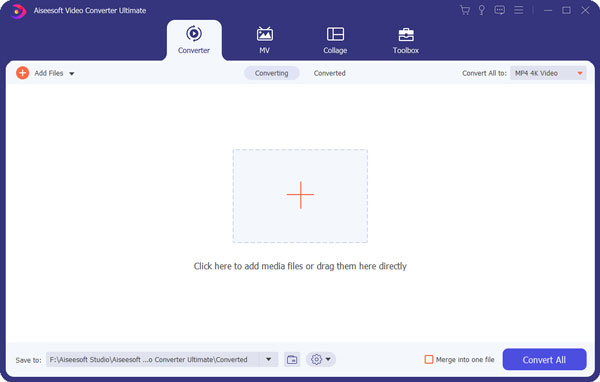
Step 3 Choose output profile
Next, click "Profile" and choose a suitable format for the target video. Then click "Browse" and define the output folder for the converted video.
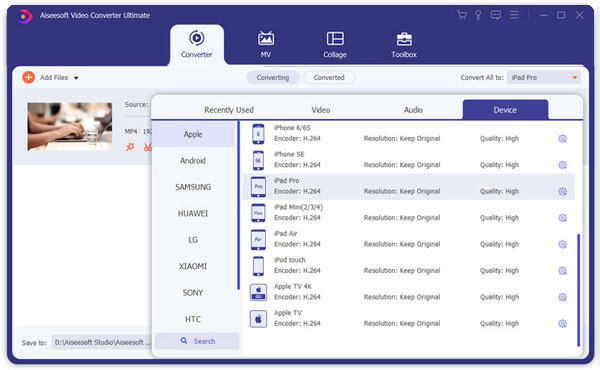
Step 4 Convert AVCHD to iPod
Click "Start" button to begin conversion. Several minutes later, you will manage converting the AVCHD video to iPod and enjoy it on your portable players.
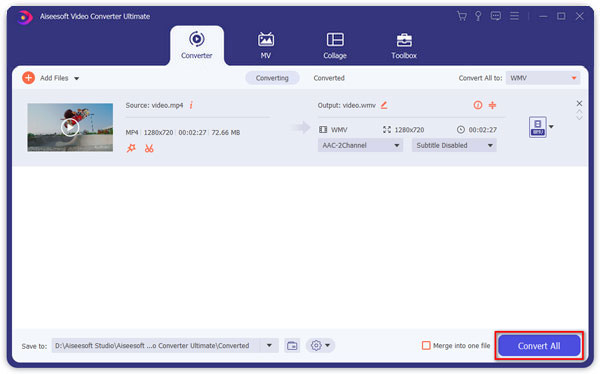
Aiseesoft AVCHD Video Converter is definitely easy to use. Several minutes can absolutely finish the whole conversion process.
Besides Aiseesoft AVCHD Video Converter, there is a couple of similar AVCHD to iPod converters for you to take into consideration.
Acethinker Online Converter is amazing online converting tool to convert any videos for free. With various output formats like MP4, MKV, MOV, AVI, WMV, FLV and more, you can simply convert the AVCHD video to iPhone, iPod without downloading any software. And follow the next steps:
Step 1 Search and access the website of Acethinker Online Converter on Google.
Step 2 Click on add media button, select add file to add your selected AVCHD video to the program.
Step 3 select the desired video format at the video tab, such as MP4, for your target AVCHD file.
Step 4 To begin converting AVCHD files to iPod, just click the Convert button. It will open automatically when the conversion finished.
MediaCoder is also a wonderful AVCHD video to iPod converting program. It supports popular file formats to help you transfer and also provide plenty of nice features to deal with the AVCHD files. Additionally, you can see the new codes and latest features of MediaCoder are updated each week, and you can download them for totally free!
Step 1 Free download MediaCoder on your PC or Mac, install and launch it.
Step 2 Add the AVCHD files from the "File" menu in batches or add folder.
Step 3 Click Profile to select a proper output format for the target AVCHD video.
Step 4 Hit on the "Convert" button to convert the AVCHD video to your iPod successfully!
EasiestSoft Video Converter, another powerful video converter, can help you transfer your AVCHD video to any iPod supporting formats, including MP4, MOV, AVI, MKV, FLV, etc.
Step 1 Download and Launch EasiestSoft Video Converter and select your target AVCHD video in the main interface. You can also input multiple videos simultaneously.
Step 2 Choose the video format you need to export at the format category. If you don't choose, the MP4 format is chose by default.
Step 3 Click the "Convert" button to convert the AVCHD video to iPod. After the converting process is complete, you can see more details about the video in the file.
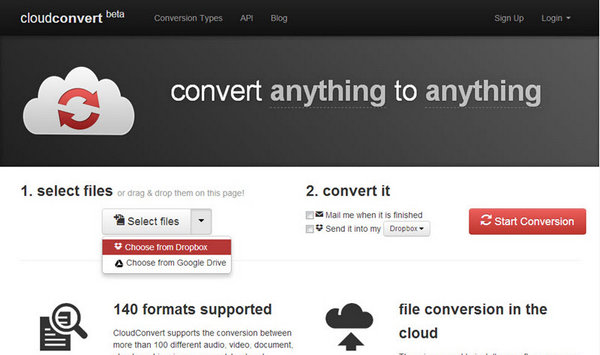
Cloud Convert is an easy yet professional online tool to help you convert AVCHD video to iPod. It supports you to convert video between a plenty of formats including MP4, MP3, AVI, WMV, MKV and more. Just upload your target AVCHD files to Cloud Converter and eave the rest to this online converter.
Step 1 After opening the webpage of Cloud Converter, click the "Select Files" button to import your AVCHD file that you want to convert to iPod.
Step 2 Select MP4 or other iPod supporting format at the left sidebar, and choose a destination folder for the converted file.
Step 3 Simply click on the "Start Convert" button in the right, you can start converting AVCHD video to MP4 or other iPod format.
Above are the detailed guides of converting AVCHD video to iPod. All the 5 apps mentioned above are convenient to download and easy-to-use enough. However, considering security and safety, we still recommend Aiseesoft AVCHD to iPod Converter for you to solve this problem.
Finally, if you have more thoughts about how to convert AVCHD to iPod, you can share them in the comments below. And do not forget to share this passage to your friends if it helps you to some extents!

June 15, 2018 08:17 / Updated by Jenny Ryan to Convert Video
 How to Convert AVCHD Video to MOV with AVCHD Video Converter
Convert AVCHD video to MOV – Guide about how to convert AVCHD video to MOV format with AVCHD to MOV Converter. Free download AVCHD Video Converter to convert AVCHD to MOV.
 How to Convert AVCHD Video to WMV
Convert AVCHD video to WMV – Guide about how to convert AVCHD video to WMV format with AVCHD to WMV Converter. Free download AVCHD Video Converter to convert AVCHD to WMV.
 How to Convert AVCHD Video to SD
Convert AVCHD video to SD – Guide about how to convert AVCHD video to SD video, like AVI, MP4, MOV, 3GP, etc. Free download AVCHD Video Converter to convert AVCHD to SD video.
 Leave your comment and join our discussion
