Aiseesoft iKnockin - iPhone Unlocker
 100% Secure. No Ads.
100% Secure. No Ads.
The iCloud activation lock on iOS can protect private information in case your iPhone is lost or stolen. Although the activation lock greatly improves the security of iPhone/iPad, there is still a major drawback. For those who buy a second-hand iPhone or iPad on eBay or from your friends without having iCloud Activation unlocked, it can be really tricky to bypass iCloud Activation.
So how can you bypass iCloud Activation on iPhone? If you are looking for the quickest way to remove iCloud lock, the following steps for iCloud bypass will be of great help.

Quick Guide
Activation Lock is a feature that was created by Apple to stop any other person from accessing your iPhone, iPad, Mac, or Apple Watch should it be lost or stolen. The activation lock is enabled immediately after you activate Find My on your device.
How does it work?
Once the activation lock has been activated, your Apple ID and password will be needed in order to:
This activation lock is connected to Apple's activation servers. If someone were to restore the gadget to factory settings, it would still require the credentials of the original owner to activate it again.
Quick Comparison: Which Methods to Bypass iCloud
| Method | Success Rate | Difficulty | Compatibility | Cost | Best for |
| Apple ID & Password | Extremely High | Very Low | All iOS versions & all models | Free | Owners who remember Apple ID or are able to reset Apple ID |
| iCloud Remote Removal | Extremely High | Low | All iOS versions & all models | Free | Users who can login to iCloud remotely |
| Aiseesoft iKnockin | High | Low | All iOS versions & all models | Paid | Users who forgot and are unable to access Apple ID |
| Apple Support Request | Moderate | High | All iOS versions & all models | Free | Users with official proof of purchase (receipt/invoice) |
| DNS Bypass | Low | Low | Mostly older iOS versions | Free | Users who need temporary access to specific features |
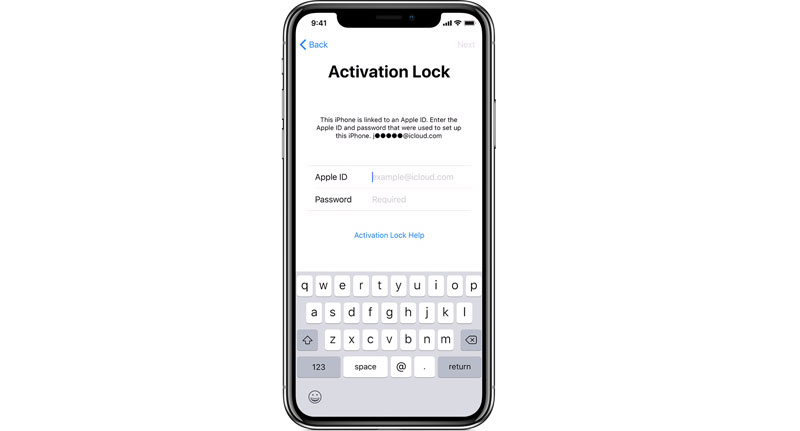
The simplest way to remove iCloud activation lock is to enter the Apple ID and password directly on the device during the setup process. If you’ve forgotten your password, you can reset it at iforgot.apple.com.
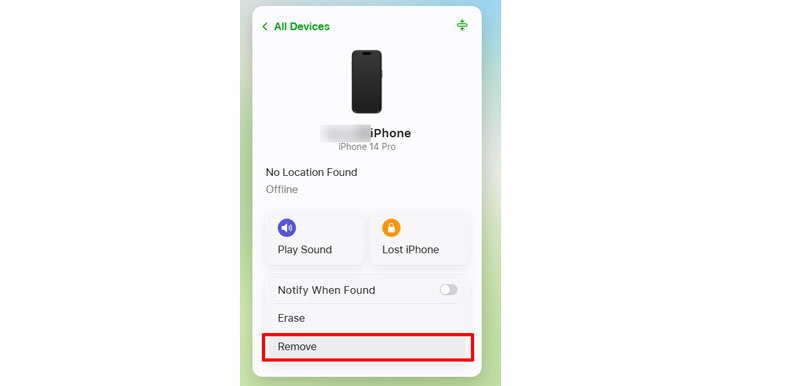
If you bought the device from someone else and they are not present, they can still delete iCloud activation lock remotely.
Tip: If your Apple ID or password is not working, click here to solve it.
Bypassing iCloud activation lock is convenient when you forget your Apple ID password and want to activate your iOS devices. While another quick way to let you not worry anymore is to remove the Apple ID from your iPhone. And Aiseesoft iKnockin - iPhone Unlocker can greatly help when you forget your iPhone passcode or Apple ID password. What's more, this software is designed with straightforward buttons and detailed built-in tutorials, enabling you to delete your Apple ID without the password quickly. In addition, you can also use this iOS-26-compatible unlocking tool to bypass Screen Time and remove MDM.
100% Secure. No Ads.
100% Secure. No Ads.
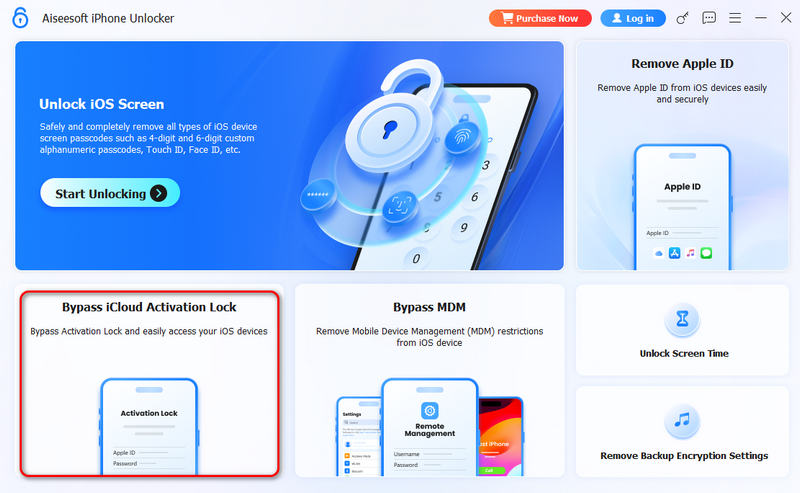
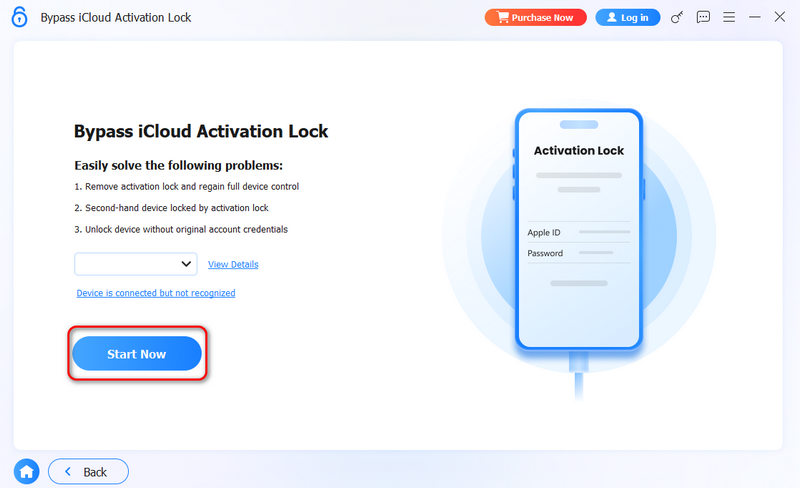
As you can see, Aiseesoft iKnockin - iPhone Unlocker is a powerful iCloud activation bypass tool. The whole process is very smooth and easy. Thus, many users choose this solution for iPhone Activation Lock bypass on all iPhones, including the latest iPhone 17 series.
If you are the rightful device owner, you can turn to official Apple Support for assistance by providing proof of ownership, such as a sales receipt or order record.
Get an iPhone that's on "Activate iPhone screen"; it needs iCloud activation bypass. You can follow the guide below to bypass iCloud Activation Lock most quickly.
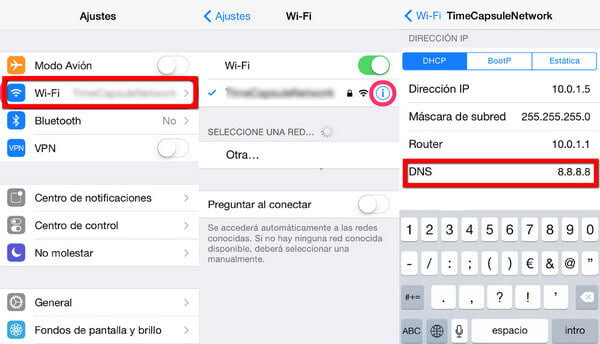
• To bypass iCloud Activation in the USA/North America, the new DNS is 104.154.51.7
• To bypass iCloud Activation in Europe, the new DNS is 104.155.28.90
• To bypass iCloud Activation in Asia, the new DNS is 104.155.220.58
• To bypass iCloud Activation in other areas, the new DNS is 78.109.17.60
Once the iCloud activation bypass settings are done, you'll receive a message saying "You have successfully connected to my Server." Now that you have completed iCloud unlock, you can access most functions like iCloud locked user Chat, Mail, Maps, Video, Games, and more.
Note:
1. This method has been proven to be effective for iCloud Activation Lock bypass for old iOS versions. If you want to remove iCloud Lock on other iOS versions, you could also give it a try.
2. Changing DNS allows you to bypass iCloud Activation Lock on iPhone quickly, but this is only a temporary solution. To bypass iCloud Activation permanently, you need to adopt the other solution.
Tip: Click here to read more about bypassing iPhone 11’s activation lock if interested.
Can I bypass the iCloud activation lock with jailbreak?
No, jailbreaking can’t remove iCloud activation lock but it is a necessary step to use iCloud removal tools like Aiseesoft iKnockin to bypass the iCloud activation.
Can you bypass the iCloud activation lock on iPad?
Of course, yes. You can use ways like entering new DNS, using iCloud, etc.
How do I activate my iCloud account on my iPhone?
You should open Settings on your iPhone first. Then tap your name you have signed in on your iPhone. After that, select iCloud and enable the feature you want to use.
Conclusion
The best way to remove iCloud activation lock is always through official Apple methods. If you forget your Apple ID, Aiseesoft iKnockin - iPhone Unlocker is your best choice for iCloud Activation Lock Removal. Try it now!
 5 Easy Methods to Unlock an iPhone without Passcode/Face ID/ Touch ID
You recently changed your passcode on your iPhone, and you forgot it already. You can still access it with these solutions on how to get into a locked iPhone.
 [Solved] 4 Easy Ways to Bypass iPhone Locked to Owner
iPhone locked to owner? Learn how to unlock or bypass this so-called activation lock without Apple ID or the previous owner safely, fast, and effectively.
 How to Bypass Screen Time Passcode with 4 Effective Ways [2025 Guide]
How do you hack screen time without the passcode? You can read this guide to bypass screen time passcode with or without Apple ID.
 Leave your comment and join our discussion
iOS Activation Lock
Bypass iOS Activation Lock
Unlock iOS Screen
iCloud Tips

To fix iPhone screen locked, wiping password function can help you a lot. And you also can clear Apple ID or Screen Time password easily.
100% Secure. No Ads.
100% Secure. No Ads.

*Required field
*Please enter a valid email

