You are here: Aiseesoft > Products > MPG to DVD Converter
Convert MPG, MPEG, MP4, etc. video to DVD

Aiseesoft MPG to DVD Converter

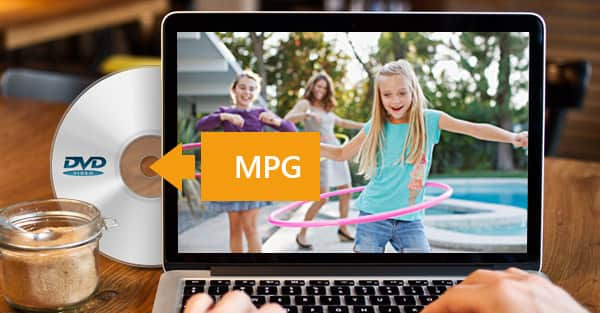
Aiseesoft MPG to DVD Converter, the versatile and easy-to-use MPG to DVD converting software, allows users to convert MPG video to DVD disc with reasonable converting speed and excellent quality. Besides DVD disc, you can also create the DVD folder and DVD ISO file with MPG, MPEG, MPEG2, MP4, MOV, M4V, MPV, MOD, MJPG, MJPEG, DAT videos, the created DVD can play well on any kinds of DVD players.

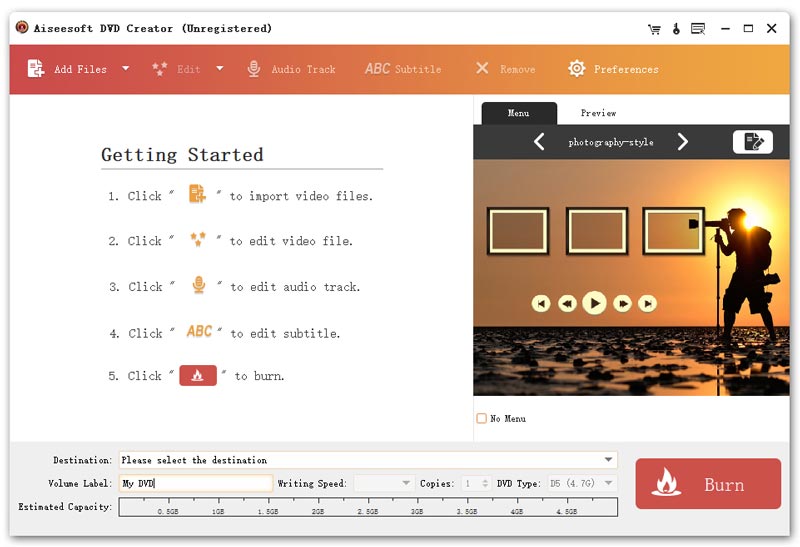
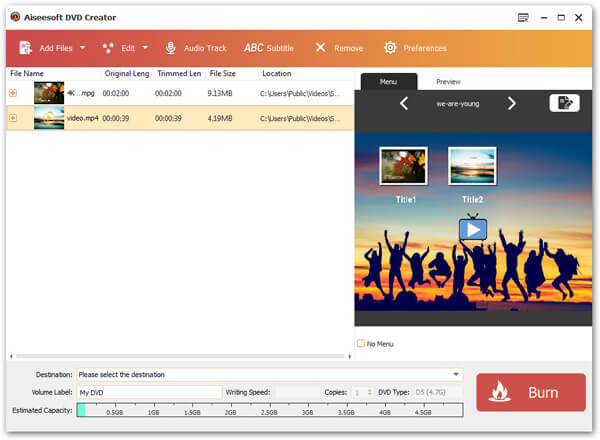
This software provides multiple editing functions to meet your needs. For instance, you can create a customized DVD menu by choosing the menu templates and adding background picture/music. And you can add the audio track/subtitle and edit the video effect to get the ideal DVD video.

  • Convert MPG, MPEG and other videos to DVD
  • Add and edit the audio track and subtitle
  • Choose the favorite menu style and add the background film

Buy Now Free Download

MPG to DVD Converter box

MPG to DVD Converter

$29.00

win7

DVD Converter Suite
Key Feature of MPG to DVD Converter
create DVD

Convert MPG video to DVD

  • Burn DVD with MPG video

    Aiseesoft MPG to DVD Converter allows you to burn DVD with MPG video, and other popular videos such as MPEG, MPEG2, MP4, MOV, M4V, MPV, MOD, MJPG, MJPEG video with excellent burning effect.

  • Create DVD disc, DVD folder and ISO files

    Besides creating DVD-format disc, this MPG to DVD Creator enables you to create DVD folder and ISO files, which can be stored in local disc.

  • Preview the source video effect

    You can preview the video effect with the built-in player and take snapshot for your favorite image.

edit DVD

Trim, crop, watermark and effect function

  • Trim and crop the added video

    This MPG to DVD Converter enables you to cut off any clips from the added video, and crop the video frame to get the ideal video aspect ratio.

  • Add watermark for the video

    You can add text or image watermark for the source video and then adjust the displayed position and size at random.

  • Adjust the video effect

    This versatile MPG to DVD Converter allows you to adjust the video brightness, saturation, contrast, hue and volume.

customize DVD menu

Customize the DVD menu

  • Choose the favorite DVD menu template

    Aiseesoft MPG to DVD Converter provides six kinds of menu templates such as Scenery, City, Festival, Plants, Animals, and Others for you to choose.

  • Define the menu frame, button and text

    You can change the original menu style and select the favorite one from multiple menu frames, and menu buttons. Also you can rename the DVD titles name from the "Edit text".

  • Inset background music, picture, and film

    This MPG to DVD Converter allows you to inset the background music, picture, and film from your local disc for your DVD video. And you can adjust the playing duration of the background music and film.

add audio track to DVD

Define the audio track

  • Add the audio track to DVD

    It allows you to add one or more proper audio tracks to meet your needs, and adjust the output volume and play synchronization situation about video and audio. Also you can set Encoder, Bitrate, Channels, and choose loop audio track or not.

add subtitle to DVD

Customize the subtitle of the output DVD

  • Add subtitle

    This MPG to DVD Converter enables you to directly customize the proper subtitles for DVD

  • Edit subtitle to be perfect

    You can freely adjust font family, font size, color, display position, and name corresponding language name for each subtitle.

convenient DVD Creator

Compatible and intuitive

  • Compatible with most DVD discs and DVD players

    Aiseesoft MPG to DVD Converter can create nearly all DVD+-R/RW, DVD-RAM, DVD-5(4.5G) and DVD-9(8.5GB) discs. And the created DVD-format disc could be played perfect on most portable and home DVD players.

  • Fast burning speed

    The user-friendly and intuitive interface of this software makes the DVD burning process much easier and faster.

Specification of MPG to DVD Converter

MPG to DVD Converter Supported Input Formats:
Video: MPG, MPEG, MPEG2, MP4, MOV, M4V, MPV, MOD, MJPG, MJPEG, DAT

MPG to DVD Converter Supported Output Formats:
DVD: DVD Disc, DVD Folder, ISO file

System Requirements of MPG to DVD Converter
  • OS Supported: Windows NT4/2000/2003/XP and Windows Vista, Windows 7
  • Hardware Requirements: 800MHz Intel or AMD CPU, or above; 512MB RAM or more
Awards for MPG to DVD Converter

Awards for MPG to DVD Converter

Related Products of MPG to DVD Converter

We offer a 25% Coupon Code (AISESHD) for all products.

To redeem the coupon, just enter the coupon code in the corresponding input box on the checkout page of the payment platform. Don't miss this great opportunity.

View details about this promotion.

Windows Products

Package Deals >More...

iPad/iPhone Tools >More...

DVD Ripper/Cloner >More...

Video Converter >More...

HD Tools

Audio Converter >More...

Media Device Tools

PDF Tools >More...

System Utilities >More...

Free Tools

MAC Products

Popular Mac Software >More...