If you often use iTunes or iOS devices like iPhone, iPad or iPod, you will be familiar with the audio format, M4A. It also refers to Apple Lossless Encoder (ALE).
As a file extension created by Apple, M4A is alongside Advanced Audio Coding (AAC). Though it is not a well-known audio format, M4A has been regarded as a new codec which will replace MP3 format, because it possesses greater audio quality and small data size than MP3.
However, M4A format is not compatible with Windows Media Player and many other players. So in many cases, you need to convert M4A to MP3. In this article, we will introduce several free ways to make audio conversion from M4A file to MP3 format.
Which third-party audio conversion software will you choose to turn M4A to MP3? There are a lot of M4A to MP3 converting software on the Internet. In order to make you quickly find the best choice, here we sincerely recommend you two reputable programs - Free M4A to MP3 Converter and Audacity.
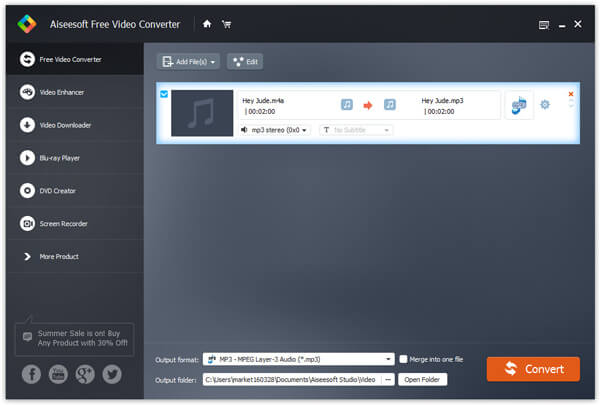
As the professional audio/video conversion software, Free M4A to MP3 Converter has helped many users to convert audio between different formats. Apart from turning M4A audio to MP3 music, you can also convert WAV to MP3, and change other audio files as you like. Besides, this app can also help you extract MP3 file from an MP4 video.
1 Install and run Free M4A to MP3 Converter.
2 Click Add file to upload M4A or other audio like AIFF, MP3, AAC, etc.
3 Tab Browse to choose the destination folder.
4 Click the button of Convert and start to change M4A to MP3.
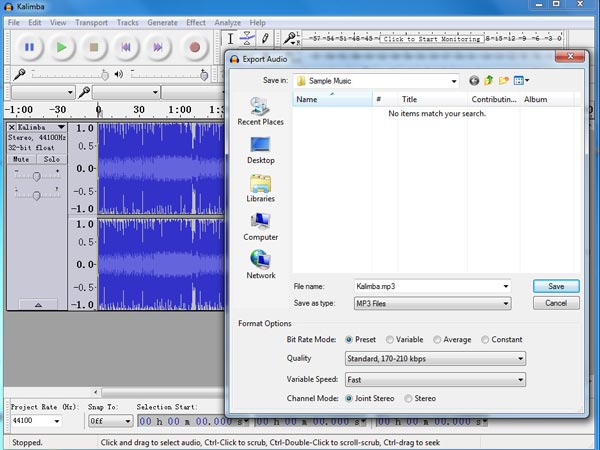
As a frequently-used open-source program for audio editing and recording, Audacity has attracted many users' attention. What's more, this brilliant software can also convert diverse audio formats. M4A and MP3 are also supported. With that, you can also edit the ID3 information of the target audio. The following guide will show you how to convert M4A to MP3?
1 Download Audacity and launch it.
2 Tab File > Import > Audio, and find the target M4A audio.
3 Click File > Export Audio >Save as type > MP3 Files > choose the destination.
4 Within seconds, the M4A file to MP3 conversion will be completed.
Notes: A lame_enc.dll file needs to be downloaded when you use Audacity to convert M4A to MP3 file. After that, remember to play the output MP3 file with a media player for test.
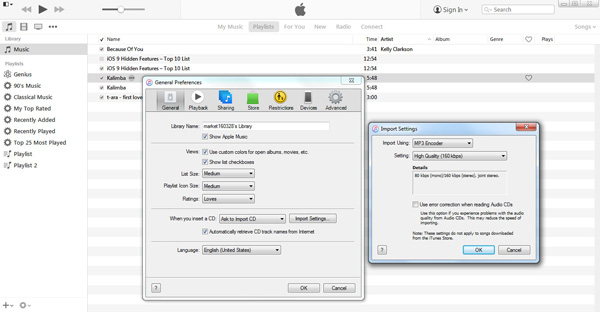
Though M4A has greater audio quality, it's a pity that M4A is not compatible with Windows Media Player which highly supports MP3 format. When it comes to change M4A to MP3, many people will choose iTunes to do that. And here, we would like to show you how to convert M4A to MP3 with iTunes for Window Media Player.
1 Download and launch the latest version of iTunes on your computer.
2 Click Preference from drop-down list of Edit, and find the Import Settings from General tab.
3 Tab Import Using, choose MP3, and click OK.
4 Right-click the M4A audio file in iTunes library, and find Create MP3 version.
If you google the methods of M4A to MP3 conversion, you will find there are a lot of online ways for you to choose from. Online audio file converters are very convenient for Mac OS and Windows users. Free online converters, like audio.online – convert to mp3, online audio converter, Zamzar - convert m4a to mp3 and media.io – audio online converter. Take online audio converter and Zamzar as examples:
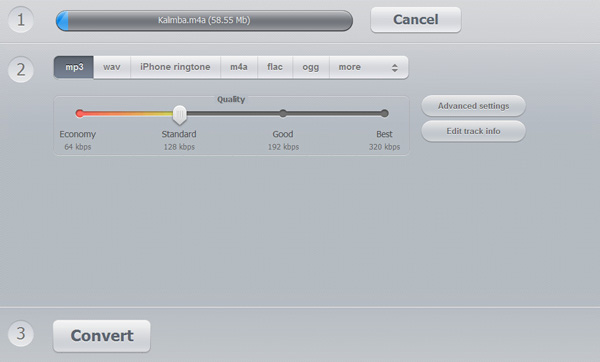
1 Go to the website of online audio converter.
2 Click "Open files" to import M4A file.
3 Choose "MP3" as the output format.
4 Select audio quality of "Economy", "Standard", "Good" and "Best". There are also some Step advanced settings of bitrates, sample rate, channels for you to customize. Or you can edit Step the audio information.
5 Click "Convert" to make audio conversion.
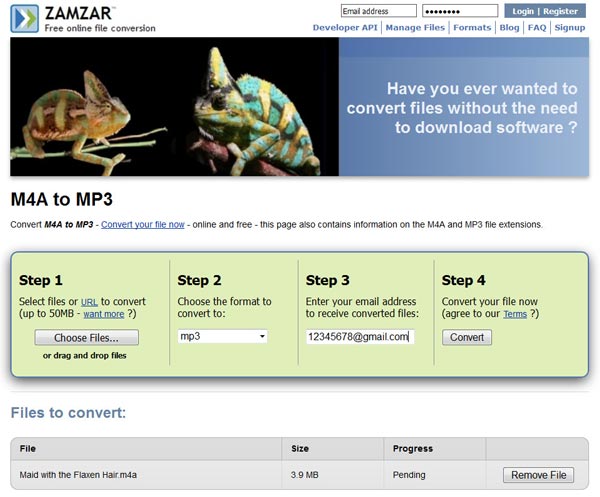
1 Go to the Zamzar website.
2 Import M4A audio by Clicking "Choose Files".
3 Click "Convert files to" arrow, and select "MP3" from the drop-down list.
4 Leave the E-mail address for receiving the output MP3 audio.
5 Tab "Convert".
Notes: When you choose online ways to convert audio, you should know that there exist some risks. For example, it may not very safe when downloading converted file from Zamzar through E-mail. What's more, some online converters has limited in the audio file size. And the online converting speed is quite slow.
Still, if you have WAV files that want to play on iPhone or iPod, then you should convert WAV to MP3.

June 15, 2018 09:23 / Updated by Jenny Ryan to Convert Audio
 How to Convert FLV Video to MP3 Music
Read this article, and find more about how to convert FLV to MP3 music.
 Free Download 5 Best HD Video Players for Windows 10/8/7/XP and Mac
What is the best HD video player? This post lists 5 best full HD video player apps (1080p/720p video player) to help you play media files on Windows 10/7/8/XP and Mac computer with great visual experience.
 Convert MP4 to MP3 for Free
How do you change MP4 to MP3? With MP4 to MP3 online converter? Or download free MP4 to MP3 converter? Read this article.
 Leave your comment and join our discussion
