For most people, the PlayStation is not only a home game console, but also a good media player. Therefore, you can watch videos with PS3 and other PlayStation series to have a good time. Some people may find that it is hard to play videos transferred from the computer on PS3 and other PlayStation products directly. Actually, there is nothing wrong with your PS3, the incompatibility issue can explain why you cannot play videos on PS3. In another word, the easiest solution is converting videos to PS3 formats.
PS3 Video Converter
According to PlayStation supported formats, MP4 is the most common choice. Therefore, you need to convert videos to MP4 before transferring to PS3. To help you choose the best PS3 video converter, this article has organized top video converters for both Windows and Mac users. Thus, you can read and choose your best video converter for PS3 video conversions from the following paragraphs.
Aiseesoft Video Converter Ultimate is the all-in-one video converter with various powerful features. With wide support of video and audio formats, you can convert media files to any format smoothly. And this PS3 video converter allows users to set the different output video quality and customize the output settings with ease.
As for people who want to transfer popular videos to PS3 for further management, Aiseesoft PS3 video converter can also satisfy this demand. Actually, you can download, edit and convert all online and offline videos without data loss here.
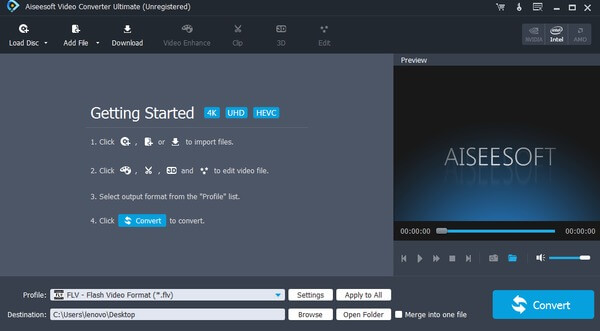
Step 1 Import your video
Free download Video Converter Ultimate on your computer. Then launch the PS3 video converter software. You can choose "Add File" button on the top to import your video.
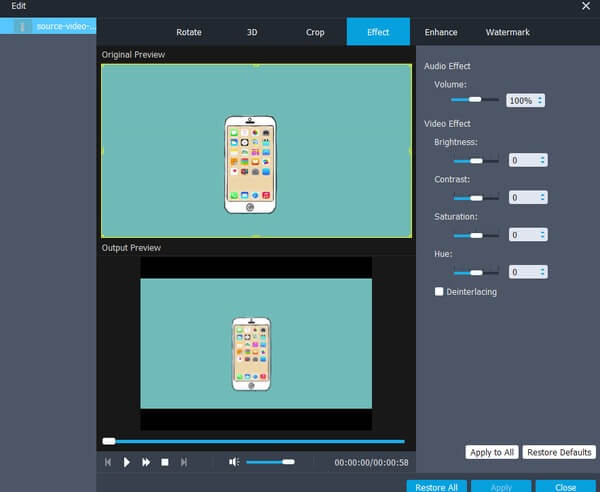
Step 2 Edit the video
Click "Edit" on the top toolbar. Later, you can see a new popping-up window to rotate, crop, enhance, watermark, add effect and 3D on videos. Then you can compare the video effect by using the original and preview windows with this PS3 video converter.
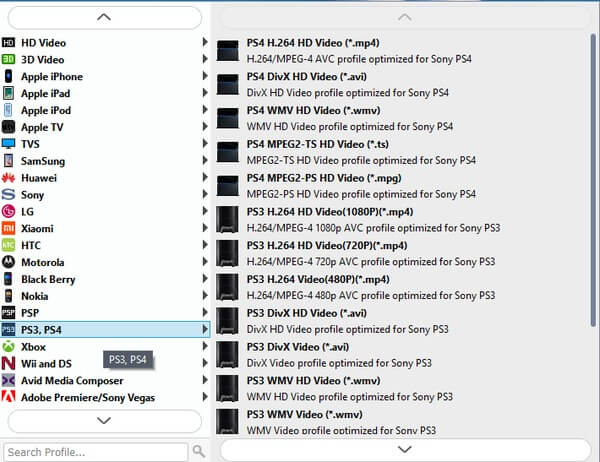
Step 3 Convert video to PS3 format
Choose "Profile" at the bottom. Then select "PS3, PS4" to access all PS3 supported formats. At last, set a destination folder and click "Convert" to change the video format to the PS3 supported format.
Well, you can alsoconvert videos output in PS3 supported format too. Just turn to "Download" section to complete the process.
Here are other free PS3 video converter software you can use to solve the problem. Compares with the above Video Converter Ultimate, the following PS3 video converters only offer basic functions. But if you have no extra requirements towards PS3 video conversion, then you can try those video converters as well.
User Ratings: 4.2/5
Operating system: Windows 10/8/8.1/7/XP/Vista, Mac OS X 10.7 or later.
Any Video Converter is a free PS3 video converter, which allows users to convert videos and audios for free. It supports many popular digital devices like Apple, Android, Game console and other 70 profiles. Therefore, you can convert videos to PS3 format for free too. Moreover, you are allowed to edit video and audio files with the basic editing tools.
Pros:
Cons:
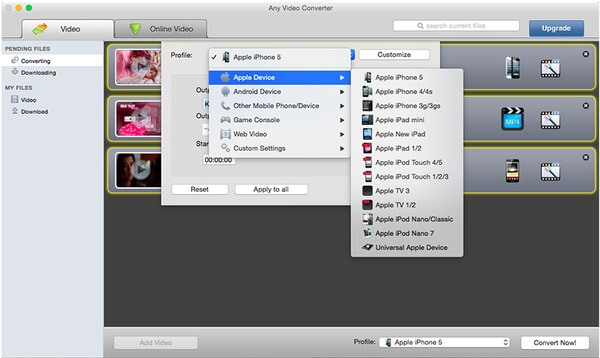
User Ratings: 3.9/5
Operating system: Windows 10/8/8.1/7/Vista
Freemake Video Converter is specially designed for Windows users. If you are using Microsoft Windows operating system, then you can run Freemake PS3 video converter freeware to get free PS3 conversion. Actually, Freemake Video Converter can convert video between 500 formats and gadgets. Thus, you can output videos to iPhone, Android, PS3 and other portable players quickly. In addition, you can also convert popular videos with no limitations.
Pros:
Cons:
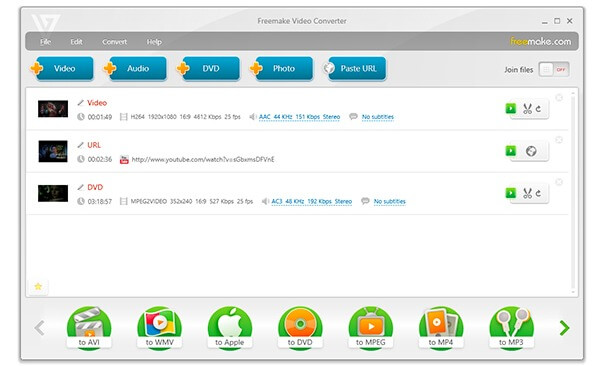
User Ratings: 3.7/5
Operating system: Windows 10/8.1/8/7/XP/Vista, Mac OS X 10.5 or later, Linux.
HandBrake is a free and open-source PS3 video converter for Windows, Mac and Linux users. You can convert nearly any format by using HandBrake. So it is quite easy to convert video to PS3 with the free PS3 video converter. And you are able to modify the video framerate, video quality and other settings as well.
Pros:
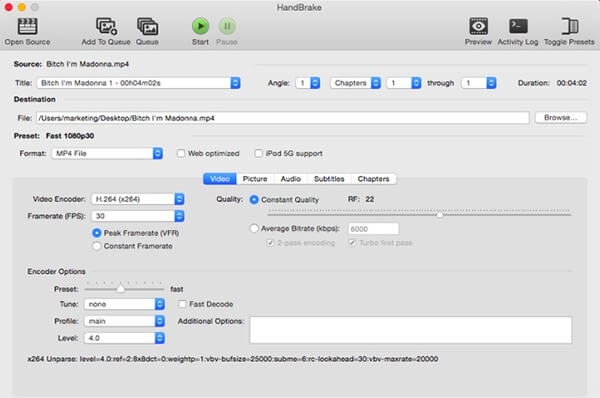
You can see that there are still some differences between video Converter Ultimate and PS3 video converter freeware. If you need to download and transfer videos to different portable devices frequently, then Aiseesoft Video Converter Ultimate can help you solve half time and improve visual experience. That's all for overviews of PS3 video converter programs, thanks for your reading.

April 11, 2018 09:00 / Updated by Jenny Ryan to Convert Video
 Top 10 Free FLV Converter Online
Read and get one of the best FLV converter freeware from this article. In addition, there are other 10 free online FLV converters here.
 Two Ways to Convert MXF to MOV
How to convert MXF to MOV for Adobe Premiere, Final Cut Pro X, VLC, or QuickTime Player on Mac? This page gathers you 2 ways to make MXF conversion to MOV.
 Recommendation of Best 5 PS3 Converter for Mac
Cannot play videos on PS3? Well, you need one PS3 converter for Mac to solve the problem. Just read and choose your best video converter here.
 Leave your comment and join our discussion
