iPhone Data Recovery
 100% Secure. No Ads.
100% Secure. No Ads.
Accidentally deleted important messages on your iPhone? Don’t panic - your lost iMessages or SMS may still be recoverable with the right iPhone Data Recovery tool.
Whether it’s personal chats, business conversations, or verification codes, iPhone message loss can feel permanent - but in most cases, it isn’t.
In this guide, you’ll learn how to recover deleted messages on iPhone quickly and safely.
When you delete a text message on your iPhone, iOS simply marks that storage space as “available to overwrite.” The actual message data stays intact until your phone needs that space for new photos, app data, or other files.
This is your window of opportunity.
Once overwritten, the message is truly gone – even professional iPhone messages recovery tools can’t retrieve it.
| Mistake | Why It’s Dangerous |
| ❌ Continuing to use your iPhone normally | Every new photo, app install, or text can overwrite your deleted messages |
| ❌ Trying free “recovery” apps from unknown sources | Most are scams, contain malware, or simply don’t work |
| ❌ Syncing to iCloud without checking first | iCloud sync can permanently remove local copies of deleted data |
👉The right approach: Stop using your iPhone for important activities immediately, then use a professional iPhone data recovery tool like Aiseesoft to scan for recoverable messages.
100% Secure. No Ads.
100% Secure. No Ads.
Apple provides two official ways to restore data: iTunes/Finder and iCloud backups. But neither was designed specifically to recover deleted messages on iPhone.
| What It Does | The Problem |
| Restores an entire backup to your iPhone | • Overwrites all current data – new photos, contacts, and messages since the backup will be erased. • Can’t help if you never backed up. |
| What It Does | The Problem |
| Restores from iCloud backup | • Requires erasing your entire iPhone first. • You can’t preview messages before restoring. |
iTunes and iCloud can perform iPhone text message recovery, but only at the cost of wiping your current data. And if you never made a backup? You’re out of luck.
If you want a safer and smarter way to recover deleted iPhone messages without backup loss, use Aiseesoft iPhone Data Recovery - a professional-grade iOS Data Recovery tool designed to:
Downloads
100% Secure. No Ads.
100% Secure. No Ads.
| Feature | iTunes / Finder | iCloud | Aiseesoft iPhone Data Recovery |
| Recover deleted messages | ❌ Only via full restore | ❌ Only via full restore | ✅ Direct or extract recovery |
| Preview messages before recovery | ❌ Not possible | ❌ Not possible | ✅ Yes – see content first |
| Overwrites current iPhone data | ✅ Yes – completely | ✅ Yes – completely | ❌ No impact on existing data |
| Requires a backup | ✅ Yes | ✅ Yes | ❌ Optional – works without backup |
| Recover specific messages only | ❌ All or nothing | ❌ All or nothing | ✅ Selective recovery |
| Works on broken/locked iPhones | ❌ Limited | ❌ No | ✅ Yes |
For recover deleted messages iPhone tasks, Aiseesoft is the clear winner – especially when you have no backup or don’t want to lose current data.
Follow these steps to get your lost SMS and iMessages back using Aiseesoft iPhone Data Recovery with no technical skills required and no risk of losing current iPhone data.
Connect your device and launch the iPhone Data Recovery software.
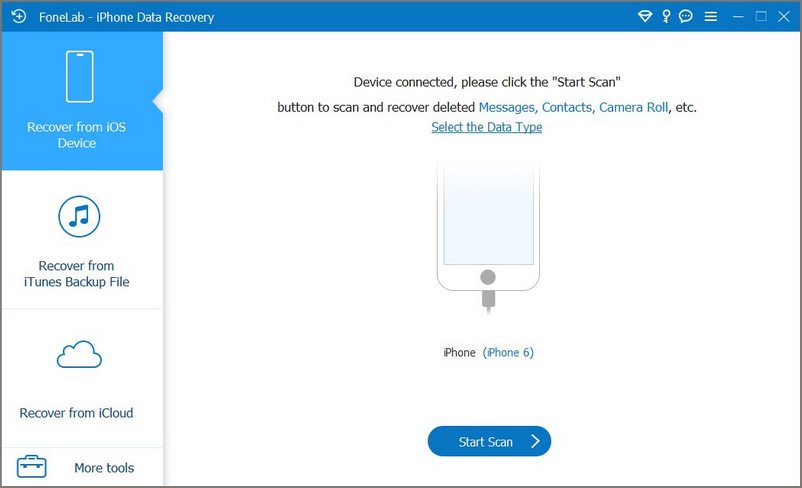
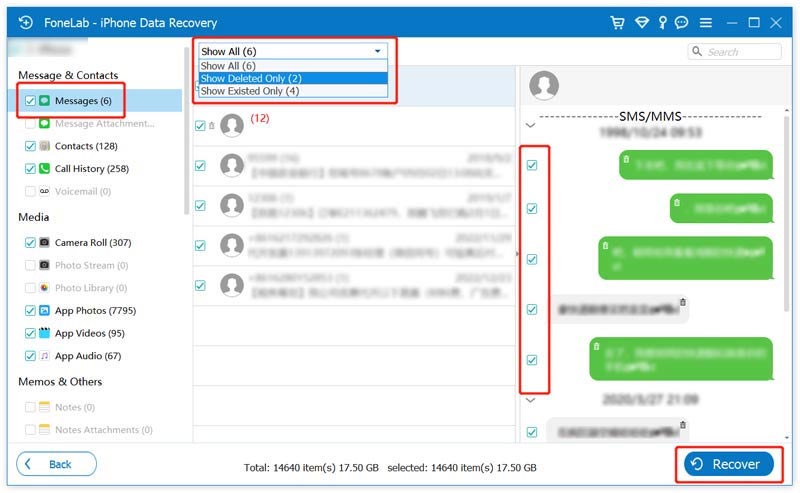
After scanning, all found data appears organized by category. Click “Messages” to view recoverable texts. Check the boxes next to the messages you want. Click “Recover” and save them to your computer
How long do deleted messages stay on iPhone?
There’s no fixed time. Deleted messages remain recoverable until the storage space they occupy is overwritten by new data (photos, app installs, messages, etc.). That’s why it’s critical to stop using your iPhone immediately after accidental deletion and run recovery software as soon as possible.
Can I recover deleted iMessages vs. SMS – is there a difference?
Both can be recovered, but with some differences: SMS is stored on your device and carrier network – recoverable via software or carrier; iMessages are stored on your device and iCloud – recoverable via software or iCloud backup. Aiseesoft recovers both types, including attachments like photos and videos.
Can I recover messages that were deleted months ago?
Possibly, but less likely. The longer you’ve been using your iPhone since deletion, the higher the chance that the data has been overwritten. However, it’s still worth scanning – many users recover messages from 3-6 months ago if the storage space wasn’t needed.
Conclusion
Losing important messages on your iPhone can feel irreversible, but in most cases, they are still recoverable if you act quickly. Apple’s official solutions like iTunes and iCloud can help in some situations, but they are limited by full-device restores, data overwriting, and lack of preview.
For a safer and more flexible iPhone Data Recovery approach, especially when you have no backup or don’t want to lose existing data, a dedicated tool like Aiseesoft iPhone Data Recovery offers a more practical solution. It allows you to scan, preview, and selectively recover deleted messages on iPhone without affecting your current files.
100% Secure. No Ads.
100% Secure. No Ads.
 Leave your comment and join our discussion
The best iPhone data recovery software ever, allowing users to safely recover lost iPhone/iPad/iPod data from iOS device, iTunes/iCloud backup.
100% Secure. No Ads.
100% Secure. No Ads.

*Required field
*Please enter a valid email

