Do you remember playing back a video and noticing that it looked a little choppy or that frames were repeating? The repeated frames are referred to as duplicate frames. It is a common problem that can easily occur when working with videos, and even the highest-quality videos can sometimes appear unprofessional or glitchy due to it. Duplicate frames can occur for various reasons, including but not limited to mistakes during recording, editing, or exporting your work. The good news is that you don’t need to be a video expert to fix them. In this article, we’ll explore how to remove duplicate frames from video using tools like Premiere Pro, FlowFrames, and FFmpeg. Every tool offers a unique method for enhancing your footage and utilizing motion restoration. While this is not a tool in its own right, we are providing a bonus tutorial on how to fix frame drops using AI, so your video plays smoothly with no interruptions.

Repeated frames that disrupt the video's natural flow are often the cause of a lagging or out-of-sync video. The good news is that there are multiple tools and methods to remove duplicate frames from a video, and regain some of that smoothness. In this section, we’ll explore a few reliable options, including Premiere Pro, FlowFrames, and FFmpeg. Each offering a unique approach to quickly and effectively cleaning up your footage.
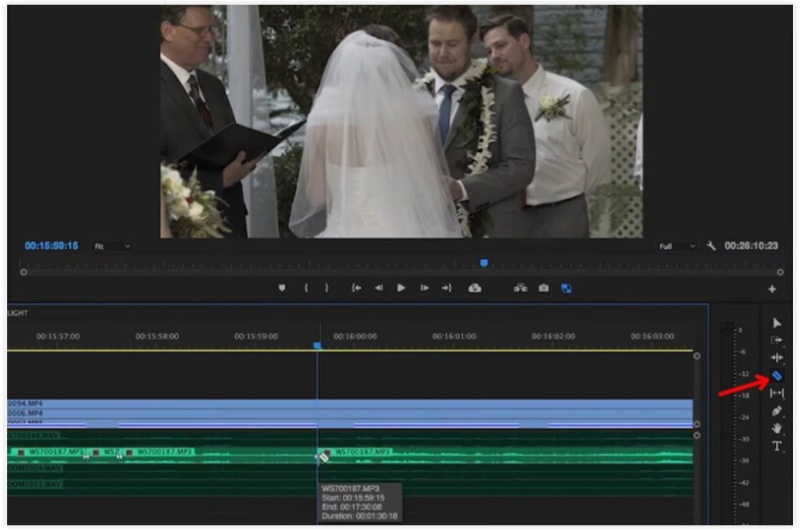
If you’re already using Adobe Premiere Pro, that’s good for you! This software provides precise control over your footage, making it one of the best tools for resolving playback issues. Whether your clip feels laggy or has repetitive moments, Premiere Pro offers several ways to refine it. Here’s how to remove duplicate frames from video using this professional editing program.
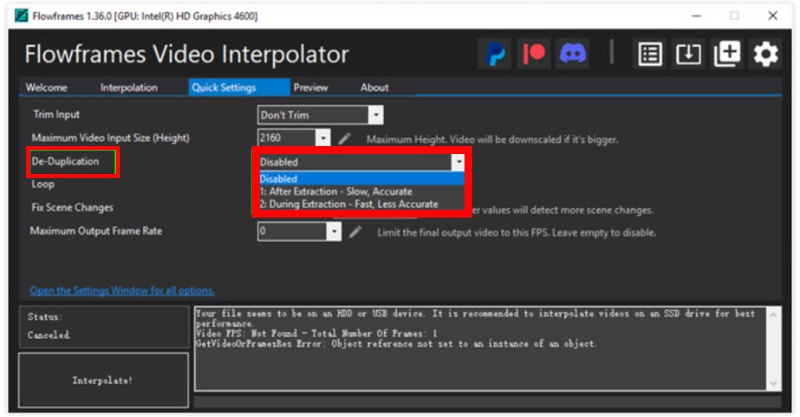
FlowFrames is a powerful software that is lightweight and geared towards video frame interpolation and restoration. It's popular among creators who want to provide a playback experience that is fluid and natural without having to waste hours in an elaborate editor. What makes it special is its AI-driven technology, which can automatically detect and remove repeated or missing frames, similar to how Topaz Video AI duplicate frames correction works. It’s fast, free, and ideal for anyone who wants quick results without advanced editing skills.
Steps to Remove Duplicate Frames from Video with FlowFrames
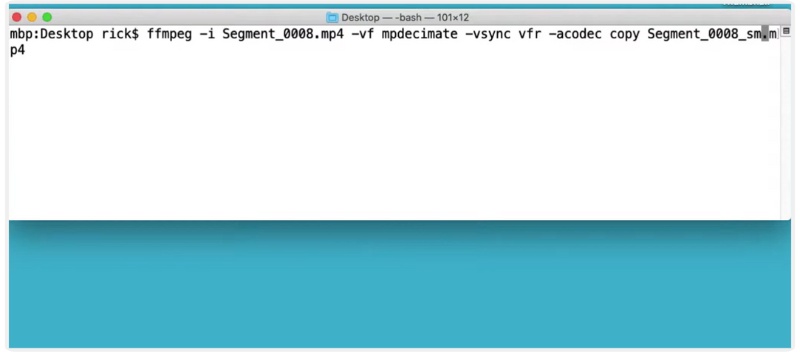
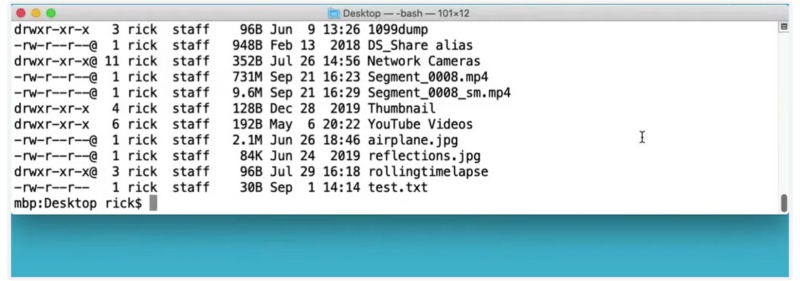
FFmpeg is widely regarded as one of the most extensible and robust video editing tools, especially for those who prefer using command-line tools. Although it may appear daunting at first, FFmpeg is one of the fastest and most precise methods for solving technical problems, especially those involving duplicated frames. Unlike AI tools such as FlowFrames or Topaz Video AI, FFmpeg operates directly at the encoding level, providing full control over how frames are processed, dropped, or re-encoded. If you’re comfortable typing a few commands, it’s a great free way to clean up your videos effectively. Here are the steps to remove duplicate frames from a video.
Note: Change input.mp4 to the name of your video file and output.mp4 to the name of the output file you want.
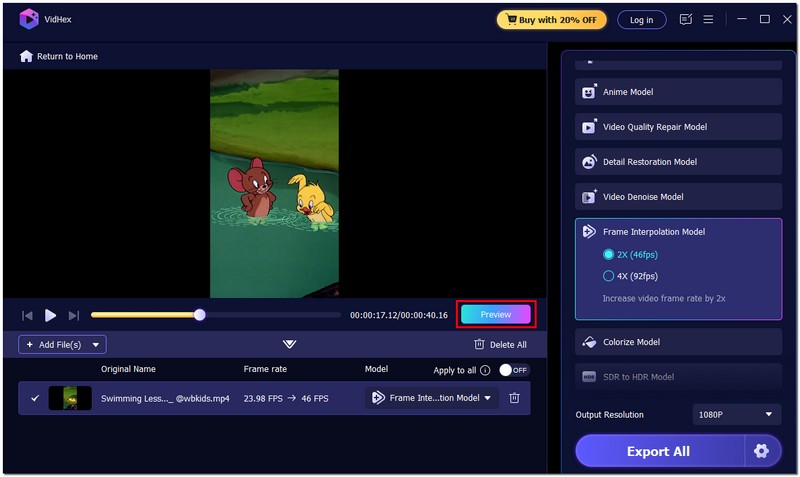
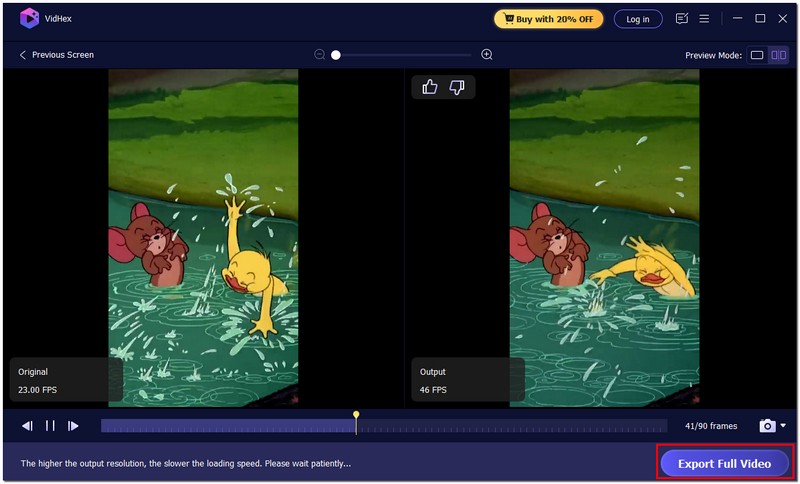
If your video stutters or skips a few frames, it can taint the entire experience, particularly if you invested time and effort into creating the footage. Fortunately, AI-directed software such as Aiseesoft VidHex can automatically repair dropped frames in your videos and return them to smooth playback. This modern software goes beyond simple editing. It utilizes artificial intelligence to fix missing or uneven frames, enhance image quality, and even increase frame rates. VidHex is one of the most reliable tools available today.

117,882Downloads
 100% Secure. No Ads.
100% Secure. No Ads.
Detailed Steps to Fix Frame Drops Using Aiseesoft VidHex
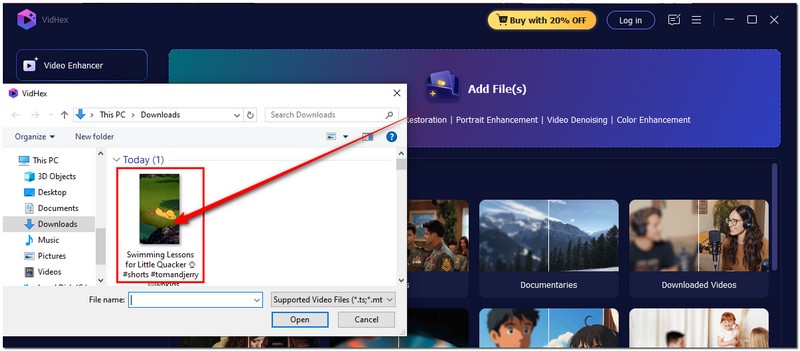
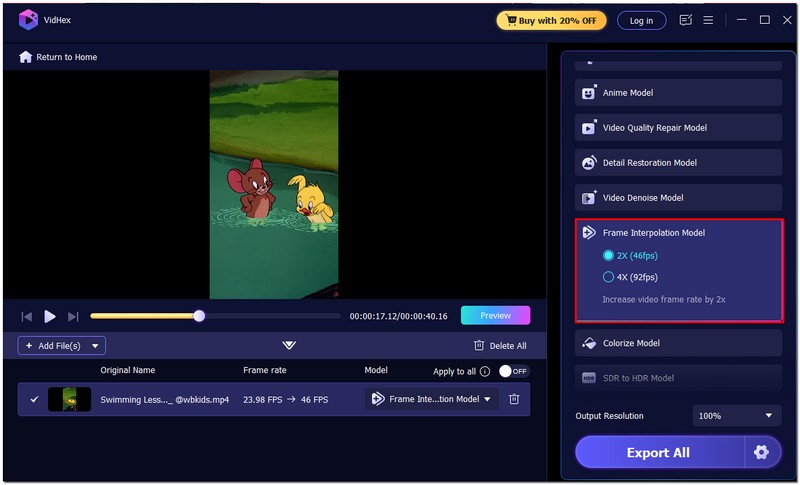
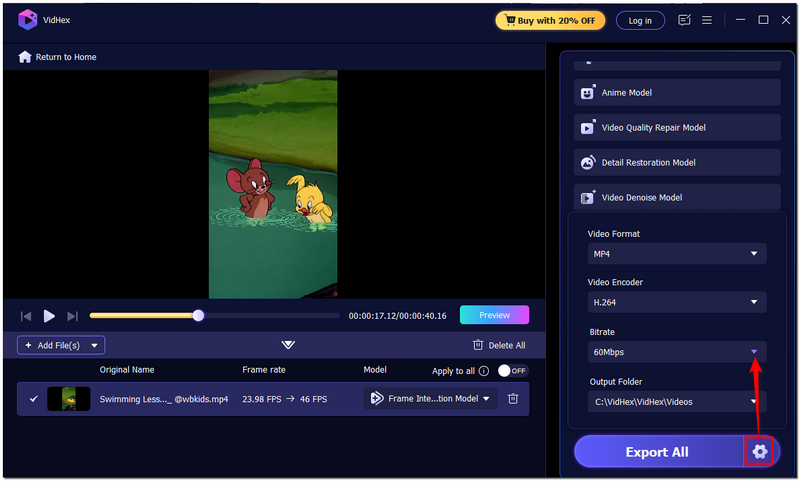
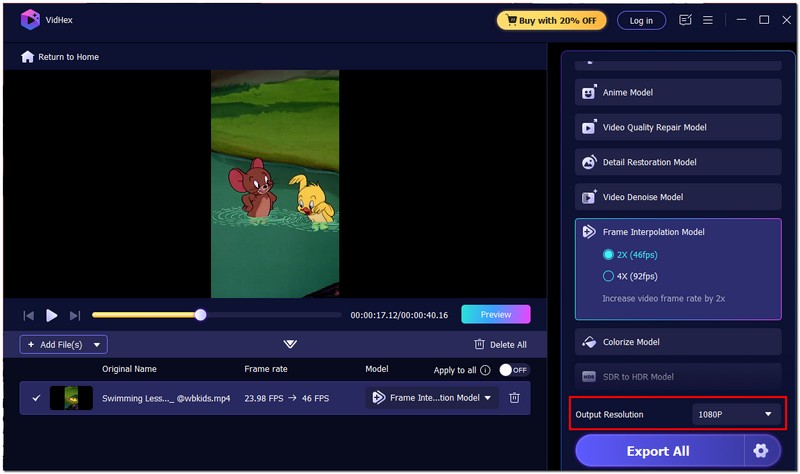
Why Choose Aiseesoft VidHex?
Aiseesoft VidHex stands out because it combines simplicity with powerful AI. You don’t need editing expertise to fix frame drops, just upload your video, enable AI interpolation, and the software handles the rest. It provides results that are quicker and of higher quality than those from more traditional tools. It is ideal for someone who wants to create a professional-looking fluid video without dealing with complicated settings or manual, time-consuming edits.
100% Secure. No Ads.
100% Secure. No Ads.
Why do duplicate frames appear in videos?
Duplicate frames usually occur during recording or exporting when frame syncing goes off. It can occur due to lag, incorrect encoding settings, or frame rate mismatches between your recording and editing tools.
How can I avoid duplicate frames when recording?
To prevent duplicate frames, make sure your recording device and software use the same frame rate setting. Also, avoid multitasking or running heavy background apps while recording.
What’s the difference between duplicate frames and frame drops?
Duplicate frames repeat existing frames, making motion appear jittery. Frame drops, on the other hand, skip frames entirely, resulting in stuttering or sudden jumps in the video.
Conclusion
It is easy to fix choppy or repeated footage! Provided you have the tools and have learned the skill, you can remove duplicate frames from video and achieve smooth, professional-looking footage. You can remove duplicate frames manually in Premiere Pro if you prefer a more technical approach. If not, you can either automatically duplicate frames using FlowFrames or use a command-line fix using FFmpeg. Regardless, there is a tool for every technical level. Additionally, tools like Aiseesoft VidHex utilize intelligent AI interpolation to address footage that suffers from frame drops. Irrespective, smoother playback is totally possible. You just have to find the right method to restore your video.
 How to Make Time-lapse Videos From Normal Videos on Windows/Mac
Click here to learn about the 5 efficient methods to make wonderful time-lapse videos of sunrise, sunset, floating clouds, flowing water, etc. in high quality.
 Best Video Frame Capture for Windows and Mac in 2025
In this article, you can learn how to record frames in a video step-by-step. Both Windows and Mac users can run this video frame capture software to solve the problem.
 Top 4 Frame by Frame Video Players for Smooth Playback
Can I move frame by frame in Windows Media Player? How do you play a video frame-by-frame in VLC? Check the 4 best frame by frame video player recommendations.
 Leave your comment and join our discussion
VidHex is an AI-powered video enhancer that upscales, denoises, colorizes stabilizes, and improves video quality in 1 click.
100% Secure. No Ads.
100% Secure. No Ads.

*Required field
*Please enter a valid email

