If you have played Pokémon Go for a while, then you probably have experienced the fun and frustration of finding rare Pokémon. Unfortunately, there are not a lot of Pokémon available in your area, and this is why many Pokémon Go players fake their location and spoof. It leads us to the important question: Do you really know how to spoof Pokémon Go without getting banned? After all, no one wants to lose their account after putting in hours of effort. In this guide, I’ll walk you through everything you need to know before trying it out. We’ll discuss whether spoofing can result in a ban and the reasons behind it, then cover safe methods for spoofing using tools like AnyCoord and PGSharp. Since many players use mobile devices, I will also provide step-by-step directions for users of both iPhone and Android phones. When we are done, you will have a good idea of how to play smarter, avoid unnecessary risks, and still be able to find those tough Pokémon, without fear of being banned.

Spoofing can result in a ban in Pokémon Go. Niantic, the creator, doesn't take cheating lightly. Their cheating rules apply to location spoofing. When using a tool or app to fake your GPS location, you are breaking the terms of service for the game completely. However, not every time you try to spoof will you be banned immediately. Niantic uses a three-strike policy to warn players first before permanently banning accounts.
• First Strike (Warning): You’ll see a message in the app warning you about suspicious activity. Some features may be limited for a few days.
• Second Strike (Suspension): You’ll be locked out of your account for up to 30 days.
• Third Strike (Permanent Ban): Your account will be banned for good, and you’ll lose all your progress and Pokémon.
Why do players get banned for spoofing?
• Using GPS spoofing apps or tools that trick your location.
• Teleporting unrealistically fast from one place to another (for example, from New York to Tokyo in minutes).
• Consistently breaking the rules, even after warnings.
So yes, spoofing can be risky. That’s why it’s important to know how to spoof Pokémon Go without getting banned.
If you want to enjoy spoofing without worrying about bans, the key is using the right tool. One of the safest and easiest tools out there is Aiseesoft AnyCoord Location Changer. Instead of relying on sketchy free spoofing apps, this provides a seamless, smooth way to change your location, plan routes, and even simulate movement, all while reducing the chances of detection. It is especially useful if you’re worried about how to teleport in Pokémon Go without getting banned. AnyCoord lets you move naturally, at a realistic speed, so it doesn’t look suspicious to Niantic’s system.

Downloads
AnyCoord - Set Virtual Location for iPhone
 100% Secure. No Ads.
100% Secure. No Ads.
Steps to Use AnyCoord Safely
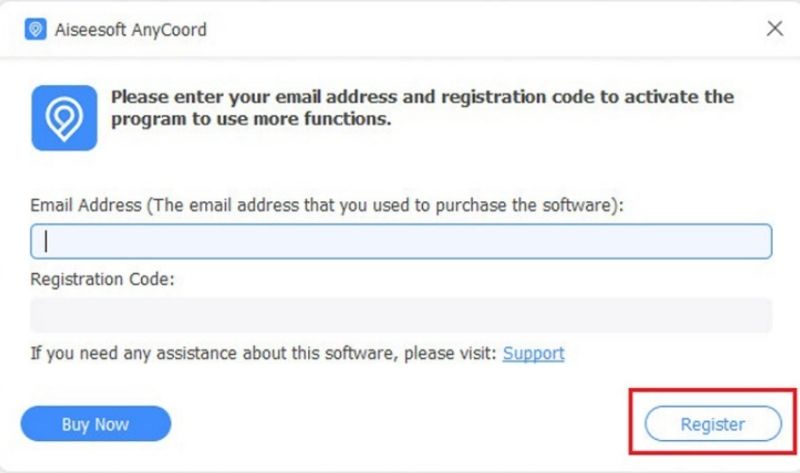
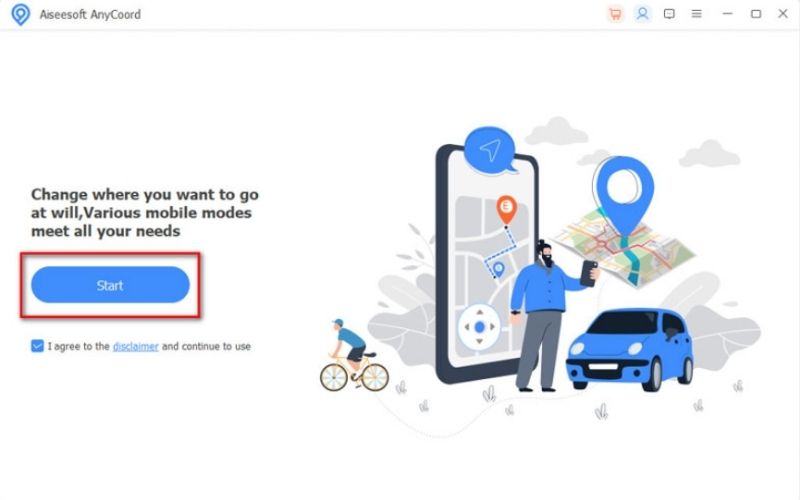
Note: To move more naturally, select One-stop or Multi-stop Mode to simulate walking or driving along a route.
If you’ve been researching spoofing tools, you’ve likely encountered PGSharp. It’s one of the most popular apps for Android users because it makes location spoofing simple and adds extra features like joystick controls, quick teleport, and auto-walk. But the big question is, does PGSharp get you banned?
The answer is, it depends on how you use it. PGSharp itself isn’t an instant ban trigger. Still, if you use it carelessly, like teleporting across the globe in minutes or overusing features unrealistically, Niantic can detect the suspicious activity and flag your account. Just like with other spoofing tools, it’s all about being smart and playing naturally.

Tips on How to Use PGSharp Safely
1. Stick to realistic movements – Don’t jump from New York to Paris instantly. Use teleport with cooldowns to make it look natural.
2. Follow the cooldown rule – The farther you teleport, the longer you should wait before doing another action (catching Pokémon, spinning stops, etc.).
3. Avoid overusing shortcuts – Features like auto-walk and quick teleport are useful, but spamming them can raise red flags.
4. Update PGSharp regularly – Make sure you’re always using the latest version for better stability and fewer risks.
5. Don’t log in on multiple devices – Stick to one device while using PGSharp to avoid suspicious login activity.
You can enjoy smoother spoofing and reduce the chance of being flagged by following these steps. PGSharp is powerful, but remember: the safer you play, the longer you’ll keep your account secure.
After going over the fundamentals, let's discuss how to spoof on various devices. Do you know how to spoof in Pokémon Go without getting banned iPhone? Or how to spoof in Pokémon Go without getting banned Android? It’s definitely possible if you use the right tools and follow some smart practices.
Tools like Aiseesoft AnyCoord work well and are better if you are on iOS, since you will not need to jailbreak your device. You would be able to teleport to brand-new coordinates, simulate walking, and change your speed. The main point is to make your movements appear natural, don't jump halfway around the planet within a matter of seconds, and always follow cooldown rules to reduce your risk of getting banned.
Quick Tips for iPhone Spoofing
• Use Teleport Mode for safe jumps.
• Stick to one region at a time.
• Avoid logging into Pokémon Go on multiple devices.
When it comes to Android, PGSharp is one of the most popular options. It gives you joystick controls, quick teleport, and even auto-walk. But to keep your account safe, you’ll need to use it wisely. If you’re wondering how to spoof in Pokémon Go without getting banned Android, the answer is to play it slow and steady, don’t abuse the shortcuts.
Quick Tips for Android Spoofing
• Respect cooldown timers at all times.
• Instead of constantly teleporting, use joystick controls.
• Update your app frequently to improve stability.
Whether you’re on iPhone or Android, the rule is the same: spoof smart, move naturally, and avoid risky behavior. That way, you’ll enjoy exploring new places in Pokémon Go without the fear of losing your account.
How to achieve Pokémon Go spoofing on iOS without getting banned?
Use a safe Pokemon Go spoofer like Aiseesoft AnyCoord (no jailbreak needed) to spoof your location. Connect your iPhone, choose Teleport Mode for instant jumps or Route Mode to simulate walking, and adjust speed to look natural. To avoid bans, don’t teleport unrealistically, follow cooldown rules, and stick to one device. This way, you can spoof Pokémon Go on iOS safely without risking your account.
What should I do if I get a soft ban in Pokémon Go?
If you get a soft ban in Pokémon Go, don’t worry, it’s temporary minutes to 2 hours and you can also get rid of the soft ban in Pokémon Go according to the rules. Just wait it out, avoid catching/spinning during the prohibition, and follow cooldown rules to prevent it from happening again.
Can I spoof while using the same account on multiple devices?
No, that’s risky. Logging in on different devices (like phone and tablet) while spoofing can trigger a ban. Stick to one device.
Conclusion
Can you get banned for spoofing in Pokémon Go? The short answer is yes, and it is you who will get banned. Spoofing comes with its own set of risks, but if you use the right tools, fake realistic movements, and adhere to the cooldown limitations set by the game, you can have a good time without worrying about keeping your Pokémon account safe and sound. We have to think of playing Pokémon Go as a balance. On both iPhone with AnyCoord and Android with PGSharp, you have to spoof smart. Avoid long, unrealistic jumps, keep your movements as natural as possible, and only use one device to save your account. You will still be able to explore, catch Pokémon, do raids, and poke your head in to see a rare Pokémon you’ve desired without the fear of getting banned. At the end of the day, it is about balancing fun and spoofing with enjoying your Pokémon gaming progress. You have put in time and effort to earn enough Pokémon to enjoy spoofing!
 Does IP Address Change with Location: How to Change Your IP or GPS
Fix the Pokemon Go iAnyGo failed to detect location issue with easy steps and discover a more reliable location changer for smoother gameplay.
 Does IP Address Change with Location: How to Change Your IP or GPS
Does IP address change with location? Learn how IP and GPS locations work, how to tell where your IP is located, and how to change them using software.
 Should I Have a Jailborken iPhone – All about Jailbreak iPhone
Learn how to catch a Pokémon in Pokémon Go with step-by-step instructions, pro tips, and region-based tactics to boost your success in the game.
 Leave your comment and join our discussion
Aiseesoft AnyCoord can help you hide, fake, or change your GPS location to any other place with ease. You can even plan a moving route if needed.
100% Secure. No Ads.
100% Secure. No Ads.

*Required field
*Please enter a valid email

