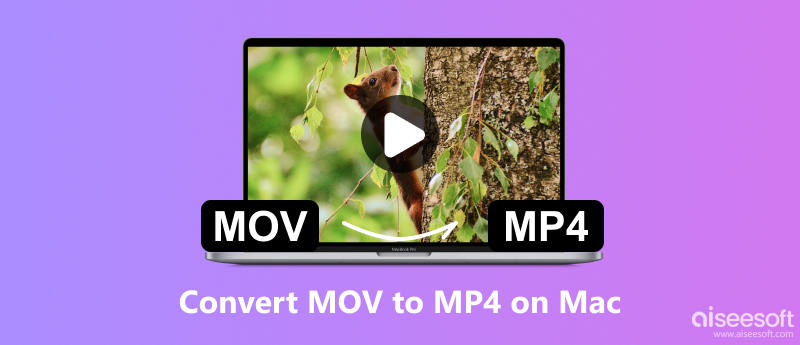
MOV typically offers higher quality using a less compression method. But it isn’t as compatible as MP4 and you may find that some media players do not support MOV files. For example, if you play certain MOV files on QuickTime, you can just get the sound with no picture, not to mention other frustrating issues. To solve this problem, you can export MOV to MP4 on Mac. Later, you can play all those videos on any portable device directly. Thus, this article offers 5 easy ways to convert MOV files to MP4 on Mac. Just read and follow.
- "I have a screen capture of my computer screen using QuickTime, but then the video turns to MOV format. I'd like to export it to MP4. Is that possible to convert MOV to MP4 Mac QuickTime without installing anything else?"
Many people want to change a QuickTime movie to an MP4 on Mac but do not know the complete operations. And some people even wonder whether QuickTime can save files as MP4 or not. To solve these problems, here are detailed steps of how to convert MOV to MP4 on Mac with QuickTime Pro.
Step 1: Launch QuickTime Pro
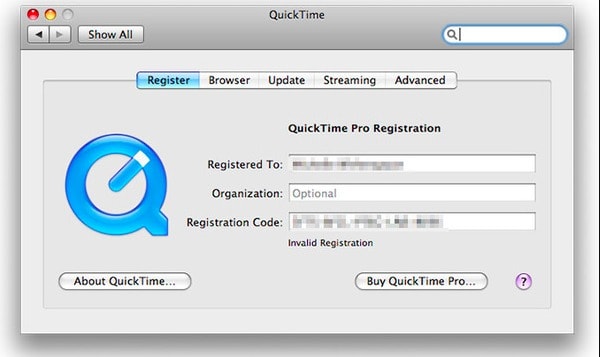
Install QuickTime 7 Pro on your Mac computer. Then enter your registration code to activate QuickTime Pro MOV converter.
Step 2: Add MOV files
Choose "File" on the top toolbar. Then select "Open File …" from its drop-down menu. You can choose MOV files to QuickTime Pro successfully.
Step 3: Convert MOV to MP4 using QuickTime Pro
Later, choose "Export …" from the drop-down "File" menu. There are many output formats you can choose. During this time, click "Movie to MPEG-4" and then choose "Save" to convert MOV to MP4 on Mac free with QuickTime Pro.
- "There are lots of free MP4 video converters, but I fear they are all virus infected ones. How would you convert a .mov movie file to .mp4?"
You can use Aiseesoft Mac Video Converter Ultimate to change MOV to MP4 and other 1000 formats on Mac safely and easily. It also supports batch conversion to help you convert multiple files at the same time. And there are many other easy-to-use and powerful editing features for you to discover.
Downloads
Aiseesoft Video Converter Ultimate
 100% Secure. No Ads.
100% Secure. No Ads.
Step 1: Add MOV videos
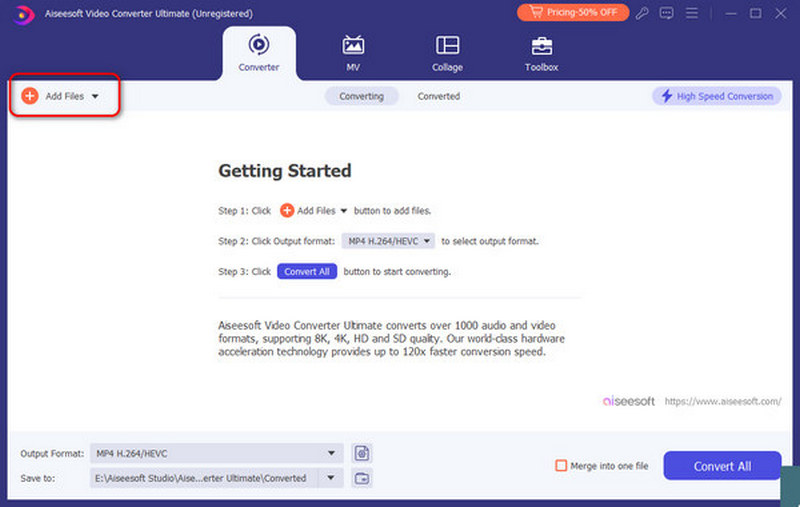
Launch Mac Video Converter Ultimate on your Mac computer. Click "Add File" on the left top to import your MOV videos. You can also drag and drop MOV files to the main interface directly.
Step 2: Set MP4 as the output format
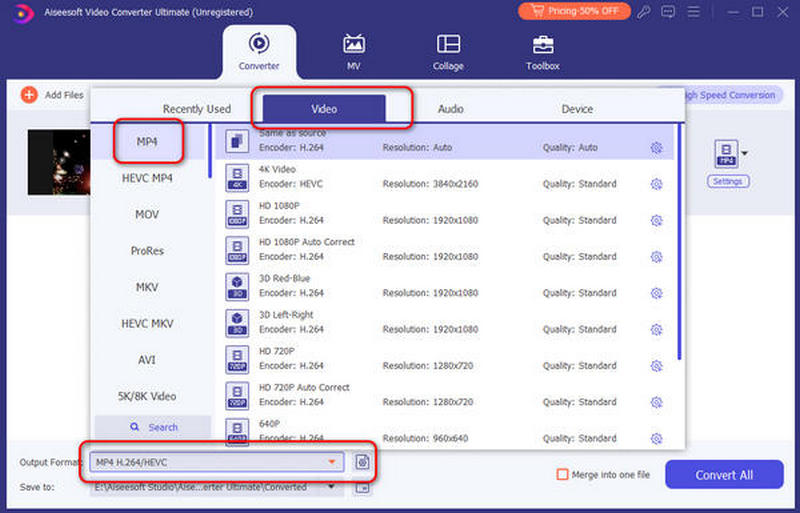
Click the drop-down option box at the left bottom of your MOV to MP4 Mac converter. Then choose "Video" from its upper menu and select MP4 as your output format.
Step 3: Batch convert MOV to MP4 on Mac
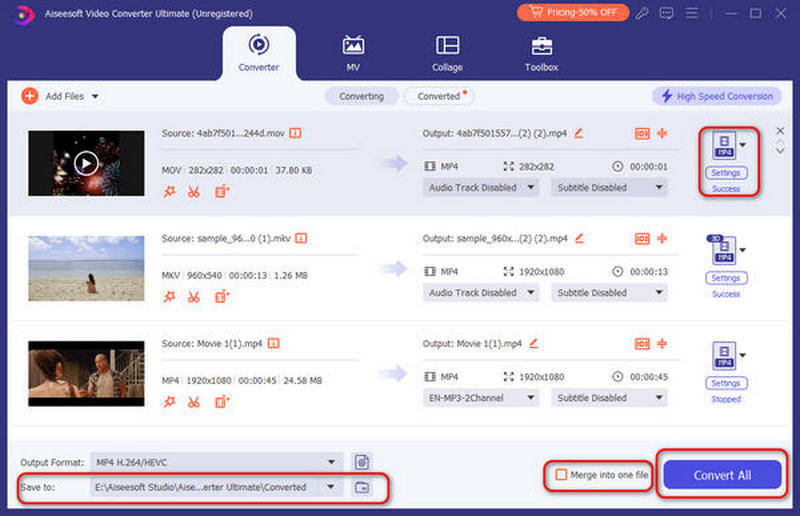
Choose the "Settings" option on the right to adjust the output video settings and audio settings. Then click "Browse" to set an output folder. Mark the small box before "Merge into one file" if you want to merge MOV clips into one file. Later, choose "Convert All" to start to convert MOV files to MP4 on Mac.
All in all, you can convert MOV to MP4 on Mac in batch or singly with above operations. Each video converter does a good job in changing MOV format to MP4. As for the safest and easiest one, then definitely Mac Video Converter Ultimate should be your first choice. Wanna batch convert and edit MOV to MP4 files in a fast conversion speed and high quality? Then come and free download this program to have a try.
- "I want to convert .mov to .mp4 on my MacBook! I saved the video from iMovie but it is in .mov format! I'm using Yosemite, how can I convert MOV to MP4 on Mac with iMovie?"
No matter which macOS operating system you are running, iMovie is always a program that is free and easy to access. As a result, you can also convert MOV file to MP4 on Mac with iMovie.
Step 1: Run iMovie on Mac
Download and install iMovie from the App Store. Double click the icon of iMovie to run this program. When you are prompted to select a theme, just click "No Theme" and move on.
Step 2: Import MOV video
Click "Import Media …" option and then choose "Import Selected" to import MOV video. After few seconds, you can see a new project displayed on the main interface.
Step 3: Convert MOV to MP4
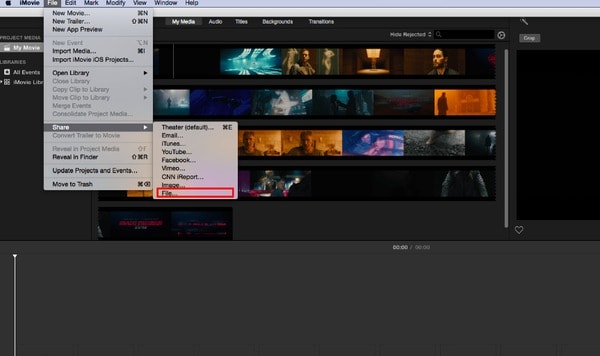
Choose "Share" from the "File" drop-down menu. You can customize the output preference if necessary. Choose "Next" and then click "Save" to start to convert MOV to MP4 Mac iMovie.
- "I have problems with VLC when converting MOV to MP4..."
VLC is an open source application designed to play and convert video and audio files. Therefore, it is a piece of cake to convert MOV to MP4 on Mac with VLC.
Step 1: Add MOV video to VLC
Free download and install VLC media player on your Mac computer. Open VLC and click "File" on the top. Then select "Convert/Stream" from its list. You can see a new popping-up window. Choose "Open media" to upload your MOV video.
Step 2: Convert MOV video to MP4 on Mac for free by VLC
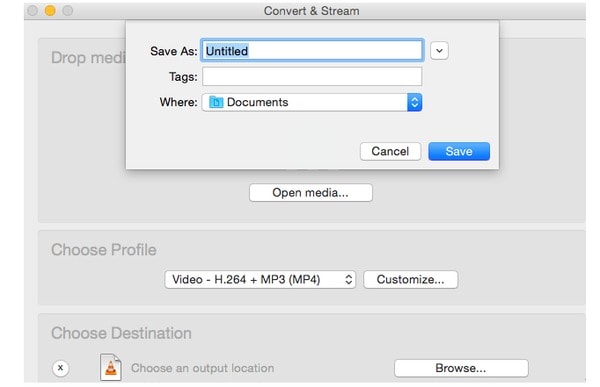
Select "video – H.264 + MP3 (MP4)" under the "Choose Profile" section. Then click "Save File" and set a destination folder. At last, you can choose "Save" to convert MOV to MP4 format on Mac for free.
- "Can anybody show me a good online video converter to convert MOV to MP4 Mac free online?"
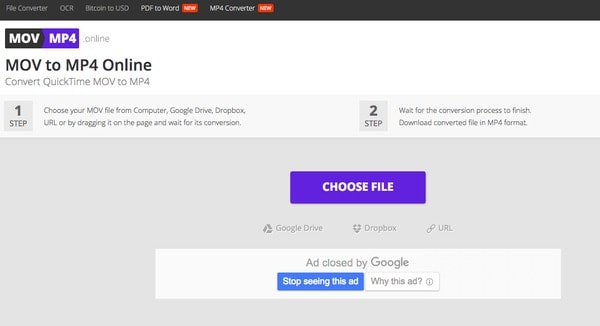
MOV to MP4 Online is a free program designed for converting QuickTime MOV videos to MP4. So if your MOV file size is not large, you can also convert MOV to MP4 Mac online for free.
Step 1: Click "Choose File" to add a MOV video
Step 2: Wait for the MOV to MP4 conversion to finish
Step 3: Download the converted MP4 video to your Mac computer
1. What is MOV?
MOV is a file extension used by the QuickTime-wrapped files. The format was created by Apple Computer to work with multimedia files. An MOV file can store audio, video, and text in the same file through different tracks, or the tracks can point to the data stored elsewhere in another file. iOS devices like iPhones and iPads are a common place to see MOV files.
2. What is the best MOV to MP4 video converter for Mac?
The best MOV to MP4 video converter for Mac is Aiseesoft Video Converter Ultimate. You can use it to change MOV to MP4 and other formats on Mac safely and easily. It also works as a practical video editor to help you edit you videos, such as rotate, flip, crop, watermark and more.
3. Can I change MOV format to MP4 in QuickTime?
No, QuickTime can't change MOV format to MP4, but QuickTime Pro can do that. You might mix up the concepts between QuickTime and QuickTime Pro. QuickTime, also known as QT, is a media player that works as the default player on Mac operating system, QuickTime Pro is the paid version of QT, allowing you to author QuickTime content and save QuickTime movies downloaded from the web. It also holds the ability of basic editing as well as converting files, including .mov to .mp4, to various kinds of formats.
4. How can I convert MOV to iPhone on Mac?
You can use Aiseesoft Mac Video Converter Ultimate, a professional Mac MOV to iPhone Video Converter, which can convert MOV and other popular video formats to iPhone MPEG-4, H.264/MPEG-4 AVC on Mac. This professional MOV to iPhone Converter for Mac also can convert audio file and extract audio from video to iPhone MP3, M4A, etc. on Mac.
 How to Convert 3GP to MP4 on Mac with High Quality (High Sierra Included)
You may need to convert 3GP to MP4 on your Mac. Find the important feature for the best 3GP to MP4 Converter for Mac and how to convert 3GP to MP4 without losing quality from this article.
 How to Convert Video to Creative Zen Vision/X-Fi on Mac
Can't play video on Creative Zen and want to convert video to Creative Zen on Mac? You can learn how to convert video to Creative Zen supported AVI/WMV/MPG in this post.
 How to Merge/Join/Combine MOV Clips on Computer [Starters Guide]
There are several ways to combine your MOV files into one quickly and effortlessly. In this article, you'll learn how to join multiple MOV clips with free and online tools.
 Leave your comment and join our discussion
Convert/Edit MOV
MOV MOV to MP4 MOV to WMV MOV to GIF MOV to AVI MOV to MPEG MOV to VOB MOV to 3GP MOV to SWF MOV to MP3 MOV to MP4 Mac MOV Editor Rotate MOV
Video Converter Ultimate is excellent video converter, editor and enhancer to convert, enhance and edit videos and music in 1000 formats and more.
100% Secure. No Ads.
100% Secure. No Ads.

