MP4 is widely used on the popular devices such as iPad, iPhone, iPod, PSP, Xbox 360, PS3 and Android smartphones. MP4 has a much smaller file size and remains the high video quality at the same time. Although we can find WMV video format in many circumstances, it is not supported by iPad, iPhone, iPod, Android phones, etc.

To enjoy the WMV video files on iPad, iPhone, iPod, Android smartphones and other popular devices, we need a WMV to MP4 video converter to solve this problem. Aiseesoft Mac Video Converter Ultimate is a good choice for Mac users to convert WMV to iPad/iPhone/iPod MP4 videos and MP4 files supported by Android smartphones and other popular devices.
Download Mac Video Converter Ultimate. Double-click the .dmg file and install this program on your Mac according to the instruction.
Step 1 Add WMV video files
Click the "Add Video" button to add WMV videos to this WMV to MP4 Converter. Also you could drag and drop one or more WMV files on the interface of the software to add WMV videos at a time.
Step 2 Select MP4 compatible with iPad, iPhone, iPod, etc.
Click the output profile drop-down button and you will see the device categories at the left side of the list. Select one from the list according to your own device. Here we choose iPad H.264 Video (*.mp4) as the output format.

Step 3 Adjust MP4 settings (optional)
This WMV to MP4 converter allows users to adjust the Resolution, Encoder, Bit rate and Frame rate of the MP4 video and Sample Rate, Channels, Encoder and Bit Rate of Audio. You can decrease the size of your video by changing these parameters.
Step 4 Select the destination
Click the "Browse" button to select the destination for the converted WMV video files.

Step 5 Start the WMV to iPad MP4 video conversion
After all the above steps, just click the "Convert" button to convert WMV to iPad MP4 video files on Mac OS X.
Aiseesoft Mac Video Converter Ultimate is a powerful Mac iPhone Converter program which can convert most popular video to iPhone MPEG-4, H.264/MPEG-4 AVC on Mac like convert WMV to iPhone MP4 Mac. Do you have the need to know how to convert WMV to iPhone MP4 Mac then enjoy the converted files anywhere? Just free download Aiseesoft iPhone Video Converter for Mac software and have a try.
Step 1 Add WMV File
Click the "Add File" button to import your files, you can also click the "File" menu to open the following drop-down menu, then select "Add File" to import WMV files.It is allowable to add one or more files at one time.
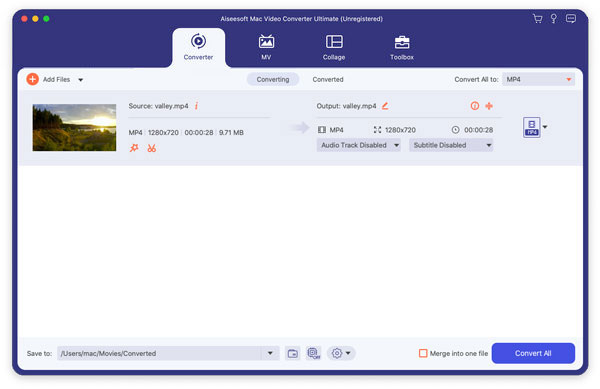
Step 2 Choose Profile
In the profile list on bottom, choose a proper format you want. Here you can select iPhone MP4 format.
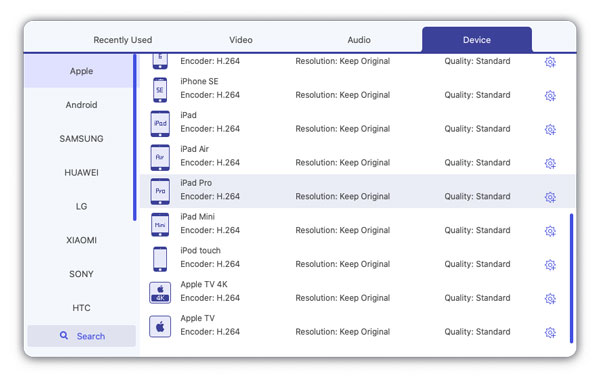
Step 3 Convert WMV to iPhone MP4
Click "Convert" to begin converting WMV to iPhone MP4 on Mac.

April 19, 2018 07:30 / Updated by Jenny Ryan to Convert Video
 How to Convert WMV to Kindle Fire MP4
Can't play WMV videos on Kindle Fire? WMV to MP4 converter enables you to easily convert WMV files to MP4 videos for Kindle Fire.
 Easiest Way to Convert MOV to WMV
Want to know best way to convert Mac QuickTime MOV to Windows Media Player supported WMV? You can find the best solution from this article.
 How to play MTS/M2TS/TS files on iPhone 5 or Mac
This article will show you how to play MTS/M2TS/TS files on iPhone 5 or Mac with MTS Converter for Mac.
 Leave your comment and join our discussion
