"I made thousands photos backup for my iPad to iTunes. After an accident, I made my iPad to factory settings. Now I want to copy selected photos to iPad from iTunes backup. But iTunes restore only allows me to restore backup with all photos and pictures. How can I transfer selected photos from computer to my iPad?" – Chelsea
"I downloaded many music files from SoundCloud. I know iTunes can help copy music from computer to iPad, but I do not know how to transfer downloaded music from computer to iPad? If without iTunes, can I copy music to iPad?" - Varsani
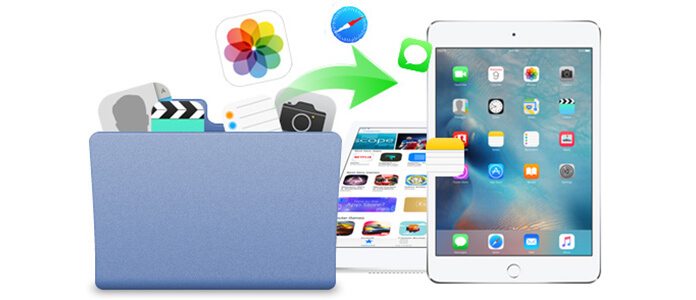
Compared to iPhone as a communication tool, iPad becomes more popular as an entertainment utility and office helper. iPad shows you a big screen to watch movies, and edit or read your word file comfortably. The wide use of iPad prompts you to move files to iPad frequently. You need to transfer movies to iPad for portable viewing. You also want to transfer pictures from iPhone or computer to iPad for a clear vision or editing. You will not miss to transfer PDF files to iPad for a continual working when you are preparing a busy trade negotiation on your journey.
So how to transfer files to iPad? Keep reading to copy files to iPad from Windows or Mac according to the following description.
iTunes is an app for iPad, iPhone and iPod. You can sync iPad to iTunes for backup. Also you could restore iPad from iTunes. See the following steps:
Step 1 Connect iPad to iTunes
Launch iTunes on your computer, and connect iPad to computer for iTunes to detect it. If iPad is disabled to connect to iTunes, please refer to this article: iTunes Won't Recognize iPhone iPad or iPod? Look Here
Step 2 Transfer files from computer to iPad
Find and click your iPad icon, choose "Photos" > "Sync Photos" > "Copy photos from" > "Choose Folder..." to open your computer local file by clicking the drop-down list of "My Pictures" to copy photos from PC to iPad.
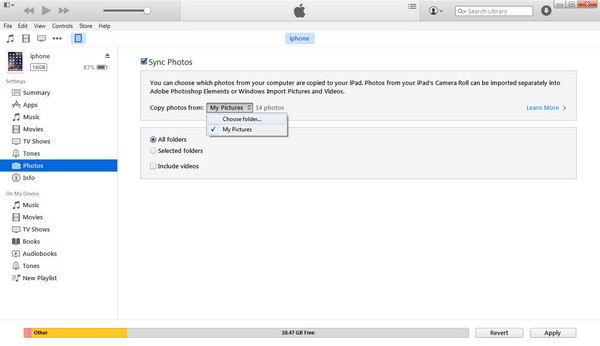
When you transfer music and movies from iTunes to iPad, there is a reminder says that once you put music or movies from your computer backup on your iPad, your existing music and movies on iPad will be removed and synced by this new sync. For your contacts, messages, calendars and bookmarks, only if you restore the whole iTunes backup, then you will transfer contacts from iTunes backup to iPad.
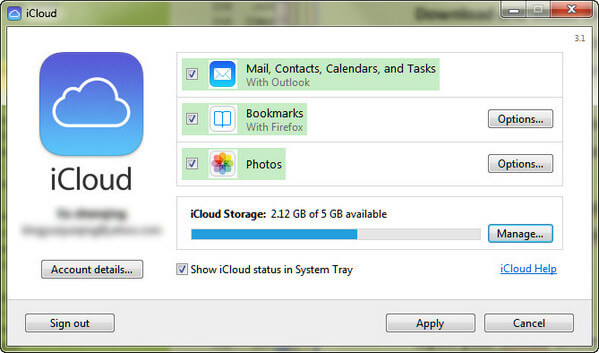
Without iTunes, you could also download files from iCloud to iPad. Firstly, you need to download iCloud for Windows and install this program on your computer. Kindly note that, iCloud Drive comes built-in to Mac OS X Yosemite, and needs to be downloaded on your Windows 7 or later.
Step 1 Launch iCloud Drive on your computer and sign in with your Apple ID and password.
Step 2 Open your iCloud Drive folder, and drag any files that you want to remove from PC to iPad. Free account can share a free 5 GB storage in iCloud Drive. It will take moments to get files from PC to iCloud Drive on computer.
Step 3 On your iPad, you will find you cannot use iCloud Drive. Instead, the files you get from step 2 can only be showed on your appropriate apps. For example, if you get a TXT file in iCloud Drive, then you can read this file with your TXT Reader app on your iPad. You need to get your app updated to support iCloud Drive. Otherwise, you will fail to view the files transferred from PC or Mac to your iPad.
The most attracting feature of Mac X Yosemite is AirDrop. Before you transfer data from Mac to iPad/ iPhone, you need to make sure your iPad runs iOS 7 or later and Mac with OS X Yosemite or above.
Step 1 In your Mac, Click "Go" > "AirDrop". You will find all nearby devices compatible with AirDrop.
Step 2 On your iPad, slide up from bottom to open the "Control Center". Tap AirDrop and select "Everyone".
Step 3 On Mac, find your iPad, navigate the file that you want to transfer to iPad, and drag it to your iPad icon. And on your iPad, click "Accept" button to copy videos, pictures, music, etc., to your iPad.
◆ When you transfer movies, photos, music, contacts, etc., to iPad, you need to turn on Wi-Fi and Bluetooth.
◆ The iOS device must have "Personal Hotspot" turned off in "Settings" > "Cellular".
◆ You must make sure that both devices are within 30 feet (9 meters) of each other.
You will also like reading: Transfer from iPhone to Android
Compared the three ways mentioned before, you will find the above ways come a little complicated, and some of them bear some limitations to transfer files from PC to iPad. So here, we show the fourth way with iPad sync software, iOS Transfer. This tool is strong enough to transfer all files (photos, music, movies, documents, contacts, SMS, etc.) from PC or Mac to iPad. Free download this utility here.
Step 1 Install and run this iOS Transfer on your computer. Connect your iPad to PC with USB cable. If you want to transfer data from Mac to iPad, then download Mac version.
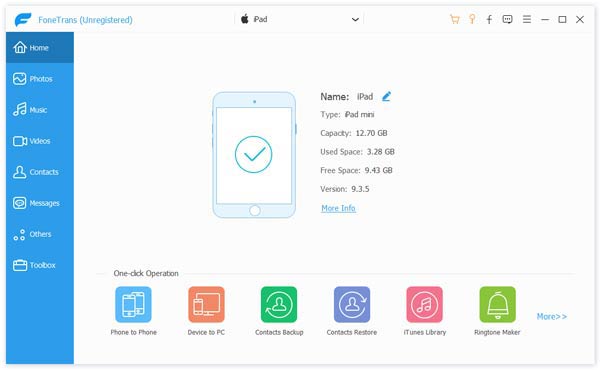
Step 2 Click "Media" > "Add" to import selected music or movies from PC to your iPad. Click "Photos" > "Add" to transfer pictures from computer to iPad. Similarly, you could transfer documents (PDF or ePub files) to iPad for reading.
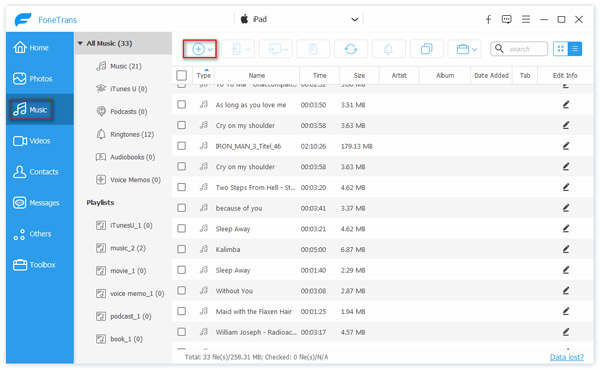
1. If you have made contacts backup in CSV file, vCard file, Windows Address Book or Outlook on your computer, then you could import those contacts to iPad now. And it will de-duplicate your contacts automatically.
2. Not only transfer files from PC or Mac to iPad, it also works as the best iPad to PC transfer software to back up iPad to computer. It lets you transfer songs, movies, photos, messages, contacts, etc.
3. Alternatively, you will also transfer files (music, movies, contacts, messages,) from iPhone to iPad, from iPad to another iPad, between iPad and iPod.
After learning the above four ways, which one is the best transfer software to add files to iPad. You may have found the answer.

June 27, 2018 07:28 / Updated by Louisa White to Transfer iOS Data
 How to Restore Disabled iPad without iTunes
StHow can I restore my iPad without iTunes? Is there any other way to recover iPad to its previous state after resetting? This guide will instruct you to restore a disabled iPad without iTunes.
 iPad is Disabled Connected to iTunes – How to Fix it
Read this guide to fix disabled iPad with resetting iPad and without losing data.
 How to Recover Deleted Data from iPad
Learn how to recover lost or deleted data files from iPad/iPhone/iPod here. You can get back iPad photos, contacts, SMS and notes with this iPad recovery tool.
 Leave your comment and join our discussion
