Aiseesoft WMV Converter is the must-have professional WMV video converting software. It helps you convert WMV files to MP4, MOV, WLMP, FLV, M4V, VOB, AVI, 3GP, MKV, MP3, and other popular video/audio formats. In addition, you can use it to convert QuickTime MOV, AVI, FLV, etc. to WMV easily on your computer.
$49.00 $39.20 20% OFF
With simple interface, it enables you, even fresh hands to deal with WMV conversion so that you can play, share, or edit on any device you possess now.








This useful WMV Converter can be used for bi-directional conversion between WMV and other video formats, which means you can convert WMV to MP4, MOV, WLMP, FLV, M4V, VOB, AVI, 3GP, MKV, WebM and more. Oppositely, you can convert MP4, MOV, FLV, AVI, etc. to WMV. The full-featured program enables you to convert FLV videos to WMV. Besides, it can help you convert video to HD resolution video, including 1080p HD, even 4K UHD.
The brilliant software allows you to convert WMV to suitable format for any frequently-used media players, like QuickTime Player, Real Player, Windows Media Player, VLC Media Player and more as well as portable devices like iPhone 11/X/8/7/6, iPad Pro, iPad Air 2, iPad mini 4, iPod touch, LG G5, Samsung Galaxy S9, HTC, Sony Xperia5, Android tablets, Windows phone, Zune, PSP, Xbox and so on. Editing software like Adobe Premiere Pro, Avid Media Composer, iMovie, Sony Vegas Pro, Final Cut Pro, etc. will be compatible with this WMV converter.
Also as a great WMV to MP3 converter, it features the excellent function of extracting audio tracks from video files. The audio file can be saved as MP3, WMA, FLAC, AAC, AC3, M4A, Apple Lossless Audio Codec (ALAC), etc. which retains the sound quality of original file and lets you experience the most realistic and immersing audio. Additionally, the software can also convert files between diverse audio formats to be playable on various audio players.
Before converting WMV file, you could cut off any segment of a video you do not like, crop video playing area and select the zoom mode to fit the display of your player, combine several videos into one, add watermark to your video with any text or picture and rotate video to a favorite angle, rotate sideways video, flip video vertically or horizontally and adjust video brightness, contrast, saturation, hue and audio volume, so that you can get an ideal video as you wish.

Enable 3D
The WMV converting app adds various 3D modes to the output video like Anaglyph, Side by Side, Top and Bottom, etc.
Output settings
Customize the output setting with various provided options like encoder, audio channel, ratio, bitrate, frame rate, etc.
Fast speed
This WMV converter provides super fast speed to convert WMV to video/audio with the supported accelerator.
Safe and easy
This software is safe without virus or plug-in to give you a clear experience, and the simple interface facilitates you.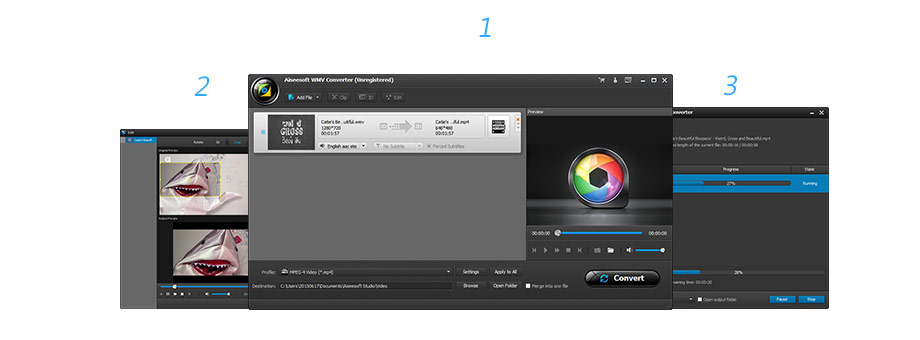 Step 1. Click Add File to import one or more WMV or other video/audio files into this software.
Check what famous editor and our customer talk about our product.


I've searched for days for a good WMV converter, and this seems to be the best tool. It works well with no problems on Windows 8.1. Fast converting, easy to use and very good output video. It is perfect for me. Thanks!
By Camille White
I used a free online WMV to MP4 video converter named Zamzar to convert video files for several times, but the file converter works not very well when it came to a big file. My friend recommends Aiseesoft WMV Converter for me. The conversion is awesome.
By Jane Miller
Nice WMV converting app! I have a lot of WMV videos in my HP computer. I have managed to convert several .wmv files to different video formats like .mp4, .mov and more simultaneously.
By Walter Gibson
I get a HD MP4 video. This WMV conversion software helps me to turn it into a WMV file. The output video is very satisfying.
By Lisa Johnso
How great software it is! It helps me to convert one WMV video to MOV, so that I can enjoy it on QuickTime Player on my MacBook Pro.
By Lincoln Clerk
I want to play WMV files on my Mac with QuickTime Player, but it says no. So I use this software to convert WMV to MOV and then play it on my Mac. Very easy.
By Janny
I have many WMV files, and want to convert them to MP4 on my computer. I tired many online WMV converters, but the converting speed is slow. This converter does me a great favor. Very quickly.
By Chown
I want to convert my recorded MTS files to WMV for sharing on YouTube. After trying much software, and find only this tool works great. Thanks a lot.
By Manik
*Required field
*Please enter a valid email

 WMV Converter