Best WMV Video Converter for Mac – Convert WMV to MP4, MOV, MP3 for playing and editing on QuickTime/iMovie/iPod/iTunes
$49.00 $39.20 20% OFF
Convert WMV to MOV, MP4, AVI, FLV, VOB, MPG, MP3, WMA and any other video/audio format on Mac OS X EI Capitan, etc with high speed and lossless quality.


As WMV is video format compatible with Windows system, it is necessary to convert WMV to MP4 and MOV or other video formats for playing on Mac or Apple devices. And if you got one MOV video that you want to play on Windows computer, you need to convert MOV to WMV video format. Videos in the format of MP4, MOV, AVI, M4V, FLV, WMV, ASF, MKV, TS, RMVB, etc. can be directly converted to WMV format by this WMV Converter Mac Version on Mac OS X 10.5 or above (Mac OS X EI Capitan included). As a two-way converter, you are also allowed to convert WMV to other video formats like MP4, MOV, AVI, FLV, MPG, 3GP and H.264/MPEG-4 AVC video for QuickTime and other players.
How to extract music from your WMV movie? How to convert MP3 to WMV on Mac? With this WMV converter for Mac, you are allowed to not only extract audio from WMV videos and save them to MP3, WMA and ALAC (M4A), but also convert AAC, M4A, WAV, AIFF, OGG and any popular audio formats to MP3, WMA. The WMV Converting Software for Mac allows you to convert several video files, whether they are in the same format or not, to the same video/audio format in the meantime.
With Mac WMV Converter, it is much easier for you to get your ideal videos, since it allows you to personalize the output video by adjusting its brightness, contrast, saturation and audio volume.
Moreover, the function of Deinterlacing is to convert interlaced video to the progressive ones as to avoid mosaic. Also, you can add watermarks in the format of image or text, and then adjust its position and transparency. Then you can upload your edited video to YouTube and other online websites.
With the "Trim" function, Mac users can trim video length by setting "Start Time" and "End Time". What's more, audio tracks can be selected according to your preference. For users who do not want subtitles to appear on the screen, they can choose "No Subtitle" to meet their need.

Merge WMV videos
Merge two or more WMV videos into one by clicking "Merge" in the main window.
Preview video effects
Before converting videos, you can preview your edited video effects in the "Preview" window.
Define output settings
You can select "Destination" before you convert WMV video, making it easy to find.
Support batch conversion
Save your time and convert two or more WMV videos at the same time.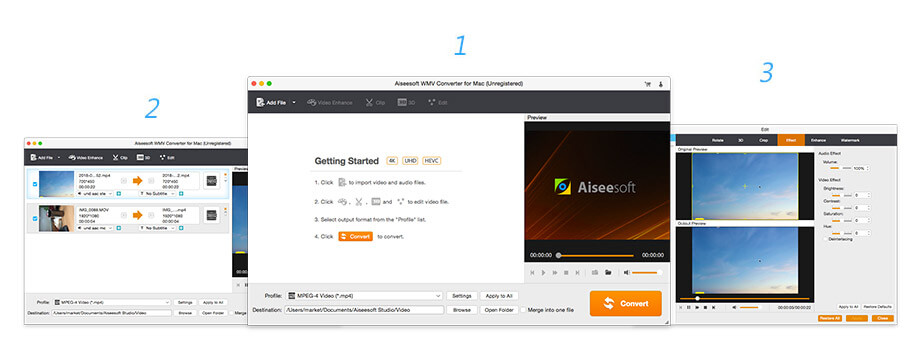
Check what famous editor and our customer talk about our product.


I tried to convert WMV video to MP3 for playing it on my iPod. This WMV iPod converter for Mac is good. At least I converted successively. I will keep using it for converting WMV videos.
From Abeka
I am so regretful that I converted WMV video online in the past. When I found this WMV converting app, it is user-friendly. The important thing is that I can convert WMV to more video formats. By the way, the converting speed is fast.
By Ruia
Sometimes, I really want to convert WMV to MP4 on Mac for uploading it on YouTube. The Mac version I use is Mac OS X EI Capitan. And after converting, my MP4 video is good quality. I will try to convert WMV to MPG, then.
By Rabe
Brilliant Software! Aiseesoft WMV Converter for Mac can be safely classified as the best WMV video/audio editing software released by Aiseesoft over a long, long time. I'll be uninstalling at least two other video editing software, for this is one killer software that has concocted all the video/audio editing/conversion you'll ever need!
By Mike
The best video recording tool to easily record screen, meetings, game, webinar, audio, and webcam videos.
BUY NOWBUY NOW
Rotate, clip, crop, watermark and convert video and audio files on your Mac and Windows.
BUY NOWBUY NOW
Transfer photos, messages, contacts, music, videos between iPhone and computer or between iDevices.
BUY NOWBUY NOW
*Required field
*Please enter a valid email

 WMV Converter for Mac