Have you ever lost important files from your computer, SD card, or external hard drive and wondered if there’s a reliable way to get them back? Stellar Data Recovery is one of the most popular file recovery programs on iPhone, Android, Mac, and Windows. It is designed to help users restore deleted, formatted, or inaccessible data across multiple devices. Whether you accidentally deleted photos, lost crucial business documents, or suffered from a corrupted USB drive, Stellar claims to recover them securely and efficiently. Now, let’s take a closer look at this popular tool and see whether it truly lives up to the hype and if it’s worth trying.
Stellar Data Recovery, also known as Stellar Phoenix Data Recovery, is one of the most reliable data recovery software designed for recovering lost, deleted, or inaccessible files from various storage devices like hard disk, macOS device, SSD, external drive, and more. This part will lead you to take a deeper look at its different versions.
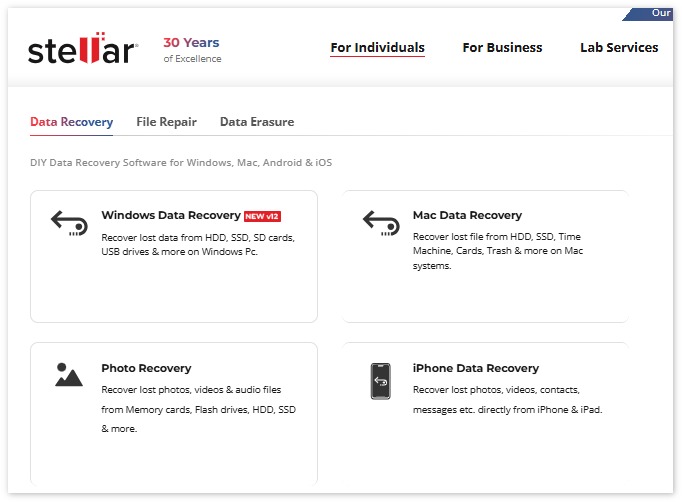
Stellar Data Recovery works seamlessly across multiple platforms like Windows, Mac, and also offers specialized tools for iPhone and Android data recovery. You can find all these versions on its official site: “stellarinfo.com”.
| Main Stellar Data Recovery product | Main capabilities | Steps to Download |
| Stellar Data Recovery for Windows | It supports recovering lost files, such as documents, photos, videos, audio files, emails, compressed files, etc., from HDD, SSD, SD cards, USB drives, and more on a Windows computer. | You can download its Windows version by going to “stellarinfo.com” > “For Individuals” > “Windows Data Recovery”. |
| Stellar Data Recovery for Mac | It allows you to recover lost files from HDD, SSD, Trash, Time Machine, and more on a Mac computer. | You can download its Mac version by entering “stellarinfo.com” > “For Individuals” > “Mac Data Recovery”. |
| Stellar Data Recovery for iPhone | With it, you can recover lost photos, videos, contacts, messages, and more from iPhone and iPad. | To download it, just go to its official site“stellarinfo.com” > “For Individuals” > “iPhone Data Recovery”. |
| Stellar Data Recovery for Android | Supporting Android 6 to 14, its Android version enables you to recover deleted data from an Android phone, such as Samsung, OnePlus, and more, without rooting. | Compared with other versions, its Android version’s downloading route is a bit more circuitous: you need to enter its site “stellarinfo.com” > “For Individuals” > “Photo Recovery” and click “Android” next to the “Also available for” prompt on the banner. |
| Stellar Data Recovery Version | Supported file types | Supported storage device |
| Stellar Data Recovery for Windows | Photos, video, document, archive formats (Zip and RAR), Email, Audio, etc. | Hard Disk, PC, laptop, SSD, external drive, USB, SD card. |
| Stellar Data Recovery for Mac | Images, graphics, videos, documents, archives, mails, music, and more. | Hard Disk, macOS devices, SSD, external drive, USB, SD card. |
| Stellar Data Recovery for iPhone | Voice memos, images, calendar, iPhone call history, notes, Safari bookmarks, data from iCloud & iTunes, and more. | iOS and iPhone variants, iPad/iPad Air/iPad mini/ iPad Pro, iTunes & iCloud backup, encrypted iTunes backup files. |
| Stellar Data Recovery for Android | Photos, videos, audio files, WhatsApp chats, media & attachments, contacts, call history, messages, etc. | Samsung, OPPO, Vivo, Xiaomi, OnePlus, internal memory of Android devices, and more. |
Stellar Data Recovery is known for its high recovery success rate, making it a reliable solution for retrieving lost or deleted files from various devices. It claims to recover deleted files in a system crash, formatted storage device, lost partitions, corrupted USB drive, encrypted drives, and more. Overall, it can recover most files you lost under most scenarios. Although some recovered files may occasionally be corrupted, Stellar Data Recovery is still worth trying compared to most other products on the market.
The recovery speed of Stellar Data Recovery depends on your scan mode, file size, and device stability. The bigger your file size is, the lower the recovery speed. But if you seek a faster scanning and recovery speed, you can count on its Quick Scan option.
The Quick Scan option in Stellar Data Recovery can scan your drive rapidly to recover recently deleted files. Ideal when you need fast results for accidental deletions or small-scale data loss. This scanning mode significantly improves scanning speed and can usually recover files within five minutes. However, it has a lower success rate compared to the ‘Deep Scan’ mode, which performs a more thorough scan but takes more time.
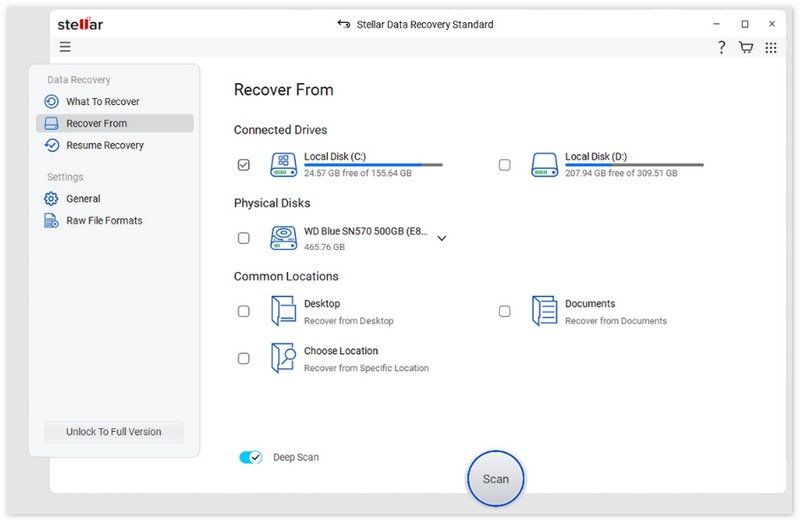
Overall, Stellar Data Recovery balances speed and reliability, making it one of the fastest recovery tools on the market while ensuring high recovery success.
Stellar Data Recovery’s pricing plan is complicated and varies across platforms. We compiled its plan and pricing in the following table for a clearer understanding.
| Product Name | Standard plan | Professional plan |
| Stellar Data Recovery for Windows | Annual price: $59.99; Lifetime price: $99 |
Annual price: $89.99 Lifetime price: $149 |
| Stellar Data Recovery for Mac |
Annual price: $69.99; Lifetime price: $129 |
Annual price: $89.99 Lifetime price: $149 |
| Stellar Data Recovery for iPhone |
Price for 3 devices: $39.99; Price for 5 devices: $49.99; Price for 50 devices: $99.99; |
/ |
| Stellar Data Recovery for Android |
Price for 3 devices: $29.99; Price for 5 devices: $39.99; |
/ |
Stellar Data Recovery is widely regarded as a safe and reliable data recovery solution for both personal and professional users. Here’s why:
1) No Malware or Adware: The software is clean, free from viruses, malware, or unwanted programs. It’s trusted by millions of users worldwide.
2) Read-Only Recovery: Stellar performs read-only scanning, which means it does not alter or overwrite your original files during recovery.
3) Trusted Brand: Stellar has been in the data recovery industry for decades and is recognized by tech experts and review sites for its reliability.
4) Secure Transactions: When purchasing a license, Stellar’s official website uses encrypted payment methods to protect user information.
5) Cross-Platform Safety: The software is compatible with Windows, Mac, iPhone, and Android, ensuring safe recovery across all supported platforms.
If you’re facing data loss on your computer or mobile device and want a reliable, feature-rich tool, Stellar Data Recovery is among the strongest options available. But it isn’t perfect and sometimes, it might not be your best option. Here we will give you its main pros and cons for your consideration.
PROS
CONS
When Stellar Data Recovery doesn’t quite fit your needs or budget, Aiseesoft Data Recovery is a strong alternative worth considering. It supports both Windows and macOS platforms and offers familiar features like quick/deep scans, previewing files, and recovering from external drives, memory cards, and more. Aiseesoft positions its product as user‑friendly yet powerful — marketed to help users restore deleted photos, documents, videos, audio, emails, and other file types with ease.
Downloads
How to use Aiseesoft Data Recovery to get back lost data?
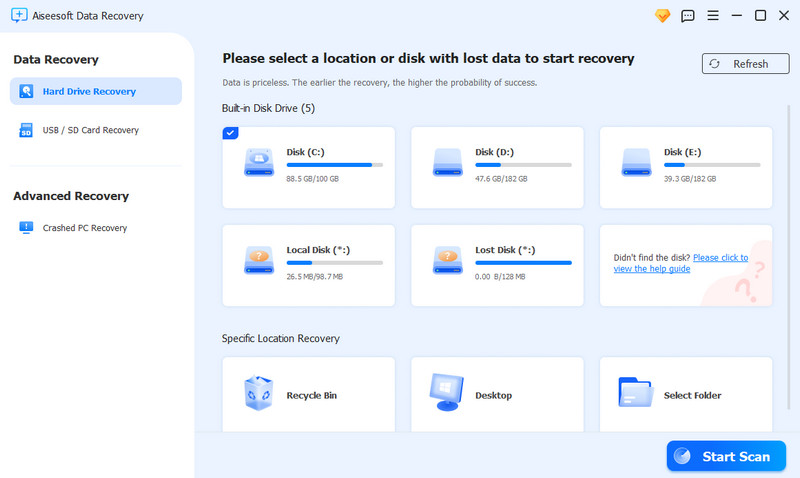
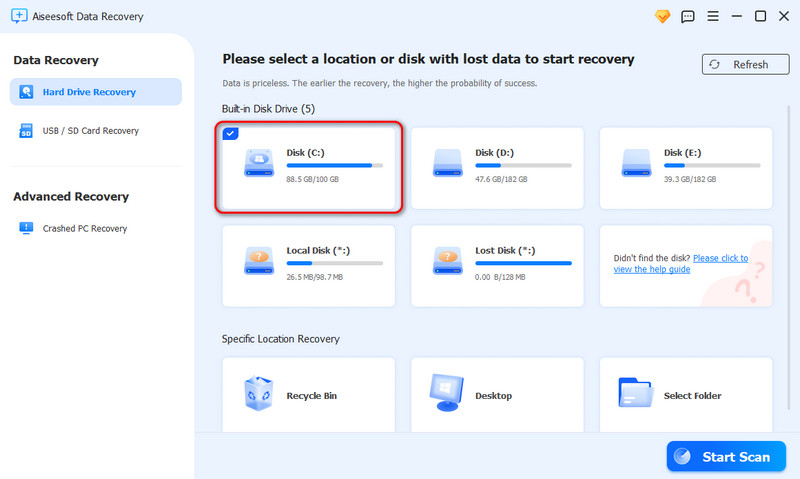
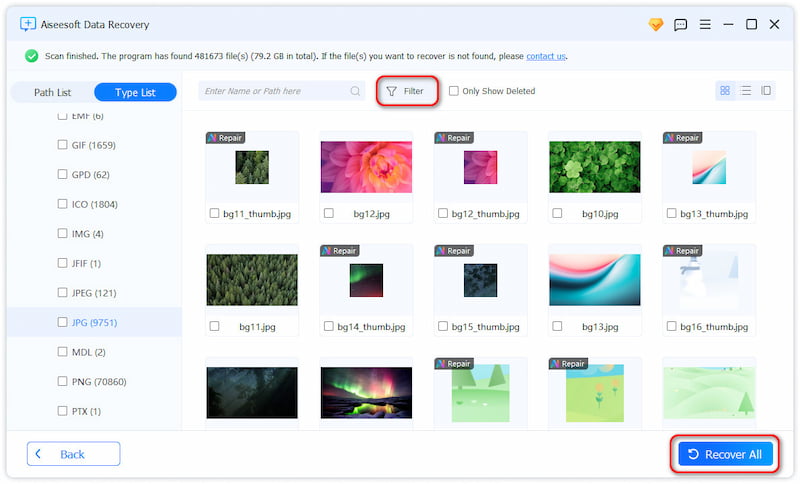
Now, your recovered files will be seen in the open folder
Does Stellar Data Recovery have a free version?
Yes, Stellar Data Recovery software does have a free version available. It allows you to recover deleted photos, videos, and other files up to 1 GB. But compared with its pro version, it can not recover from lost partitions, optical media, and more. If you prefer a more strong free solution, Aiseesoft Free Data Recovery might be better.
What is the difference between Stellar Data Recovery Premium and Professional?
The main difference between Stellar Data Recovery Professional and Premium lies in media repair capabilities. While both versions support advanced file recovery, lost partitions, and unbootable or crashed systems, Premium adds the ability to repair corrupted files, photos and videos. This means that if your priority is not just recovering lost files but also restoring damaged media, Premium is the better choice. Professional covers all other advanced recovery needs but does not include photo or video repair.
Is Stellar’s video repair feature included in all versions of Stellar Data Recovery?
No, the video/photo repair capability is usually part of the Premium or higher/“repair-enabled” editions (or as a separate Stellar Repair utility) rather than the basic or Professional version.
Conclusion
When it comes to data recovery, Stellar Data Recovery is a powerful and reliable tool, offering advanced scan modes, broad file type support, and compatibility with Windows, Mac, iPhone, and Android. Its Professional and Premium versions include extra features such as lost partition recovery and video/photo repair. However, some users may find it expensive, and certain advanced features are only available in higher-tier licenses. For those looking for a more user-friendly and cost-effective alternative, Aiseesoft Data Recovery is an excellent choice. You can download it using the button below, and feel free to leave any questions in the comments section.
 How to Fix Corrupted SD Card Easily without Data Loss
Don’t worry if your SD card is corrupted or damaged. This tutorial is a detailed guide about repairing corrupted SD card to restore its data.
 SSD Data Recovery and Explore How Successful Are Their Rates
Is it possible to recover lost data from my dead SSD? What are the success rates of SSD data recovery? This post explores how successful are SSD data recovery.
 7 SanDisk Recovery Tools to Retrieve Photos and Other Files
Can I recover deleted photos from my SanDisk memory card? How do you retrieve files from a SanDisk SD card? Check the detailed SanDisk card recovery guide.
 Leave your comment and join our discussion
Aiseesoft Data Recovery is the best data recovery software to recover deleted/lost photos, documents, emails, audio, videos, etc. from your PC/Mac.
 100% Secure. No Ads.
100% Secure. No Ads.

*Required field
*Please enter a valid email

