
Trust by 50,000+ Users: Aiseesoft Android Unlocker
 100% Secure. No Ads.
100% Secure. No Ads.
FRP or Factory Reset Protection is a built-in security feature that Android 5.1 or higher devices use. Its main functionality is to protect your device and information by locking your Android phone screen, encrypting data, and more. Once FRP is activated on your Android, your device won't be used in an insecure environment after factory resetting your phone. So, you may have encountered that you can't use your Samsung after resetting it. It is common that you don't know FRP lock. And this post will show you how to bypass FRP on Samsung.
Before delving into specific solutions for FRP bypass on Samsung devices, I would like to provide a basic introduction to FRP.
As mentioned above, FRP, or Factory Reset Protection, is a native security feature on your Samsung phone. Since Android 5.1, FRP has been designed to protect your device if it is stolen or lost. The feature will automatically activate if the source Google Account was not properly removed before a factory reset. After the reset, your Samsung phone will require the previous Google Account and password to proceed with setup.
FRP exists in all newer Android versions, including Android 5 Lollipop, Android 6 Marshmallow, Android 7-14, and the latest Android 16 Baklava.
When you reach the Google Account verification after a reset on your Samsung phone, you can easily get past it if you are the owner and know the linked Google account passcode. Even if you can’t remember the associated account details, you can still bypass FRP. The practical methods depend on your specific Android version and Samsung Galaxy phone model.
| Samsung FRP Bypass Method | Effectiveness & Requirements |
| Professional PC Software (Android Unlocker) | • High effectiveness • Safer and more reliable than unofficial APK methods • Supports the latest Android 16 and all Samsung Galaxy phones • Requires a PC and a USB cable and follows on-screen instructions |
| Google Account Recovery | • The official way to bypass FRP on Samsung and regain access • You should remember the account credentials or have access to your recovery phone/email • Requires a good internet connection and access to your recovery options |
| Find My Device | • Needs another device to log into your Google account • Your Google account should be logged in your Samsung before |
| Google Keyboard | • Complicated and time-consuming • Only works on some older Android versions |
| Hard Reset Samsung Phone | • Erases all existing settings and files from your Samsung device • Requires a suitable backup that contains all the necessary data |
| Google Voice Typing | • The Google Voice Typing feature should be enabled on the Samsung phone • Does not work in modern Android versions |
| Use SIM PIN Code | • Entering the SIM or PIN code may vary on different Android devices • You must have a SIM card with a known PIN code |
The first method I want to share with you is using Aiseesoft Android Unlocker. If you have a computer around you and want to use the easiest and quickest solution, this way is suitable for you.
Key Features:
1. One of its main features is Bypass Google FRP Lock. When you forget the Google account and password on your Samsung phone, you can directly connect your phone to this Samsung unlocker. After several simple clicks, the FRP on your Samsung will be removed.
2. Supports Any Android Lock Screen Removal Scenario. It can handle various Android lock and passcode forgotten issues. Moreover, its interface is clean and straightforward.
3. FRP Bypass on Samsung and Other Android Devices. Apart from Samsung devices, Android Unlocker supports almost all Android devices that run Android 16 or earlier, including Google Pixel, Xiaomi, OPPO, etc. What’s more, if you forgot the lock screen password on your device, or your phone’s screen and face recognition can’t work, you can also use this program to unlock your Android devices quickly.
100% Secure. No Ads.
100% Secure. No Ads.
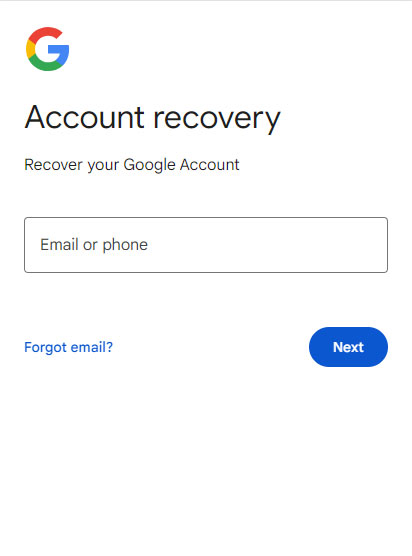
If you don't have a computer nearby, you can try to recover your Google account on your Samsung phone after resetting it. Google has two options, Forgot Password and Forgot Email, to let you restore your account. However, when testing the method on my Samsung, I figured out that it needs me to remember my Google email address or password, and a network connection is necessary.
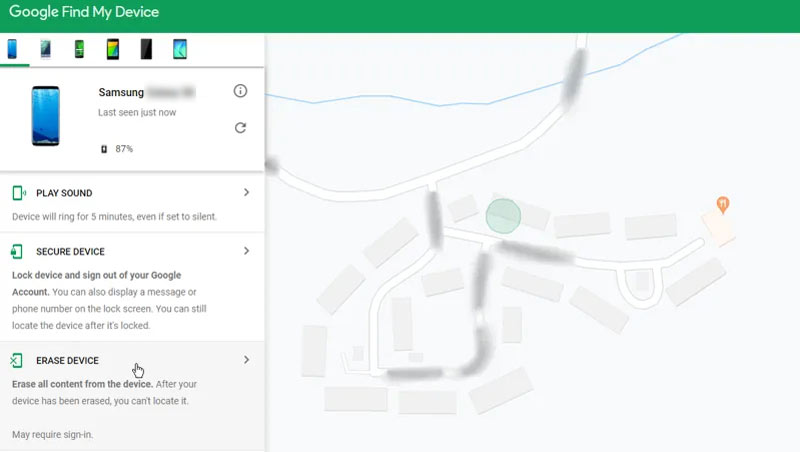
You also can use Find My Device from Google to bypass FRP on your Samsung phone. Its Erase Device feature can help you do that. The process is simple, but you should prepare another device that can log into your Google account. And you have to make sure that you have logged in to your Google account on your Samsung before, there is an internet connection on your Samsung, and you have enabled Find My Device and location on your Samsung. If you can't meet one of the requirements above, using Aiseesoft Android Unlocker would be better.
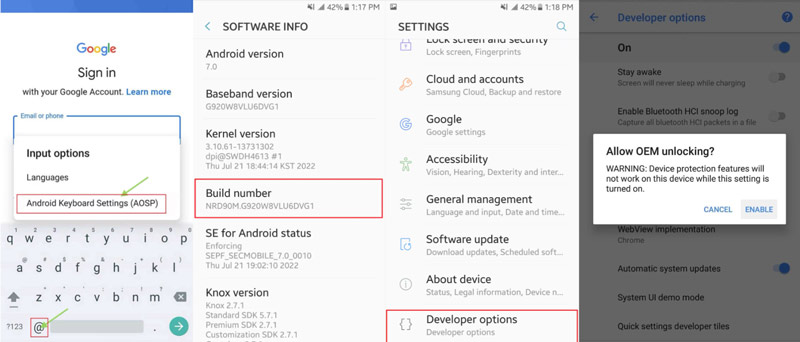
If you don't have the Google account and password of your current Samsung phone, you can use Google Keyboard to bypass FRP. However, this method is complicated and time-consuming.
Another way to remove FRP from your Samsung device is to hard reset the Android. This method is quick, but it will remove all data from your Samsung phone. Thus, you should have already ensured that you don’t need the data or that you have backed it up.
Some older Android versions had a potential way to access device settings via Google Voice Typing. When you are stuck at the Google verification screen and unable to type the associated account details, use the microphone to enter them.
Tap the text field for your Google account to bring up the keyboard. Tap the microphone icon to enter information through your voice. You should speak clearly in the email or on the phone. Try entering the correct account details to bypass the FRP on your Samsung phone.
You can bypass the Google account verification on some Samsung phones through the SIM PIN code. The core idea is to trigger the SIM PIN unlock prompt. You need to enable accessibility features like TalkBack to finally bypass FRP. TalkBack is designed for Android devices that provide feedback to help users with visual impairments in using their devices. The process may bypass Google account verification (FRP) on specific Android devices.
Can you disable FRP on Samsung phones?
Yes, you can turn off FRP on your Samsung phones. Enter the Settings app on your Samsung, select Accounts or Accounts Backup, and tap on the Remove Account option. Then, you will disable Google FRP on your Samsung or other Android devices.
How do I bypass Samsung lock after factory reset?
You can use Aiseesoft Android Unlocker to bypass Samsung lock. After installing and running this Samsung unlocker, select Remove Screen Password and connect your Samsung to the software with a USB cable, then click the Start Removal button.
What causes FRP lock on Samsung?
When you have logged in to your Google account on Samsung and your Samsung device is stolen, lost, or Factory Data Reset in a dangerous environment, FRP lock will be enabled on your Samsung.
Conclusion
That's all about how to bypass FRP on Samsung! We have offered 5 solutions for you to select from. If you prefer a simple and quick way, Aiseesoft Android Unlocker can suit you most.
 [2025 Guide] How to Bypass Google Lock on Android Devices
How to unlock a Google-locked Samsung phone? The Smart Lock gives the device excellent security but can lock you out. Find the best solutions here.
 Locked by Find My Device? 3 Useful Fixes to Help in 2025
Can Google Find My Device unlock my Android phone? What to do if I forget the Find My Device password? This post will share all-related to solve this problem.
 3 Workable Ways to Bypass LG FRP (Factory Reset Protection) Easily
Get stuck with LG FRP after a reset? The article offers three effective methods to bypass LG FRP with or without a computer.
 Leave your comment and join our discussion
Compatible with all Android OS versions, this unlocker provides a secure and easy way to remove screen lock of any kind and bypass FRP quickly.
100% Secure. No Ads.
100% Secure. No Ads.

*Required field
*Please enter a valid email

