Like many other Android devices, LG phones use FRP (Factory Reset Protection) to guarantee the data security of an LG device once it's logged in with a Google account. To get access to an LG device after an untrusted factory reset, you have to enter the associated Google account credentials to verify you are the real owner. It's an effective way to protect your LG phone from being illegally used in case it's stolen or lost.
However, there are times when we may forget our Google account or password, or we get a second-hand LG phone without knowing the original account. To address the problem, we need to bypass LG FRP. In this article, we share three effective methods to remove the FRP lock easily.
Quick Answer
To bypass the LG FRP (Factory Reset Protection) lock, you can use:
1. Manual keyboard settings method via Wi-Fi
2. PIN-locked SIM card
3. PC software like Tungkick for older models.
The SIM card method is currently the fastest way to bypass LG Google verification without a computer.
Note: Because LG stopped manufacturing phones in 2021, PC bypass software generally only supports legacy devices.
| Feature / Requirement | Keyboard Settings | PIN-Locked SIM | Tungkick PC Tool |
| Difficulty Level | Hard (Many Steps) | Easy | Medium |
| Time Required | ~30 Minutes | ~10 Minutes | ~15 Minutes |
| Computer Required? | No | No | Yes (Windows PC) |
| Tools Needed | Wi-Fi Connection | Locked SIM card, 2nd Phone | USB Cable, PC |
| Device Support | Most LG Models | Most LG Models | Legacy/Older Models Only |
| Best For... | Users who don't have a PC or spare phone and have patience. | Users looking for the fastest bypass and have a spare SIM. | Users with older LG phones (like the G4) who prefer PC software. |
This method can effectively remove Factory Reset Protection on LG phones. Since you need to go through many steps as below, make sure your LG phone has enough battery power or connect it to a power source.
To successfully bypass LG FRP without harming your LG device, make sure you follow the guide step by step.
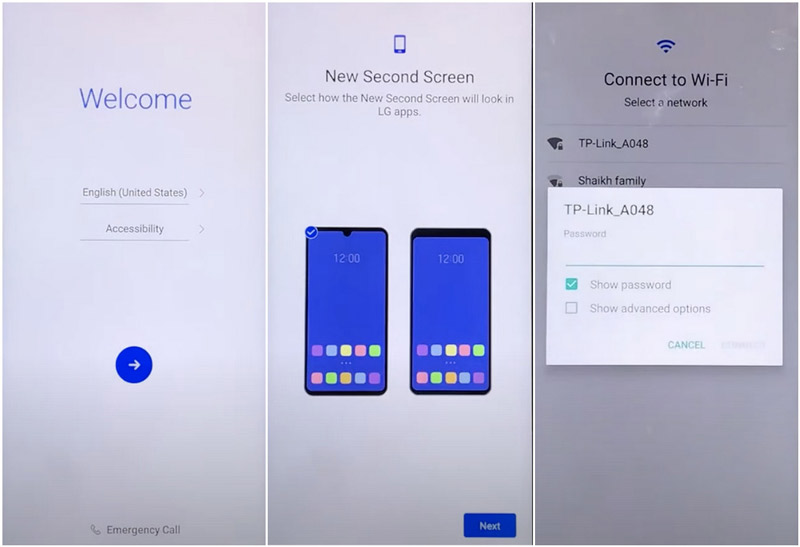
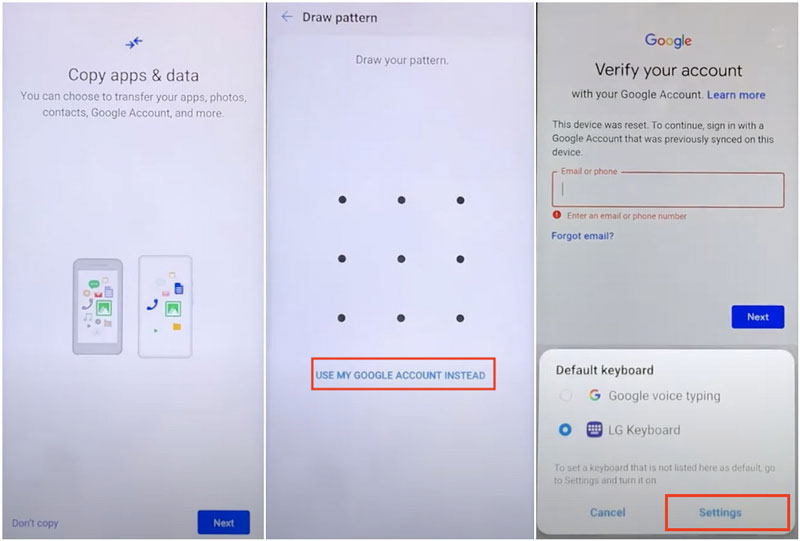
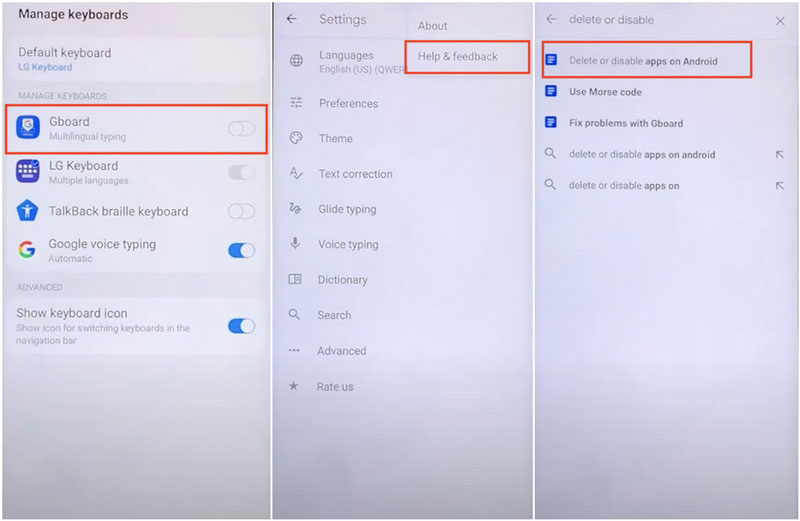
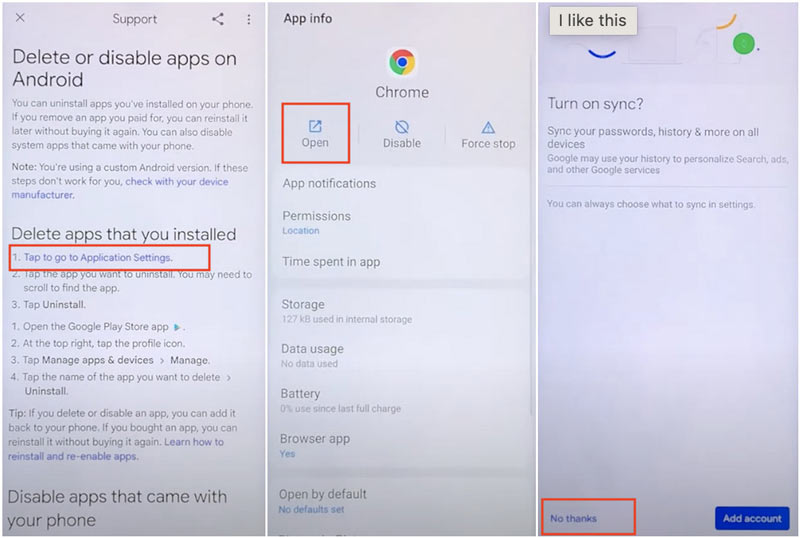
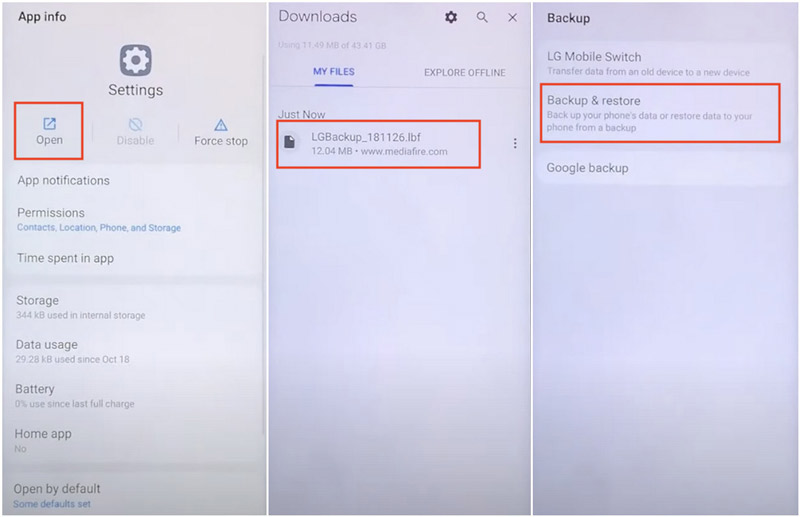
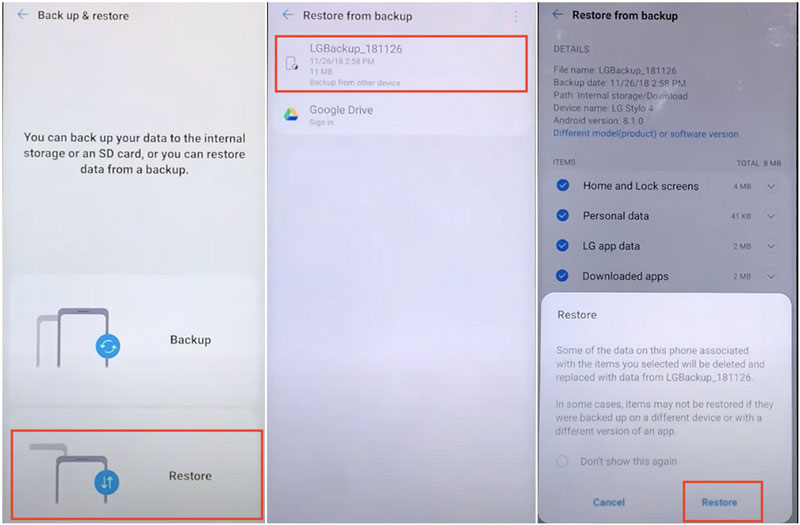
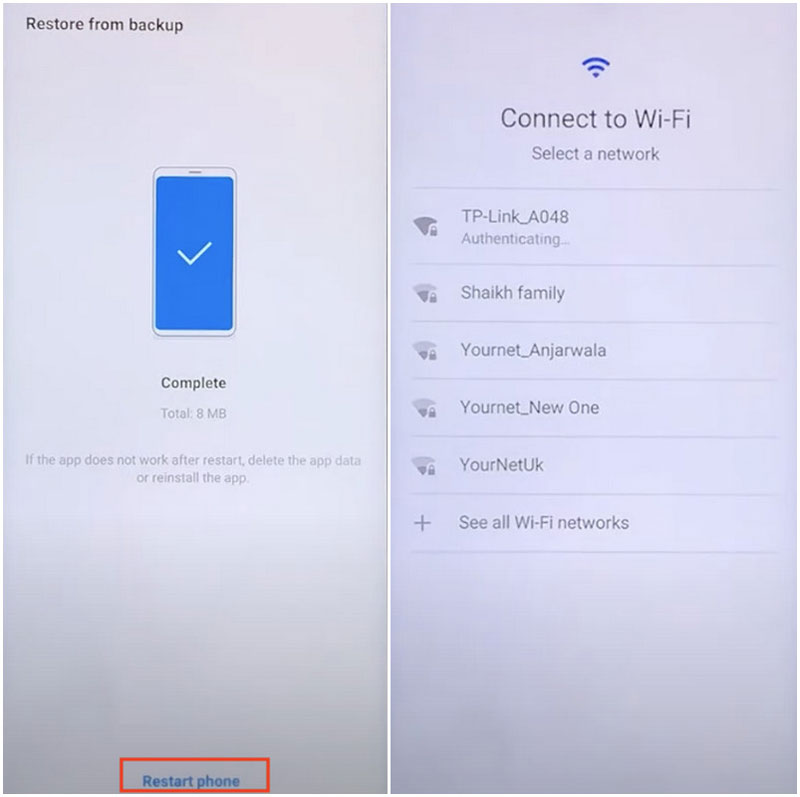
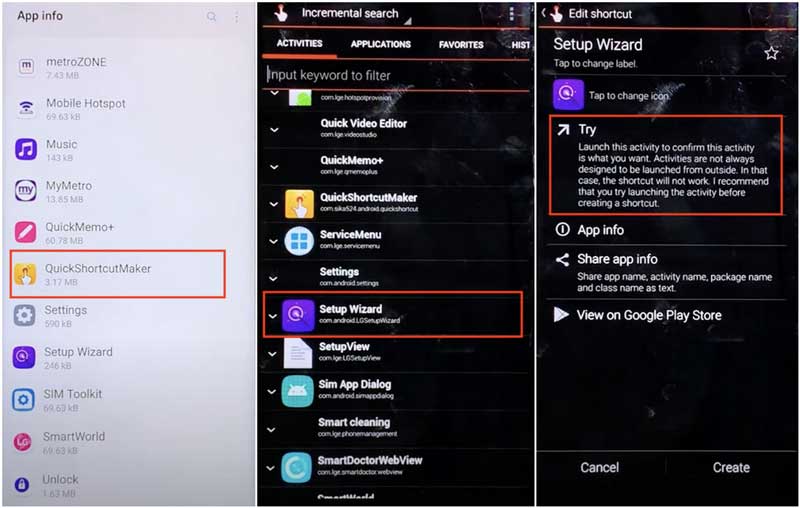
Wait for a while to let the LG phone complete the process. After the LG device automatically restarts, the LG FRP has been successfully removed. Although this method is time-consuming and hard to learn, it's said to be more effective than other methods, according to LG users. If you are proficient in such operations on the LG phone, it's recommended to try this method.
Pros
Cons
If you think the first method is overwhelming and want an easier one, try using a SIM card to bypass LG FRP. First of all, you need to prepare a PIN-locked SIM card. If you don't have one, you can find an idle SIM card and make it locked by entering the wrong PIN several times (usually 3 consecutive times).
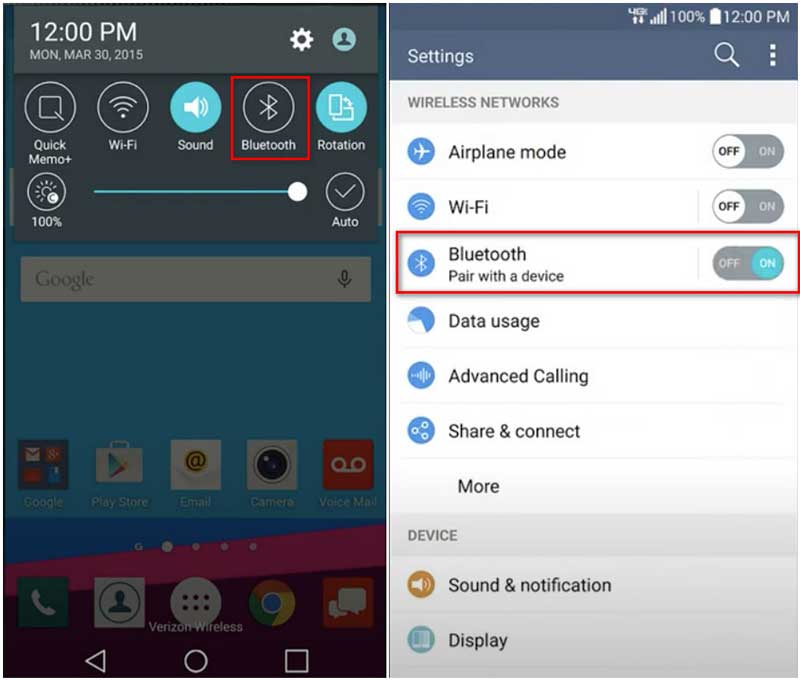
If a Google account option appears during the process, simply tap Skip to bypass Google account credentials.
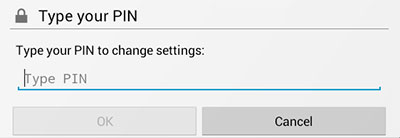
Pros
Cons
The third way to bypass LG Factory Reset Protection on LG phones is via Tungkick, a free program for PCs to bypass FRP after an LG phone reset. Until now, Tungkick supports the following LG phone models: LG G4, LG Stylo, LG G3, G3 CAT 6, etc. The method requires your LG phone to be in the Download Mode. Learn how to complete the settings from the detailed guide below.
When it finishes, restart your LG phone, and you have successfully bypassed LG Factory Reset Protection.
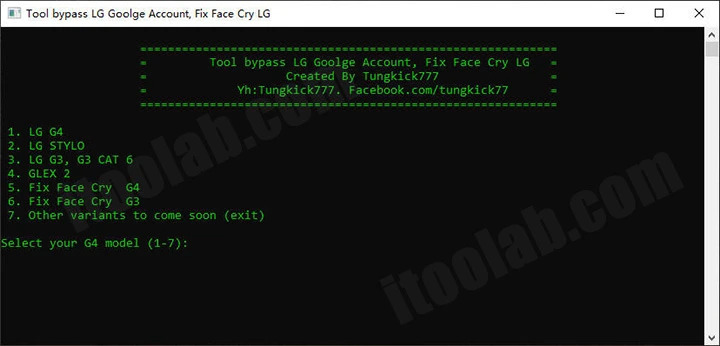
Pros
Cons
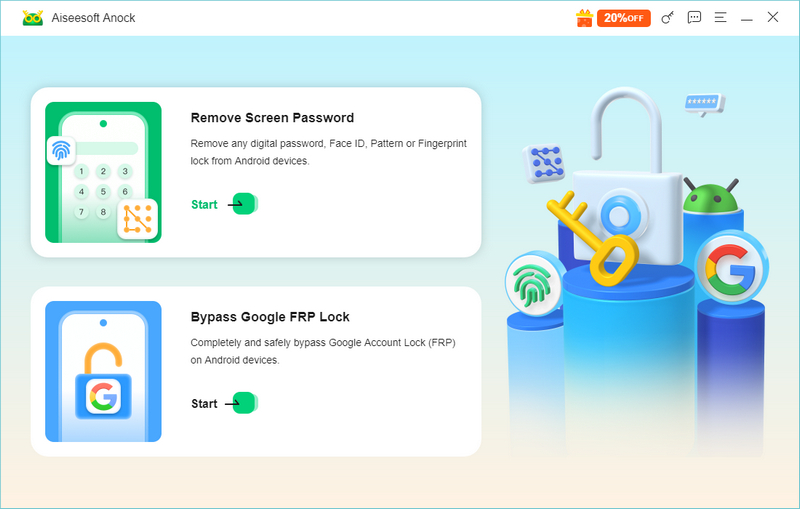
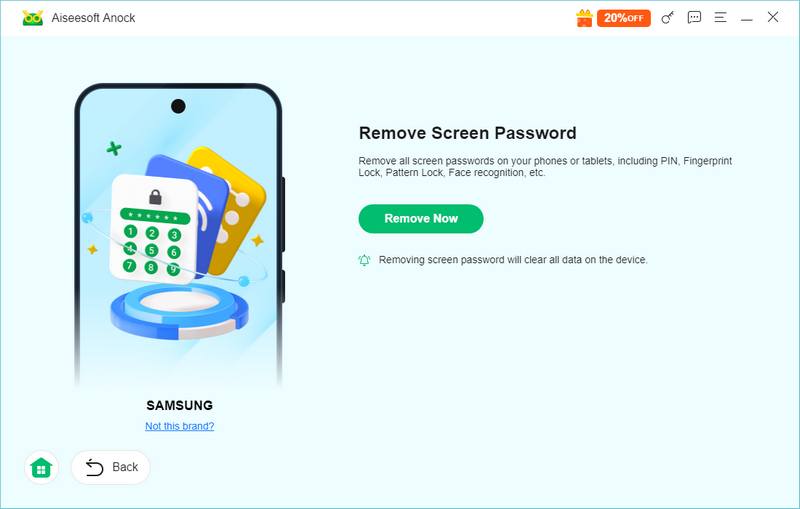
For anyone who wants to quickly and easily unlock an LG device, the Aiseesoft Anock Android Unlocker can be your best helper. It's a powerful and easy-to-use tool for bypassing LG Screen Lock. With it, you can access the LG device without an account, password, or any other verification. It can remove LG screen locks from nearly all LG models in a few simple steps to save you more. Check out more features of the powerful Aiseesoft Anock Android Unlocker.
Key Features of Aiseesoft Anock Android Unlocker
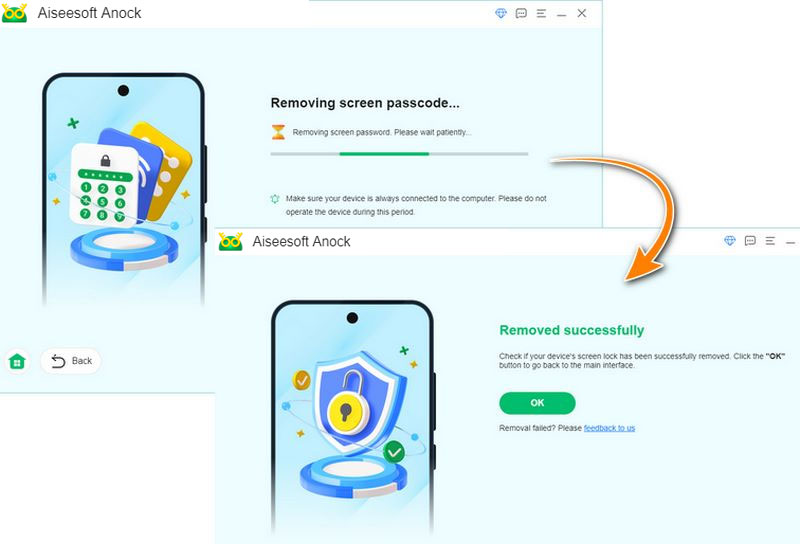
Follow the steps below to remove the LG screen Lock easily.
Removing the LG screen lock will erase all data on the LG device.
 100% Secure. No Ads.
100% Secure. No Ads.
How do I safely remove a Google account before a factory reset?
To avoid triggering the FRP lock entirely, you should remove your Google account before factory resetting the phone. Go to Settings > Accounts (or Cloud & Accounts) > Your Google Account. Tap the three-dot menu and select Remove account. You can now factory reset the phone safely without triggering FRP.
Does bypassing FRP on an LG phone erase all my data?
No, bypassing the FRP lock does not erase your data, because your data is already gone. The FRP lock only triggers after an untrusted factory reset has wiped the phone. Bypassing FRP simply allows you to access the already-erased device.
Why is there an FRP lock on LG phones?
Factory Reset Protection (FRP) is a security feature developed by Google. It protects your Android phone from unauthorized use if it is lost or stolen. If a thief steals your phone and wipes it via Recovery Mode, the FRP lock prevents them from using the device unless they know your Google password.
Conclusion
While FRP is an effective measure to prevent LG phones from being illegally used after a reset, it can cause trouble for their owners if they forget the Google account. The post shares three effective methods to bypass LG FRP to help you get access to your LG phone. In case you forget the screen lock password, we also share a powerful tool to remove the screen lock on LG or other Android phones.
 How To Fix Enter Password to Unlock 30/30 Attempts Remaining
Enter Password to Unlock 30/30 Attempts Remaining appears when you fail to unlock your device many times. This article will tell you the reasons and solutions.
 [Easy] How to Factory Reset a Motorola Phone that is Locked
Getting locked out of a Motorola phone is frustrating. The good thing is you can reset the device with two solutions. Click here to read the best guide.
 [2024 Guide] How to Bypass Google Lock on Android Devices
How to unlock a Google-locked Samsung phone? The Smart Lock gives the device excellent security but can lock you out. Find the best solutions here.
 Leave your comment and join our discussion
Compatible with all Android OS versions, this unlocker provides a secure and easy way to remove screen lock of any kind and bypass FRP quickly.
100% Secure. No Ads.
100% Secure. No Ads.

*Required field
*Please enter a valid email

