If you like watching DVD, you must get familiar with VOB files. VOB files are a high definition file format used to stored DVD videos. It contains multiple video and audio streams, subtitles, and DVD menus. You are able to view these VOB files on many PC or Mac based players or large format TV screens, or extract them from a DVD. However, most portable device and players are not compatible with the VOB files.
So if you want to enjoy your VOB movies on your mobile phone or other portable media player, it is necessary for you to convert VOB to other appropriate format, such as MPG. And this passage is going to show you the most popular and professional video converters for you to convert these VOB videos to MPG. If you are interested with this topic, please read on and learn.
When it comes to convert VOB to MPG, Aiseesoft Total Video Converter is capable of converting videos to many kinds of popular video formats like MP4, MKV, WMV, AVI, 3GP, DivX, MOV, M4V, DivX, XviD, ASF, SWF etc. The output videos have excellent image/ sound effect and can be successfully played on mainstream players like PSP, iPod, iPhone, PS3, Zune, Creative Zen, Blackberry, Mobile Phone, iRiver, Walkman, Pocket PC etc. With Aiseesoft Total Video Converter, converting among different video formats becomes extremely easy.
Key Features:
 100% Secure. No Ads.
100% Secure. No Ads.
Step 1: Install and launch video converter
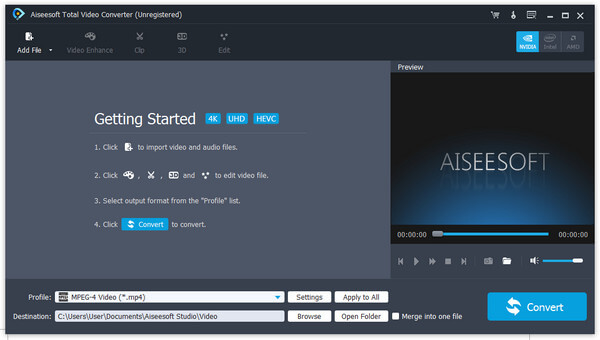
Install and launch Aiseesoft Total Video Converter, add your VOB file by clicking Add File in the File menu. Of course, you can drag and drop the VOB files into the program.
Step 2: Select output format and destination folder
In Profile drop-down list, you may select output format. Press Browse... to select the destination folder for output MPG files.
Step 3: Set professional parameters
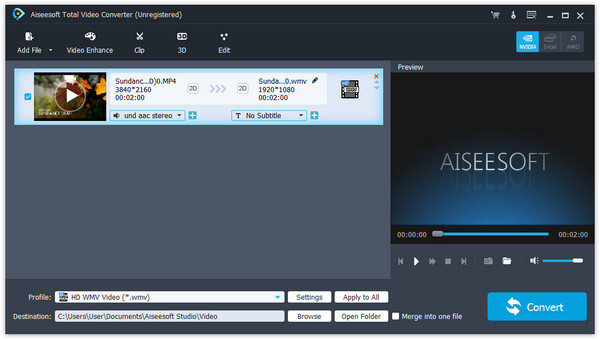
After selecting certain output format, click Settings to set output video and audio parameters. Save as... button can assist you to reserve well-customized profile.
Step 4: Start the VOB to MPG conversion
Finally, click Convert to begin VOB to MPG conversion. After a few minutes, the whole process of VOB file converting to MPG file is finished and you can enjoy your wanted MPG file on your player now.
Movavi Video Converter is also a wonderful VOB to MPG converter for you to take into consideration. It is easy to use and the conversion speed is quite fast. This program is well compatible with Windows system (including Windows 8). And it can convert not only VOB files to MPG format but also perform the conversion between any video/audio formats.
Key Features:
Step 1: Free download and install Movavi's VOB Converter for Windows or Mac, after that you can launch the program on computer.
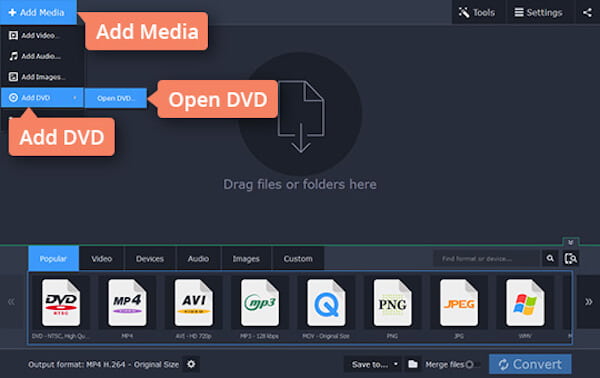
Step 2: Hit the Add Media button, select Add DVD, and click Open DVD. Now you can add your DVD video files to the program.
Step 3: Choose your desired video format, like MPG, from the list, and select a suitable format preset.
Step 4: Click the "Convert" button to start converting your VOB files to MPG format.
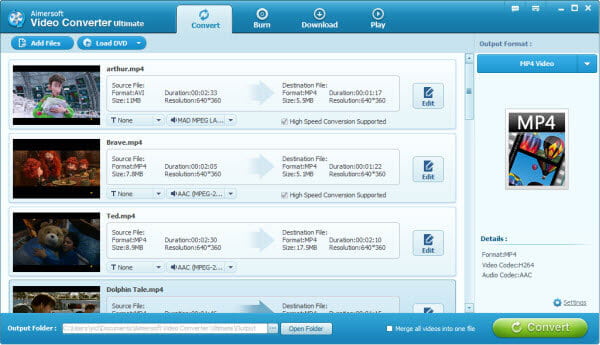
With Aimersoft Video Converter Ultimate, you can easily change formats of videos from VOB to MPG, MP4, AVI, WMV, MOV, MKV, etc. what's more, you can get many other exciting features like video editing, screen recording, video capture, and more to the VOB files. Just download the program and follow the simple instructions below.
Key Features:
Step 1: Load a VOB file into this video converter by clicking "Add Files" button or dragging it into the interface.
Step 2: Choose MPG as the output format, and select a destination folder for the converted VOB file.
Step 3: Click the Convert button to start the VOB to MPG conversion process. Now you have MPG files and can play seamlessly on your Windows media player!
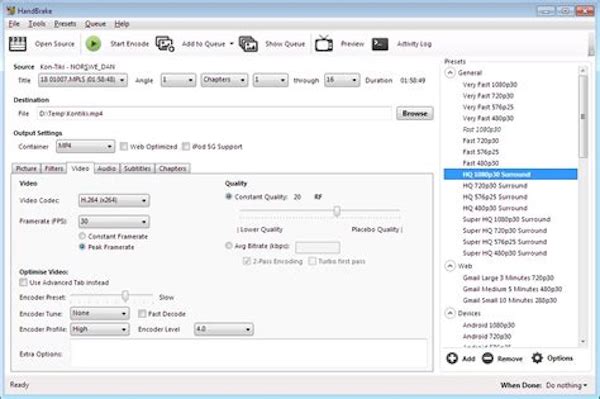
HandBrake is an intuitive and insanely fast all-in-one video/ audio converter, DVD ripper, DVD burner, video editor and web video downloader. With this amazing VOB to MPG converter, you can effortlessly achieve all your multimedia demands and enjoy your VOB videos anywhere and anytime you like.
Key Features:
Step 1: Download and Launch the HandBrake software and import your VOB video in the main interface. You can input multiple videos, too.
Step 2: Before converting VOB to MPG, choose the video format you need to export at the format category, MPG as an example.
Step 3: After all is set, click the "Convert" button. After the converting process is complete, you can see more details about the MPG video in the file.
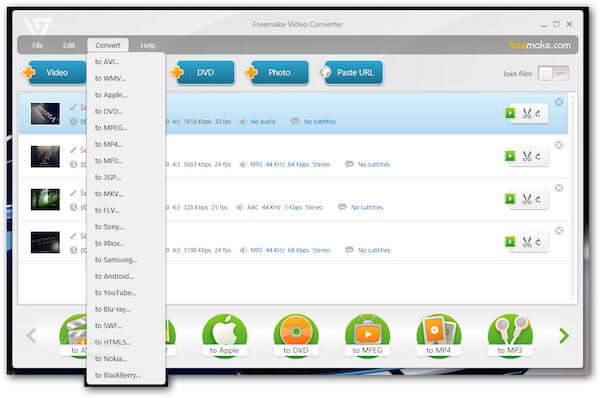
Freemake Video Converter is also one of the best free VOB to MPG video converter. It supports a wide variety of outputs formats, such as VOB, MPG, MST, MP4, AVI and etc. Moreover, you can convert any video format with a high quality by this converter.
Key Features:
Step 1: Download and install Freemake Video Converter, and then launch it on your computer.
Step 2: Click the Add button to import your File that you want to convert from VOB to MPG into the software.
Step 3: Hit on the video tab, select MPG format at the left sidebar, and choose the video resolution to confirm the output format.
Step 4: Simply click on the Convert button in the lower right corner, you can start converting VOB files to MPG files. You will be notified at the end of the transformation.
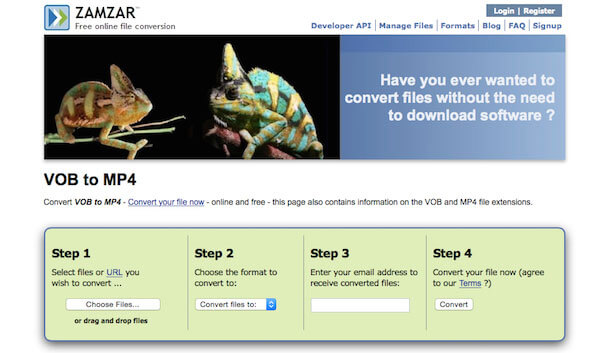
Zamzar is an online file converter, which can help you to convert video files from VOB to MPG without downloading software tools. What's more, it supports more than 1000 different types of transformation.
Step 1: Click the "Choose Files…" button to load the VOB files into the program. You can also enter the URL for the VOB files for conversion.
Step 2: Choose the "Convert files to:" as MPG or MPEG in order to convert the VOB files into the desired format.
Step 3: Enter a valid email address to make sure you can get the output MPG files after the conversion.
Step 4: Click the "Convert" button to transcode VOB to MPG files, after one or two minutes, you can check your email address to find the output file.
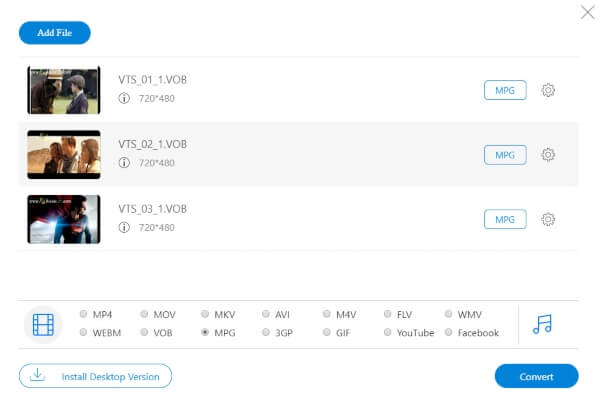
Aiseesoft Free Online Video Converter is a fast and safe way to convert your videos from VOB format to MPG format. The free online conversion tool supports you to make your file conversions with ease and convenience. It also lets you adjust the video bitrate, resolution, sample rate, encoder, etc. for the MPG output file easily.
Step 1: Once you access this site, you should click the "Add Files to Convert" button. After that, you are prompted to download and install the converter launcher.
Step 2: In the loaded conversion window, you should click the "Add File" button at the top-left corner to upload the VOB files.
Step 3: Select and click the VOB file, and select the checkbox of MPG at the bottom. Then click "Convert" to start converting and downloading the VOB files to MPG automatically.
If you like, you can click the setting button next to the MPG format to adjust the parameters as you like before converting.
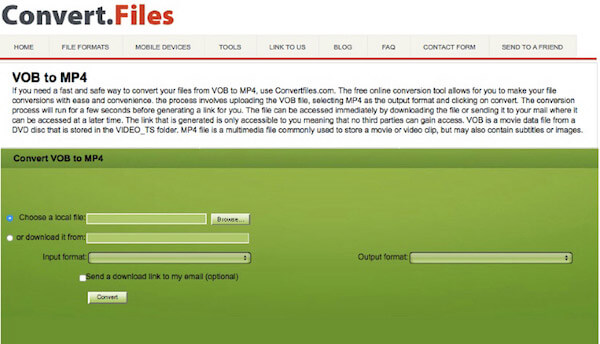
Convertfiles is another free online file converter. It has a lot of different source formats and supports you to convert video and audio files from one format to another (including VOB to MPG), which brings great convenience to many users.
Step 1: Click the "Browse…" button to select a VOB file into the program, or download the VOB files online to the program.
Step 2: Choose the input format as VOB and the output format as MPG in order to transcode VOB to MPG.
Step 3: When you need to receive the MPG output via email, you can check the "Send a download link to my email" option before clicking the "Convert" button.
Conclusion
In this article, we mainly talk about how to convert VOB to MPG. We show you many effective ways to get the job done. Whether you want to free convert VOB to MPG, or finish the video conversion from VOB to MPG with professional video converter, you can find suitable solutions and tools here. If you still have any question, you can leave us a message.
 How to Convert Common Videos to HD Quality (4K, 1080p and 720p)
You can easily get your video with high quality after converting it to 4K or 1080p HD video. Read this article and get the way.
 How to Free Convert FLV to MP3
You can learn how to convert FLV to MP3, include converting downloaded FLV to MP3 with RealPlayer, VLC, Free FLV to MP3 Converter and online converters.
 How to Convert F4V to MP4
This is a guide about how to use Best F4V converter to convert F4V to MP4, AVI, WMV, MP3 and other popular video files.
 Leave your comment and join our discussion
VOB Converter
VOB VOB Converter VOB to MP4 VOB to MOV VOB to AVI VOB to WMV VOB to MKV VOB to FLV VOB to MPEG VOB to DivX VOB to XviD VOB to SWF VOB to TS VOB to MPG VOB to 3GP VOB to MP3 VOB to WAV VOB to MP4 Mac VOB to iPhone Mac
Video Converter Ultimate is excellent video converter, editor and enhancer to convert, enhance and edit videos and music in 1000 formats and more.
100% Secure. No Ads.
100% Secure. No Ads.

