
Best AI Video Converter Ultimate
 100% Secure. No Ads.
100% Secure. No Ads.
Security cameras are usually the ones who help us out, right? So what if the videos are unclear, too dark, or too pixelated to see any details? Low-quality recordings can be a real problem when reviewing the events in question. This is the point where enhancing security camera footage is really needed. This article will teach you how to bring clarity back to low-quality recordings using four of the best video enhancement tools available today. After reading this, you’ll know exactly which tool fits your needs and how to transform unclear security videos into sharper, more usable evidence.
Security cameras have the purpose of recording significant events, but in reality, they are not always clear. It is a shock for many people to see their security footage and realize they can hardly make out faces, license plates, or even movements because the images are blurred, pixelated, or otherwise distorted. This can occur due to a number of reasons:
1. Low Resolution
Some cheap or old security cameras may record at low resolutions such as 480p or 720p. Therefore, the camera's detail-capturing capability is limited, and pixelated or soft images are the result.
2. Poor Lighting Conditions
Security cameras often struggle in low-light settings. Without enough illumination, sensors introduce digital noise, making the footage appear grainy or muddy.
3. Motion Blur
Fast movements, especially at night or with low shutter speeds, can cause subjects to appear smeared or unclear.
4. Dirty or Damaged Lens
Dust, smudges, rainwater, or scratches on the camera lens can drastically reduce image clarity.
5. Compression Artifacts
To save storage space, many CCTV systems apply heavy compression. While it reduces file size, it also removes important details, leading to blocky or blurry visuals.
6. Camera Placement & Focus Issues
Incorrect angle, distance, or failure to focus the lens can lead to distorted images or an out-of-focus subject.
Video enhancement is capable of making your footage more clear, in particular with the use of contemporary AI-driven tools. The technology indirectly suggests that it does not fabricate new details, but rather rescues and brings to the surface the quality that is already there in the recording. Enhancement tools can:
It is time to fix them once you understand the reasons for CCTV videos becoming blurry. Here, you will discover how to enhance security camera footage with four powerful tools that can bring out details, remove noise, and adjust overall image brightness. These are easy methods for making the videos that are not of high quality, clearer and more viable.
If you want the easiest and most effective way to improve blurry or low-quality security recordings, Aiseesoft Video Converter Ultimate is the top tool to try first. Designed with powerful AI enhancement features, it lets beginners and non-editors instantly upgrade their footage with just a few clicks. This tool makes how to enhance video surveillance footage simple and fast even if you’ve never edited a video before.
Downloads
Aiseesoft Video Converter Ultimate – The Best Video Speed Controller
100% Secure. No Ads.
100% Secure. No Ads.
How to Enhance Security Footage Using Aiseesoft Video Converter Ultimate
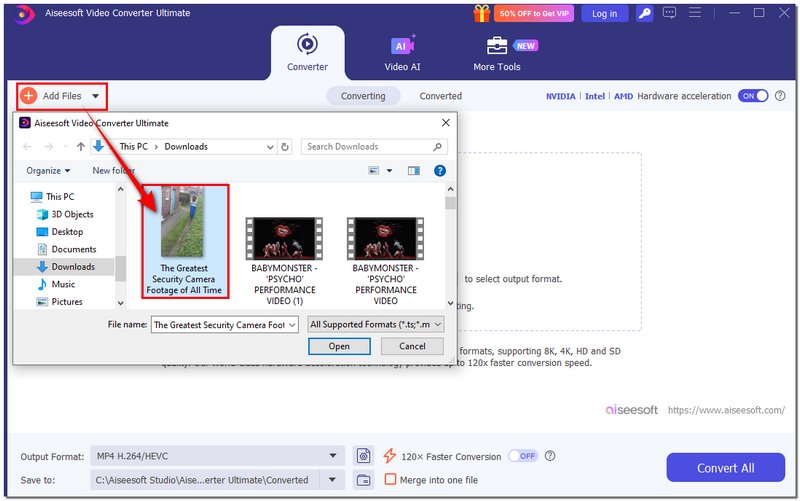

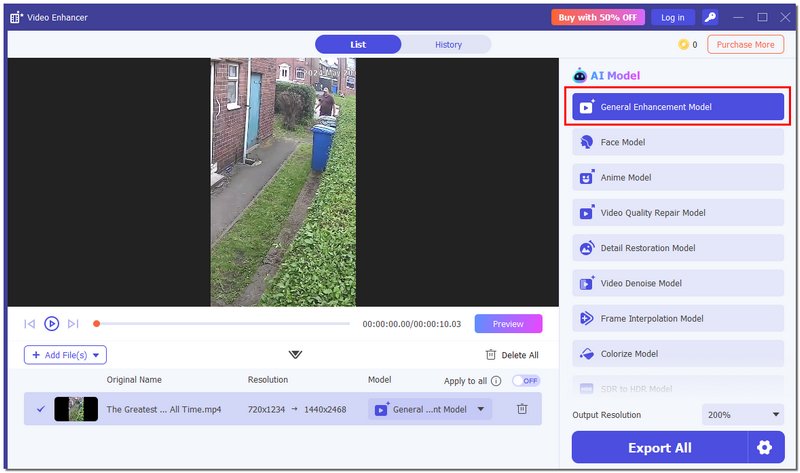
Aiseesoft makes the entire enhancement process quick, intuitive, and reliable, perfect for anyone who wants crystal-clear surveillance footage with minimal effort.
A professional-grade program, Topaz Video AI uses advanced artificial intelligence to enhance security camera footage with astounding precision. In contrast to ordinary video editing software, it specializes in extracting intricate details, making faces clearer, and increasing the resolution of low-resolution videos, thus making out-of-focus videos significantly clearer. It makes it a great choice for users who need high-quality results and don’t mind spending a bit more time processing.
How to Enhance Security Camera Footage Using Topaz Video AI
Verdict
Topaz Video AI delivers some of the best results for restoring fine details, sharpening blurry objects, and upscaling low-resolution CCTV footage. It’s particularly effective when you need the highest-quality enhancement for faces, license plates, or important details.
Limitations
DaVinci Resolve is a professional video editing software that is a favorite of the film industry and content creators. However, it is equally efficient in doing the task of how to enhance surveillance footage. Its set of tools for color correction, noise reduction, and sharpening is very powerful, so users can make videos clearer, adjust lighting, and even extract more details from a blurry or low-quality security camera video. Although it produces outputs of a professional caliber, it is most effective for users who are prepared to devote some time to understanding the program.
How to Enhance Surveillance Footage Using DaVinci Resolve
Verdict
DaVinci Resolve is the one with the perfect control over video quality. In fact, its color grading and noise reduction features make it the most suitable tool for bringing out the best in surveillance footage, particularly when high-level clarity and detail recovery are required.
Limitations
Pixop is an AI-powered video enhancement platform that operates entirely in the cloud, allowing for a fast and efficient process of enhancing security footage. In contrast to conventional software that requires installation, Pixop is a web-based application that can be used on any internet-connected device. It’s perfect for users who want automated enhancements without complex editing processes, while still achieving sharper, clearer video from low-quality security camera recordings.
How to Enhance Surveillance Footage Using Pixop
Verdict
Pixop is good at giving a quick, automatic method of upscale security footage that doesn't need a user to have technical knowledge or a strong machine. In particular, it is a great help to users who need cloud-based services or who wish to handle multiple videos remotely.
Limitations
Is it possible to make better the records of the old-fashioned analog CCTV?
Definitely, if the footage has been converted to a digital format, contemporary AI tools can still make the image clearer, less noisy, and more detailed, even for the most ancient camera systems.
Does the process of enhancing the footage remove the timestamps or overlays?
Not really. The video quality improves through the enhancement process. However, it does not mean that elements embedded in the video, such as timestamps, logos, or watermarks, will be removed.
Do enhancement tools remove motion blur completely?
They can unblur a video and reduce motion blur, but perfect restoration is not always possible, especially if the blur is severe or the subject moved too fast.
Conclusion
In this article, you learned the main reasons security footage becomes blurry and explored practical tools that show how to enhance security camera footage easily and effectively. There’s a solution that fits your needs. By choosing the right tool and applying the proper steps, you can turn unclear videos into clearer, more useful footage, helping you review, analyze, and protect your space with greater confidence.
 Top 8 AI Video Restoration Tools to Enhance Old Footage
Can AI repair old videos and restore details? How can I restore the quality of old videos? This post shares 8 AI video restoration tools to enhance quality.
 Upscale Video in DaVinci Resolve with These Easy Steps
A complete guide on how to upscale video in DaVinci Resolve. Improve video quality fast and see the best alternative for stunning results.
 Causes and Fixes for Adobe Premiere Choppy and Glitchy Video
After spending hours editing a project, Adobe Premiere becomes choppy and glitchy, giving you a hard time previewing it. There are still ways to fix it!
 Leave your comment and join our discussion
Video Converter Ultimate is excellent video converter, editor and enhancer to convert, enhance and edit videos and music in 1000 formats and more.
100% Secure. No Ads.
100% Secure. No Ads.

*Required field
*Please enter a valid email

