Why is my video so low quality on Twitter?
Twitter video quality bad has been an issue for years. The abysmal video quality can be confusing in an age of 4K HDR and lightning-fast internet. While browsing and viewing videos on Twitter (now X), they are always pixelated, blurry, and low quality, at least for the first few seconds. Even if you reload, the blocky artifacts remain on the Twitter video.
This post will guide you to know the root cause of the bad video quality on Twitter. Moreover, you can learn helpful tips to get high-quality results for uploading and viewing on the platform.
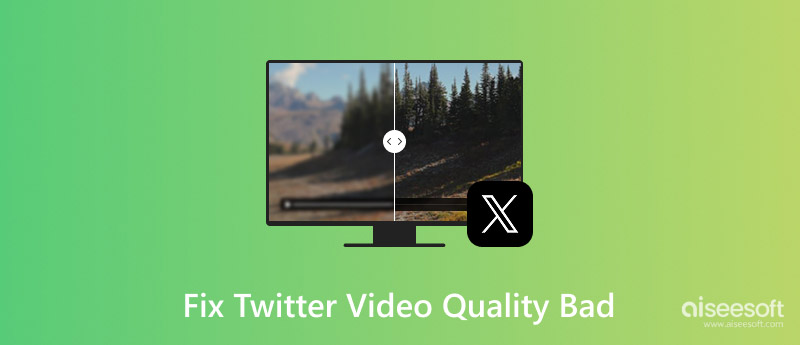
The core reason for bad video quality on Twitter/X is due to compression. Like other similar platforms, Twitter will compress all uploaded videos and images according to its algorithms. This is a necessary strategy for all social media apps and websites to save storage space, ensure a smooth streaming experience, and set appropriate standards. Twitter uses compression algorithms to shrink files down to a manageable size. The compression will inevitably cause quality loss.
Twitter’s primary goal is speed and efficiency. Compared with Facebook, Instagram, TikTok, or YouTube, it applies a much aggressive compression algorithm. Its compression algorithm is designed to shrink file sizes down as much as possible. That may easily result in a blurry, pixelated, or low-quality look.
The bad Twitter video quality problem may also be caused by the source file, poor internet speed, and other reasons. If the original video you are uploading is already of low quality or compressed, it won’t be enhanced after sharing on Twitter. When you watch Twitter videos and experience poor viewing quality, you should check your network connection.
This section shares several valuable tips for you to get a better Twitter video quality, whether as a casual viewer or an uploader.
• Adjust the Twitter Quality Settings. While watching a video on Twitter, click the settings icon and switch to the highest available resolution. Do not rely on “Auto” to control the quality for you.
• Connect to a Fast, Stable Connection.As mentioned, a poor Wi-Fi or cellular signal will lower the playing quality and lead to a bad viewing experience. Ensure your device has a strong, stable internet connection for the best quality.
• Visit the Desktop Website.If the Twitter video quality is often bad while using its mobile app on your phone, try watching on the web. You can open a browser app on your device and try requesting the desktop site.
• Upload the Highest Quality Source Possible.When you upload a video to Twitter, you should maximize your source video quality according to the platform’s requirements. Use a high resolution, bitrate, and a professional codec like H.264.
• Use the Right Video Format and Dimensions. he video you uploaded should be in a standard aspect ratio, such as 16:9 or 9:16, and at a resolution that Twitter supports natively, like 1080p. Even though the platform can handle higher resolutions, you are not advised to upload 2160p videos. The heavy compression often leads to a worse quality.
Using a dedicated AI video upscaling and enhancement tool like VidHex is an excellent strategy to improve your video quality before uploading it to Twitter. It can help counteract the platform’s inherent compression efficiently.
 100% Secure. No Ads.
100% Secure. No Ads.
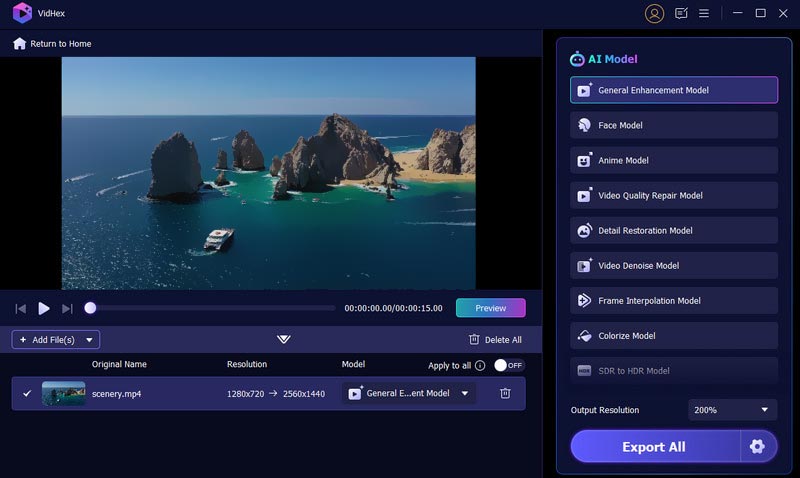
VidHex is designed precisely for different enhancement needs. It provides multiple AI models for you to increase video resolution, reduce noise, sharpen edges, improve clarity, correct colors, and more. It lets you set the output resolution, format, and others for the best-fitting Twitter uploads.
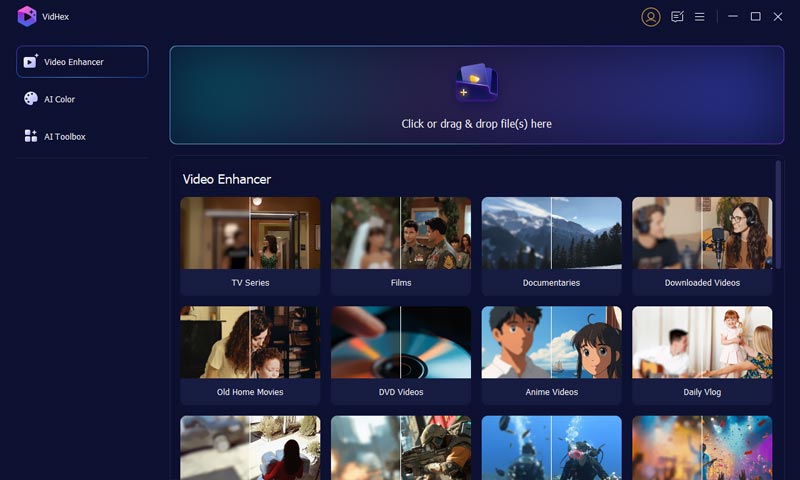
This Twitter video enhancer offers a straightforward way to improve the overall quality of your source footage. Just add the video, select a suitable AI model, apply it, preview the final result, and then export the enhanced version once satisfied.
Question 1. Why does Twitter reduce picture quality?
It can be a similar issue that Twitter reduces picture quality. This is primarily to improve loading speeds for a better user experience and save server storage space. Generally, all images and videos uploaded to Twitter/X will be compressed. Like other social platforms, Twitter has its recommended formats and sizes. For instance, you should convert PNG to JPEG. If your uploaded image is small or low-quality, it will appear blurry when expanded to fit Twitter’s display.
Question 2. What is the best resolution for Twitter videos?
When you want to upload a video to Twitter (X) and aim for high quality, you need to use a suitable resolution based on its orientation. For the highest quality, 1280 x 720 pixels (horizontal videos) and 720 x 1280 pixels (vertical videos) are the recommended standards by Twitter. The maximum frame rate should be 30 FPS or 60 FPS. Moreover, you should turn on the “High-quality uploads” in your Twitter settings to ensure your video will not be compressed more than necessary.
Question 3. Can I upload 4K videos to Twitter?
Yes, you can upload 4K videos to Twitter/X. However, this uploading capability is currently a feature limited to its Premium subscribers. For casual users, the platform maintains specific limitations on video quality and length. The maximum resolution is 1920 x 1200 pixels for free users.
Conclusion
This article has discussed the problem of Twitter video quality bad and offered several methods to resolve it. While we can’t control Twitter’s compression, we can employ strategies to ensure our videos look as good as the platform allows. Download the recommended VidHex and test if its video enhancement capabilities perfectly suit your needs.
 A Detailed Guide on How to Change Your Twitter Backgrounds
How do you change Twitter theme and background? Can I get a white background on Twitter? This post tells how to change your Twitter display on mobile and PC.
 Complete Guide on Changing Twitter Image Size Easily
Are you having trouble with the Twitter image size? Many do! So, to solve this you will need to spend a minute reading this article.
 How to Send and Manage Your Direct Message on Twitter
How to send a Direct Message on Twitter? This article gives you the through instruction to DM (Direct Message) someone on Twitter.
 Leave your comment and join our discussion
VidHex is an AI-powered video enhancer that upscales, denoises, colorizes stabilizes, and improves video quality in 1 click.
100% Secure. No Ads.
100% Secure. No Ads.

*Required field
*Please enter a valid email

