
Video Converter Ultimate
 100% Secure. No Ads.
100% Secure. No Ads.
You may often access remastered songs on music apps and websites. These remastered recordings can deliver higher sound quality. Do you know how to remaster a video?
As a casual user, you don’t need to remaster a video to a professional degree like classic film remastering. Generally, you only want to enhance its quality and increase clarity. This article will tell you how to remaster videos using AI-powered enhancers.
AI video remastering is the process of enhancing videos and improving overall quality, usually for these old, classic films and meaningful videos. The process relies on advanced AI techniques to reduce noise and grain, sharpen edges of video images, increase resolution, and optimize color and brightness. You can remaster a video to and elevate it to modern standards.
Remastering old footage is essential for better preservation. In some cases, you need to remaster videos and transform them into more suitable digital formats. Moreover, remastering enables you to adapt older content to modern viewing devices. For instance, 1080p HD and 4K resolutions are preferred by modern smart TVs and players. Remastering a video can help to create a more immersive and engaging viewing experience.
Video remastering usually covers resolution increasing, frame rate adding, color grading, noise reduction, stabilization, and other operations. You should analyze your video carefully to figure out which parts need improvement. If you don’t want to manually do these enhancements and adjust various customization options, just turn to a reputable AI video enhancer like Aiseesoft Video Converter Ultimate. It has a dedicated AI Enhancer that can automatically handle all the necessary enhancements.
100% Secure. No Ads.
100% Secure. No Ads.
For users who want professional-grade results without a steep learning curve, the software is the most recommended AI video enhancer. It provides AI models specifically trained for remastering old films and low-resolution videos.
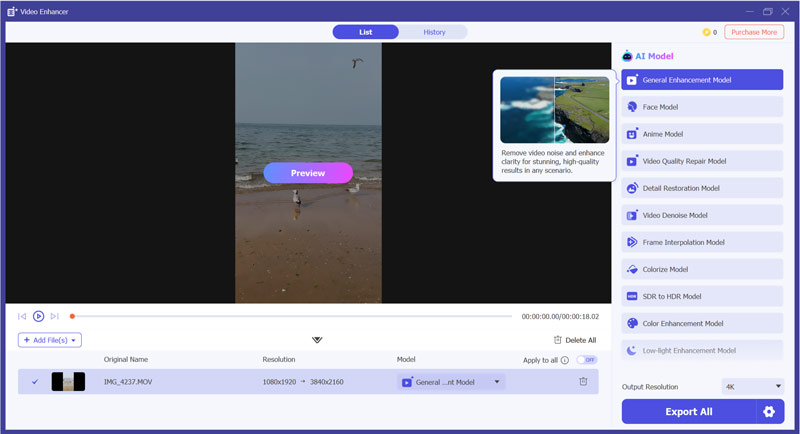
As mentioned above, the AI video enhancer offers a straightforward way to automatically complete video remastering. It uses advanced AI technology to analyze the source footage and then perform suitable enhancements. The deep-learning algorithm is trained by millions of videos to guarantee high-quality results.
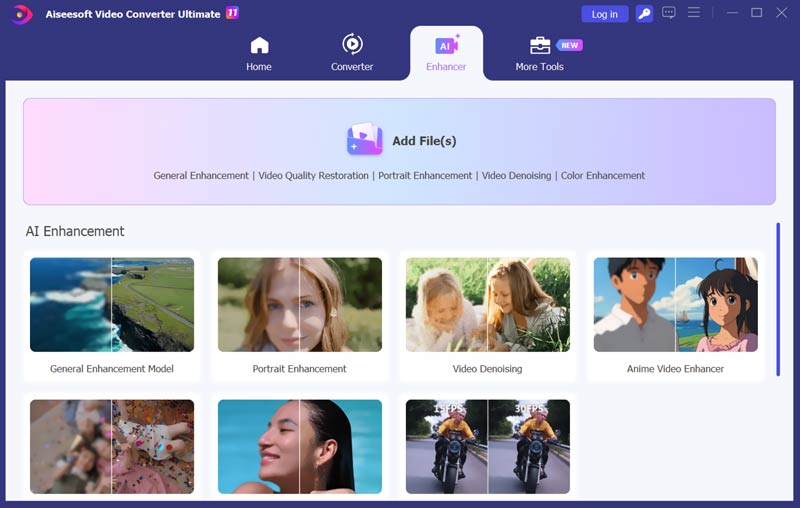
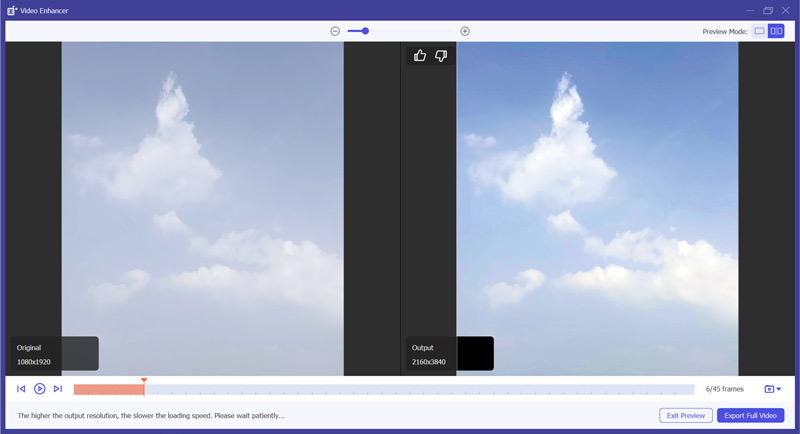
Besides the recommended Aiseesoft AI Enhancer above, there are several other options available for video remastering, including professional video editors and free online tools.
Remastering a video to 1080p HD or 4K involves upscaling the resolution and improving quality. You can use a specially designed AI video enhancer like Topaz Video AI to effectively remaster the video. It offers various AI-powered functions like upscaling, noise reduction, detail enhancement, and more to ensure your video is remastered with higher quality.
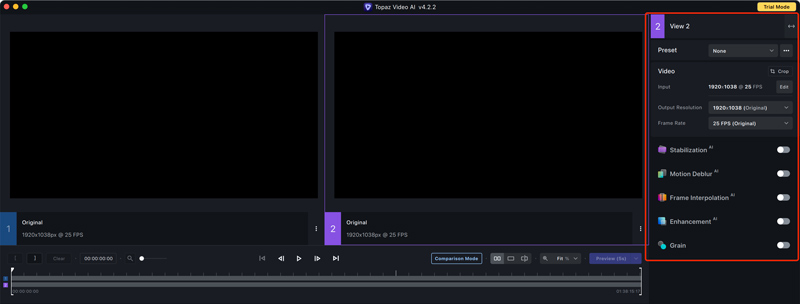
After adding your video to Topaz Video AI, you can access different options to upscale and enhance it.
Some professional-grade video editors, such as DaVinci Resolve, Adobe Premiere Pro, and Final Cut Pro, also have related enhancement functions. You can start with a free version of one and try using it for noise reduction, color correction, stabilization, and other video remastering works. A powerful computer with a good graphics card may be necessary to accelerate the remastering process.
When you search for solutions to remaster videos, you may easily get online video enhancer and upscaler recommendations.
Some popular ones include HitPaw AI Video Upscaler, Vmake AI Video Enhancer Online, Pixop One Click AI Video Remastering, Clideo, Kapwing, and Flixier. These online tools offer basic enhancement features. They are mainly used for remastering valuable video clips captured by mobile phones.
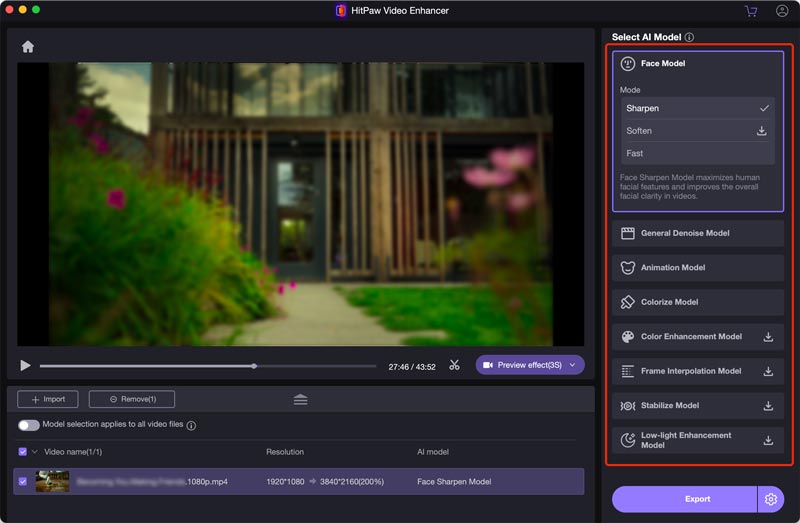
All these online video remastering tools claim to enhance quality for free. However, there are always various limitations on file size, format, features, processing time, watermark, and more. Even though free options exist, getting professional-quality video remastering results often needs specialized software or services.
What is a remastered recording?
A remastered recording often refers to a new version of an existing audio recording. The source file is remastered for better sound quality. The remastering is usually done using advanced technology to remove noise, enhance clarity, and more. A remastered recording has improved quality compared to the original song. In some cases, a remastered recording can also be an upscaled or enhanced video.
How do I remaster a 4K video?
You generally don’t need to remaster a 4K video. Instead, you can rely on a video enhancer like the recommended Filmai to upscale resolution, increase clarity, reduce noise, and adjust color to improve the overall quality. Remastering typically refers to enhancing the quality of a lower-resolution video to a higher one. For instance, you can remaster a common SD video to HD or 4K. If you already have a 4K video, you don't need to do the resolution upscaling.
What does it mean when a movie is remastered?
A remastered movie often refers to an updated version of an older film. The old movie is remastered to deliver a higher resolution, increased clarity, and better visual experience. A movie can be remastered and enhanced using modern technology. As I mentioned above, the common remastering techniques include resolution upscaling, noise reduction, color correction, audio restoration, details sharpening, and more. Generally, the remastering is performed on classic films to give them a new lease on life.
Conclusion
After reading this article, I hope you can gain a deeper understanding of video remastering. Many video enhancers can help you turn a low-resolution source into a high-quality 4K video. You can try using different tools and then select the software that best suits your remastering needs and budget. If you have more questions about how to remaster a video, you can message me in the comment section.
 How to Enhance Video Quality with 4 Different Solutions
How does Nvidia Video Super Resolution enhance streaming videos? How can I enhance video quality using AI? Read the complete guide to improving video quality.
 Top 8 AI Video Enhancers to Improve Video Quality in 2025
Here are 8 AI video enhancers with unique features, pros and cons. See how to choose the best video enhancer for you and enhance your video to a higher quality.
 Learn to Reduce Noise and Denoise Videos in Premiere Pro
Does Premiere Pro have a DeNoise function? How do you remove noise from a grainy video in Premiere? Check the guide on how to denoise videos in Premiere Pro.
 Leave your comment and join our discussion
Video Converter Ultimate is excellent video converter, editor and enhancer to convert, enhance and edit videos and music in 1000 formats and more.
100% Secure. No Ads.
100% Secure. No Ads.

*Required field
*Please enter a valid email

