
Video Converter Ultimate
 100% Secure. No Ads.
100% Secure. No Ads.
Reducing noise is a common need while editing videos. Noise can be a common issue, especially for these videos captured in low-light conditions or with high ISO settings. Removing these unwanted noises can effectively improve the overall clarity and quality of your video. This article will tell you how to denoise a video in Premiere Pro with detailed steps.

Several factors may cause unwanted noise or grain in your videos, such as low light conditions, wrong ISO settings, compression, and others. If you already have the Adobe software installed, just follow the guide below to denoise a video in Premiere Pro.
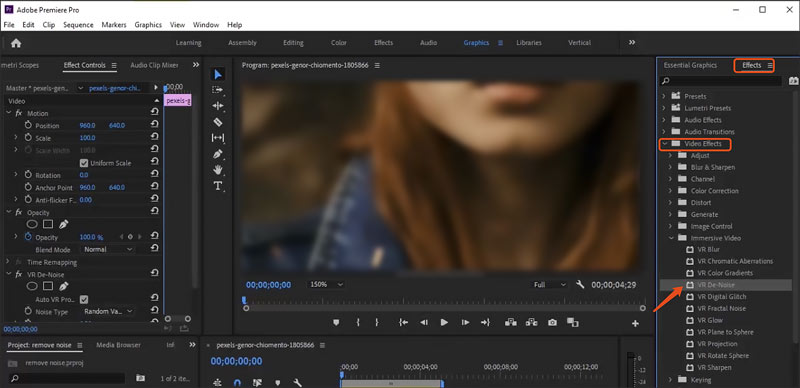
Premiere Pro does not have a specially designed noise reduction tool. However, it has a built-in VR De-Noise effect to erase annoying noise from your 3D videos. You can try applying it to common videos for noise removal.
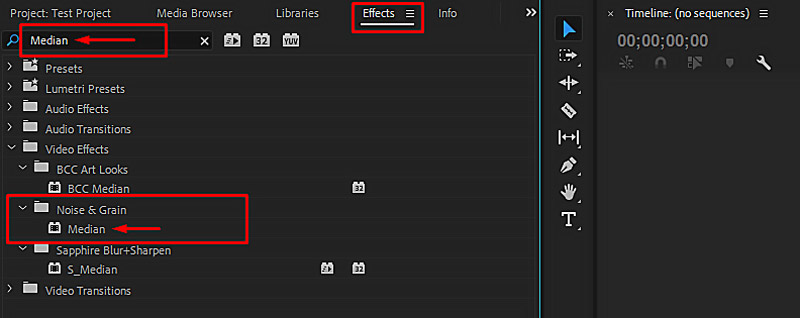
To denoise a video in Premiere Pro, you can also try using the Median effect.
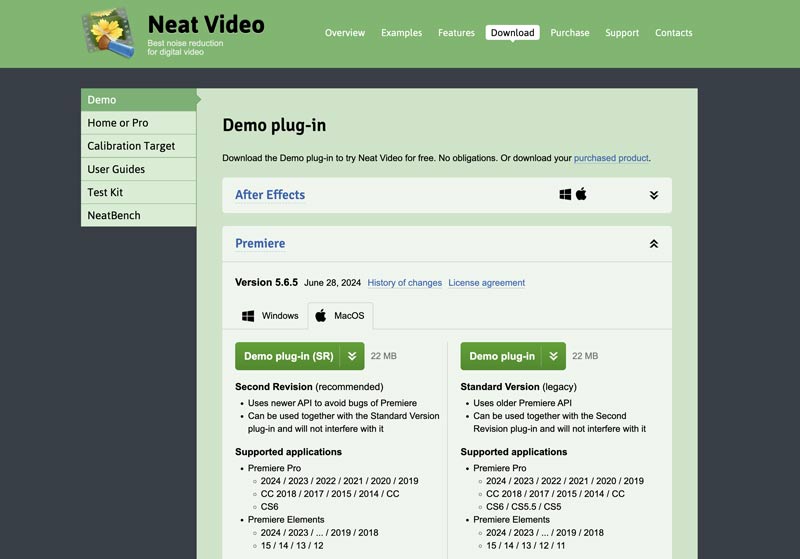
If you prefer more advanced noise reduction functions or controls, you can turn to some third-party plugins. Several helpful plugins can help you remove unwanted noise from videos while maintaining the original details. Some popular noise reduction plugins include Neat Video, Red Giant Denoiser III, and DeNoise AI.
Neat Video is a famous denoise plugin for Premiere Pro known for its high-quality noise reduction results. Moreover, it offers various customization options to better reduce noise. The Red Giant Denoiser III plugin provides several presets for dealing with various noise types. It shares a simple but effective way to remove grain and noise from your videos. Topaz DeNoise AI uses advanced AI to generate high-quality noise reduction results. You can select the desired plugin and use it to denoise videos in Premiere Pro.
Adobe Premiere Pro is not a free video editing program. Instead, it is quite expensive. If your primary goal is simply to clean up grainy footage, there are many other options offered.
Aiseesoft Video Converter Ultimate can be a great Premiere alternative for noise reduction. Its built-in AI Enhancer is specially designed to reduce background noise and grain, upscale video resolution, sharpen edges, adjust color, and improve quality. The adoption of the latest artificial intelligence guarantees the best noise reduction results.
100% Secure. No Ads.
100% Secure. No Ads.
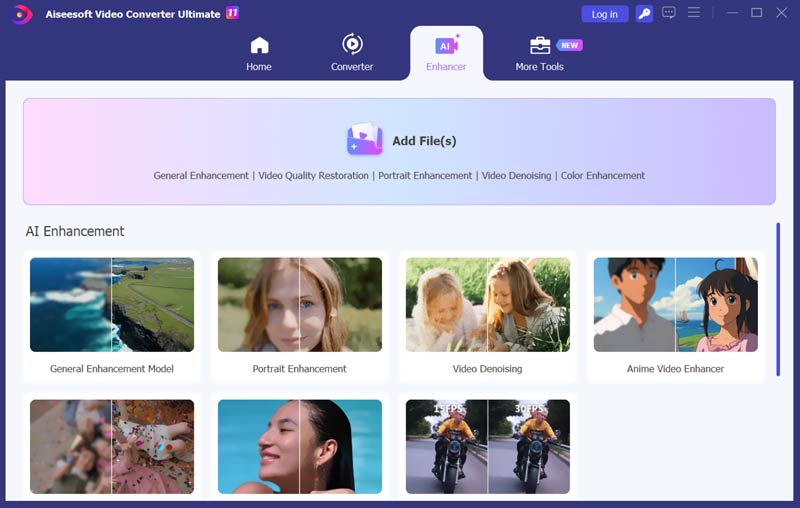
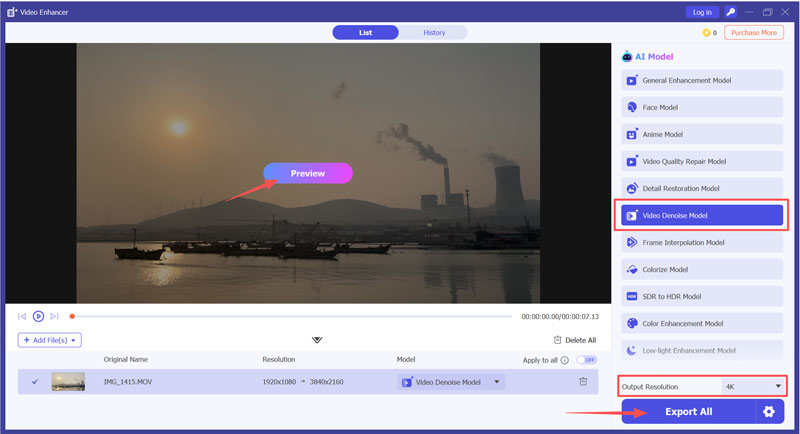
Compared to Premiere Pro, Aiseesoft VCU offers a more budget-friendly approach for users who need a simple solution for different AI video enhancements. Moreover, Aiseesoft is optimized for speed and efficiency. It does not require a powerful CPU/GPU for fast processing.
Question 1. How do I clean up a video in Premiere Pro?
Premiere Pro is an all-in-one video editing tool that carries various functions to edit videos and enhance quality. It has a specific noise reduction effect called VR De-Noise. You can apply it to easily remove noise from your video. After applying the VR De-Noise effect, Premiere Pro will clean up your video with ease. Besides, you can rely on some third-party plugins like Neat Video or DeNoise AI to make your video cleaner.
Question 2. Is there a DeNoise in Premiere Pro?
Yes, as mentioned above, Adobe Premiere Pro has a built-in denoise effect. You can access and apply the VR De-Noise effect from the Video Effects under Effects. If you are unsatisfied with the noise reduction results, you can turn to associated third-party plugins, such as Neat Video and Red Giant Noise Reduction.
Question 3. Is the Neat Video plugin for Adobe Premiere Pro free?
No, the Neat Video plugin is not free, whether for Premiere Pro, After Effects, Final Cut Pro, or other programs. It requires a purchase to access the full features. However, a free Demo edition is typically available. You are allowed to test its noise reduction capabilities before buying it.
Conclusion
This post provides a detailed guide on how to denoise a video in Premiere Pro. Again, if you already have the Adobe program on your computer, you can follow the guide above to perform the noise reduction. Otherwise, you can first try using the recommended VidHex to reduce noise and enhance quality.
 The Easiest Way to Merge MP4 Files Online for Free
How can you merge several MP4 video files online without installing? This article provides the best answer and a concrete guide to help you get what you want.
 How to Crop Video for Free in PC, iOS and Android [2024 Updated]
How to crop a video free? Read this post to get the free video croppers to crop videos on Android, iPhone, windows or Mac now.
 Best 10 Video Sound Editors for Windows/Mac/iPhone/Android Devices
Read and get your best video sound editor for Windows, Mac, iPhone, and Android. You can choose any tool to edit the audio track of your video on a desktop or mobile device with ease.
 Leave your comment and join our discussion
Video Converter Ultimate is excellent video converter, editor and enhancer to convert, enhance and edit videos and music in 1000 formats and more.
100% Secure. No Ads.
100% Secure. No Ads.

*Required field
*Please enter a valid email

