Aiseesoft Screen Recorder
 100% Secure. No Ads.
100% Secure. No Ads.
Does Snapchat notify when you screenshot a story?
Your Snapchat photos and videos will be automatically erased after being opened. This self-destruct nature is the app’s biggest innovation. Also, this is the biggest difference with other platforms like Facebook and Instagram. The unique feature also creates a strong need to save this missing content. At the beginning, many users choose to take a screenshot directly when opening a Snapchat photo.
Surely, you don’t want the dreaded “[User] took a screenshot!” to appear in the chat, or for the sender to receive a notification. How to screenshot on Snapchat without them knowing on an iPhone?
It is still possible to take screenshots without someone knowing on Snapchat. However, we have to admit that it is significantly harder than it used to be.
There is no legitimate, officially supported way to screenshot Snapchat without them knowing on an iPhone. You should know that Snapchat’s detection technology on iOS is highly advanced. The app hooks directly into Apple’s system-level APIs (Application Programming Interfaces) and standard screenshot function.
Your on-device screenshot actions (like pressing the Side button and Volume Up) will be easily tracked. iOS will instantly send a signal to the Snapchat app. Snapchat will then immediately send that alert to the person who sent the message.
There are two common ways to take a screenshot on Snapchat without people knowing. You can either operate completely outside the app and the iOS device (the Apple ecosystem) or use third-party software to capture iPhone screen content indirectly. This section will share the two methods with you.
This is the safest and most reliable way to take a screenshot of a Snap without them knowing. It can work every single time. The Snapchat app's advanced tracking or detection code only runs on your phone. It cannot track your actions outside the device. So, when you want to take a screenshot of a certain Snap, you can rely on your second device’s camera.
Ensure target Snapchat content is clearly visible. When you open the message or photo on your main iPhone, use the second device to take a picture immediately. You can also choose to record a video of the iPhone screen.
This method is completely undetectable. However, the screenshot's quality is often much lower than that of the source content. It is also inconvenient if you don’t have a suitable device readily available.
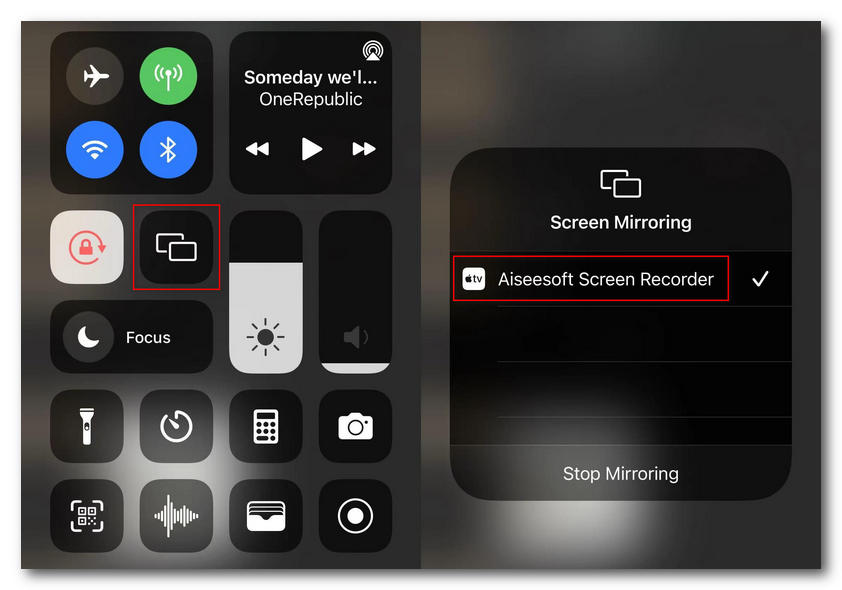
If you want a high-quality Snap capture without a notification, screen mirroring your iPhone content to a computer is a good choice. This makes your actual screenshot action off the iPhone (the Snapchat app) and moves to a separate computer.
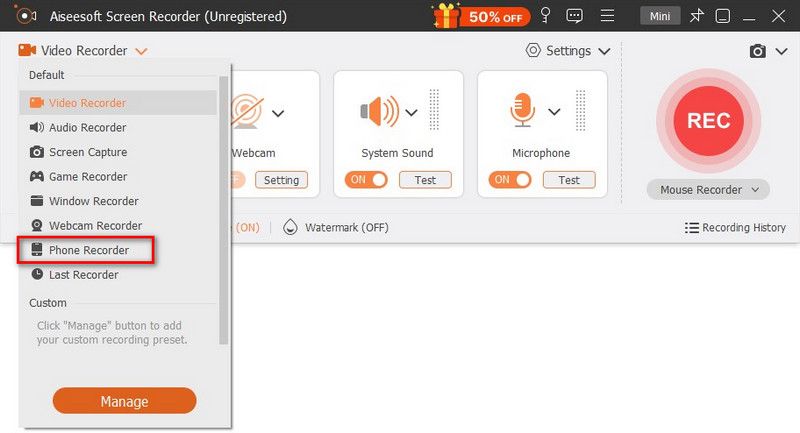
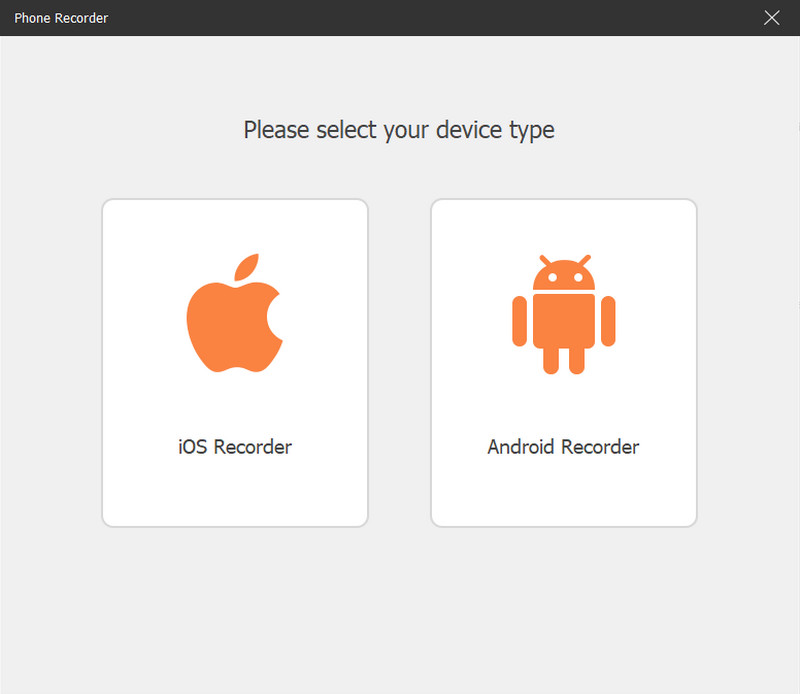
To safely mirror your iPhone screen to a computer, you can rely on the reputable Aiseesoft Screen Recorder. The software allows you to capture mirrored phone (iOS and Android) displays with ease.
100% Secure. No Ads.
100% Secure. No Ads.
Question 1. Can I screenshot on Snapchat through the Airplane Mode trick?
If you have searched for some Snapchat hacks, you may have heard of the Airplane Mode trick. When you want to screenshot a Snap, you can open it and then immediately turn on Airplane Mode. Ensure both Wi-Fi and Cellular Data of your iPhone are completely disconnected. Then, press the hotkeys to take a normal screenshot. After that, you must immediately force-quit the Snapchat app to prevent being tracked. The truth is, you cannot clear the cache on a modern iPhone. Snapchat will still notify when you screenshot. This trick is useless if you want to screenshot on Snapchat without them knowing.
Question 2. Does Snapchat notify when you screen record?
Yes. The Snapchat app can easily track your recording operation. Screen recordings on Snapchat are the same as screenshots for Snaps, Stories, and chats. Others will get an alert, prompting that your screen recorded the snap.
Question 3. Is it illegal to screenshot someone’s Snap without them knowing?
It is generally not illegal to take screenshots on Snapchat, even without them knowing. For most content on Snapchat, especially these daily messages, photos, and videos with friends, it is not illegal to screenshot. In some cases, they just don’t want you to save a copy of the content. However, if the Snap contains sensitive, private, or explicit material content, you should not save or share it.
Conclusion
It is quite understandable to save a fleeting digital moment on Snapchat. This post tells two effective methods to screenshot on Snapchat without them knowing on an iPhone. You can select a preferred way to save a Snap without triggering an alert. If you have a desktop nearby and need high-quality screenshots, turn to the recommended Aiseesoft Screen Recorder.
 The Default Method to Use Boomerang on Snapchat on iOS/Android/Web
A boomerang video has been a popular post on any social platform. Here, you can learn how to do a boomerang on Snapchat by default.
 100% Secret Ways to Save Snapchat Pictures in Original Resolution
This article talks about different ways to save pictures from Snapchat. Luckily, you can get 100% workable ways to save Snapchat pictures without them knowing here.
 Access Your Account with 4 Snapchat Password Finders
If you are having trouble remembering the Snapchat passwords, here are 4 Snapchat password finders that can help you re-access the Snapchat account.
 Leave your comment and join our discussion
Aiseesoft Screen Recorder is the best screen recording software to capture any activity like online videos, webcam calls, game on Windows/Mac.
100% Secure. No Ads.
100% Secure. No Ads.

*Required field
*Please enter a valid email

