
Best for: Beginners to video enhancers but with comparatively high video effect requirements.

Best AI Video Converter Ultimate
 100% Secure. No Ads.
100% Secure. No Ads.
Video quality plays an essential role in the impact and engagement of your content in the visually-driven digital landscape of today. The quest for bright, clean, and clear videos is no longer limited to professionals. Thankfully, there is a range of AI tools available to improve video quality in post-production. In this article, we review the top 6 online AI video enhancers and compare them against the ultimate desktop solution, Aiseesoft VidHex, to help you find the perfect balance between quality, speed, and cost.
We spent hours testing every product we reviewed, and we made a comparison chart of the main parameters for your reference:
| AI Tool | Highest Resolution | Processing Speed | Watermark (Free)? | Free Plan Limitations | Best For |
| Fotor | 1080p | Fast | Yes | Paid credits required for HD | Quick Lighting Fixes |
| Vmake | 1080p | Fast | No (Preview) | High-Res requires sub | E-commerce / Product Video |
| Clipchamp | 1080p | Fast (Local) | No | No upscaling (Only color fix) | Windows Users / Basic Edits |
| VEED.IO | 720p (Free) | Fast (Cloud) | Yes | 10 min limit / Watermarked | Business & Audio Fixes |
| Picwand | 8K | Fast | No | Limited daily credits | Anime & Mobile Upscaling |
| Canva | 1080p/4K | Medium (Cloud) | No | 4K export often requires "Pro" | Social Media Layouts |
| Aiseesoft VidHex | 4K / 8K | Ultra-Fast (GPU) | No | Free Trial | Pro Restoration & Privacy |
Best for: Beginners to video enhancers but with comparatively high video effect requirements.
You don’t need to spend time learning about specific skills or knowledge like contrast, saturation, sharpness, etc. It will process your video automatically, with a professional output video effect.
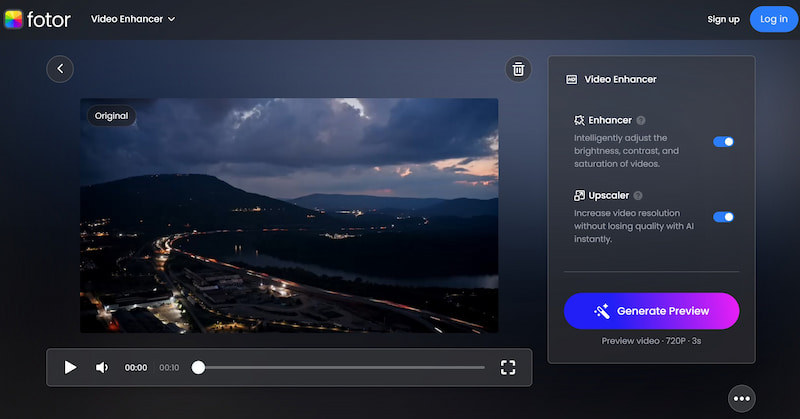
Fotor Video Enhancer is a free one-click video enhancement online. It offers its users the chance to improve the quality of their low-resolution and blurry videos without complex software. Users can combine diverse materials and make professional-looking videos with an efficient drag-and-drop system.
It contains two main parts: video enhancer and AI video upscaler. Using AI technology, Fotor's online Video Upscaler provides a simple way to increase the quality of your videos to a higher resolution. And Video Enhancer can automatically improve the brightness, sharpness, and other elements of your videos, so you don’t have to adjust the effect by yourself.
Key Features
• Upscale your videos to HD in one click.
• Enhance your video effect automatically.
PROS
CONS
Best for: Users who have low-res video but the video has no big problem with color, saturation, contrast, etc. because it won’t adjust your visual effects.
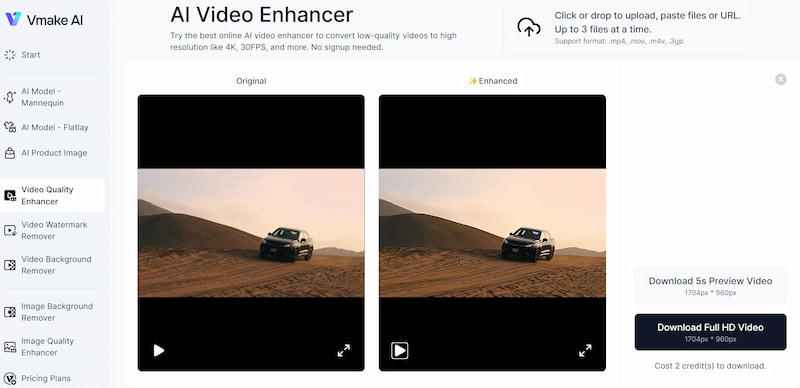
Vmake AI Video Enhancer uses powerful AI technology for significant quality improvements, especially for low-resolution videos. It offers a one-click enhancer, and users can easily import up to 3 files at one time for enhancement via a straightforward process. Actually, its enhancer is more like a video upscaler, which mainly focuses on the improvement of resolution and clarity.
Features
• Support enhancing up to 3 video files at one time.
• Automatic generation.
PROS
CONS
Best for: Enthusiasts of video editors who want to make different-style videos quickly, for example, YouTube, Instagram, and TikTok uploaders.
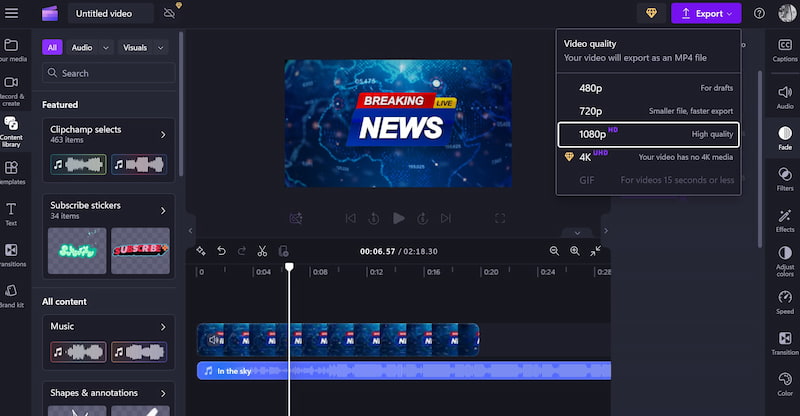
Clipchamp Video Enhancer is an attractive in-browser video enhancer to make your videos more polished. It is more like a professional online video editor, which can be seen in the following picture. It combines AI technology to improve its quality, including video enhancer. It has abundant resources for you to choose from, like videos, music, stickers, shapes and annotations, backgrounds, etc.
Features
• It has an abundant content library, templates, transitions, text styles, etc.
• It converts videos to HD and even 4K.
• Cross-platform capabilities: save to YouTube, TikTok, Dropbox, LinkedIn, OneDrive, and Google Drive.
PROS
CONS
Best for: Users need a wide range of functions but not the high-quality of their videos.
Veed Free Online Video Editor helps improve video quality using advanced AI technology. It can make outdated or low-quality video clear by upscaling resolution and adjusting parameters like brightness, contrast, saturation, speed, and more. You can import your videos from a link or drag & drop them, saving time and effort. Besides, you can edit your videos by changing transitions, compression, filters, etc. It is 80% like Clipchamp but is less professional, and the enhancing features don’t adopt AI.
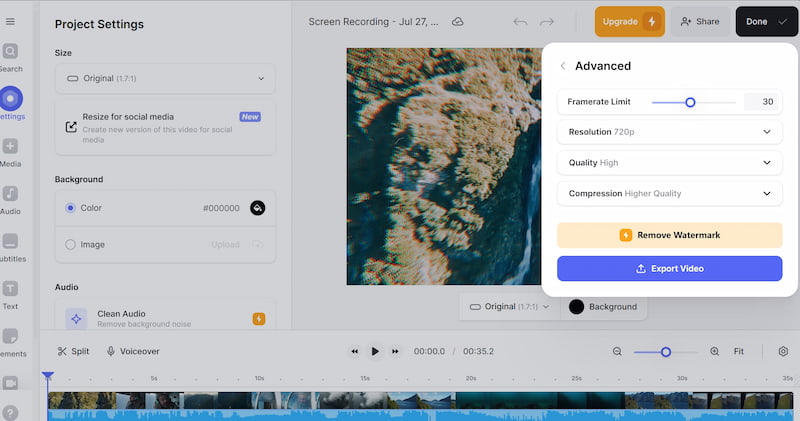
Features
• Upscale video to HD.
• Add elements and subtitles.
• Multiple platforms support: share to Facebook, Twitter, LinkedIn, Embed, and Email.
• Export files in MP4, MP3, or GIF.
• Video editor available.
PROS
CONS
Best for: Users who want professional 4K upscaling directly on their mobile device or web browser.
Picwand is a dedicated AI upscaler that specializes in breathing new life into low-resolution footage. Unlike general video editors, Picwand focuses entirely on pixel restoration, utilizing deep learning to enlarge videos by 200%, 400%, or even up to 8K without losing quality. It is particularly famous for its ability to fix blurred anime and cartoons.
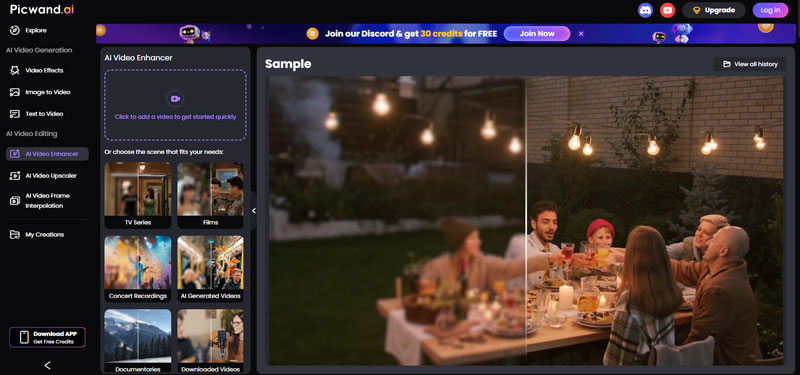
Features
• AI Resolution Upscaling: Enlarge videos to 1080p or 8K with a single click.
• Intelligent De-blurring: Automatically detects and fixes motion blur or out-of-focus shots.
• Anime Enhancer: specialized algorithm preserves the lines and colors of animated content better than standard tools.
PROS
CONS
Best for: Social media creators needing an all-in-one design and enhancement workspace.
Canva is widely known for graphic design, but its recent "Magic Media" updates have made it a contender in the AI video space. While it isn't a dedicated restoration tool, Canva offers a suite of "Video Quality Enhancer" apps and filters within its editor. It allows you to adjust brightness, saturation, and sharpness automatically while laying out your video for Instagram, TikTok, or YouTube.
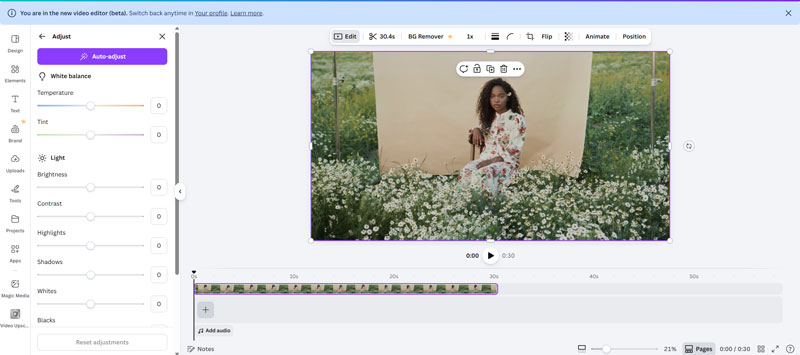
Features
• Auto-Enhance Filters: One-click adjustments for light, color, and contrast.
• App Integrations: Access third-party AI enhancement apps directly inside the Canva interface.
• Stock Library: Overlay high-quality stock footage to mask low-quality segments of your video.
PROS
CONS
Although the 4 online video enhancers mentioned above can effectively improve video quality, it is unavoidable to have some common problems. So, if you are looking for a professional AI video enhancer, we recommend you choose professional software like VidHex.
• Privacy Risks: You are uploading personal videos to a public cloud server.
• File Limits: Most reject videos larger than 500MB or longer than 5 minutes.
• Internet Dependency: A slow connection means a failed render.
VidHex is a video enhancement software. It supports upscaling all popular video formats, including MP4, MKV, WEBM, GIF, etc. With it, you can easily enhance your videos to sharper, clearer, smoother ones. Its deep AI technology enables you to change your video resolution to 2× and 4× without losing quality. For old videos with too much noise, VidHex can denoise them and offer a clear visual effect. If your videos are black and white, you can also try this tool to colorize your videos to a more vivid and colorful state.
100% Secure. No Ads.
100% Secure. No Ads.
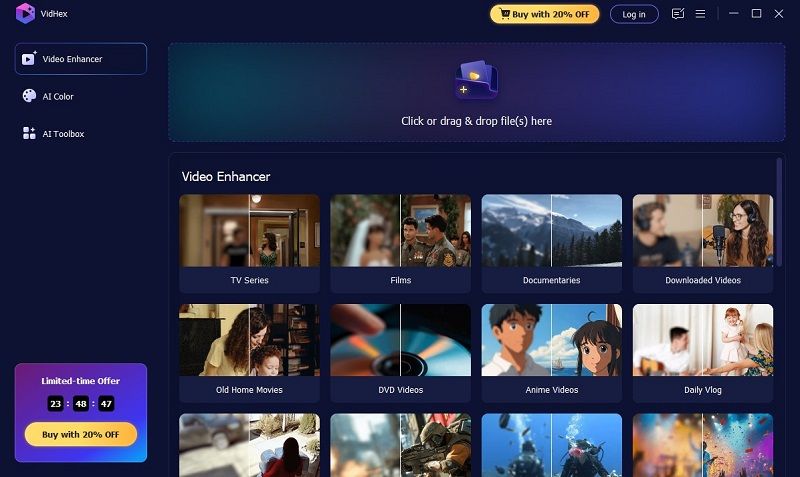
Key Features:
• 4K upscaling enhancement and enlargement.
• Various AI models to enhance and fix grainy videos.
• Reduce video noise and remove pixelation.
Is there a free AI video enhancer?
Yes, there are several free AI-powered video enhancers available online that you can use to improve the quality of your videos, such as Clipchamp Online Video Enhancer and Veed Create. It's a good idea to try out a few options to enhance your videos with AI algorithms.
How do you edit a video to make it clearer?
To edit a video and make it clearer, you can use video editing software that supports enhancement features; you can upscale low-resolution videos up to 720p, 1080p, and even 4K, which can make your files crisper and clearer. The software is Unifab Video Upscaler AI, Topaz Video Enhance AI, and Aiseesoft Filmai, for instance.
Is there a completely free AI video enhancer with no watermark?
Most "free" online tools add a watermark or limit the resolution. Clipchamp are watermark-free but lack advanced generative upscaling features. For professional restoration without watermarks, a desktop tool like Aiseesoft VidHex (free trial) is recommended.
Can I upscale 480p to 4K online?
Technically yes, but online tools often compress the output to save bandwidth, which defeats the purpose. True 4K upscaling requires significant processing power, which is best handled by desktop software utilizing your GPU.
Is it safe to use online video enhancers?
When you use an online tool, you upload your video to a remote server. While reputable sites have privacy policies, there is always a risk with sensitive content. Desktop software like VidHex processes files locally, guaranteeing 100% privacy.
Conclusion
In conclusion, with the help of AI algorithms, you can now enhance your videos online using the right tools and methods. All seven AI Video enhancers mentioned above are effective. You can weigh the benefits and drawbacks of each option to determine which is best for you. Of course, if you have no idea which one to choose to enhance your videos quickly, effectively, and effortlessly, we recommend you try Aiseesoft Video Converter Ultimate.
 Top 5 AVI to MP4 Converters for Mac, Windows PC, and Online
Should I convert AVI to MP4? How do you change an AVI file to MP4? Can VLC Media Player convert AVI to MP4? Get 5 AVI to MP4 converters to make the conversion.
 [2025] Best Review of EaseUS MobiUnlock: Unlock Anything?
Want to buy EaseUS MobiUnlock? Don’t rush yet! This in-depth review will reveal its pros, cons, and alternatives to unlocking iPhone and Android devices.
 Top 3 MP4 Metadata Editors to Edit Video Info on Mac and PC
Can VLC edit metadata on MP4 videos? How do you check and edit MP4 metadata in Windows? Get three MP4 metadata editors to edit video metadata on your Mac or PC.
 Leave your comment and join our discussion
Video Converter Ultimate is excellent video converter, editor and enhancer to convert, enhance and edit videos and music in 1000 formats and more.
100% Secure. No Ads.
100% Secure. No Ads.

*Required field
*Please enter a valid email
