
Best for: Desktop users who need an all-in-one video converter, editor, and noise remover with AI support and lossless output quality - ideal for podcasters, videographers, and content creators.

Video Converter Ultimate
 100% Secure. No Ads.
100% Secure. No Ads.
Background noise removal plays a critical role in video and audio quality. Whether you are editing a podcast, a vlog, an interview, or a lecture, unwanted ambient noise — wind, hum, buzz, hiss, or room echo — can distract listeners and ruin an otherwise great recording. While many video recorders capture decent audio, few deliver professional-grade sound straight out of the box. In this post, we share the top 5 tools to remove background noise from videos and audio on Windows, Mac, Android, and iPhone, so you can choose the best noise remover for your workflow.
Quick Answer
Quick answer: To denoise video or audio, use a dedicated background noise removal tool. On desktop, Aiseesoft Video Converter Ultimate offers one-click noise reduction through its Toolbox. On mobile, apps like Audio Video Noise Reducer and ByeNoise let you remove background noise directly on your iPhone or Android. All tools below support common formats including MP4, MP3, MOV, WAV, and FLAC.
Is it possible to remove background noise from videos and audio for free? Can you erase excess hiss, wind, and hum while enhancing your video to HD or 4K quality? Can you edit, convert, and denoise files all in one place? The answer is yes with Aiseesoft Video Converter Ultimate — the best desktop AI noise remover for Windows and Mac users who need professional audio noise reduction without a steep learning curve.
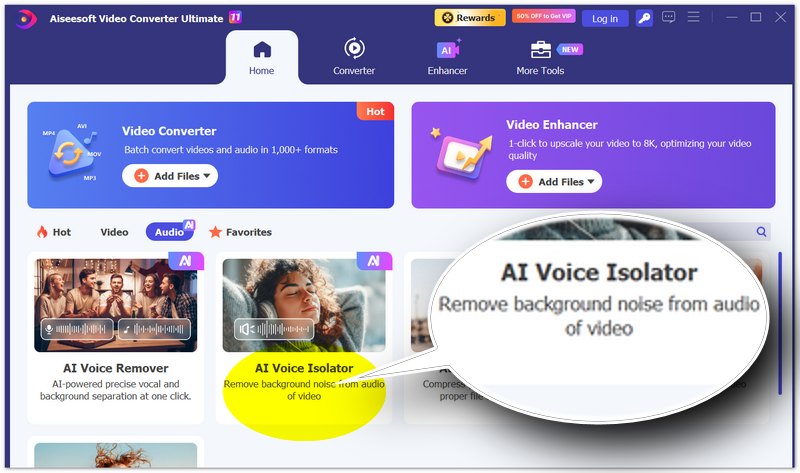
Aiseesoft Video Converter Ultimate includes a dedicated AI Voice Isolator in its Toolbox, offering the most professional yet simple way to remove background noise on your computer. You can denoise audio and video automatically or fine-tune the settings manually, all while preserving the original quality of your file. It supports over 1000 input and output formats, making it the most versatile audio noise reduction app for desktop.
Best for: Desktop users who need an all-in-one video converter, editor, and noise remover with AI support and lossless output quality - ideal for podcasters, videographers, and content creators.
100% Secure. No Ads.
100% Secure. No Ads.
OS: Windows, Mac
Features:
PROS
CONS
If you prefer to denoise video and audio directly on your phone, these four background noise removal apps cover iOS and Android. Each offers a different balance of features, price, and ease of use — from all-in-one recorders to dedicated audio denoisers. Read on to find the best noise remover app for your iPhone or Android device.
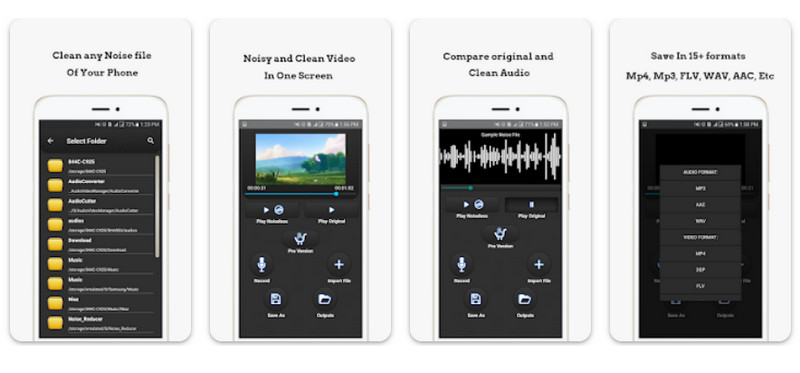
Audio Video Noise Reducer has attracted several millions of users to download and install this tool on their mobile phones. People can not only get noiseless audio and video but also utilize its bonus functions like a noiseless recorder, compressor and more.
Device: Android, iOS
Features:
PROS
CONS
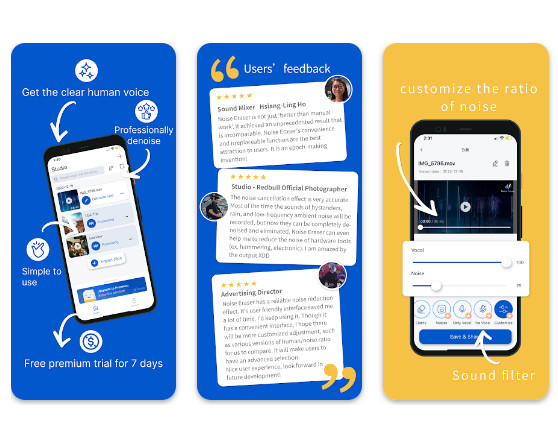
You can acquire this tool from the Google Play store and start the noise reduction easily. Unlike other noise removal apps, you can edit the file with more details on the noise ratio and vocal volume with a toggle bar.
Device: Android
Features:
PROS
CONS
If you are looking for how to remove background noise from the audio on the iPhone, then Noise Reducer is worth trying. The whole user interface is intuitive, with functional buttons and heads to noise reduction directly.
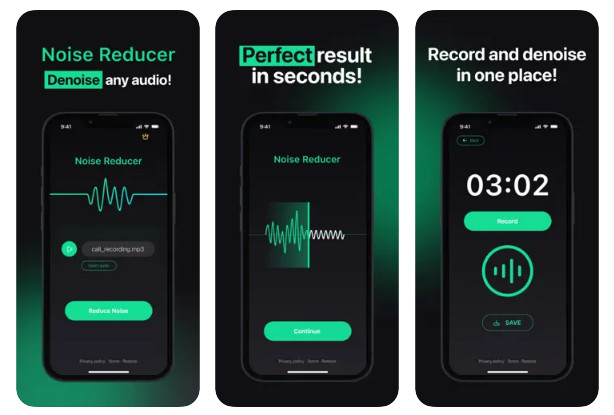
Device: iOS
Features:
PROS
CONS
iOS users can also access ByeNoise from the App Store to clean the wind, buzz, hum, ticks and more noise from the video and audio files. Through a simple tap, you can view the denoise level and enjoy a clearer video with real results.
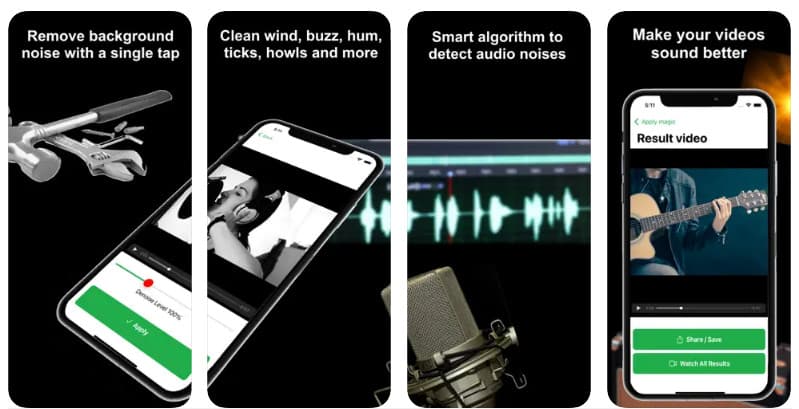
Device: iOS
Features:
PROS
CONS
How do I denoise my iPhone?
You can activate Phone Noise Cancellation to reduce ambient noise on phone calls by visiting Settings > Accessibility > Hearing > Audio/Visual on your iPhone. For denoising recorded video or audio files, use a dedicated noise remover app like Noise Reducer or ByeNoise from the App Store.
How do I remove background noise from an MP3?
Launch Aiseesoft Video Converter Ultimate, visit the Toolbox and enter Noise Remover. Upload your MP3 files by clicking the central Plus button, then enable audio noise reduction and adjust the settings as needed. You can also edit multiple audio tracks freely before exporting.
Can iMovie remove background noise?
Yes. Open the iMovie app and add your audio or video files to the timeline, then click the Noise Reduction icon in the menu bar, tick Reduce background noise, and drag the slider to adjust the strength from 0% to 100%. When you are satisfied, save your creation.
Is background noise removal free?
Many tools offer free tiers. Aiseesoft Video Converter Ultimate provides a free trial for desktop noise removal. Mobile apps like Audio Video Noise Reducer offer free basic denoising, while ByeNoise and Noise Eraser limit the free trial to short clips (around 30 seconds) and require a paid plan for longer videos or full features.
How long does it take to denoise a video or audio file?
Processing time depends on file length, resolution, and your device. A short 1-minute audio clip typically takes a few seconds on desktop and under 30 seconds on mobile. A 10-minute 1080p video may take 1 to 3 minutes on a computer and longer on a phone. Aiseesoft Video Converter Ultimate uses GPU acceleration to process files up to 30 times faster than conventional tools.
Conclusion
Based on the introductions above, you might grasp multiple ways to do background noise removal in audio and videos. Whether you are a professional, tech-savvy or beginner, you can use Aiseesoft Video Converter Ultimate on your computer to reduce background noise in videos. For mobile-first people, there are 4 apps to get rid of background noise in videos and enhance your audio quality. We hope you enjoy this post.
 The Easiest Way to Merge MP4 Files Online for Free
How can you merge several MP4 video files online without installing? This article provides the best answer and a concrete guide to help you get what you want.
 How to Crop Video for Free in PC, iOS and Android [2024 Updated]
How to crop a video free? Read this post to get the free video croppers to crop videos on Android, iPhone, windows or Mac now.
 Best 10 Video Sound Editors for Windows/Mac/iPhone/Android Devices
Read and get your best video sound editor for Windows, Mac, iPhone, and Android. You can choose any tool to edit the audio track of your video on a desktop or mobile device with ease.
 Leave your comment and join our discussion
Video Converter Ultimate is excellent video converter, editor and enhancer to convert, enhance and edit videos and music in 1000 formats and more.
100% Secure. No Ads.
100% Secure. No Ads.

*Required field
*Please enter a valid email
