
Video Converter Ultimate
 100% Secure. No Ads.
100% Secure. No Ads.
While editing and creating videos, enhancement has become an essential part. To generate high-quality visuals, you need to remove unwanted noise and grain, adjust color and brightness, stabilize the camera shake, and perform other associated operations. Cutout.Pro AI Video Enhancer is a popular online tool that can help you restore and upscale videos. This article gives you a full Cutout.Pro enhancer review. You can learn its features, pros, cons, pricing, and related information.
How We Test Cutout.Pro AI Video Enhancer
To ensure an objective review, we put Cutout.Pro AI Video Enhancer through a standardized test across four key dimensions:
When your captured, received, or downloaded videos suffer from noise, grain, blurriness, or low resolution, you can rely on an online video enhancement service like Cutout.Pro enhancer to improve quality. Cutout.Pro provides various AI-powered tools to deal with different editing tasks. Generally, all these tools are collected in four main categories, AI Removal, AI Restore, AI Generation, and AI Editing. Besides an AI Video Enhancer, Cutout.Pro also offers Photo Enhancer and Anime Enhancer.
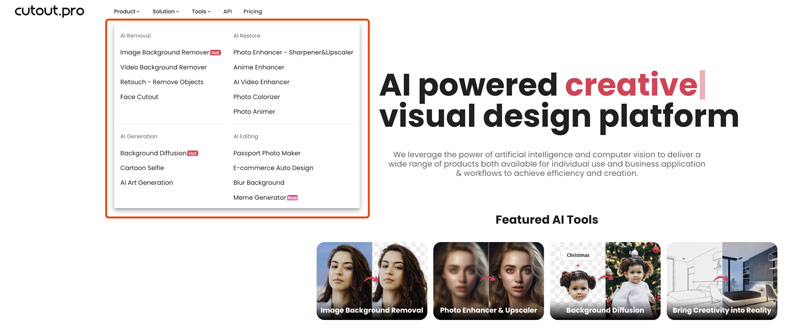
Note that the Cutout.Pro enhancer mentioned in this post refers to its AI Video Enhancer tool.
Cutout.Pro AI Video Enhancer is mainly used to enhance your video online using AI. It uses advanced artificial intelligence to automatically improve the overall quality of videos. The enhancement includes video upscaling, frame interpolation, camera shake stabilization, and deinterlacing. Cutout.Pro offers a simple way to automatically transform low-quality videos to high resolutions like 1080p HD or 2K.

Cutout.Pro enables you to access and use its AI Video Enhancer on any commonly used web browser, including Chrome, Safari, Edge, and Firefox. Actually, you can start a free trial to check if you are satisfied with the enhancement results.
The core functionality of Cutout.Pro enhancer is its upscaling function. As mentioned above, it allows you to easily turn low-resolution videos from 240p, 360p, 480p, or 720p to a higher resolution like 1080p HD, 2K, or even 4K without sacrificing quality. Moreover, Cutout.Pro can effectively remove unwanted noise and motion artifacts to clean up your videos.
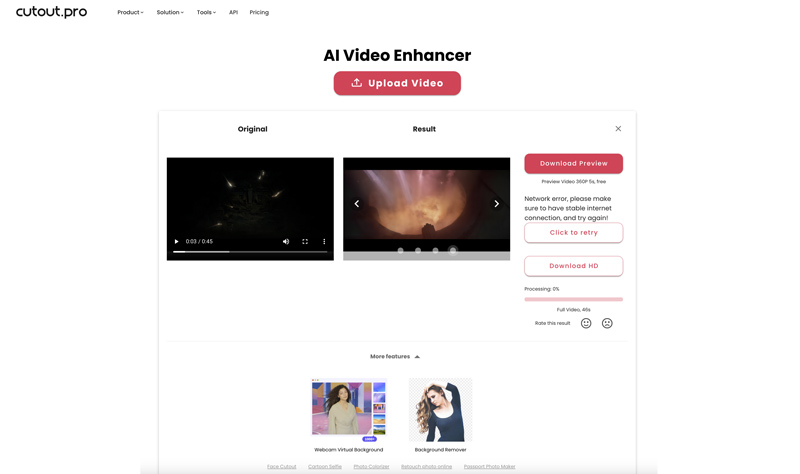
Cutout.Pro enhancer can create frames between the existing ones to make videos smoother or slow-motion effects. It can help to reduce camera shake and other shakiness in your footage. In addition, this AI-powered video enhancer can restore and fix old videos by sharpening details.
Pros
Cons
Besides the basic pros and cons, we noticed some specific limitations of Cutout.Pro during testing:
Cutout.Pro allows you to start a free trial to access basic enhancement functions. However, when you want to download the edited video in HD, you will be prompted to purchase credits. You will be taken to the specific Video Pricing page to pay related prices based on the video length.
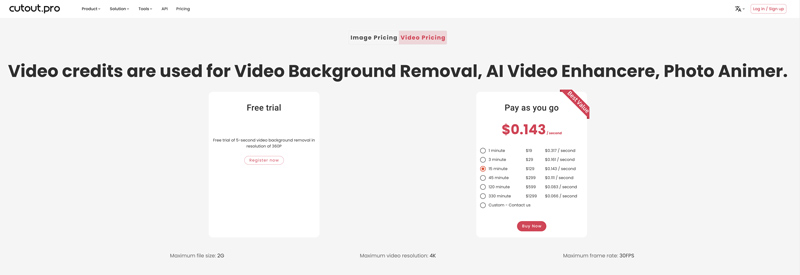
You are suggested to have a free trial of Cutout.Pro AI Video Enhancer and check if its enhancement functions suit your needs. If you don’t have enough credits to download HD videos or you are unsatisfied with its performance, try using a more powerful AI video enhancer to replace Cutout.Pro, Aiseesoft Video Converter Ultimate.
Compared with Cutout.Pro, Aiseesoft VCU uses more advanced AI algorithms to generate higher-quality results. It provides several AI models, upscaling types, and customization options to help you better control the whole enhancement. As a Cutout.Pro alternative, it gives you a solid way to increase resolution, clarity, and quality.
100% Secure. No Ads.
100% Secure. No Ads.
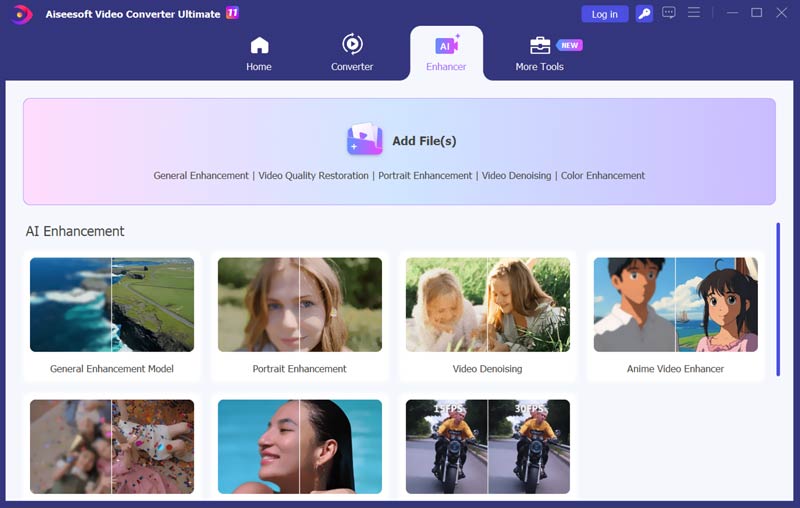
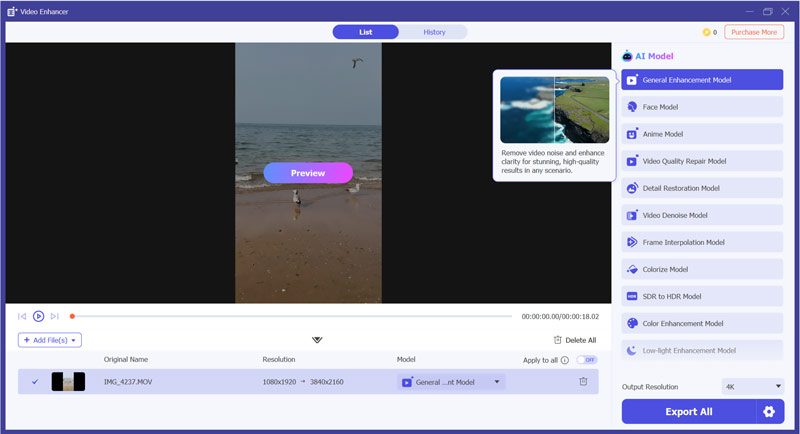
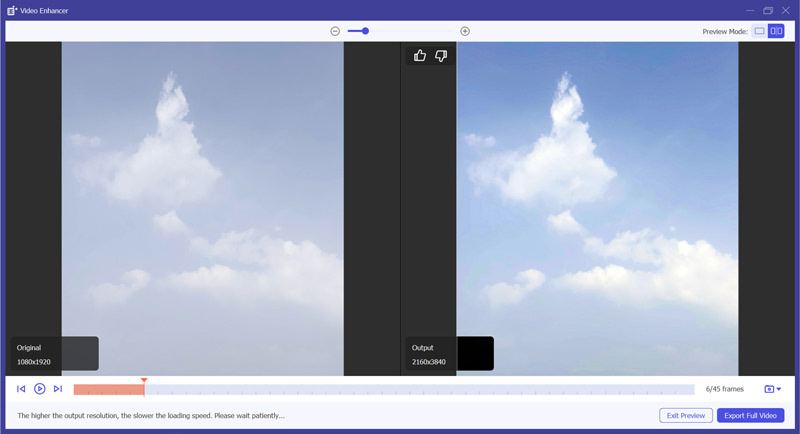
| Feature | Cutout.Pro AI Video Enhancer | Aiseesoft Video Converter Ultimate |
| Platform | Web-based (Online) | Desktop (Windows, macOS) |
| Processing Speed | Slow (Depends on file size and cloud server load) | Fast (Hardware accelerated) |
| Upscaling | Up to 4K | Up to 8K |
| Advanced Control | Minimal (Fully automatic) | High (Different models and more output settings) |
| Key Features | Upscaling, stabilization, frame interpolation | More enhancement features, color correction, noise reduction, video editing/conversion, 1000+ format support |
| File Size and Format | 2GB limit Supports MP4, MOV, WebM |
No file size limit Supports virtually all video/audio formats and codecs |
| Privacy & Safety | Lower Requires uploads to a third-party server |
High All processing can be done locally |
| Pricing Model | Credit-based | One-time purchase or subscription for a full software suite |
What formats does Cutout.Pro video enhancer export?
Cutout.Pro AI Video Enhancer provides an effective solution to improve the overall quality of your videos. It allows you to export your enhanced video in MP4 format for wide compatibility. However, if you choose to download a 5-second preview video, the edited video will be saved as a WebM file.
Can Cutout.Pro Enhancer enhances photos?
Yes, as mentioned above, Cutout.Pro offers an individual Photo Enhancer for you to improve the quality of image files using AI. The enhancer tool can increase the resolution and sharpness of your photos. Moreover, it helps you to reduce noise, optimize color, adjust light and shadow, and change saturation.
Which video format does Cutout.Pro Enhancer support?
Cutout.Pro AI Video Enhancer can edit videos in MP4, MOV, and WebM. Moreover, it lets you upload GIF files for enhancement.
Conclusion
Cutout.Pro is a popular choice for casual users who need a quick, online enhancement solution without installing software. After reading the Cutout.Pro AI Video Enhancer review, you can learn necessary information about it. Generally, you are suggested to start a free trial to test if you are satisfied with the AI tool’s performance. If you are unhappy with the file size limits, credit-based pricing, or the enhancement capability, turn to the recommended Aiseesoft VCU for a safer and faster workflow.
 Top 5 AI Tools to Colorize Your Black and White Videos
Can AI colorize videos? Is there a free AI video colorizer to turn a black and white video into color? Check the five best AI tools to colorize your videos.
 CapCut Video Upscaler Review: Can It Upscale Footage to 4K
This is a review of this Capcut Video Upscaler including its pros and cons, a guide to using CapCut for 4K videos, and an alternative tool for video upscaling.
 Learn to Reduce Noise and Denoise Videos in Premiere Pro
Does Premiere Pro have a DeNoise function? How do you remove noise from a grainy video in Premiere? Check the guide on how to denoise videos in Premiere Pro.
 Leave your comment and join our discussion
Video Converter Ultimate is excellent video converter, editor and enhancer to convert, enhance and edit videos and music in 1000 formats and more.
100% Secure. No Ads.
100% Secure. No Ads.

*Required field
*Please enter a valid email

