
Video Converter Ultimate
 100% Secure. No Ads.
100% Secure. No Ads.
We've all experienced the frustration of watching 1080p videos on a 4K screen, only to be greeted by blurry visuals. Similarly, gamers struggle with rendering 4K in AAA titles, while streamers face limitations from low bitrate settings that degrade the video quality of live streams. But what if there was a way to break through these resolution limitations?
This is where Real-time AI video upscaling comes in. Using the power of AI, it can transform low-resolution content—whether it's a 1080p video or a 720p stream—into stunning, high-definition quality. We'll explore how AI makes this possible and how you can use this technology effectively.

Traditional upscaling (like Bicubic) simply stretches pixels, often resulting in a blurry "oil painting" effect. In contrast, Real-time AI video upscaling-powered by CNNs and Transformers-acts like an artist. It "imagines" missing details by predicting textures and patterns based on millions of trained images, delivering a level of sharpness traditional methods can’t match.
The Catch: This "magic" isn't free. It requires specialized hardware like NVIDIA Tensor Cores or Intel XMX units. Before starting, ensure your GPU is modern enough to handle these AI calculations without lagging your system.
Real-time AI upscaling isn’t a one-size-fits-all solution. It works best when tailored to specific use cases. Here, we’ll break down the best tools for different types of users:
Scene A: Streaming and Watching Live (Web-based Users)
Recommended Tool: NVIDIA RTX Video Super Resolution (VSR)
If you're a fan of streaming TV shows or watching live streams, NVIDIA’s RTX Video Super Resolution is your best friend. This tool leverages the power of AI to upscale low-resolution videos on supported browsers like Chrome and Edge. It works seamlessly in the background, making your content look much sharper, without requiring any manual intervention.
Key Focus: To enable VSR, simply open your NVIDIA Control Panel and adjust the settings. Once activated, VSR works automatically on your browser, so all you need to do is sit back and enjoy the enhanced quality.
Scene B: Hardcore Gamers (Windowed/Fullscreen Gaming)
Recommended Tool: Lossless Scaling (LS1 Algorithm)
For gamers who want to upscale their content while maintaining smooth gameplay, Lossless Scaling is a great option. This tool uses a unique algorithm (LS1) to upscale game visuals in real-time without sacrificing performance. One standout feature of Lossless Scaling is Frame Generation—a technology that takes a game running at 30 FPS and ups it to 60 FPS without introducing stuttering or tearing.
Highlight: Frame Generation is particularly useful for gamers with mid-range GPUs, as it allows them to enjoy a smoother gaming experience without needing top-tier hardware. This technology is a game-changer for those who want high-quality visuals and smooth gameplay.
Scene C: Retro Games/Anime Fans (2D Animation)
Recommended Tools: Magpie or Anime4K
Anime enthusiasts and retro gamers have unique needs when it comes to video upscaling. Traditional upscaling can blur intricate line work and mess with the aesthetics of hand-drawn animation. To preserve the beauty of older games and anime, Magpie and Anime4K specialize in improving 2D visuals. These tools offer fine-tuned optimizations for line drawing and denoising, making sure your retro games and anime look crisp without losing any of their original charm.
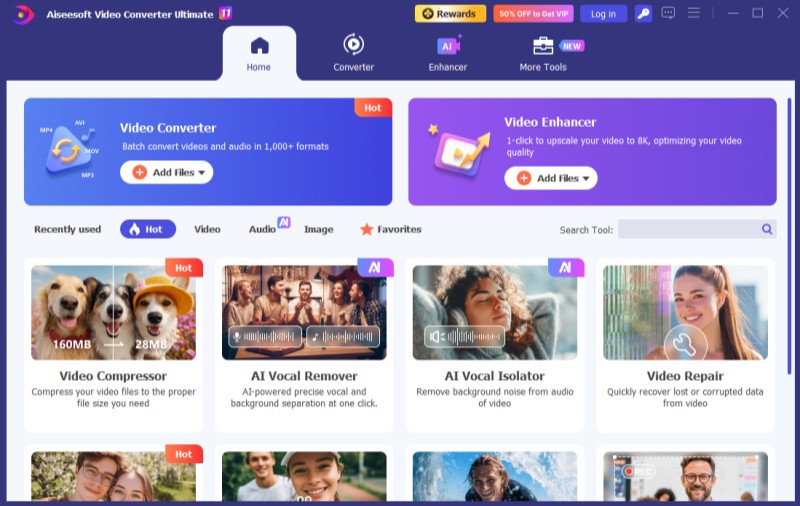
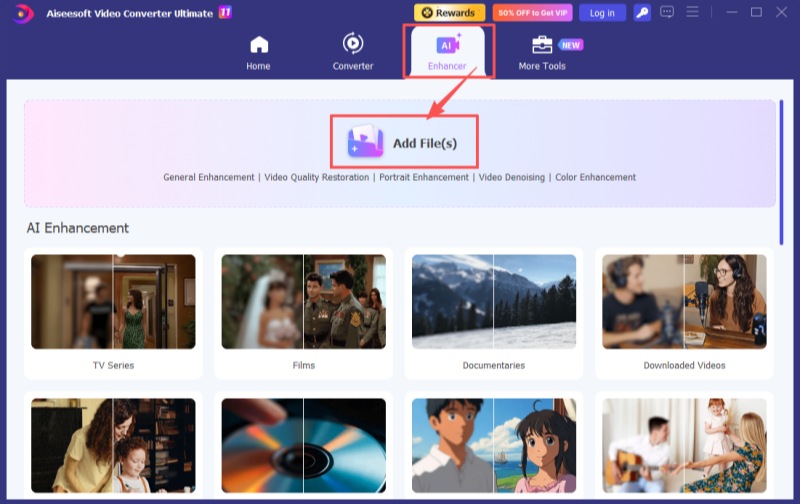
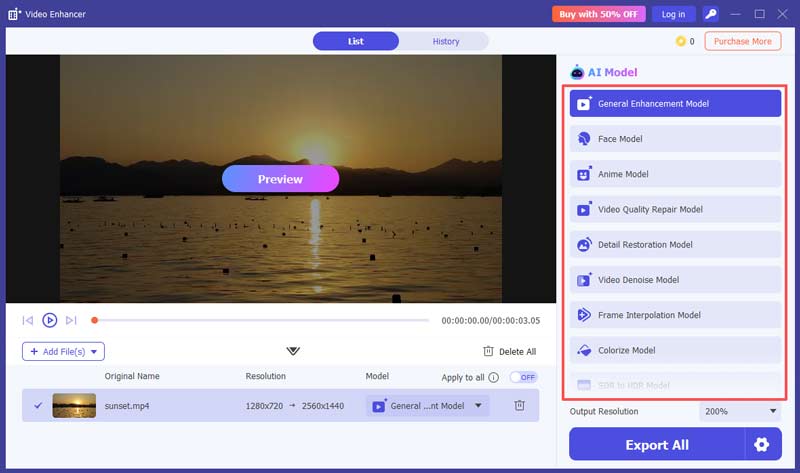
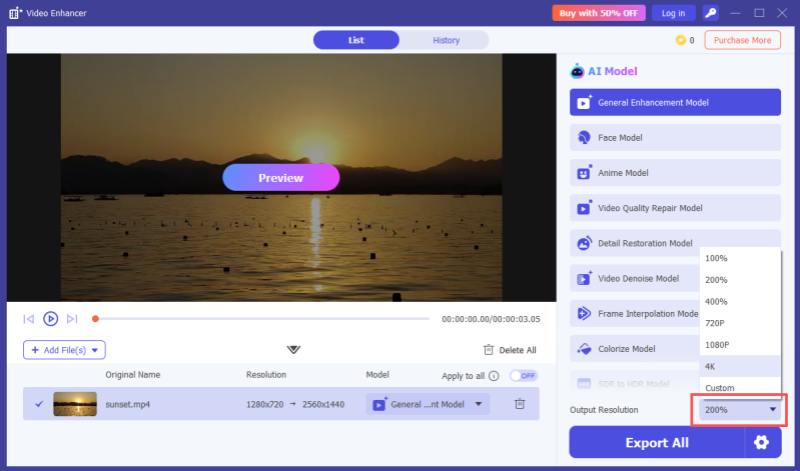
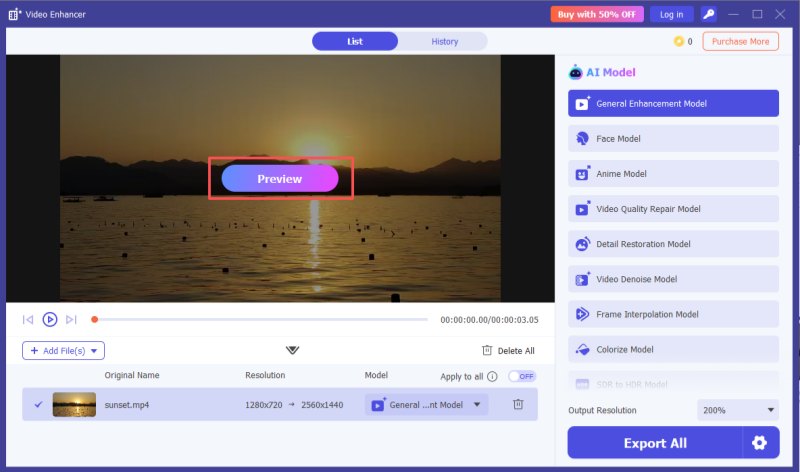
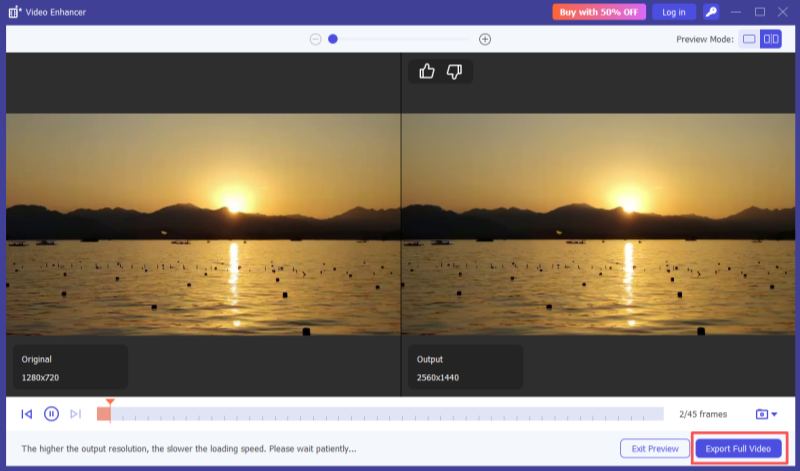
p>Reason: Both Magpie and Anime4K focus on enhancing the quality of 2D animation by reducing noise and preserving important visual details, making them perfect for fans of older media.Ordinary video upscaling is an offline process that involves exporting files and is relatively simple. We need to first import the entire video file into AI enhancement software, and only after it finishes processing can we export the HD file for viewing. However, good processing software can minimize your waiting time as much as possible. Aiseesoft Video Converter Ultimate is a video enhancement software with a processing speed that is fast enough. It can be downloaded and tried easily and free of charge.
100% Secure. No Ads.
100% Secure. No Ads.
To achieve ideal real-time enhancement effects, do I need a high-performance graphics card?
Yes, a low-performance graphics card or integrated graphics may cause stuttering and delays in the visuals.
Does Real-Time AI Video Upscaling use a lot of GPU?
Yes, GPU usage might spike from 20% to 60%, so keep an eye on the fan speed.
Why don't game streamers use 4K for live streaming?
Streamers are often capped by upload bandwidth (not just their hardware), and you can use AI upscaling to shift the burden of quality from the sender to your own powerful GPU.
Conclusion
Real-time AI video upscaling offers an exciting solution to overcoming resolution limitations, whether you're streaming, gaming, or enjoying retro media. With the right tools and a little bit of configuration, you can significantly improve your viewing experience. The key is balancing lossless quality, low latency, and compatibility with your hardware. In addition, if you want offline video upscaling, Aiseesoft Video Converter Ultimate will be a great choice.
 5 Top 4K AI Video Upscaler: Features, Pros, Cons, and More
There are 5 most frequently used 4K AI Video Upscalers. Does it fit everyone? We have everything you want to know about that. Let's check it out!
 How to Enhance Video Quality with 4 Different Solutions
How does Nvidia Video Super Resolution enhance streaming videos? How can I enhance video quality using AI? Read the complete guide to improving video quality.
 A Step-by-Step Guide to Convert Video to 4K Quality [2025]
This post has offered various methods to turn video into 4k resolution. Check our post and discover the best way to convert video and improve it to 4k quality.
 Leave your comment and join our discussion
Video Converter Ultimate is excellent video converter, editor and enhancer to convert, enhance and edit videos and music in 1000 formats and more.
100% Secure. No Ads.
100% Secure. No Ads.

*Required field
*Please enter a valid email

