 iPad Video Converter for Mac
Best iPad video converter for Mac ever - convert any Mac video to iPad supported video/audio formats including 1080p/720p H.264 Video (*.mp4), MP4 Video (*.mp4), M4V MPEG-4 Video (*.m4v), MOV, etc.
$29.00 $23.20 20% OFF
Mac OS X 10.7 or higher | Requirements
30-Day Money Back Guarantee
This should be the best iPad video tool that enables you to convert video to iPad compatible formats easily.



This Mac iPad Video Converter makes it easy to convert various videos for playback on iPad Pro/iPad Air/iPad mini and other iPad devices. It supports to convert all standard and high definition video files like AVI, MKV files to any video format supported by iPad such as 1080p/720p H.264 Video (*.mp4), M4V MPEG-4 Video (*.m4v), MOV. Meanwhile, it is also an excellent iPad audio converter, which could convert popular audio formats to iPad audio formats, such as AAC/MP3.
No need to worry about what iPad series you are using, this iPad conversion tool allows you to convert videos for iPad of all models. iPad Video Converter offers almost 100 preset profiles, such as iPad Pro H.264 HD Video (*.mp4), iPad mini 4 H.264 720p Video (*.mp4), iPad Air 2 MPEG4 Video (*.mp4), iPad 4 H.264 HD Video (*.mp4), etc. These profiles cover all iPad models on the market, including the latest iPad Pro. In fact, not just iPad, you can also convert videos for iPhone/iPod with this Mac video converter.
This iPad Video Converter for Mac allows users to choose audio track and subtitle as you like. With this converter for iPad, you can customize your video however you like. Cut the unwanted video segment off, remove the letterbox from video clips, adjust the aspect ratio, add a text/image watermark and adjust video brightness, contrast, saturation, hue and the output volume to personalize video. You could also upscale resolution, remove video noise and more to enhance your video files.
With advanced technology, Aiseesoft iPad Video Converter for Mac delivers the unmatched performance on converting videos to iPad playable video files with super fast conversion speed and perfect image quality. The intuitive interface makes all the operations very easy. You can convert videos to iPad with only a few clicks.

Preview before conversion
Preview the video effect before the conversion.
Take snapshot with one click
One click under preview window, you can save the screenshot.
Define the output parameters
Adjust output parameters like video encoder, frame rate, etc.
Batch convert videos
Convert multiple videos simultaneously.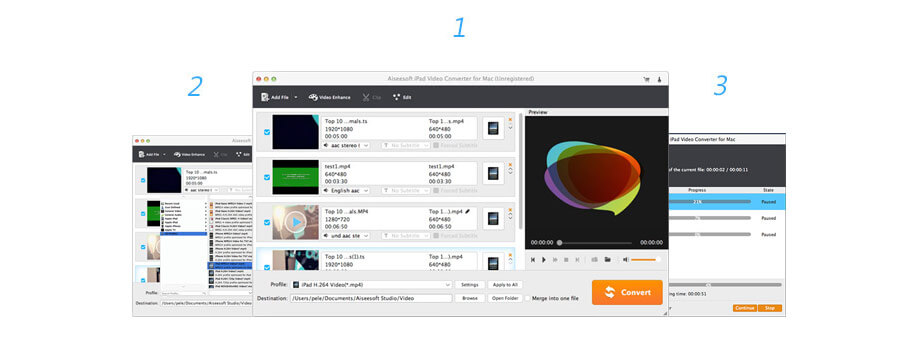
Lifetime License
$29.00$23.20
Use it Lifetime
Use it on 1 Mac
30-Day Money Back Guarantee
Check what famous editor and our customer talk about our product.


Nice software. It allows to edit the video files before the conversion process. The converted video files can be played well on my iPad. Thanks Aiseesoft!!!
By Lisa
A friend recommended this software to me. I tried to convert an AVI video to play on my iPad mini 4, and it worked well. The converting speed and video quality are all very impressive. Thanks to my friend!!
By Milly
It's hard to find an iPad video converter for Mac, especially one that supports the latest Mac OS X 10.11 El Capitan. Fortunately, this converting tool works perfectly. It provides all kinds of profiles, which I think would satisfy everyone's need.
By Rogers
The simplest video converter ever! The interface is so intuitive that even you don't know anything about converting videos, you can learn it quickly. Basically, you don't need to dig into anything, with only a few clicks, the conversion is done
By Leo
I use it to convert video for my iPad pro. All editing features are very useful, like rotating, cropping, 3D. Thanks a lot.
By Blade
It is a great and useful iPad Video Converter for Mac. Then interface is very user-friendly. And the output file is very satisfying.
By Jerry
You would prefer this iPad Video Converter for Mac. I used it to convert various videos for my iPad mini.
By Zita
So great. This iPad VIdeo Converter has many editing functions. This tool is very easy to use.
By Mike
Video Converter Ultimate for Mac
Multi-media helper to convert, edit and enhance video and audio file in one click.
BUY NOWBUY NOW
Rotate, clip, crop, watermark and convert video and audio files on your Mac and Windows.
BUY NOWBUY NOW
Play Blu-ray disc/folder and DVD disc/folder/ISO file and common media files and videos smoothly.
BUY NOWBUY NOW
*Required field
*Please enter a valid email

