 Mac PDF to Image Converter
Mac PDF to Image Converter is the professional PDF to image converting software which can convert PDF to JPEG, PNG, GIF, BMP, TGA, PPM, TIFF and JPEG 2000 with high output quality and fast speed.
$25.00 $20.00 20% OFF
Mac OS X 10.7 or higher
30-Day Money Back Guarantee



How to convert PDF to JPG? Use this Mac PDF to Image Converter. It supports converting PDF to JPEG on Mac freely, so you can regard this PDF file converter as a PDF to JPEG converter. Moreover, there are various image formats are supported, including PNG, GIF, BMP, TGA, PPM, JPEG2000 and TIFF. Then users could easily enjoy the output image with popular image viewers and portable devices.
If you have the PDF file composed of lots of pages, and you just want to convert a few pages. How can you do that? With this PDF to image Mac version, users can export any part of the source PDF file by choosing specific pages, and save them as JPG/PNG/GIF and more on Mac. Of course, you can convert a PDF to image as you like. Also this app supports batch conversion. It enables users to convert several PDF files with only one conversion.
This amazing Mac PDF to Image Converter also enables users to modify output settings. You can set Pixel and DPI size, or image color for all output images, and choose "multi-page" option for the GIF and TIFF formats. Even you can set quality for JPEG format and compression for TIFF format.
Sometimes, people like pictures more than PDF files, so they want to turn PDF into images for editing the pictures on image editors. For example, users can convert PDF to TIFF for editing the TIFF image file on Adobe Photoshop CS/CC or GIMP. With this PDF to picture converting app, Mac users can editing converted JPEG/PNG/GIF/JPEG2000/BMP/TIFF file on Adobe Photoshop CS/CC, GIMP, Affinity Photo, Sketch, Pixlr.com, etc.

Lossless converting quality
The converted images have high quality for you to edit them with image editing software.
Convert multi-PDF files at the same time
With this program, you can change multi-PDF files simultaneously to save your time.
Preview before converting
In the right window of the main interface, you can preview the file effects as you need.
Easy and safe to use
You can convert PDF to image on Mac with this Mac PDF Converter easily and safely.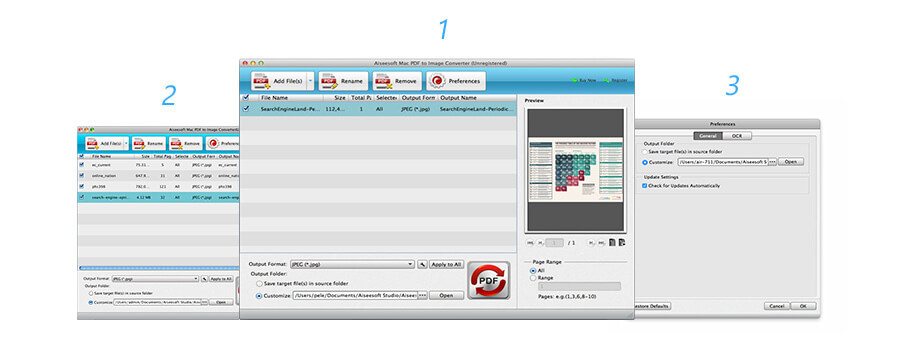 Step 1. Launch Mac PDF to Image Converter and click "Add File" to upload the PDF files you want to convert.
Lifetime License
$25.00$20.00
Use it Lifetime
Use it on 1 Mac
30-Day Money Back Guarantee
Check what famous editor and our customer talk about our product.


I haven't found anything bad for a while. This Mac PDF to Image Converter can help me convert all my PDF files to images fast. And the output image quality is great. I strongly recommend this product.
From Stefan
This PDF software is genius. I love it and all its great features. I use it to convert my PDF to PNG, and then import the output images to my iPhone for enjoyment. All I do is click a couple buttons and sit back and let it do all the work.
By Jordan
I want to convert a PDF to a JPEG. This software helped me do this. I am looking for a while for this kind of converter. Try it if you have the same situation with me.
By Mary
I want a free PDF converter, but since I use this PDF to Image Converter, I can save my PDF to JPG image file more conveniently. I think it is better than free ones. But if you want to convert PDF to word, just try another way.
By Leonado
This is a fast, free and efficient PDF to PNG converter to convert PDF files to PNG or reformat PNG Images to PDF in a few seconds.
Try Now
Multi-media helper to convert, edit and enhance video and audio file in one click.
BUY NOW BUY NOW
Convert PDF files to Text, Word, Excel, ePub, and HTML and image files with high speed and accuracy.
BUY NOW BUY NOW
Congratulations!
You have successfully subscribed to our newsletter. The exclusive 40% off for subscribers is AISEFOKS . Now, you can copy it and use it to enjoy more benefits!
Copied successfully!
*Required field
*Please enter a valid email


