Quick Answer: How Do You Play a DVD on a Chromebook?
There is no native support for playing DVDs on a Chromebook. The devices have no optical drive, and Chrome OS doesn’t contain any DVD decoders. Therefore, the only reliable way to play a DVD on Chromebook is to rip DVD to MP4 or play with and external DVD drive and DVD player.
Want to play DVD on Chromebook? Have you encountered problems? However, there is no optical disks in your Chromebook. No need to worry about that. We have solved this problem for you.
With DVD Drive and DVD players, it is much easier to play DVD on your Chromebook.
Next, we will introduce 2 methods to play DVD on Chromebook.
The short answer is No. You cannot play CD or DVD videos on a Chromebook directly, for two reasons:
1. No DVD drive: most Chromebooks do not include a DVD/CD drive, and ChromeOS does not support reading optical discs even when one is connected via USB.
2. No DVD codecs: The Chrome OS doesn't support with DVD codecs. Codecs are used to encode or decode a digital data stream or signal. Chrome OS system has many limitations. Only a few video or audio formats are accepted. It supports video formats like MP4, MOV, AVI, 3GP, WEBM, OGV, etc. and audio formats like MP3, AAC, AMR-NB, etc.
Since Chromebook cannot read DVD, the easiest and most reliable way is to convert the DVD to a general format like MP4. If you want a lossless conversion. Try Aiseesoft Video Converter Ultimate. It makes the conversion simple with few steps. Besides, it lets you convert video to any format with high quality including the MP4, WEBM and MOV profiles that Chromebooks play natively.
 100% Secure. No Ads.
100% Secure. No Ads.
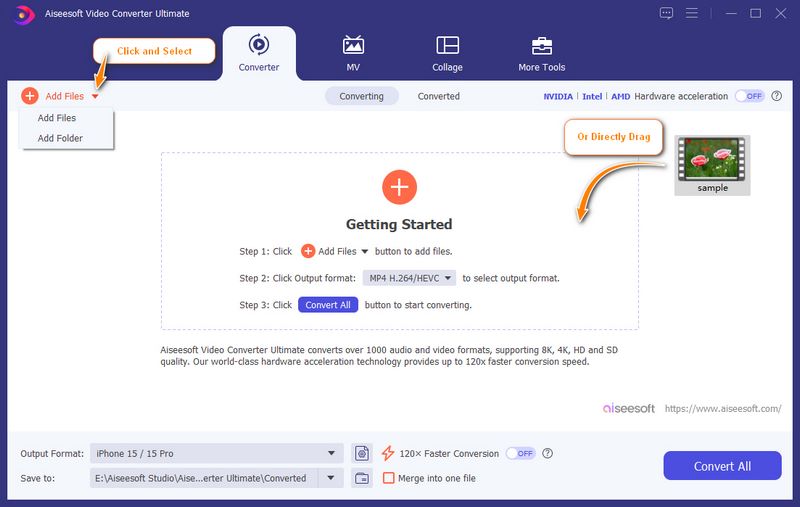
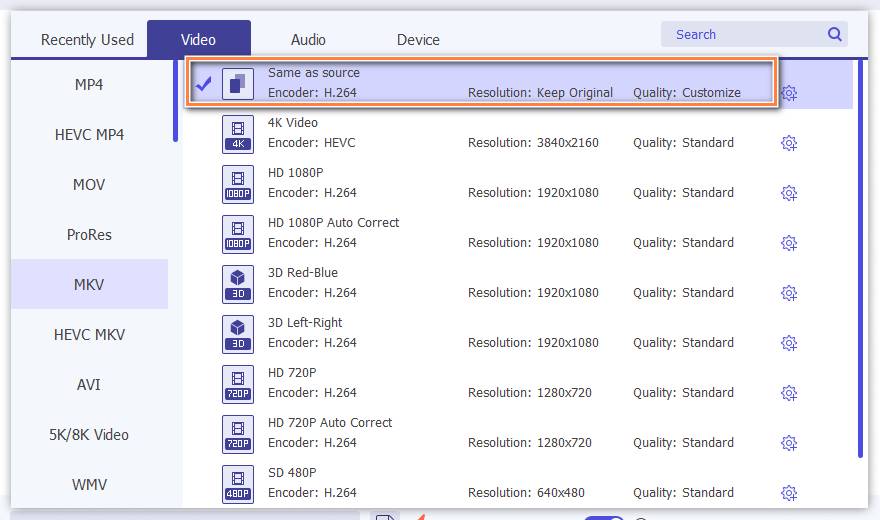
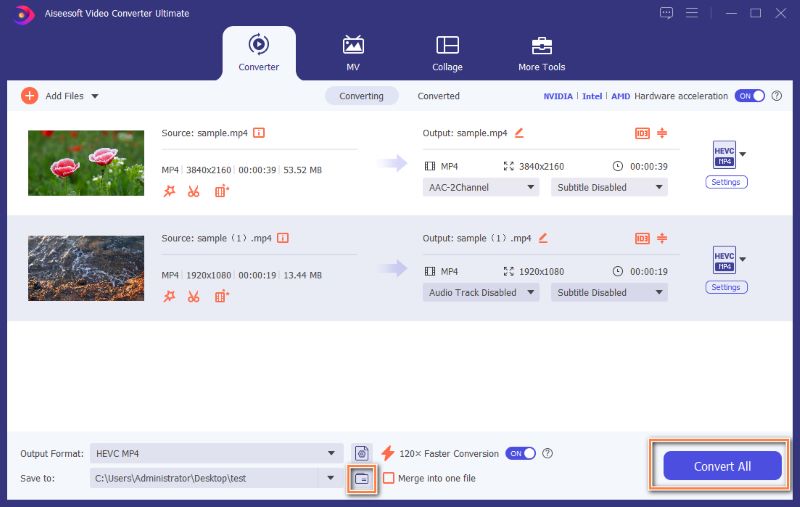
There is also a more direct way to play DVD but it take more physical steps and success depends on hardware compatibility and the DVD's encryption.
Can a Chromebook play DVDs with an external DVD drive?
Not directly. ChromeOS play DVD discs even through a USB drive because the native player doesn’t support DVD codecs. You need to install VLC Media or other DVD players.
Do I need to install Windows on my Chromebook to play DVDs?
No. Installing Windows is too complicated and risky for non-tech users. You can convert the DVD to MP4 or play with and external DVD drive and VLC.
Is there a free DVD player app for Chromebook?
VLC for ChromeOS is free and plays DVD ISO/folder files and most video formats.
Conclusion
Playing a DVD on a Chromebook is practical with the two methods above: convert the disc to MP4 on any computer or play with an external DVD drive and free VLC Media Player. These 2 methods are faster, safer, and free. Pick one and enjoy your movie.
 3 Ways to Play DVD on Mac with/without DVD Drive
How to play DVD on Mac? Here are 3 ways to play DVD with DVD drive, external DVD drive, DVD player, etc. on MacBook (Air/Pro), Mac Pro/mini, iMac (Pro), etc.
 How to Play DVD on Xbox 360
Can Xbox 360 play Blu-ray? Want to know how to play DVD on Xbox 360? You can learn how to play DVD on Xbox 360 in this post.
 How to Record Audio Video on Chromebook with Best 10 Recorder
How to record video and audio on Chromebook? This page collects the best 10 screencast tools (online and plug-in) to help you save screen video and audio to your Chromebook.
 Leave your comment and join our discussion
Video Converter Ultimate is excellent video converter, editor and enhancer to convert, enhance and edit videos and music in 1000 formats and more.
100% Secure. No Ads.
100% Secure. No Ads.

*Required field
*Please enter a valid email

