
Video Converter Ultimate
 100% Secure. No Ads.
100% Secure. No Ads.
FLAC is a lossless audio format that reduces file size without sacrificing audio data. It is smaller than uncompressed WAV or AIFF while preserving the original audio information exactly. But what is a FLAC file, and how does it compare with MP3, WAV, AIFF, and ALAC? Can you play FLAC on Windows, Mac, iPhone, or Android? And what should you do if your device or music app doesn't support it? This guide explains what FLAC is, how lossless compression works, where you can play FLAC files, and when you should convert them to another format.
FLAC stands for Free Lossless Audio Codec. It is an open-source audio codec that uses lossless compression to reduce file size without permanently removing audio data.
Unlike lossy formats such as MP3, FLAC preserves the original audio information. When a FLAC file is decoded, the original PCM audio data can be reconstructed bit-for-bit.
FLAC is commonly used for CD-quality music, but it can also store high-resolution audio, including 24-bit/192 kHz recordings.
A FLAC file can also contain:
The exact file size depends on the recording, but FLAC files are generally much smaller than equivalent uncompressed WAV or AIFF files.
Yes. FLAC is a lossless audio format.
Converting a CD-quality recording or uncompressed WAV file to FLAC does not remove audio information. When decoded, the FLAC file reproduces the original PCM data exactly.
However, FLAC does not improve audio quality. If the source recording is already low quality, converting it to FLAC will not make it sound better. FLAC preserves the quality of the source rather than restoring information that is already missing.
FLAC, MP3, WAV, AIFF, and ALAC differ mainly in compression, audio quality, file size, compatibility, and typical use cases.
| Feature | FLAC | MP3 | WAV | AIFF | ALAC |
| Compression | Lossless | Lossy | None | None | Lossless |
| Audio data | Fully preserved | Some data removed | Fully preserved | Fully preserved | Fully preserved |
| File size | Smaller | Smallest | Largest | Largest | Smaller |
| Audio quality | Lossless | Depends on bitrate | Lossless | Lossless | Lossless |
| Metadata support | Excellent | Good | Varies | Good | Good |
| Compatibility | Broad | Excellent | Excellent | Broad | Best in Apple ecosystem |
| Best for | Archiving & playback | Portable listening | Recording & editing | Pro audio & Apple workflows | Apple music libraries |
FLAC vs. MP3: FLAC is better for preserving audio quality, while MP3 is better when file size and compatibility matter most. FLAC uses lossless compression, whereas MP3 permanently removes some audio information to achieve much smaller files. Choose FLAC for music archiving and Hi-Fi listening. Choose MP3 for portable listening, limited storage, or older playback devices.
FLAC vs. WAV and AIFF: WAV and AIFF are generally uncompressed, so they require more storage than FLAC while preserving the same audio data. They are commonly used for recording, editing, and professional audio production. Choose FLAC for efficient lossless storage and WAV or AIFF when your recording or production workflow specifically requires them.
FLAC vs. ALAC: FLAC and ALAC are both lossless and compressed formats. The main difference is ecosystem compatibility. FLAC is more broadly used across platforms, while ALAC is particularly convenient for Apple's ecosystem. If you mainly manage your music through Apple devices and apps, ALAC may be the easier choice.
FLAC playback is widely supported today, but the experience varies depending on the operating system, app, and device.
| Platform | FLAC Playback | Notes |
| Windows | Yes | Many FLAC players support FLAC |
| Mac | Yes | Compatible third-party players can play FLAC |
| iPhone/iPad | Yes | Compatible apps can play FLAC |
| Android | Yes | Support varies by device and music app |
| Apple music library workflows | Limited | ALAC is often more convenient |
If your preferred music app cannot open a FLAC file, you can install a compatible FLAC player or convert FLAC to MP3, ALAC, WAV, or another supported format.
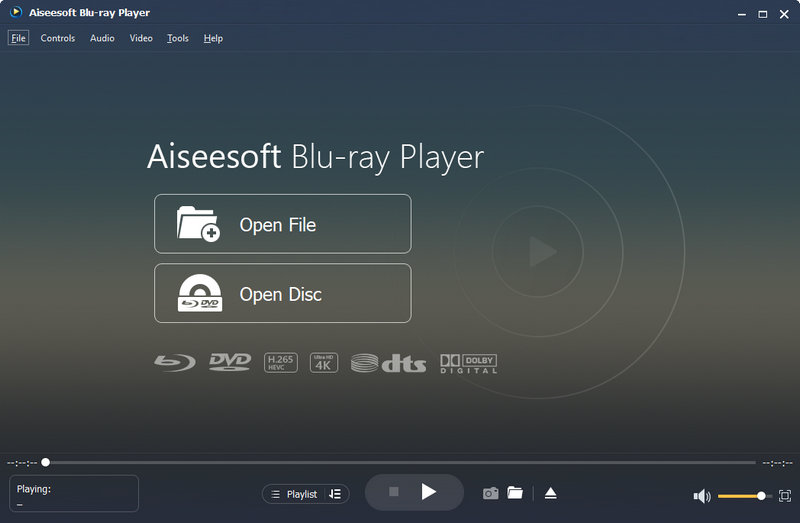
Aiseesoft Blu-ray Player is a versatile media player for Windows and Mac that lets you play FLAC and other popular audio and video formats. It offers a simple interface while providing high-quality playback, making it a convenient choice if you want one player for both music and video.
Downloads
100% Secure. No Ads.
100% Secure. No Ads.
Yes, but the two conversion directions serve different purposes.
Converting FLAC to MP3 is useful when you want to reduce file size, save storage space, transfer music to devices with limited storage, improve compatibility with older players or car stereos, or create smaller files for portable listening. The resulting MP3 uses lossy compression, so some audio information will be removed. This is usually an acceptable trade-off when smaller file sizes and broader compatibility are more important than preserving lossless audio quality.
You can convert MP3 to FLAC, but this does not restore lost audio quality. When an MP3 is created, some audio information is permanently discarded. Converting that MP3 to FLAC only stores the existing audio data in a lossless container. It cannot recover information that was removed during the original MP3 encoding. For the best results, keep your original FLAC files as your lossless copies and create MP3 versions when you need smaller files.
If you need to convert multiple FLAC files, a desktop audio converter can be more convenient than processing them individually. Aiseesoft Video Converter Ultimate supports audio and video conversion to 1000+ formats and can batch-convert FLAC files for different playback, storage, and editing needs.
100% Secure. No Ads.
100% Secure. No Ads.
Here's how to convert FLAC files:
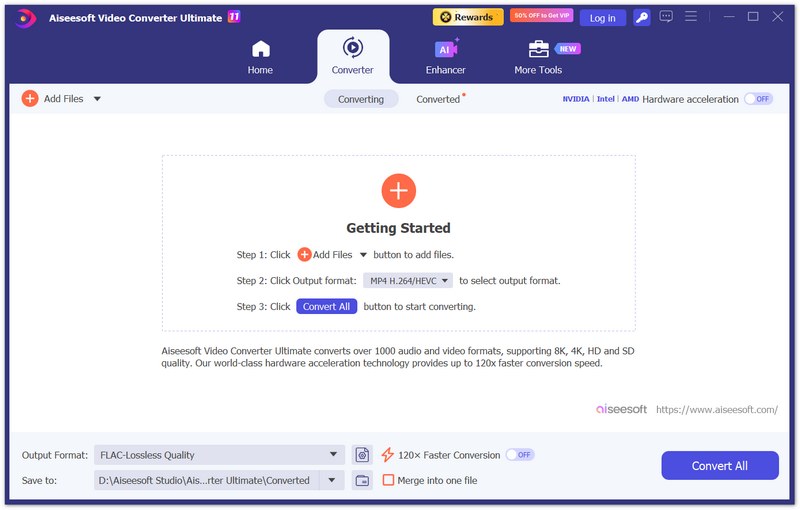
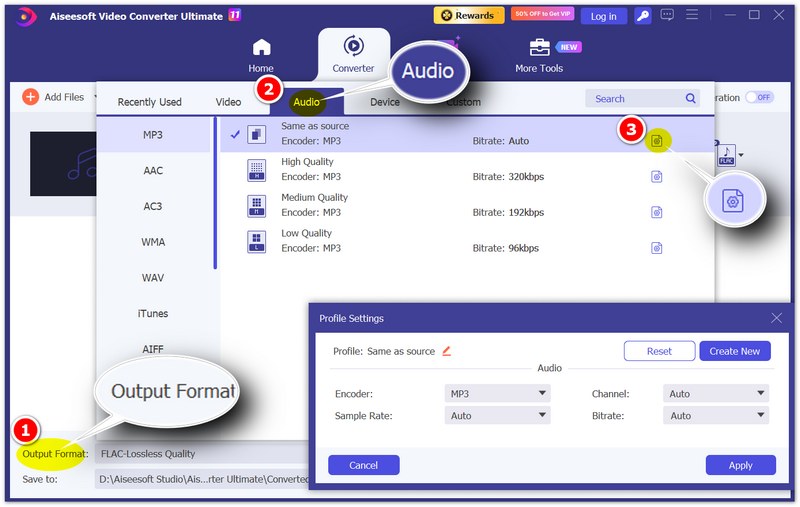
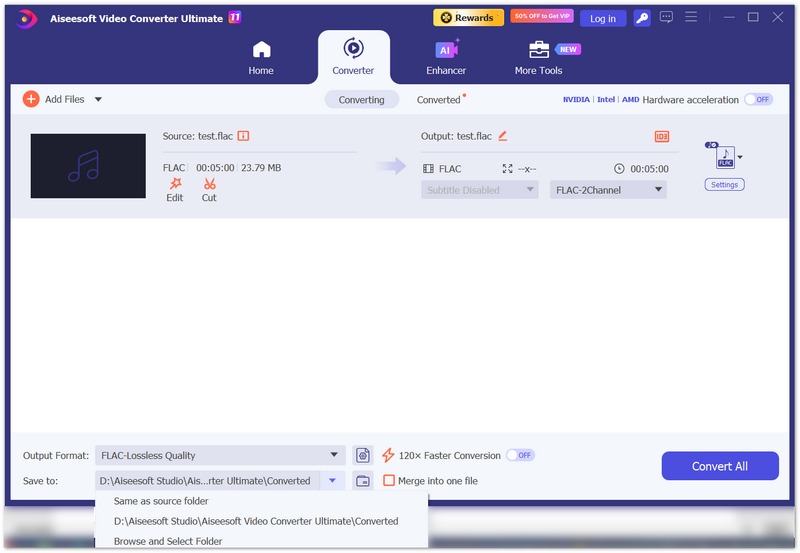
You can add multiple FLAC files at once and convert an entire album or music collection in a single batch.
Can Apple Music Play FLAC?
FLAC support depends on the Apple Music workflow and platform. If you want to manage lossless music directly within Apple's music library ecosystem, ALAC is generally the more convenient choice.
How Big Is a FLAC File?
FLAC files are typically much smaller than equivalent uncompressed WAV files. The exact size depends on the recording, duration, sample rate, bit depth, and other characteristics. A CD-quality FLAC track can often be tens of megabytes.
Is FLAC Good for DJing or Music Production?
FLAC is excellent for music archiving and can be useful for DJ libraries when the software supports it. For active recording and editing in a DAW, WAV and AIFF are often preferred because they are widely supported in professional production workflows.
Conclusion
FLAC is an excellent choice when you want lossless audio quality with smaller file sizes than uncompressed WAV or AIFF. It is particularly useful for archiving music, building a high-quality music library, and listening on compatible Hi-Fi equipment.
MP3 remains practical when file size and compatibility matter most, while ALAC can be more convenient if you primarily use Apple's ecosystem.
If you have FLAC files that need to be converted for a specific device, player, or workflow, Aiseesoft Video Converter Ultimate provides batch conversion and flexible audio output options to make the process easier.
100% Secure. No Ads.
100% Secure. No Ads.
 Find Ways to Compress FLAC Files With Best FLAC Compressors
Read this post and learn how FLAC audio compression is achieved using practical and professional audio compression tools.
 [Free and Easily] How to Free Import FLAC to Apple iTunes
Can I import a FLAC file into iTunes? No. However, you can convert FLAC to iTunes-supported MP3, WAV, and other formats for importing. Follow the 4 steps here to convert and import FLAC to iTunes.
 FLAC to M4A: Easiest Way to Convert FLAC to M4A
Want to convert FLAC to M4A? This article will show you the easiest way to convert FLAC to M4A. You can read this article to find what you need.
 Leave your comment and join our discussion
Convert FLAC
1.1 FLAC 1.2 FLAC Converter 1.3 FLAC to MP3 Converter 1.4 Mac FLAC Converter 1.5 Mac FLAC to MP3 Converter 1.6 FLAC to AAC 1.7 FLAC to M4A 1.8 FLAC to MP3 1.9 FLAC to WAV 1.10 FLAC to ALAC 1.11 FLAC to iTunes
Video Converter Ultimate is excellent video converter, editor and enhancer to convert, enhance and edit videos and music in 1000 formats and more.
100% Secure. No Ads.
100% Secure. No Ads.

*Required field
*Please enter a valid email

