
Video Converter Ultimate
 100% Secure. No Ads.
100% Secure. No Ads.
Recently, I've been researching AI tools for enhancing video quality and, as expected, I searched first on Freepik since that is my primary resource for designers anyway. You have probably heard of their AI package, Pikaso, which is mainly focused on image upscaling and AI-generated content. However, when it comes to videos, many users, including me, are still wondering if there is a proper Freepik Video Upscaler.
This post will explore what Freepik has in store now, whether there really is a video upscaler at Freepik, and what to expect from it if you are considering giving it a try. Besides that, I will discuss its major features, shortcomings, and suggest some alternatives if you want better-looking, high-resolution videos without selling out.
When I explored Freepik’s tools, I noticed that while the Freepik AI video upscaler isn’t a fully dedicated feature yet, it still offers several useful capabilities within its AI suite. Here are the main features I found:
Freepik may not be able to completely replace a specialized video upscaling tool, but these qualities make it excellent for artistic projects and fast improvements.
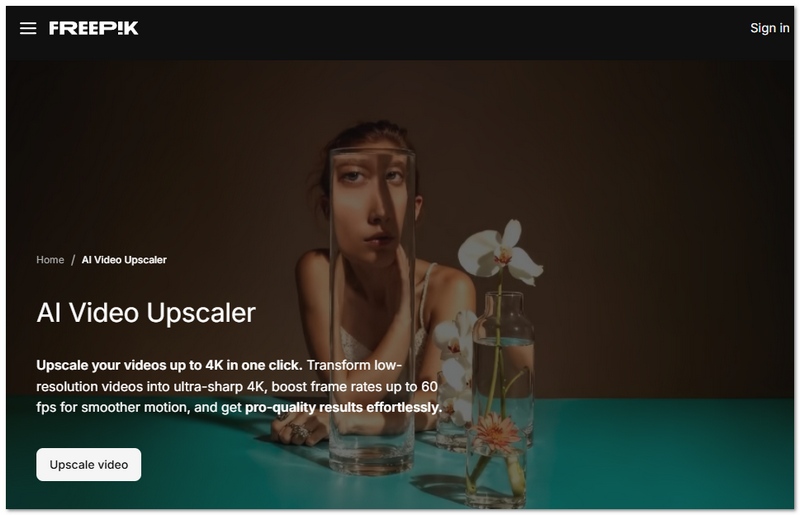
To see how well it actually performs, I tried to upscale the video Freepik using its available AI tools. Since Freepik doesn’t offer a fully dedicated AI video upscaler yet, I focused on how its system handles video-related tasks in terms of speed, quality, and limitations.
Processing Speed
Processing runs fast, mostly with short clips or low-demand jobs. It's cloud-based, so my device never felt slow. For longer videos or high-res content, speed depends on server load at least in theory. There's a slight delay when the system gets busy. The performance isn't consistent across all situations.
Artifact Handling
This is where I saw flaws. Freepik's AI improves images well, but doesn't handle video upscaling right. Blurring, noise, or fake smoothing show up, in particular in fast motion or detailed shots.
Maximum Resolution Output (4K/8K)
Unlike dedicated upscaling tools, Freepik currently doesn’t clearly support true 4K or 8K upscaling for videos. Its focus is more on image resolution and AI-generated visuals, so video output may not reach the same level of sharpness and detail as specialized software.
Free Tier Limitations
One thing that struck me immediately was that the free version is limited in certain ways. This might mean you get only a certain number of processing credits, or the quality of the output may be lower, or you may find that some of the more advanced features remain inaccessible to you. If you use it quite often, then it may become necessary to upgrade to a paid plan.
Overall, based on my testing, Freepik offers a convenient and beginner-friendly experience, but when it comes to serious video enhancement, it still falls short compared to dedicated tools.
After testing and exploring the platform, I had mixed but realistic expectations about the video upscaler Freepik offers. It’s definitely promising, but whether it’s the right tool for you depends on what you actually need.
Pros
Cons
My Overall Verdict
In my opinion, the Freepik video upscaler is a nice and creative tool for beginners. Besides, it's a natural add-on if you're a Freepik design or AI content user. Along with its high-speed processing, helpful and user-friendly features, this tool can also help in producing decent-quality short clips and social media content.
However, if you want to do hardcore video enhancement, very long projects, or professional-quality upscaling, then this tool may be too limited for you. In my opinion, it is excellent for fast edits and artistic applications, but it is most definitely not the best choice for you when it comes to video upscaling.
Final takeaway
Choose Freepik if you want simplicity, quickness, and creativity. Don't use it if you need advanced video processing and complex control.
If you are using Freepik but consider its features to be quite simple when it comes to video upscaling, your feelings are understandable. Getting a system that actually allows you to manage the quality would be one of the reasons why I changed. The main reason for going with Aiseesoft Video Converter Ultimate is that it enhances resolution, sharpness, and details instead of focusing on artistic effects. It can do upscaling of HD, 1080p, and 4K even without the use of AI visuals. The results tend to be sharper and more precise than generic tools. But this works well for new users or creators who need better output than what basic apps provide.

Downloads
100% Secure. No Ads.
100% Secure. No Ads.
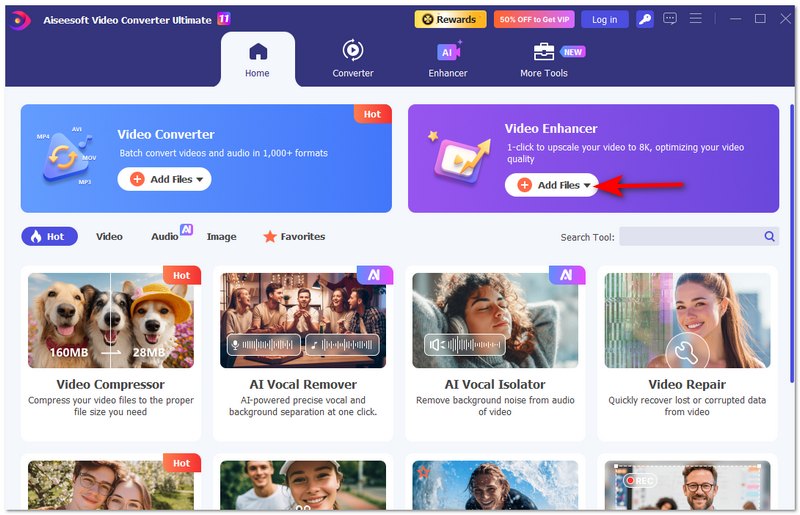
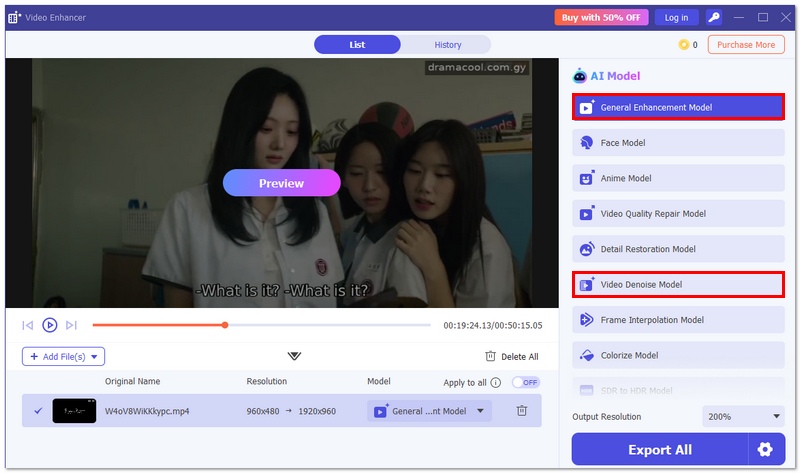
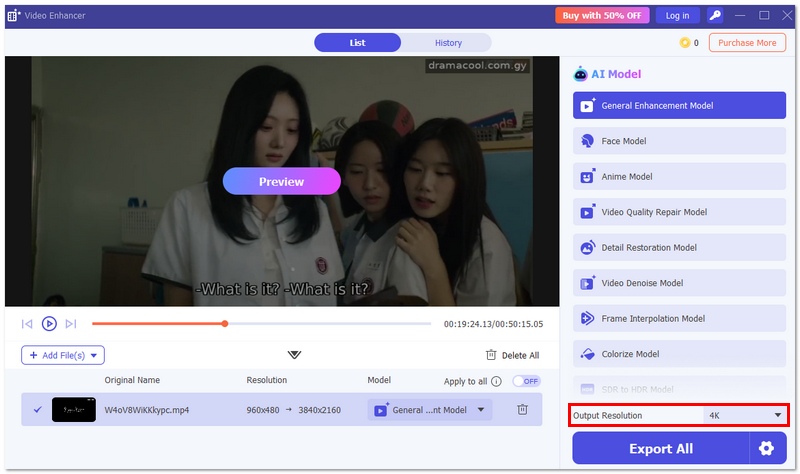
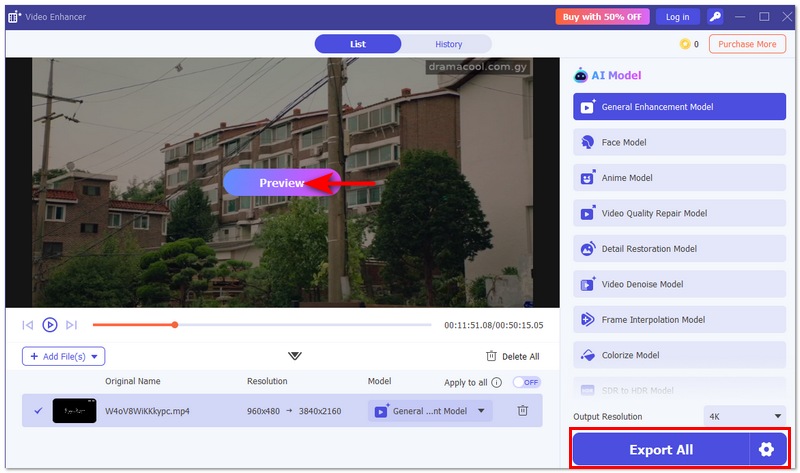
Steps to Upscale Video Using Aiseesoft VCU
Why It’s a Better Alternative
Based on my experience, Aiseesoft VCU is a tool that can provide you with more stable and controllable results in comparison to Freepik. While Freepik is indeed useful for spontaneous, creative work, this one is a better option for serious video enlargement, blur correction, enhancement of the video quality, etc.
If you want real video enhancement with higher resolution output and fewer limitations, Aiseesoft Video Converter Ultimate is a much stronger alternative.
Does Freepik add watermarks to upscaled videos?
Those who use the free version might get watermarked or a limited number of exports, whereas those with premium accounts usually get outputs without any branding.
Can Freepik Video Upscaler improve animation or cartoon videos?
It is possible to increase the level of detail in a slight way. However, the outcomes are likely to mix since AI animated edge and line fine somewhat between struggle.
Can I use Freepik Video Upscaler on mobile devices?
Yes, it can be accessed through a mobile browser, but the experience is smoother and more stable on a desktop.
Conclusion
The Freepik AI video upscaler tool, in the end, is a handy and quite simple tool for beginners that is well integrated into Freepik's expanding AI ecosystem. It works very well for quick fixes and artistic endeavors and is especially beneficial if you are a regular user of their platform. On the other hand, my personal use of the tool suggests that it still has quite a few shortcomings concerning the upscaling of videos to higher resolutions in a professional manner, handling longer clips, and achieving top-notch quality results. In case you require a quick and easy tool, you might as well test it out. However, if you are more into improving the quality of your videos, looking into specialized alternatives would be a better choice since they offer more satisfying and reliable results.
 10 Best Ways to Sharpen Video Quality Easily (2026 Guide)
Learn how to sharpen video quality on Windows/Mac. We tested 10 tools, from AI Video Enhancers to Premiere Pro, to help you fix blurry or out-of-focus videos instantly.
 5 Top 4K AI Video Upscaler: Features, Pros, Cons, and More
There are 5 most frequently used 4K AI Video Upscalers. Does it fit everyone? We have everything you want to know about that. Let's check it out!
 Top 8 AI Video Restoration Tools to Enhance Old Footage
Can AI repair old videos and restore details? How can I restore the quality of old videos? This post shares 8 AI video restoration tools to enhance quality.
 Leave your comment and join our discussion
Video Converter Ultimate is excellent video converter, editor and enhancer to convert, enhance and edit videos and music in 1000 formats and more.
100% Secure. No Ads.
100% Secure. No Ads.

*Required field
*Please enter a valid email

