
Best for: Most users who want a quick, reliable location spoofing experience; Overall stability for playing games and using social apps.
Anycoord
 100% Secure. No Ads.
100% Secure. No Ads.
Nowadays, it’s common for various applications to ask for the permission of location service on iPhone. There are no difficulties in refusing this kind of service and stopping sharing your location, but if you have ever tried to change your location on your iPhone, you know how difficult it can be. Fortunately, there are several GPS spoofing tools that can help you solve this problem. You can use them to hide your location or change the location to a fake one instead. This is a detailed review of 3 different iPhone location changers. Skim over it and find the most suitable one to switch your location for various purposes.

How to Choose the Best iPhone Location Changer
| Feature | Aiseesoft AnyCoord | iTools (Virtual Location) | Tenorshare iAnyGo | |
| Best For | Overall stability and privacy. Quick start. Location-based gaming. |
Beginners & budget-conscious users. Simple location-spoofing needs on older iPhones. |
Gamers who need to enhance Pokémon GO or a similar gaming experience with fine-tuned control. | |
| Compatibility | Computer: Win 7/8/10/11; macOS X 10.7+. iPhone: All iOS versions (via computer connection). |
Common Windows and macOS versions. iPhones with older iOS versions (before iOS 26) |
Computer: Win 7/8/10/11; macOS 10.10+. iPhone 17/16/15/14 and older models with all iOS versions. |
|
| Key Strengths | • Most stable operation. • Four modes, including Joystick for AR games. • 7-day free trial & 30-day money-back guarantee. |
• Simple process, good for basic location teleportation. • Saves locations as GPX files. • Lower one-time license cost. |
• Strong emphasis on safety and security. • Flexible movement speed range. • Historical records & GPX import/export. |
|
| Main Drawbacks | No wireless connection (requires USB). | • Unstable performance. • May conflict with antivirus programs. |
• No free trial available. • Most expensive option, especially for long-term. |
|
| Location Change Modes | 1. Modify Location 2. One-stop Mode 3. Multi-stop Mode 4. Joystick Mode |
1. Move Mode 2. Walk Mode 3. Pin Mode 4. Jump Mode |
1. Change Location 2. Single-Spot Movement 3. Multi-Spot Movement 4. Joystick Movement |
|
| Ease of Use (Rating) | 4.6/5 (Highest rated) | 4/5 (Simplest but outdated) | 4.5/5 (Feature-rich but complex) |
You may want to hide or change your iPhone location for various reasons. Before the specific app recommendations, we would like to talk about several main reasons why you may need this kind of location changer tool.
Our recommendations are supported by extensive research. We have used the 3 location-changing tools ourselves to test their functions, including location modification, GPX import, Exclusive Favorites, etc., and make a comparison of their performance. Aside from testing, we have also taken into account the experiences of customers. Therefore, this is a comprehensive and totally objective review of iPhone location changers. Please feel free to read and make the best choice for yourself.
Best for: Most users who want a quick, reliable location spoofing experience; Overall stability for playing games and using social apps.
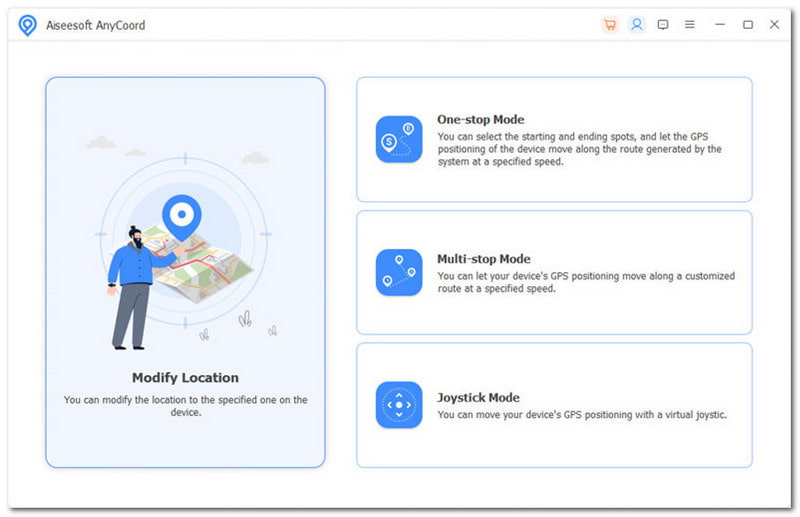
Aiseesoft AnyCoord, one of the greatest location changers for iPhone, helps you switch your GPS location to another one easily in one click. With Aiseesoft AnyCoord, you can effortlessly set a virtual location by inputting an exact address or taping a GPS coordinate on the map, and you can check your current position as well as nearby places thanks to the integrated map. Besides, you are allowed to drag the map and zoom in or out to examine more location details. What’s more, if you are troubled by moving around when playing AR games, AnyCoord can assist you.
100% Secure. No Ads.
100% Secure. No Ads.
Features:
• Four modes of movement: Modify Location, One-stop Mode, Multi-stop Mode, and Joystick Mode.
• Set virtual location for iPhone on the computer quickly.
• Move iPhone with customized routes pretendedly.
• Mock location for SNS and Dating Apps to share.
• Move GPS locations at different speeds, from 1m/s to 50m/s.
• Play AR games on the iPhone without walking.
Pros:
Cons:
Overall, Aiseesoft AnyCoord is an excellent location changer and spoofer for iOS devices that helps you hide where you are and modify your exact location. With it, you don’t need to worry about common issues of location change tools like slow and unstable running, app crashes, heating, or anything else. The only thing you need to do is open it and change your location safely and effectively.
Best for: Basic location-spoofing needs on older iPhones.
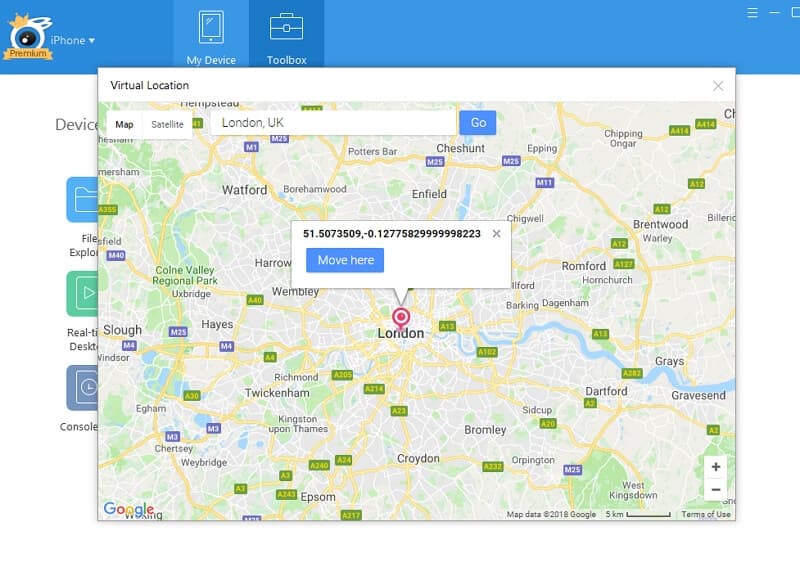
iTools (developed by ThinkSky) is a popular iOS device manager tool that offers various commonly used data transfer, conversion, and management tools. It has a dedicated GPS location spoofer called Virtual Location. Its primary purpose is to let iPhone users simulate being in a different location worldwide without needing to jailbreak their device. You can change your exact location with it.
Most apps on your iPhone that use GPS will receive the virtual location. It supports both Windows and macOS and allows you to change the speed to customize your route.
Features:
• Four modes of movement: Move Mode, Walk Mode, Pin Mode, and Jump Mode.
• Suitable for AR games like Pokemon GO and Harry Porter GO.
• Save the location list as a GPX file.
• Simulate the GPS movements with joysticks or a keyboard.
Pros:
Cons:
If you are a beginner in location changing and simply want to switch your position for privacy, you can choose iTools Virtual Location. However, if you have much higher requirements for stability and compatibility of the location change tool, iTools seems not to be the best choice.
Best for: Location-based gamers like Pokémon GO players who want advanced controls with a reduced risk of detection.
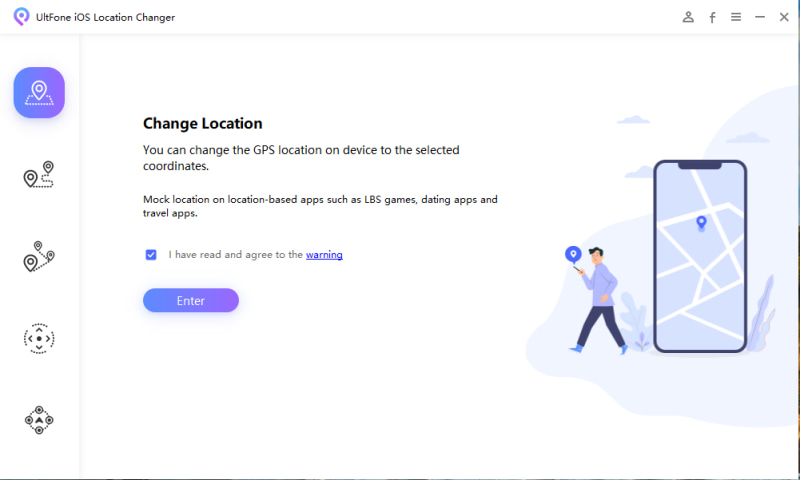
Tenorshare iAnyGo is another useful iPhone location spoofer, providing location change and 3 modes of movement. It is compatible with all iOS versions and works with all location-based apps, such as WhatsApp, Facebook, Google Maps, etc. You can freely change GPS location without jailbreak. Another great benefit of Tenorshare iAnyGo is that its producers claim it is completely safe and risk-free to use.
Features:
• Four types of virtual movements: Change Location, Single-Spot Movement, Multi-Spot Movement, and Joystick Movement.
• Historical records support.
• Adjustable moving speed from 3.6 km/h to 108km/h.
• Import/Export GPX file.
• Jump teleport is available.
Pros:
Cons:
In conclusion, Tenorshare iAnyGo is a powerful alternative tool for location changing, which provides multiple movement modes, speed customization, GPX import, etc. However, if you don’t have an adequate budget, it’s not wise of you to choose iAnyGo.
Can I change my iPhone location without jailbreaking?
Yes, aside from using a VPN (Virtual Private Network), you can also change your iPhone location without jailbreaking. There are several useful location change tools that can help you, such as iMyFone AnyTo, Aiseesoft AnyCoord, and Tenorshare iAnyGo.
Are iPhone location changers legal to use?
Generally, using location spoofing tools is not forbidden by law. Note that if you choose to use one of these tools, it's crucial to pick reliable and well-reviewed ones because some of them may have the potential to damage your data or privacy.
Will changing my iPhone location affect other apps?
Indeed, depending on how other applications use location data, changing your iPhone's location may have an impact on them. Based on the changed location, apps that provide location-based services—like local news and weather—may deliver totally different information. And some apps might not work correctly.
Conclusion
This is a lead-in post about iPhone location changers. If you are interested in any of the 3 location-changing tools reviewed above, don’t hesitate to try them and embark on an amazing experience. You can weigh the benefits and drawbacks of each option to determine which is the best for you, or you can choose Aiseesoft AnyCoord to have a quick start, for it is the best tool we have tested.
 Actionable Ways to Turn off Location Service on iPhone and iPad
To turn off location on iPhone for privacy protection or other purposes, you can read our comprehensive guide and follow the steps to get it properly.
 Virtual Location - Change or Fake a GPS Location on iPhone
What is a virtual location? Can you fake current location? How to set a virtual location on iPhone? Learn what virtual location is and how to fake location.
 5 Best Mock Location Apps to Spoof or Fake GPS Locations
What is the best fake location app for Android? Can I spoof my GPS location on an iPhone? This post shares the 5 best mock location apps to fake GPS locations.
 Leave your comment and join our discussion
Aiseesoft AnyCoord can help you hide, fake, or change your GPS location to any other place with ease. You can even plan a moving route if needed.
100% Secure. No Ads.
100% Secure. No Ads.

*Required field
*Please enter a valid email
