
Video Converter Ultimate
 100% Secure. No Ads.
100% Secure. No Ads.
AI video generation in 2026 is no longer experimental. Just two years ago, AI videos often had strange hands, broken motion, or inconsistent faces. Today, top models can create smooth, high-quality clips that look close to professional productions.
Two major players stand out: Sora 2 and Seedance 2.0.
In simple terms:
Your choice depends on what matters more to you: realism or control.
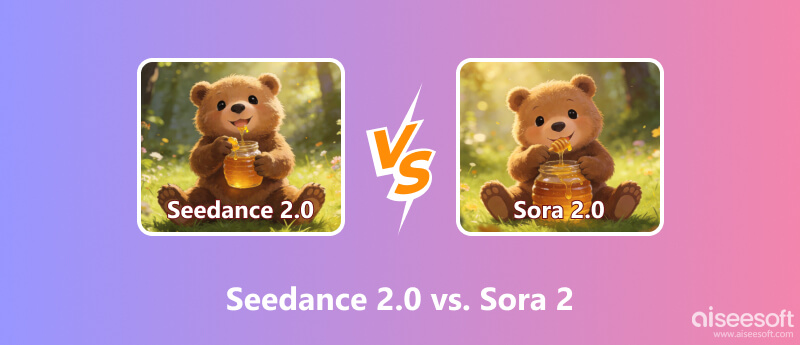
Perhaps your impression of AI-generated video modes is still stuck on Text-to-Video and Image-to-Video, but Seedance 2.0 this time brings Multiple Input Types.
Unlike basic text-to-video models, Seedance accepts:
This means you don’t have to describe everything in words. You can upload:
This layered input system makes results more predictable and easier to repeat.
Seedance includes a tagging system. You can label your materials like:
Then you refer to them directly in your prompt. Instead of saying "a woman who looks like the image above," you simply write "use @Image1 as the protagonist."
This reduces guesswork and saves time, especially for teams.
A common AI problem is "identity drift," where a character’s face or outfit changes across shots.
Seedance includes an Identity-Lock feature that helps keep:
For brands and marketers, this is extremely important.
Seedance can generate multiple camera shots in one go. For example:
1. Wide shot
2. Medium shot
3. Close-up
Instead of producing one short clip at a time, it creates something closer to a short edited scene. This is very useful for creators on TikTok, Instagram Reels, and YouTube Shorts.
Overall, Seedance feels like an AI assistant for structured content creation.
If Seedance is a director’s assistant, Sora 2 is more like a physics engine.
Sora 2 is especially good at:
It tries to simulate how the real world behaves. Motion usually looks natural and smooth, especially in complex scenes.
If your video includes explosions, heavy movement, or detailed physical interactions, Sora 2 often performs better.
Sora 2 supports generating videos up to around 25 seconds.
Seedance usually limits each generation to around 15 seconds.
For filmmakers who want longer continuous shots, this can be important.
In fast-moving scenes—like car chases or crowded streets—Sora tends to keep motion stable and believable. Objects are less likely to suddenly distort or change shape.
Sora’s output often feels:
Seedance outputs usually look sharper and more "produced," similar to commercial or social media content.
Neither style is better. It depends on your goal.
I used the same prompt for both Sora 2 Pro and Seedance 2.0: In a sunny park, a golden retriever jumps up to catch a red frisbee thrown by its owner, while some people nearby play with their pets.
Both were set to 720P output. Sora generated a 4-second video, and Seedance produced a 5-second video. Below is a side-by-side comparison: Sora on the left, Seedance on the right.
We can see obvious differences in the contrast.
1. Although both were rendered at 720P, Seedance’s video is noticeably sharper and clearer.
2. The two models differ greatly in cinematography:
1) The dog sits on the grass and barks.
2) The owner throws the Frisbee forcefully.
3) The dog runs (slow-motion shot).
4) The dog jumps and catches the frisbee (slow-motion shot).
5) The dog lands and drops the frisbee.
Seedance’s camerawork is dynamic, coherent, and natural, almost like a professionally directed scene.
3. In both videos, the owner and dog—including details like the golden retriever’s fur—look realistic, with natural body movements and no major distortions. Both models realistically render sunlight, shadows, and trees in the background. However, in Sora’s video, a human-like figure sitting on the grass appears uncanny and unrealistic upon closer inspection.
4. In addition, Seedance includes far richer background details: In addition to the owner, golden retriever, distant people and pets, lawn, and basic trees mentioned in the prompt, it also adds street lamps, bushes, fences, benches, distant buildings, and parked cars.
Overall, Seedance delivered the bigger surprise. Given this simple prompt, it produced far richer, more professional results with no obvious flaws. Moreover, there is no obvious advantage of Sora in terms of realism and lighting in the visuals, whereas Seedance significantly stands out in camera design, visual richness, and high resolution.
Here is a simplified breakdown:
| Feature | Seedance 2.0 | Sora 2 |
| Max Resolution | 2K (great detail) | 1080p (Pro: 1792×1024) |
| Input Modalities | Text + Image + Video + Audio | Text + Image |
| Control Precision | High (camera, motion, identity) | Moderate (prompt-based) |
| Physics Accuracy | Strong | Best-in-class |
| Max Duration | ~15 seconds | ~25 seconds |
| Generation Speed | Faster (short-form optimized) | Slower (high simulation cost) |
| Multi-Shot Output | Native | Limited |
Seedance works best for structured, repeatable production.
Sora is stronger for realistic simulation and immersive scenes.
Sora 2 is typically available through premium subscriptions or API access. Because it uses heavy computation, the cost per second can be relatively high.
Seedance 2.0 is integrated into ByteDance’s creator ecosystem. It often uses subscription or credit-based pricing and is positioned toward marketers and content creators.
If you don’t need enterprise-level tools, there are also simpler platforms that offer more affordable and beginner-friendly options.
It is often positioned toward content creators and digital marketers.
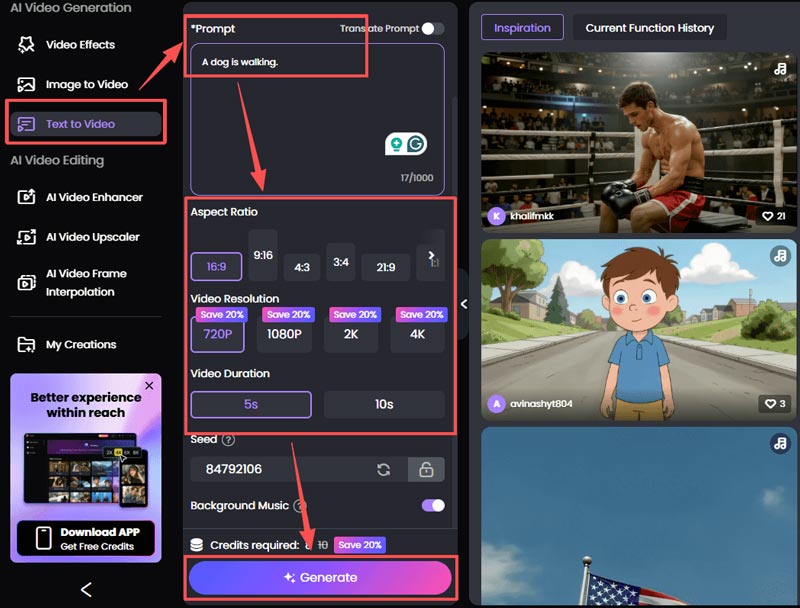
Although Seedance 2.0 and Sora 2 represent the cutting edge in AI video generation, not every creator needs enterprise-level complexity or high per-second costs. If you are looking for a more practical solution, I recommend Picwand.ai. You can generate videos with simple text prompts, turn images into action clips, and export content ready for release. For many everyday use cases, simplicity, cost-effectiveness, and speed better meet practical needs. You can use it for free without downloading it, and experience AI-generated videos in just a few simple steps.
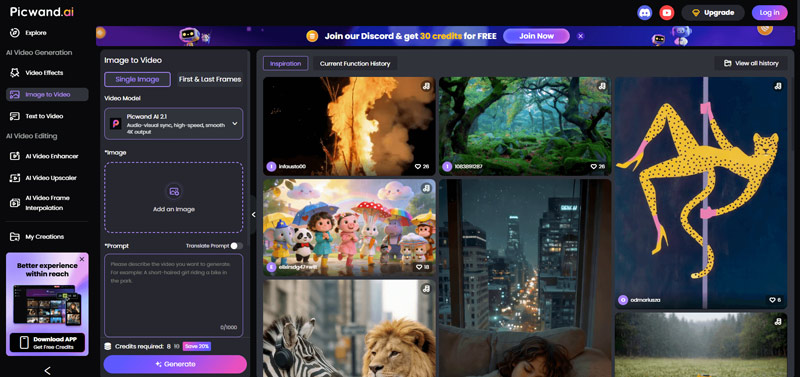
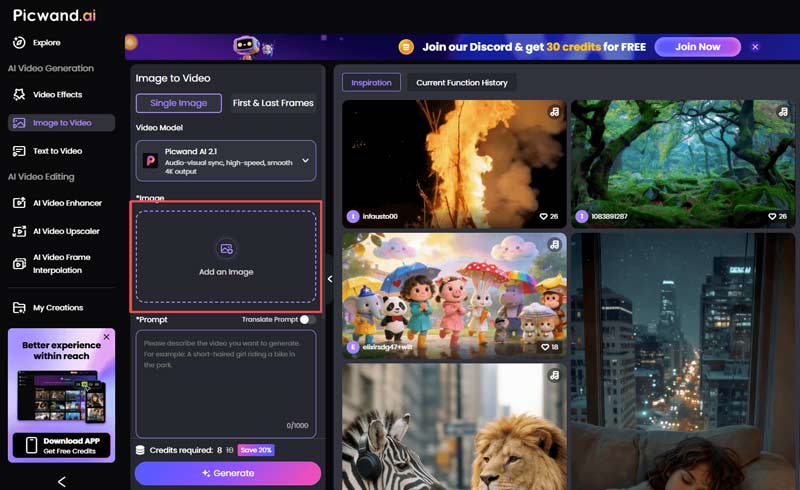
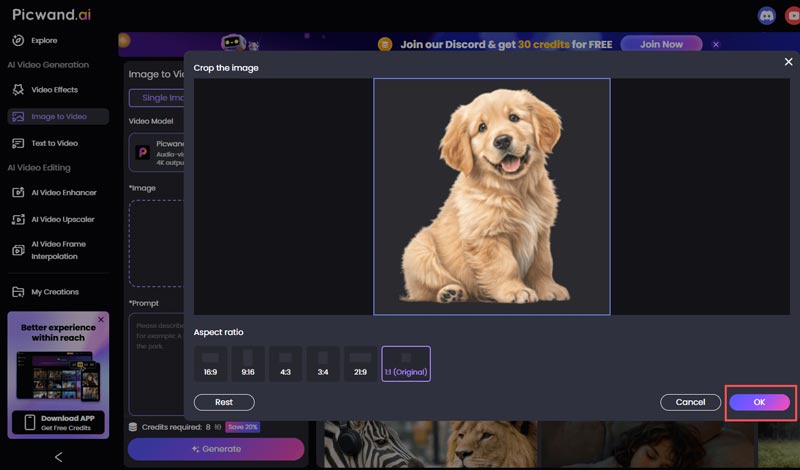
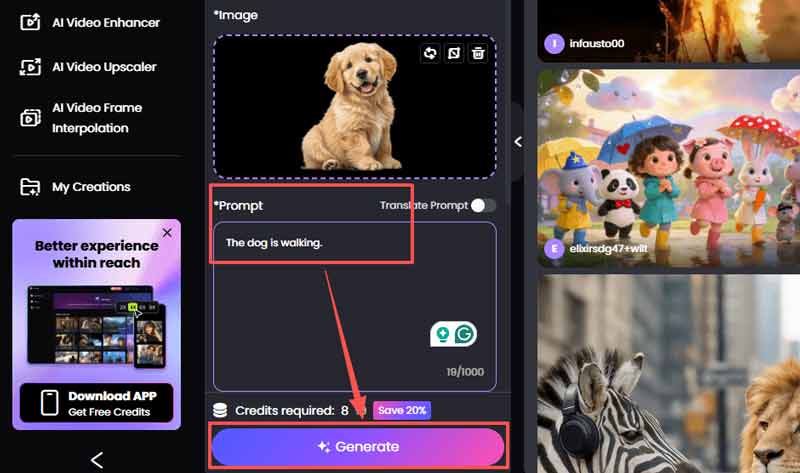
The steps for generating videos from text are similar. First, click Text to Video on the sidebar, then enter a Prompt. You can edit the video parameters you want below (Aspect Ratio, Video Resolution, Video Duration, etc.), and then click Generate to create the video.
Do they require strong hardware?
Both models run in the cloud, so your computer does most of the work through a browser. Seedance’s interface may use more browser memory due to interactive features.
Do they support real-time generation?
Sora still takes several minutes to render complex scenes. Seedance offers faster preview modes for quick adjustments.
Which handles on-screen text better?
Seedance performs better when you upload reference images with correct fonts. Sora has improved, but may still distort long text in some cases.
Conclusion
AI video tools are no longer just experiments—they are production tools.
Seedance 2.0 and Sora 2 represent two different ideas:
In the future, we will likely see models that combine both strengths.
For now, the right choice depends on your role:
If you manage brand content and social media output, Seedance may fit better.
If you aim for realism and complex physical scenes, Sora may be the stronger option.
AI video is no longer about simply generating clips. It is about directing them.
 Top 7 AI Voice Generators for Desktop, iOS, and Android
What is the best text to voice generator? Is there a free AI voice generator? Can you make an AI of your voice? Check the reviews of 7 AI voice generators.
 5 Best AI Cartoon Video Generators to Make Animation Videos
Is Animaker free? How do you convert a normal video to a cartoon online? Get five AI cartoon video generators to create animation videos from text or photos.
 Top 5 AI Video Editing Software for Automated Video Editing
Is there any free AI video editing software? What are the best AI websites for video editing? Is Invideo AI free? This post shares the 5 best AI video editors.
 Leave your comment and join our discussion
Video Converter Ultimate is excellent video converter, editor and enhancer to convert, enhance and edit videos and music in 1000 formats and more.
100% Secure. No Ads.
100% Secure. No Ads.

*Required field
*Please enter a valid email

