
Video Converter Ultimate
 100% Secure. No Ads.
100% Secure. No Ads.
When you Google video smoother, you will be presented with a plethora of options, including free online tools, professional desktop software, and sophisticated AI-powered solutions. Video smoothing is commonly associated with frame interpolation, a technique that ups the motion quality of videos by creating extra frames in between the original ones. Apart from eliminating jitters, this technique also has the effect of increasing the frame rate, which helps quick-moving scenes look more continuous and natural. In this post, we will talk about the top 5 video smoother software that can help stabilize shaky footage and increase FPS, hence ensuring a far more polished viewing experience for all kinds of video content.

A video smoother is a tool, software, or hardware that improves video playback by making motion appear more fluid. Modern video smoothers often use AI-powered frame interpolation to generate new frames between existing ones, resulting in a more seamless and enjoyable viewing experience.
Videos can appear unsmooth for several reasons:
A video smoother can help fix shaky footage and stabilize it, or increase the smoothness of the video by adding frames through frame interpolation. Also, it can lessen motion blur. Depending on how much the problem is, you can change the settings to find a good balance between smoothness and realism so that the video doesn't look too artificial. This way, you can reduce motion blur vs. camera shake and still have natural motion in your video.
Video Smoother Tools Comparison Table
| Tool | Platform | AI Frame Interpolation | Shake Reduction | FPS Enhancement | Ease of Use | Best For |
| Aiseesoft Video Converter Ultimate | Windows / Mac | ✅ Yes (AI interpolation model) | ✅ Yes, strong | ✅ Up to 60fps+ | ⭐⭐⭐⭐⭐ | Professional smoothing, gaming, sports, and fast-action videos |
| Adobe Premiere Pro | Windows / Mac | ✅ Yes (Optical Flow) | ✅ Moderate | ✅ Up to 60fps | ⭐⭐⭐⭐ | Professional editors needing advanced controls |
| DaVinci Resolve | Windows / Mac | ✅ Yes (Optical Flow) | ✅ Moderate | ✅ Up to 60fps | ⭐⭐⭐⭐ | Color grading + smoothing for cinematic footage |
| Media.io AI Frame Interpolation | Online | ✅ Yes | ✅ Basic | ✅ Moderate | ⭐⭐⭐⭐ | Quick AI smoothing for online videos |
| 123APPS Online Video Stabilizer | Online | ❌ No | ✅ Basic | ❌ Limited | ⭐⭐⭐ | Simple shake reduction for casual users |
Many video smoothers and stabilizers are offered on the market that can help you enhance quality by improving overall smoothness and reducing shakiness. In this part, I would like to introduce you to five of the top AI Video Motion Smoother tools available.
Searching for the best software to stabilize and smooth video? Aiseesoft Video Converter Ultimate may be the perfect solution. It employs an AI-based frame interpolation strategy to create additional frames, resulting in smoother motion and less camera shake. Besides that, it features high-resolution videos, batch processing, and numerous formats, which make it an ideal tool for professionals, gamers, and content creators.
Steps to Use Aiseesoft Video Converter Ultimate
100% Secure. No Ads.
100% Secure. No Ads.
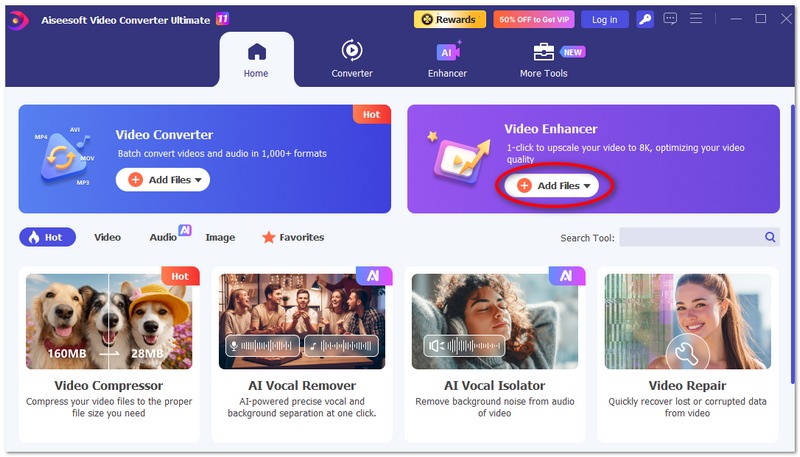
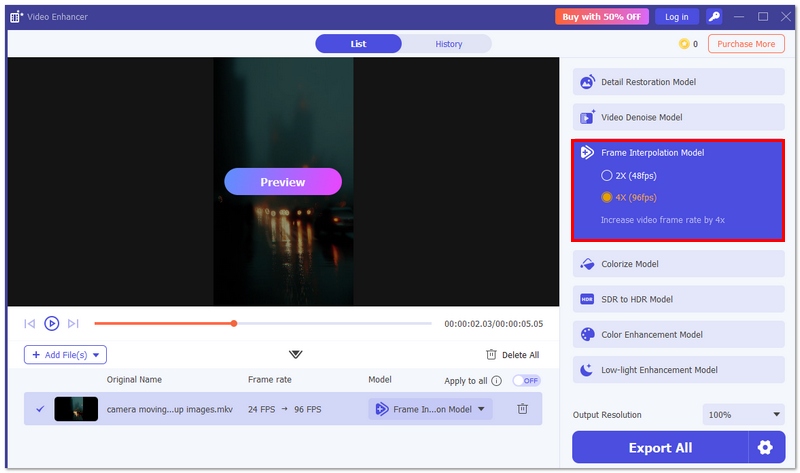
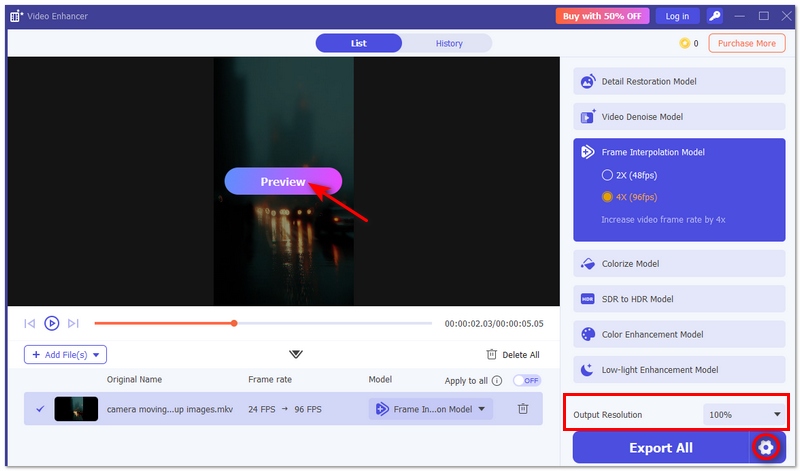
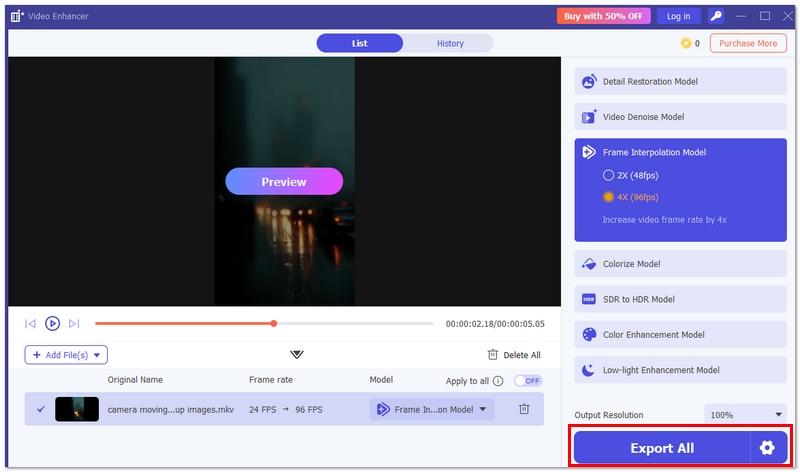
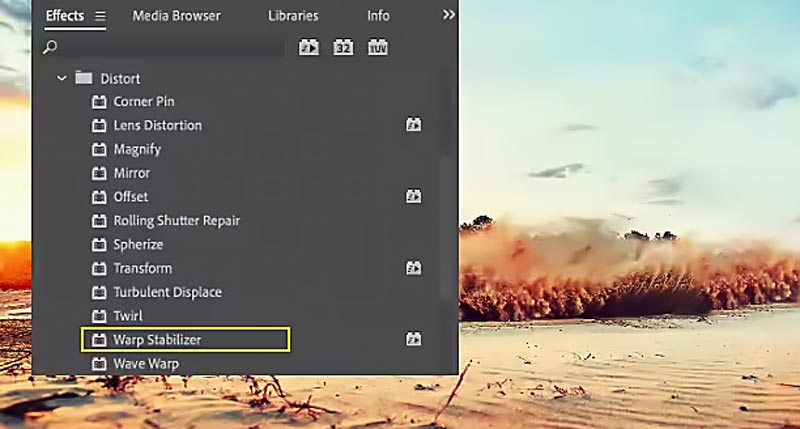
Adobe Premiere Pro is a professional editor that can also remove video stutter from 30 fps to 60fps. Its Warp Stabilizer effect automatically analyzes your footage to reduce shake and smooth motion. You can adjust stabilization settings for precise control, making it ideal for professional editing and cinematic-quality results.
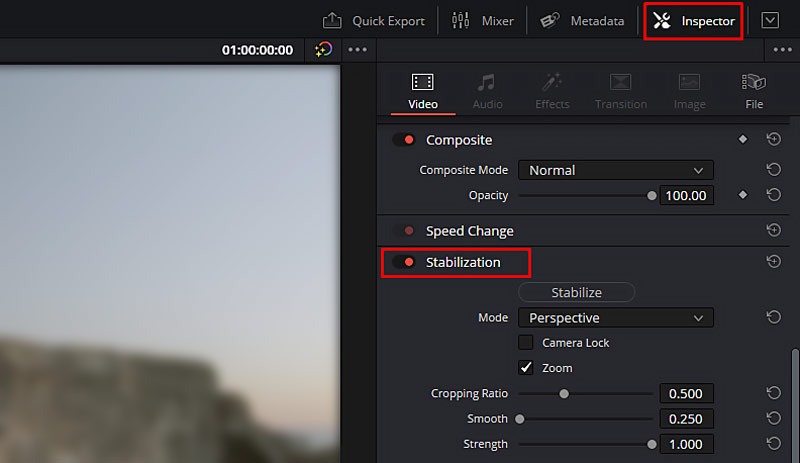
DaVinci Resolve is a professional video editor and video smoother designed to stabilize shaky footage and enhance motion clarity. Its built-in stabilization tools first analyze the movement of the frames and then make the necessary adjustments. Meanwhile, the Optical Flow feature increases the frame rate to allow for smooth playback, which is a big plus for cinematic projects and quality content.
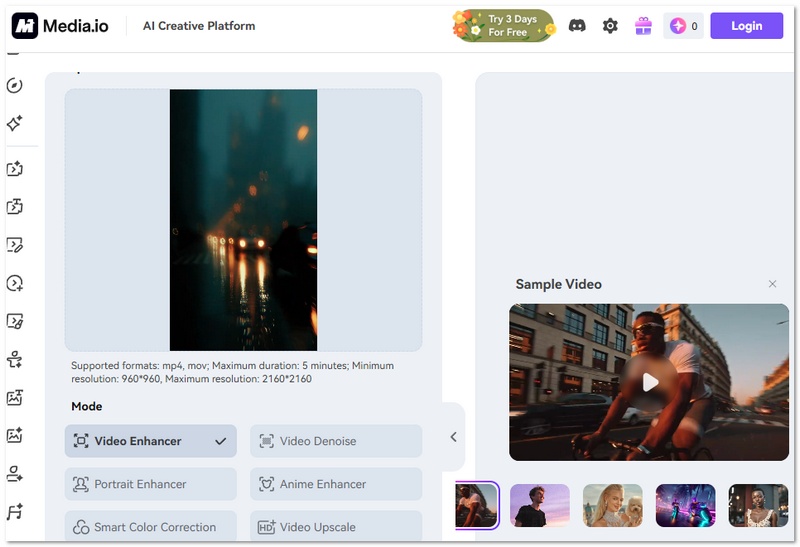
Media.io AI Frame Interpolation is a very user-friendly online video smoother. This innovative tool automatically inserts new frames, thereby significantly boosting the smoothness of the video playback. Media.io AI Frame Interpolation is perfect for those who are looking to upgrade their FPS and get rid of slight movements without the need to install any desktop software. With its simple interface and cloud processing, you can quickly make videos smoother for social media, presentations, or casual editing needs.
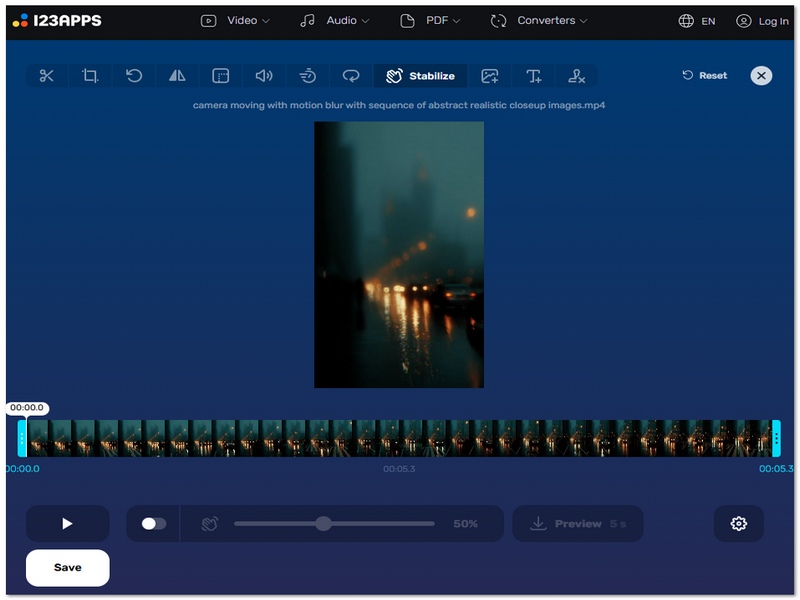
123APPS Online Video Stabilizer is a very simple video smoothening tool for newbies that helps in minimizing camera shake instantly, and is also a web-based application, so it doesn't require installation. Unlike other high-end editors, its primary focus is on stabilizing the video, not FPS enhancement, which is a feature that is often used by gamers. So this tool would not require a lot of skill and would be perfect for users looking to fix shaky recordings, travel videos, or mobile video footage with minimal effort.
What is the best way to achieve smooth video playback?
Various factors will affect the smooth video playback, including hardware, software, network conditions, source video files, and more. Powerful CPU and GPU are essential for decoding video and smoother playback. Also, your device should have sufficient RAM and storage to prevent buffering. To ensure smooth video playback, you should use a reliable player with hardware acceleration support, such as VLC, Blu-ray Player, MPC-HC, and PotPlayer. If you need smooth online streaming, you need a high-speed network connection. In some cases, you also need to match the video resolution to your display.
Can video smoothing increase video resolution?
Video smoothing often refers to frame interpolation or motion smoothing. It usually includes the process of creating new frames between existing ones. Video smoothing won’t increase resolution. However, some AI-powered video enhancers like Filmai can add new details to the video. You can also use them to upscale resolution, increase clarity, and enhance quality.
Is frame interpolation the same as video smoothing?
Yes, frame interpolation is generally considered the same as video smoothing. They refer to the process of generating frames between existing ones in a video sequence. They both generate a smoother, more fluid motion.
Does smoothing reduce quality?
Video smoothing does not always reduce quality, but excessive smoothing can make footage look overly soft or artificial. Basic stabilization or frame interpolation may slightly crop frames or introduce minor artifacts. However, AI-based video smoothers are designed to maintain clarity while improving motion fluidity.
Conclusion
This article recommends five great AI video motion smoothers for you to smooth motion and reduce motion blur. You can compare their features and select a preferred tool to make your video smoother.
 2026 Free AI Video Enhancer Online: No Watermark & Unlimited
Looking for a free AI video enhancer online? We tested 6 tools on speed, 4K quality, and watermarks. Plus, the best unlimited desktop alternative.
 Upgrading Old Footage: A Hands‑on Review of AVCLabs Video Enhancer AI
Discover how AVCLabs Video Enhancer AI can transform old, blurry, noisy or shaky videos into clean, 4K/8K content. Full test results, pros, and cons revealed.
 Best Video Enhancer App for Android and iPhone in 2026
Compare the leading Video Enhancer App for Android and iPhone, including features, pros, cons, and performance to boost your video quality.
 Leave your comment and join our discussion
Video Converter Ultimate is excellent video converter, editor and enhancer to convert, enhance and edit videos and music in 1000 formats and more.
100% Secure. No Ads.
100% Secure. No Ads.

*Required field
*Please enter a valid email

