It’s a common but annoying issue when your iPhone Bluetooth cuts out. In some cases, the sound from your wireless headphones is suddenly distorted. What if you’re on an important call?
If you own an iPhone, whether you use AirPods, third‑party wireless headphones, or your car stereo, you may experience Bluetooth audio issues like crackles, stops, or disconnects. This article explains several common reasons why your iPhone Bluetooth keeps cutting out. Moreover, we share four proven methods to fix the issue.
The first section covers the possible reasons behind iPhone Bluetooth cutting out. The frustrating part is that the cause is rarely obvious. It is not always the headphones or the phone. Knowing the root cause helps you choose the right solution quickly.
1. Physical Distance and Obstacles.
You should know that Bluetooth has an effective range of about 10 metres (30 feet). If your iPhone moves too far from the accessory, or if walls, floors, or other solid objects sit between them, the signal weakens, causing choppy audio or disconnections.
2. Corrupted Pairing Information
After a system upgrade, some old pairing keys on your iPhone may not be fully compatible with the new Bluetooth stack.
3. iOS System Software Bugs
Sometimes an iOS update itself introduces Bluetooth issues. The Bluetooth daemon might hang, or the N1 coprocessor may fail to load its firmware properly.
4. Multiple Active Connections
Connecting several Bluetooth devices simultaneously, such as headphones, a smartwatch, and a speaker, can overload the available bandwidth or cause priority conflicts.
If you are looking for a fast, effective way to stop your iPhone Bluetooth audio stutters, drops, and random disconnections, check the four methods below.
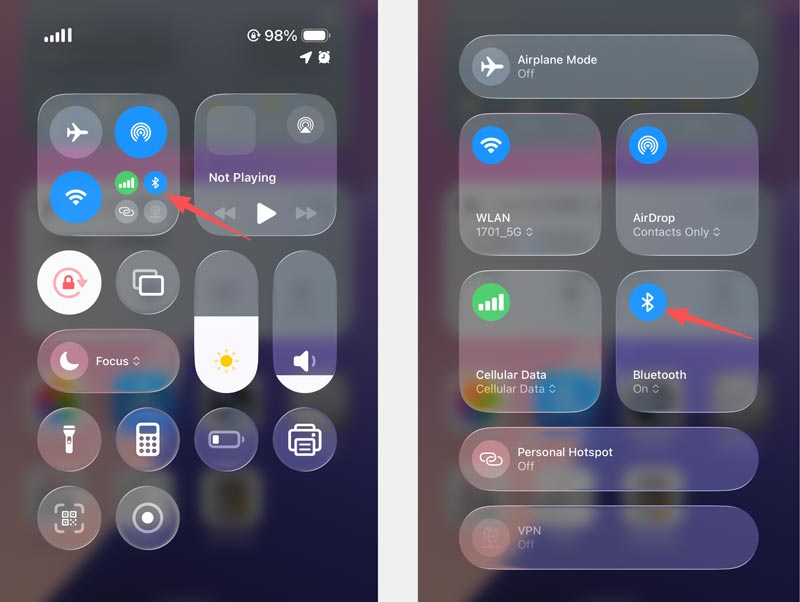
This sounds almost too simple to work. It frequently does. The Bluetooth radio stack on iOS can get stuck in a bad state - it thinks it’s connected, but the data stream is corrupt. A quick toggle forces the radio to reinitialize.
Open Control Center and tap the Bluetooth icon to turn it off. Wait 10 seconds. Tap it back on. If the iPhone Bluetooth audio problem persists, you can perform a force restart.
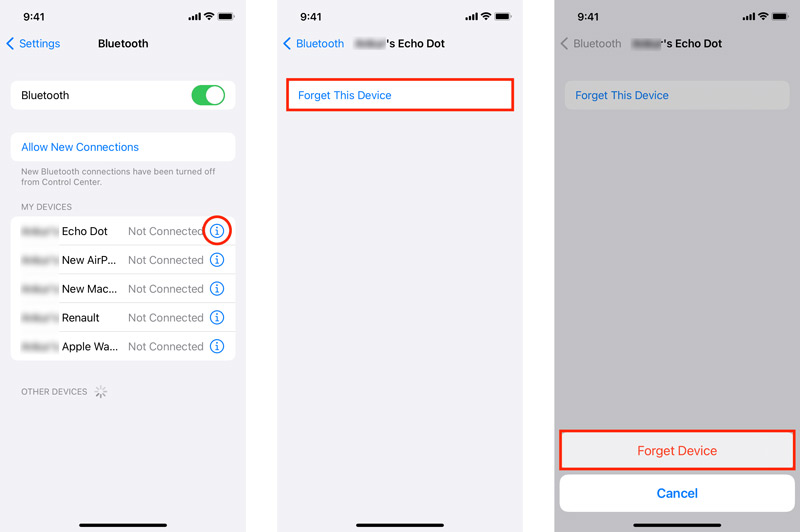
If your iPhone Bluetooth always cuts out with one specific device, such as your car or Bluetooth headphones, the saved pairing profile is often the reason.
Go to Settings > Bluetooth. Tap the i icon next to the problem device.
Choose Forget This Device and confirm your action. Put your accessory back into pairing mode and re-pair it as if it were new.
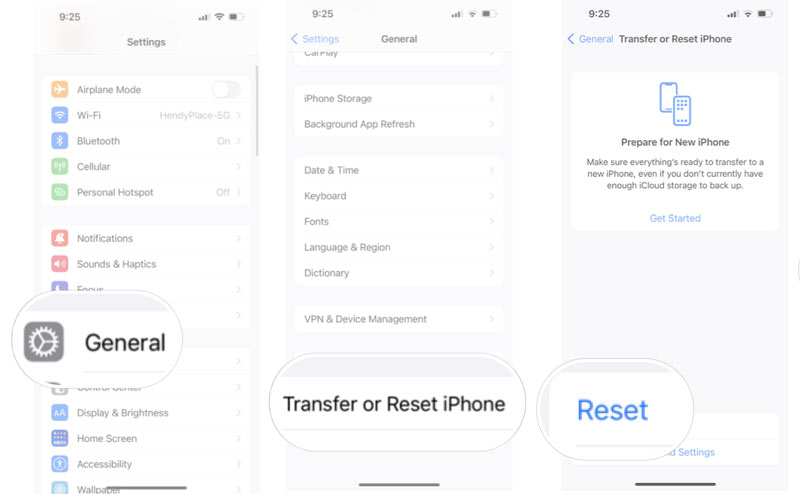
iOS stores Bluetooth connection data, Wi-Fi passwords, and cellular settings. When that cache becomes corrupted, you may get Bluetooth drops on your iPhone even after re-pairing.
Note that this operation removes saved Wi-Fi passwords and VPN configurations. It won’t erase your iOS data and other personal settings. To prevent data loss, back up your iPhone first.
Go to Settings > General > Transfer or Reset iPhone. Tap Reset, then tap Reset Network Settings. Enter your device passcode to confirm. Your iPhone will restart.
After the restart, you will need to re-enter Wi-Fi passwords and re-pair your Bluetooth accessories. It is a minor inconvenience for what is often a permanent fix. In my testing, this resolves about 70% of persistent iPhone 13 Pro Max Bluetooth cutting-out cases.
Sometimes, the iPhone Bluetooth cutting out problem isn’t the accessory or the cache - it is the operating system itself. Deeper system corruption can cause Bluetooth to drop even after a network settings reset. That is where a dedicated repair tool comes in.
Aiseesoft iOS System Recovery fixes all the common iOS system-level problems without erasing your data. Unlike a full factory reset, which wipes everything, this tool repairs the system files responsible for Bluetooth connection while keeping your iPhone photos, videos, messages, and app data.
 100% Secure. No Ads.
100% Secure. No Ads.
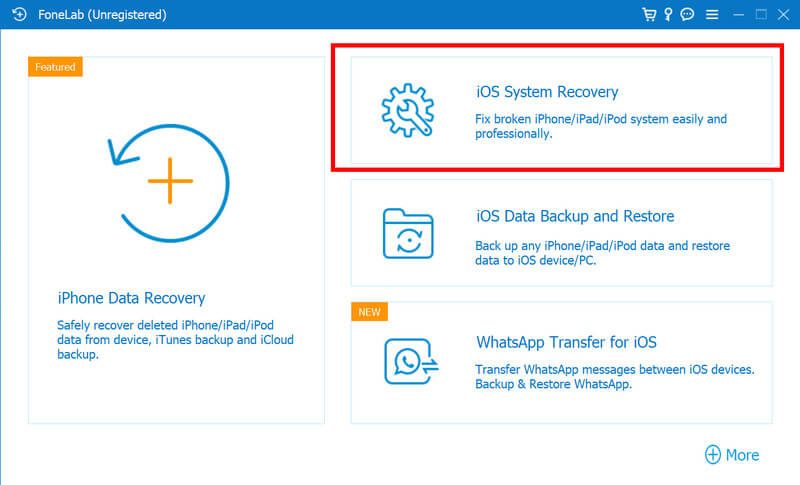
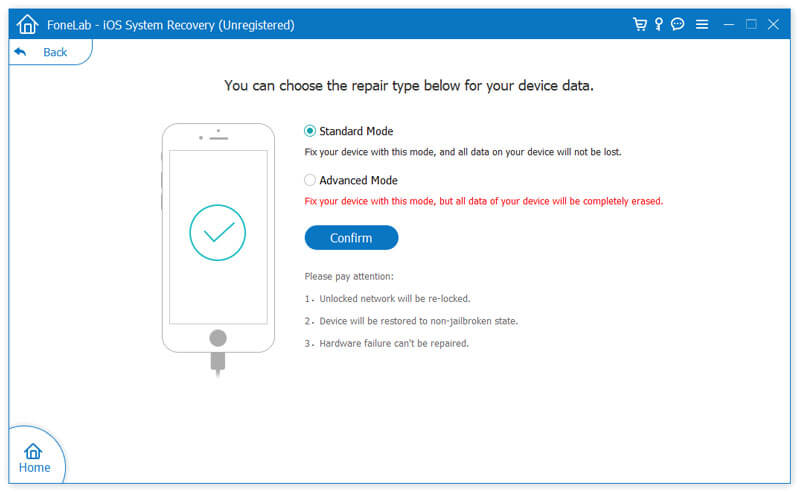
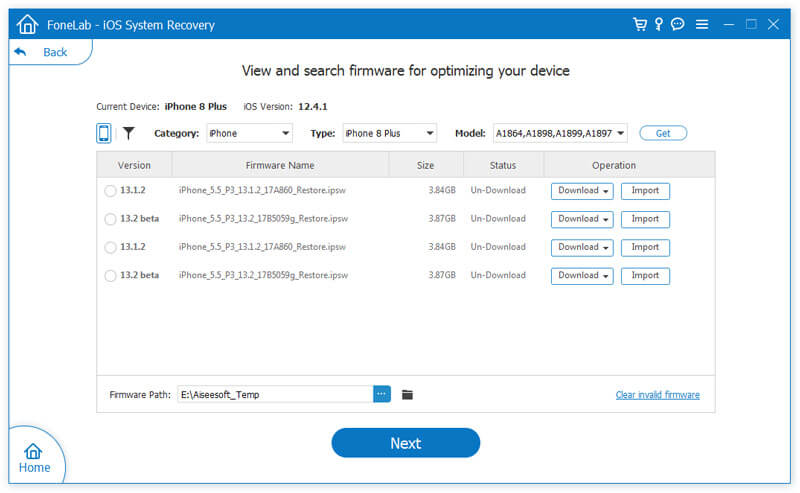
If the issue persists after a system repair, the problem is almost certainly hardware. Check the iPhone’s Bluetooth antenna or the accessory itself.
Question 1. Will updating iOS fix Bluetooth audio problems?
Yes. Check Settings > General > Software Update. If you are more than one major version behind, updating your iPhone’s system should be your first move.
Question 2. Does Low Power Mode cause Bluetooth drop?
Yes, in some cases. Low Power Mode will reduce background activity and can alter how your iPhone manages Bluetooth connection power. If you notice your iPhone's Bluetooth cutting out only when the battery is below 20%, test with Low Power Mode disabled.
Question 3. How can I disconnect my AirPods with my iPhone?
When you want to disconnect your AirPods, use the “Forget This Device” steps above. Go to Settings > Bluetooth and tap the “i” icon next to your AirPods.
Conclusion
After reading this post, you can learn the possible reasons behind the iPhone Bluetooth cutting out problem. It also offers 4 effective solutions to resolve it. Start with a quick toggle and restart, then move to a network settings reset. If the problem persists, consider a system-level repair with a tool like Aiseesoft iOS System Recovery.
 [100% Successful] 2 Easy Ways to Transfer iMessages from iPhone to Mac
How to download iMessage history on Mac? You can learn 2 ways here transfer iMessages, SMS and MMS from iPhone 16/15/14/13/12/11/XS/XR/X/8/7/SE/6/5/4, etc. to Mac Pro, mini, Air, etc. in this article.
 Bluetooth Not Working? Get 6 Ways to Troubleshoot Mac Bluetooth Issues
What you can do when Bluetooth is not available on Mac? You can get 6 proven ways to troubleshoot Mac Bluetooth not working error here. Just read and follow.
 iPhone No Sound? 7 Tips to Fix No Sound on iPhone (iOS 26/18)
iPhone is stuck in headphone mode? Why is my iPhone 15 speaker not working? How do I unmute my iPhone 17? Learn 7 proven methods to fix iPhone no sound issues.
 Leave your comment and join our discussion
Fix your iOS system to normal in various issues like being stuck in DFU mode, recovery mode, headphone mode, Apple logo, etc. to normal without any data loss.
100% Secure. No Ads.
100% Secure. No Ads.

*Required field
*Please enter a valid email

