
Video Converter Ultimate
 100% Secure. No Ads.
100% Secure. No Ads.
When you have an MKV file and you want to run it on a device that only supports the MP4 format, one of the first names that may pop up besides VLC Media Player is a free, user-friendly, and easy-to-access media player program that many people already have on their computers. Yet, is converting through VLC Media Player from MKV to MP4 actually this simple?
Our objective in this article is to present to you the step-by-step procedure for converting video files from MKV to MP4 through VLC without going into a technical level. We will also explain what kind of results you may get while converting your video files. On top of that, we will compare the performance between VLC and Aiseesoft Video Converter Ultimate and see which one could be a better fit, based on your needs.
How We Test
To ensure a fair comparison, we tested both VLC Media Player and Aiseesoft Video Converter Ultimate using the same MKV and similar settings. We assessed conversion speed, output quality, file size, and ease of use of the tools. Also, after conversion, we examined MP4 files to make sure that both video and audio play correctly.
This would allow us to find out which tool is more suitable for regular MKV to MP4 conversions.
VLC Media Player is essentially more than a video player. It is a complete media player. A totally free and open-source application that also contains the option of performing conversions. This means that through it you can even convert MKV to MP4 without having to search for another software tool. This media player recognizes a large number of video formats and only gives you basic capabilities for editing the final video output.
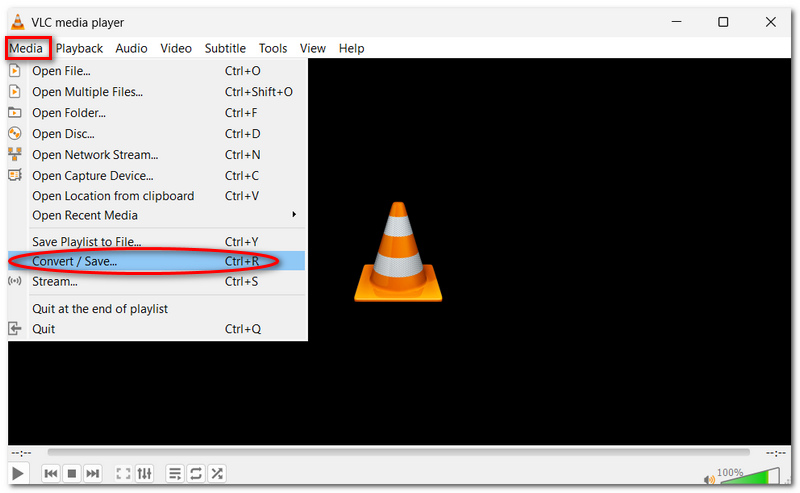
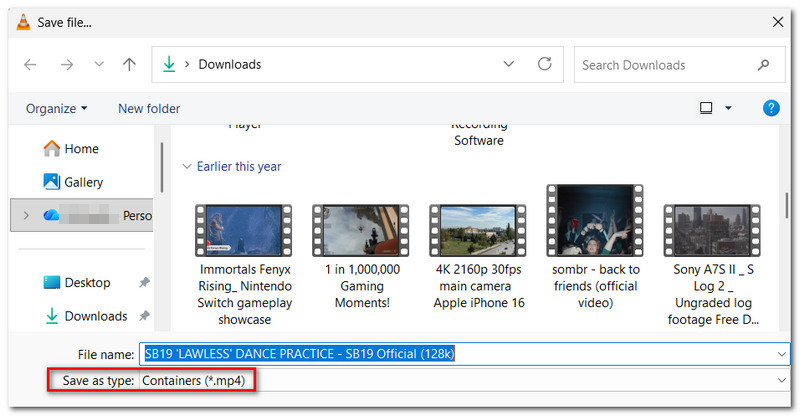
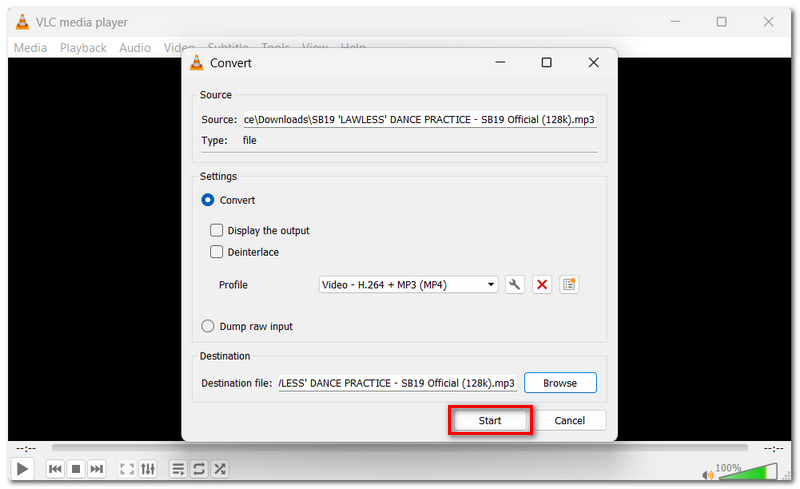
You should follow these steps to convert MKV to MP4 in VLC:
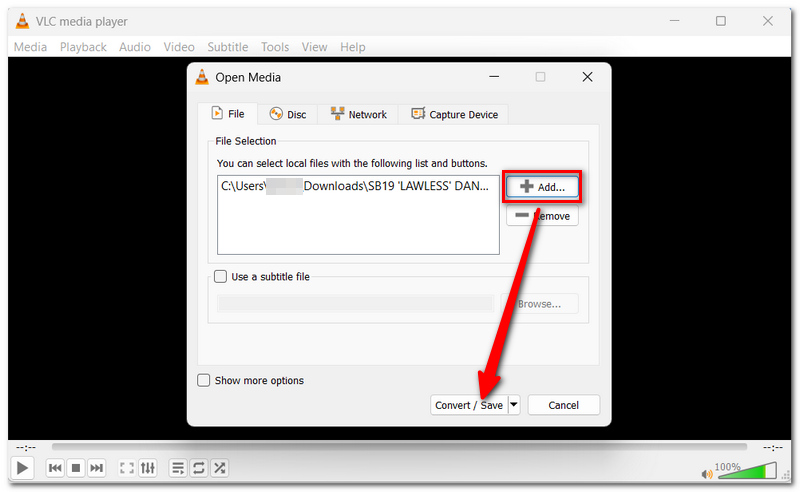
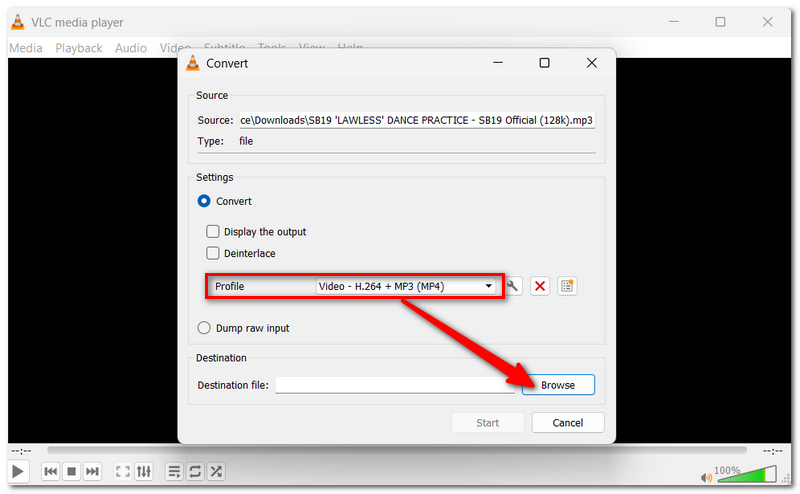
Then, in the Open Media box, click Add to locate and select the MKV file you wish to convert.
Aiseesoft Video Converter Ultimate, tailored entirely for video conversion purposes, gives users greater control over the process compared to VLC. It features extensive format support covering both video and audio with 1,000+ formats, and it also offers tools for video editing and enhancement, which are great additional features that make this converter a more complete tool for dealing with MKV files.
Downloads
Aiseesoft Video Converter Ultimate
100% Secure. No Ads.
100% Secure. No Ads.
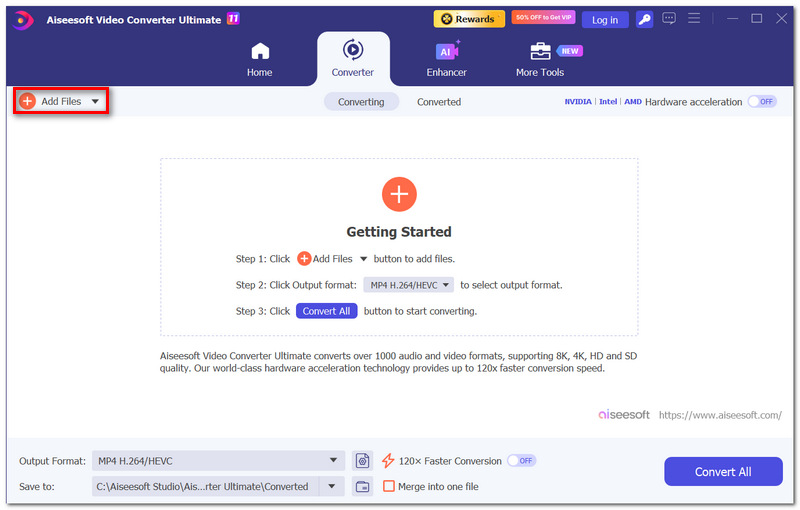
How to Convert MKV to MP4 with Aiseesoft Video Converter Ultimate
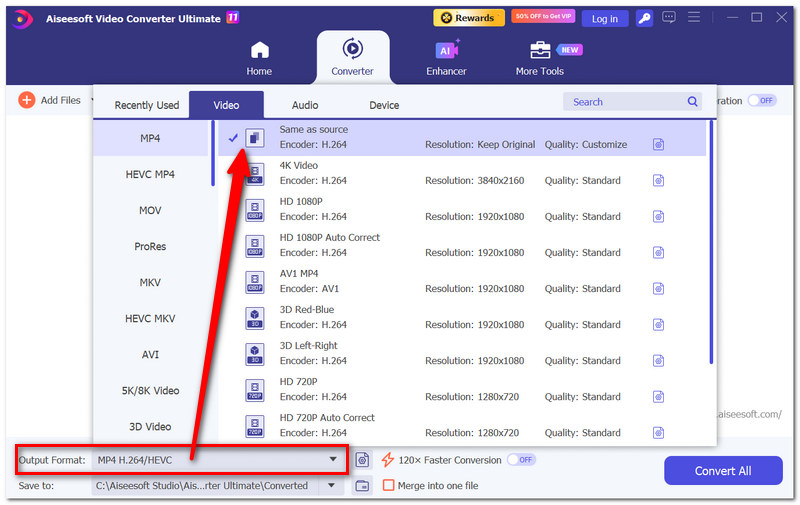
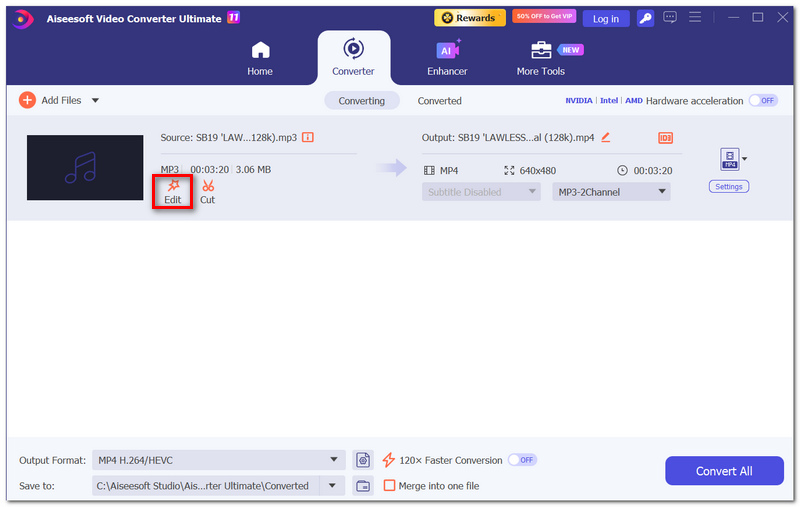
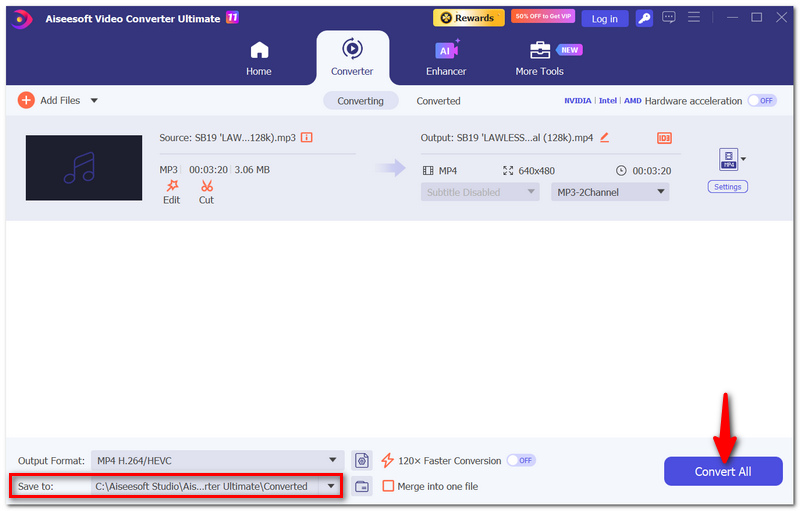
Both methods can convert MKV to MP4, but they differ in features, convenience, and overall flexibility.
| VLC Media Player | Aiseesoft Video Converter Ultimate | |
| Price | Free | Free trial; paid version available |
| Ease of use | Simple | More streamlined |
| Format support | Wide range | 1,000+ formats |
| Batch conversion | Limited | Yes |
| Output controls | Basic | More options |
| Editing tools | Basic | Built-in editing tools |
| Hardware acceleration | Limited | Supported |
Which One Should You Choose?
Go with VLC if you only convert a few videos at a time and want a totally free way to do it without dedicating a whole space on your hard drive to something you'll rarely use.
If you convert videos regularly, have several files you need to convert at the same time, or like the ability to tweak how your output files look, Aiseesoft Video Converter Ultimate is your best batch video converter.
Summing up, VLC gets you through the easy stuff, and Aiseesoft gives you a full package of conversion features.
Do you have to get rid of the original MKV after converting it?
You should probably check if MP4 works well on the device or platform you originally intended to play the content on. Only then will you be able to know for sure whether you need to keep the original MKV.
Is it possible to pause the conversion of MKV to MP4 on VLC and continue it after the pause?
No, it is impossible to pause an ongoing conversion of files in a computer program like VLC. You may have to resume the process from the start if you interrupt it.
Why does VLC complete the conversion, but the MP4 file is empty?
Such behavior might occur if something was selected, for example, the wrong profiles, the wrong codec, or different output settings. If you try different settings that support MP4, you should be able to fix this issue.
Conclusion
Both VLC and Aiseesoft are capable of converting MKV to MP4. If you want a free and straightforward tool, then VLC is an excellent choice. Yet, if your focus is on additional features and greater control, Aiseesoft would be the best solution for you. If you are just interested in finding a fast, workable method to convert your MKV files to MP4 files, then converting MKV to MP4 with VLC is definitely a very suitable choice.
 VLC Media Player and Best VLC Player for Windows/Mac Alternative
Want to learn about VLC Media player and VLC player download? This article gives you a list of the best VLC player for Mac/Windows 7/8/10 alternatives.
 [Advanced Guide] VLC Blu-ray - VLC Play Blu-ray on Windows 7/10
Want to use VLC to play Blu-ray on Windows 7/10/8? You can learn about VLC Blu-ray and how to play Blu-ray with VLC player on Windows/Mac.
 How to Play DVD and Record DVD Using VLC or the Best Alternative
Can VLC record DVD? How do I record a video from DVD? In this post, we will take a look at how to copy and record DVD, and also introduce a great VLC alternative to capture DVD movies.
 Leave your comment and join our discussion
Video Converter Ultimate is excellent video converter, editor and enhancer to convert, enhance and edit videos and music in 1000 formats and more.
100% Secure. No Ads.
100% Secure. No Ads.

*Required field
*Please enter a valid email

