 DVD Converter Suite for Mac
The professional DVD Converter Suite for Mac enables you to handily play Blu-ray disc, convert 2D to 3D, convert video/audio format, create DVD disc, burn DVD, transfer iOS data to Mac and more.
$65.00 $52.00 20% OFF
Mac OS X 10.7 or higher
30-Day Money Back Guarantee
Aiseesoft DVD Converter Suite for Mac is the best toolkit for you to convert video formats, play Blu-ray disc, create DVD disc, transfer iOS data, convert 2D to 3D, burn DVD to DVD folder/ISO image file on Mac.



Mac Blu-ray Player can freely play Blu-ray disc on your Mac with no limitation. You can easily enjoy your Blu-ray disc/folder/ISO image files with fantastic visual experience. In addition, this Blu-ray Player allows you to play your Blu-ray movies with 1080p HD and lossless audio effect. You can improve your audiovisual entertainment with its user-friendly interface and functions.
Would you like to make a DVD on your Mac? This DVD Creator for Mac will do you a great favor. If you have videos downloaded from internet, or have videos imported from your iPhone, iPad, camcorder and other devices, you can burn these multiple videos into a single DVD, and do not need to worry about the video quality.
Mac FoneTrans has another name called iOS transfer. It means to transfer files including contacts, text messages, call history, photos, videos, music and more from your iPhone/iPad/iPod to your Mac. Of course, this powerful iOS data transfer also allows you to transfer your files from Mac to iOS devices for replacing the inconvenient iTunes.
Mac Video Converter Ultimate provides you with the best way to convert video to your preferred video formats like MOV, MP4, AVI, FLV, MKV, WMV, RMVB, etc. It is compatible with any frequently-used audio formats like MP3, AAC, M4A, FLAC and more. You can use it to convert any audio format with high output sound quality. In addition, it is designed with many key editing features to help you edit video and adjust output effects.

Edit video and adjust effects
Clip video into parts, crop video clips, adjust video effects, add text or image watermark and merge segments into a single one.
Convert Video to Lossless Audio
Extract audio track from video and convert it to frequently-used lossless audio in FLAC, WAV or WMA or regular MP3 format.
Convert 2D video into 3D
Turn 2D video to stunning 3D movie, make the 3D to 2D conversion, or conversion between different 3D modes.
Batch Video/Audio Conversion
It has the capability to convert one or more video/audio files at a time to improve the conversion efficiency.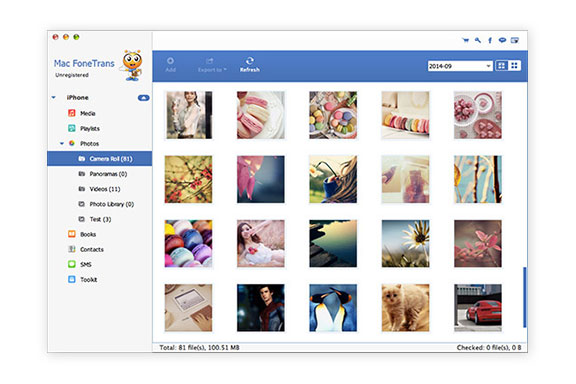
Mac FoneTrans - Click " Mac FoneTrans " option to Manage and transfer files between iOS and iOS/computer.
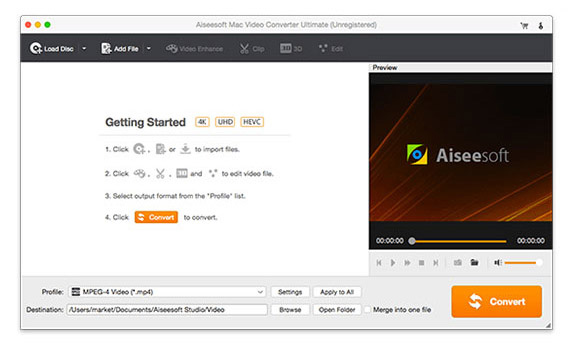
Mac Video Converter Ultimate - Click "Mac Video Converter Ultimate" option to convert, edit and enhance videos on computer.
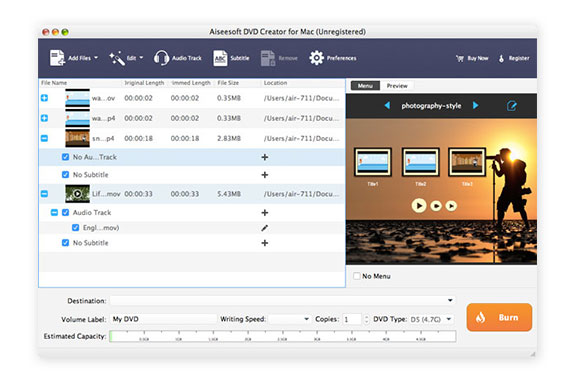
DVD Creator for Mac - Click " DVD Creator for Mac" option to burn video to DVD disc/folder.
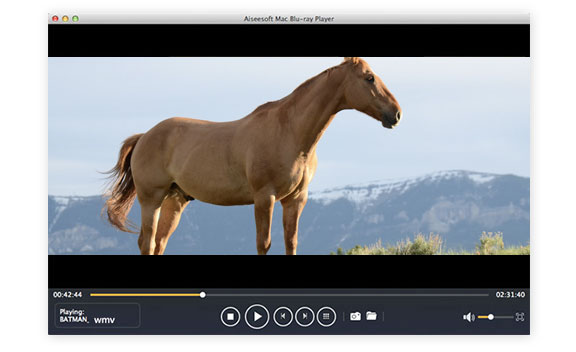
Mac Blu-ray Player - Click " Mac Blu-ray Player" option to play Blu-ray disc/folder/ISO image file on Mac.
1 Year License
$65.00$52.00
Use it 1 Year
Use it on 1 Mac
30-Day Money Back Guarantee
Lifetime License
$99.00$79.20
Use it lifetime
Use it on 1 Mac
30-Day Money Back Guarantee
Check what famous editor and our customer talk about our product.


It will save you a lot if you buy this suite rather than buy single ones one by one. It's more price worthy for lifetime license. I love these programs, especially Mac FoneTrans. Now it becomes convenient to transfer iPhone files.
By Aaron
Easy to use! The iOS files transfer tool is the best alternative to iTunes. It enables me to easily transfer videos/songs to my iPad and back up my iPhone data to Mac.
By Shane
I really like the video converter and Blu-ray player. I have various movies collection and always want that kind of tools to help me convert video formats and play them. And they work greatly!
By Mark
I always want to download online videos. But easily get videos in some unsupported formats. Now I can convert these online videos with just a few clicks.
By Stan
I have many DVD discs. Now I can burn DVD to DVD folder or ISO image file for better saving and playback on Mac.
By Kate
I always have the need to convert my captured videos to DVD. Now the DVD converter can help me make my own DVDs with ease.
By Summer
Recommend it! It carries four powerful tools. Whether for video converting, DVD creating, data transferring, or media playing, this DVD converter suite is a great choice.
By Melly
Great alternative to iTunes! This Mac FoneTrans make it very convenient to transfer different iOS files between my iPhone and Mac.
By Cathy
Multi-media helper to convert, edit and enhance video and audio file in one click.
BUY NOW BUY NOW
Play Blu-ray disc/folder and DVD disc/folder/ISO file and common media files and videos smoothly.
BUY NOW BUY NOW
The best video recording tool to easily record screen, meetings, game, webinar, audio, and webcam videos.
BUY NOW BUY NOW
*Required field
*Please enter a valid email

