
Best Video Enhancer: Upscale Video to 4K/8K
 100% Secure. No Ads.
100% Secure. No Ads.
When you search for an AI-powered video enhancer in the app store of your phone, you may easily access AirVid-AI Quality Enhancer Pro. It is a popular choice for many users to transform blurry, low-resolution videos into high-quality ones. Like other AI enhancer apps, it uses artificial intelligence to sharpen, upscale, and improve videos.
Before installing the app on your device, you may wonder if it is truly worth your time and money. This AirVid review explores what this app is, its key features, pros, cons, and more, answering those exact questions.
AirVid, or AirVid-AI Quality Enhancer Pro, is a mobile app that uses AI to improve video quality. AirVid is available for both Android and iOS devices. That is ideal for users who are looking to quickly enhance video content directly on their phones.
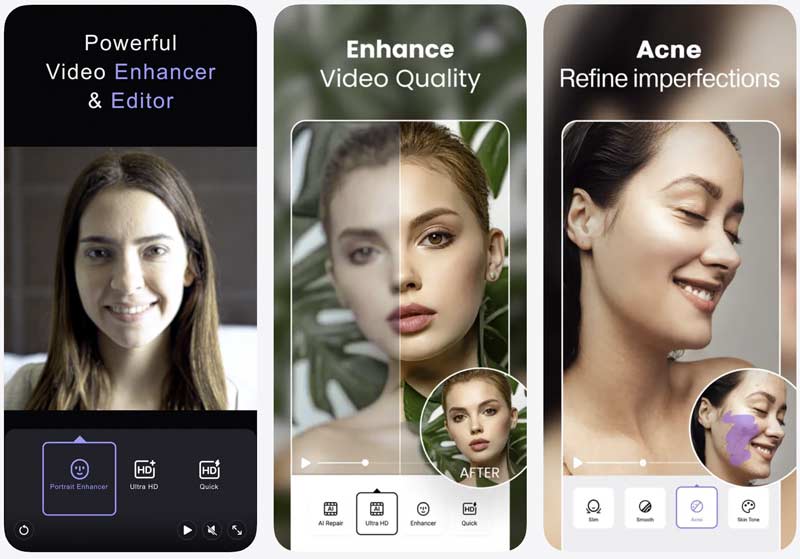
The AirVid app is mainly used for casual users and content creators to upscale resolution, reduce blur, sharpen details, and adjust colors. It is the official extension app of Airbrush AI Photo Editor. AirVid offers various customizable controls often found in professional desktop software.
When you access the AirVid-AI Quality Enhancer Pro app in the Google Play Store or App Store, you can scroll down the “About this app” section to know its key functions. This part breaks down its advertised capabilities, strengths, and weaknesses.
AirVid-AI Quality Enhancer Pro is designed with the necessary functions for common video enhancement and editing. It offers a free version for users to test basic functions. As an AI-powered app, it can quickly complete various enhancement tasks, such as upscaling and sharpening. Some complex edits can be done with ease.
However, like most other AI enhancer apps, the trial version of AirVid comes with various limits. You need a subscription to remove these limits.
AirVid is not a totally free app. As mentioned, it allows you to start a free trial to test its enhancement capabilities. Its pricing is not a single fixed price. You can choose to upgrade within the app. It offers several plans to choose from, including a $14.99 one-year subscription, a $2.99 monthly or weekly plan, and a $59.99 annual plan.
AirVid is a convenient mobile solution for casual users who need to quickly enhance video quality. Through my tests, the AirVid-AI Quality Enhancer Pro app is just another common video enhancer. It does not generate really impressive, high-quality results. The overall performance is not satisfactory, especially considering that it is not a free app. Its weekly limits and subscription cost make it a harder sell for serious creators and users on a tight budget.
Generally, you are advised to start a trial, test its basic functions, and then decide whether to purchase a subscription or choose an alternative.
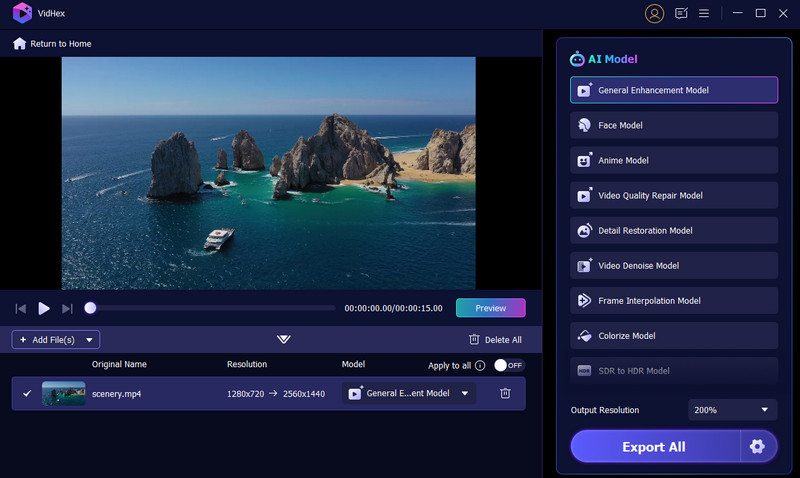
If you need a dedicated AI video enhancer that delivers professional results, try using the reliable Aiseesoft VidHex. This AirVid alternative provides multiple advanced AI models for various enhancement needs. These models are trained on millions of videos to ensure high-quality, correct generations.
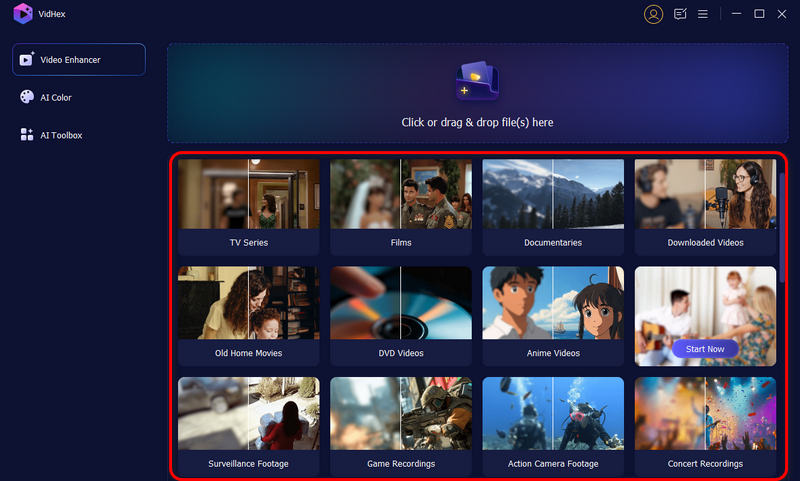
As an alternative to AirVid, VidHex carries all the enhancement functions AirVid offered. Compared to AirVid, it often generates higher-quality results. Moreover, the desktop software ensures faster, more stable processing, particularly for 4K video upscaling, detail restoration, sharpening, and frame interpolation.
100% Secure. No Ads.
100% Secure. No Ads.
Question 1. Is AirVid-AI Quality Enhancer Pro a safe application?
The AirVid-AI Quality Enhancer Pro app is often considered safe to use. You should download it from a trusted source on your phone, such as the App Store or Google Play Store. For critical or sensitive content, you can customize the app’s permissions to ensure security. Moreover, you should read its privacy policy to understand how AirVid collects, uses, and stores your data.
Question 2. Is Remini better than AirVid for increasing the quality of faces?
Remini is specifically renowned for its AI-powered facial enhancement, while AirVid offers various general editing features. Compared to AirVid, Remini is often considered a more specialized and effective tool. In most cases, it can deliver higher-quality enhancement results. You can download both apps, start a trial, test their capabilities with your own videos, and then decide which one better suits your needs.
Question 3. Which app is best for enhancing video quality for free?
When you search for the “best” free video quality enhancer, there are several top contenders, including CapCut, Wink, Clipchamp, YouCut, Video2X, Media.io, and Picwand AI. Most free apps come with features and output quality limits. First, you should select a suitable option based on whether you prefer a quick online solution, a mobile app, or a full-featured desktop program. Then, download the desired one and use it to enhance your videos.
Conclusion
You can learn necessary information about the AirVid-AI Quality Enhancer Pro app after reading this review. We recommend trying the free version of AirVid first to see whether its features and output quality meet your standards. Before committing to a subscription, compare its results with the recommended alternative, VidHex.
 Topaz Video AI Review: Features, Pros & Cons, and Best Alternative
Complete Topaz Video Enhance AI review: features, pros/cons, and usage guide. Discover a powerful alternative for perfect video upscaling.
 3 AI Video Upscalers to Improve Video Quality (2025)
This is a comprehensive review of 3 best AI video upscaler tools. Use them to optimize your videos effortlessly.
 Top 7 Photo Enhancer Apps to Enhance Resolution and Quality
What is the best photo enhancer? Is it possible to enhance a blurry photo? How to improve the photo quality? Here to get 7 best photo quality enhancer apps.
 Leave your comment and join our discussion
VidHex is an AI-powered video enhancer that upscales, denoises, colorizes stabilizes, and improves video quality in 1 click.
100% Secure. No Ads.
100% Secure. No Ads.

*Required field
*Please enter a valid email

